
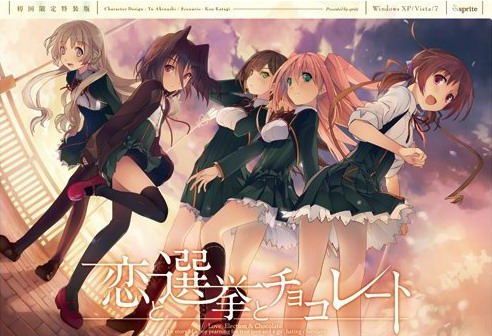
Yuuki, who wants to fall in love, and Chisato, who doesn’t like chocolates. They are lifelong friends and students of the same school. They both belong to the food club with Mifuyu, their classmate. Actually, they don’t do anything everyday, just enjoying chatting… But one day, Satsuki, president candidate of the student council, promises to close the clubs that do nothing. To stop it, they decide to run against her… But who will they send out..? Yes, Yuuki is forced to run for the election… To save the club, he will just need to be the next president!


















Youre the best thanks!
fast as always, thank you!
What did you use to bypass the DRM? The start.exe method?
Yes. Ripped game files from original .iso (skips serial# prompt during setup and saves around 600MB of download from dummy file that was padding the size). start.exe spawns the game process and skips DVD check.
How do you do that? Sorry, I haven’t heard of that method to use on a vn.
>extract to get a folder (no need to mount yay)
>use english patch on folder
>start.exe or any exe
>ask for DVD (damn i knew no mount was too good to be true)
so uh no crack yet? or am i suppose to download something to mount so there is a “DVD”.
Might be stupid questions, sorry and thanks.
start.exe disables the DVD check. On Windows10 you might need to use compatibility mode.
-using window 7 pro 64bit
-tried all compatibility
-tried different directory
-tried replace start.exe with one before eng patch
-tried to play without eng patch, still ask for DVD
only thing left to do now is find PC iso to mount.
if exist KSC-LICENSE.dat in Config folder, delete it, overwrite start.exe again and it will ask fr code, just click button below textbox
good way to start december :3
gonna download it later XD
Thanks!!! I spent about one hour trying to get the japanese version in order to use the patch and couldn’t do it… x)
Thanks a lot! Just got around to school days (monstrous download) so I’ll download and hold off.
But you bet I’ll enjoy every second of it.
Thanks again!
I’ll bet you wont enjoy school days though 😀
sick game, somewhat a piece of art, but sick.
Thank as always , year’s awaiting te release in english !!!
wow that was so fast!!! thanks
did you upload it beforehand?
thanks
holy shit you got this really fast, been waiting for this translation to finish for quite some time now, thanks alot admin!!
Woot! Thank you.
admin are there any rance like game release? i feel lonely. . .
Is this the “safe” version in which the H-Scenes are removed.
Thanks for fast upload.
All the VN here are the +18, no safe ones. Adming, thx a lot, i’ve been waiting for this so bad D: since i saw the anime~
Ever 17 & Remember 11 are not 18+.
That’s because there is no 18+ versions of either game.
Tags tells otherwise.
Anyway, the safe version of the patch is also available at the TL’s website if you’re interested on that one
For future reference, any all-ages VN has a tag denoting it (I think it’s “no sexual content”). If the VN doesn’t have that tag, there are H scenes.
But are there any in koichoco?
When I run it from the start.exe I get a message “Runtime error 217 at 500E8338”. When I click okay, it starts and asks for a cd.
I’m running windows 10 x64 build 10240 and my local is set to Japanese.
is this for psp or pc?
PC
Can i get some help??
I get an error saying: “Please insert the Koichoco DVD in the DVD-ROM drive”
How can i fix that? Thanks!!!
Could someone please make step by step instructions starting from the beginning (un zipping the folder that you can download here), I have read many visual novels before and this is the first one that I’m having immense difficulty getting to work, so any help would be greatly appreciated. It seems that I can’t skip the “DVD check”.
great
Why can’t i start the game with start.exe. Tried everything but nothing happen (Windows 10 64b)
Windows 10 issue. Try compatibility mode.
Still no luck. Waited for years for this release and now compatibility issue, this suck. Now try to play with VM, thanks for reply admin!
I tried to play it on a win 7 VM running on a win 10 host and it crashes the VM.
Just tested on Win10 VM (fresh installation) and it runs without problems. Make sure you change to JP locale, no other compatibility settings needed.
This is the only game I’ve had this problem with. And I’ve downloaded it 4 or 5 times both 17 parts and the single download. Both do the same thing.
http://i.imgur.com/RcvCHjt.png
i had the same thing, when it says please insert disk, just hit ok. it will bring up another pop up with japanese nlettering. there will be 2 clickable buttons. dont remeber but one of them will let you play the game. hope that helps. sorry if i was not specific
you always there (admin) when i feel lonely. thanks admin
Thanks as usual admin. I had a lot of vn to play now (not that I ‘m complaining ^^)
I’m using windows 8, jap local and everything. I ran the patch and used the start.exe but it doesn’t bypass the cd-rom insert screen. Help would be great if anyone can tell me whats wrong.
you may need to run start.exe with admin right
and 1 more thing, after patching u need to copy start.exe from rar and overwrite it. open and click the button below textbox and u good to go
That didn’t work for me. I just keep getting a message asking me to insert the DVD. I’ve been waiting to play this VN for years, so I really hope someone knows how I can get it to work.
I can’t get the game to run. it freezes my computer when I start it.I have windows 8.1 is it just my computer
I had the freezing problem too, but instead of hard reseting my computer, I just waited a minute or two and the computer unfreezes, game started ok.
This only happened in the first time.
Thanks that worked but now i have the no DVD error
After some problems, i found out how to play the game, tried on pc with win 7, 10 (dont have 8 to try ;))
1. set locale to Japanese
2. Unrar
3. Patch
4. Overwrite start.exe with the old one in rar
5. Open start.exe, if a window show up with textbox and buttons, click the button bellow textbox
6. Enjoy ur time 😉
Finally, can play this game and actually not have to end up with worst girl! Thanks.
Truly, thanks for the awesome.
am i the only one having trouble with the saving? after installing the patch, i’ve already tried running “start.exe” it on admin privileges since the application executable would ask for the DVD, if you go to the saving screen, save your progress and press “back” the button will disappear and there’s no way to go back to the game so you close it and if you go back to the load screen you’ll lose your file, srsly anyone encountered this problem?
Try moving the game to different folder (Desktop, My Documents) maybe? I tested the game on Win7 x64 pro and it works without problems, saving too.
yea i just tried advancing the game a little bit further than the first screen, now it’s works pretty good, even the disappearing “back” button glitch is gone now…. weird… but thanks anyway
You are amazing admin
thanks!
Finally. Been waiting since forever. Wished the MC would ended up with Mifuyu in Anime, but now I could go for Mifuyu route myself 😉
Thank you and now waiting for Mahoutsukai no Yoru~
Anyone got this to work on Win10? All suggestions given to this point seems to have no effect on for me.
Now, I hate the enforced playing order in this, thanks for the upload.
Does anyone know how to get around the no DVD-ROM? I tried every solution I can find,
-my comp already set to Japanese locale
-tried running “start.exe” as admin
-overwritten “start.exe” after english patching, as mentioned above
-Tried running on compatibility mode
OS is Win 7, so I don’t know if that could be a problem. Don’t know if my problem has to do with directory either, since I tried it on the C Drive and it still didn’t work. I would be grateful for any help.
Same, Windows 7, tried all that and can’t get it to work, some help would be appreciated 🙂
Exact same here, W7 x64.
If you guys happen to find a solution please post it.
delete KSC-LICENSE.dat in Config folder if exists and overwrite start.exe and try again
What if there is no KSC-LICENSE.dat ? 😛
Like what Gaporigo said, there is no KSC-LICENSE.dat file. Well not when I run “start.exe” with no DVD anyways, as I learned after downloading the .mdf file from another site, that KSC-LICENSE.dat might be created after the DVD check. I’m seeing some people saying that “start.exe” might be a bit wonky on Win7 x64, so that could be my problem. Not that I really mind now anyways, since I pretty much gave up and decided to mount up the .mdf whenever I launch now.
would you mind explaining what you are doing? I don’t mind if starting it takes a few extra steps if it will actually start. I am also windows 7 x64 by the way.
Nothing much really. All I did was just downloaded and mount the .mdf from another site and then just start the VN by either “start.exe” or the main .exe file, Koichoco works after entering the serial code.
which website? I know how to mount the .mdf but not where to get one for this game.
Have to also mention that that doesn’t mean that the VN works without DVD. You have to mount the image every time you want to make koichoco work, it’s a bit of a pain, but it’s better than spending the whole night experimenting on ways to get around the DVD requirement.
I am fine with mounting the image every time. Any suggestions on where I can find the image?
The start.exe still requires me to have the DVD in the DVD-ROM drive, is there a way to get around this? I’m running it on Windows 7.
nevermind, it work. thanks
i have that same bug the saving (and consequently the loding, though not as much) is compleatly borked and the back button tends to just dissappear.
did you do anything od did it vanish from itself?
So, win8 here
I set to japan locate, i ran the patch, overwritten the start.exe for the one in the rar
the thing is: no window is opened when i run the star.exe
does anyone know the way around this?
Found a way to skip the DVD check, extract everything in one folder, apply the patch and then move the folder into your Program Files. Run start.exe then, you may need to use compatibility mode.
Works on Windows 10.
I can confirm that this works but you need to move it to Program Files(x86)
Thanks a lot friend!
Didn’t work for me. I’m using Windows 8, replaced the start file after patching and tried admin’s access as well compatibility mode. If anyone has a solution do tell.
Still getting asked for dvd, tried everything listed here, nothing seems to work, running windows 7 64bit
Can’t get it to work. I’m still getting the DVD request.
I followed all VNLover’s steps. I’m in Japanese locale, I unzipped the game, ran the patch and then replaced the post patch start.exe with the old one. I’m running Windows 8, and tried running the game in compatibility mode for windows 7 and XP. No luck so far. Anyone have any ideas?
Forgot to include that I’m also running as Admin.
Wow, I literally had just asked myself if there was nothing hype going on for me to enjoy.
I’d been waiting for this ever since the anime came out, though I only ever watched the first episode. Seeing as I don’t like watching promotional anime (it’s usually incomplete, often innacurate).
Thanks as always, based admin.
I’m also getting the Insert DVD message. Any way to fix the issue?
game wont work it says this ???? please help
Same thing happens to me. I followed the steps mentioned in the comments above. Still cant bypass the Dvd issue and when i try compatability mode it says that teh program cant start because IML32.dll is missing from your computer and that i have to reinstall to fix. Someone help please
Also getting the DVD problem and I’ve tried all the fixes I’ve read. I’m trying random things, but I hope a solution is found by me or someone else because I really want to play this one.
would you mind explaining what you are doing? I don’t mind if starting it takes a few extra steps if it will actually start. I am also windows 7 x64 by the way.
I got that DVD check thing but when i tried again the game run without problems until when i tried to save, the back button simple dissapears making it impossible to continue and the save didnt even work
Oh damn. I saw this and literally lost my shit. This is gona be GREAT!
Another horrible translation. 🙁 I thought I saw the worst of it with koisuru natsu no last resort but apparently not. These guys are making up dialogue at this point.
Reading this will be very confusing for people who don’t understand any japanese.. I mean these guys are translating stuff like “he didn’t say anything” to “he told me everything.” How elementary can these mistakes be?
Damn fast! NOICE!
also had insert cd problem, but seems to have resolved itself after i did the following. Extract folder, execute start.exe, it asks for cd, i press yes, it asks for a serial (blank box with 2 buttons below it), just click button below it, exit game, patch it with english patch, click the start.exe again, it still prompt me with insert cd, but clicking yes would just start the game anyways. running windows 10 with japanese locale btw.
nah i already try in windows 10, after chisato route, ending, crashing like this
this link below:
http://i63.tinypic.com/2ahtk7r.jpg
ok i got it to work after trying everything out on this site i found a tipp for moving the entire folder into:Programme (x86)
after that i could start the game without problem (first time starting came the textbox i was searching^^)