
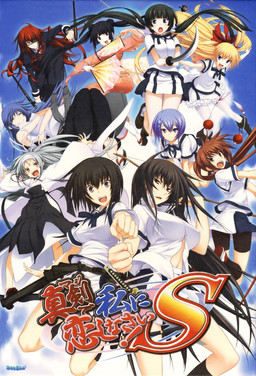
Majikoi is back and better than ever in this sequel to the hit 2009 visual novel. Majikoi S takes place after the events of Majikoi and lets you choose which of Majikoi’s many endings to proceed from. Choose your favorite heroine and enjoy new romantic events with her, or choose to start with no commitment and romance one of 5 new heroines.
















I can’t play it. when i try to start theres a message that says i have a debugger on my pc. can you help me? and i don’t use AVG
I recently downloaded the game, but when I try to run the game, the game doesn’t pop up – no application, no error message nothing. Instead, after investigating with task manager, I noticed that a background process called NeXAS (32 bit) appeared. I had seen that someone in the past had a similar problem and they downloaded a k-lite codec pack, which fixed it for them, but even after downloading the pack the game still doesn’t appear for me. One thing I did notice was that when I tried to run the startup tools an error message appeared, saying something that I think roughly translated to ‘the config version is different’. Any ideas? I just finished the first game and would really like to be able to play the sequel.
OK. I will make a guide on how to install the game and solve the error 1503.
1-Download all parts of the game and English patch.
2-Extract all parts of the game but DO NOT extract the English patch.
3-Open the folder that appeared when you extracted the parts of the game. There will be two files there: MKS-1. CDI and MKS-2. CDI.
4-Open the daemon tools and mount the MKS-1 file. Once assembled, double-click the mounted file.
5-run the setup. exe file.
6-in the middle of the installation will ask for Disk 2. Minimize the window. Dismount the MKS-1 from where he was and mount the MKS-2. CDI in the same place where he was assembling the MKS-1.
7-Go back to the window that had minimized before and click OK.
8-When finished installing, run the English patch. exe in the same folder where the image discs were installed, should appear the right part automatically, just press next. If not, it will be on the hard disk somewhere in the program Files (x86).
9-When finished search and download the Alpharomdie program and install it on the Internet. You’ll have an alpharomdie. exe file. Put it in the same Majikoi-s folder on your hard drive.
10-Drag the game launcher. EXE to the Alpharomdie. exe to open.
11-should work. Enjoy and thank you for reading.
Thanks a lot, this guide works 100%.
It gives me a config.html error when I’m trying to install CD 1, I’ve already set the location to Japan so I don’t know why
got the same problem.
have you already found out a solution?
Found it out myself:
you need to install “Local Emulator and run the setup with that!
Thx mate
Where did you find Alpharomdie.exe? i haven’t been able to find it
The game works fine but I don’t have any save file, when I save it shows that I succesfully saved but there is no save data
Help, it says there is not enough space on Disc 1 and that I need more GB to put the Disc 2 part together with Disc 1. How do I fix this?
For anyone as foolish as me, please be advised that when using alpharomdie, you need to OPEN the program first, and then drag the application into the blue box, the program doesn’t work if you just throw it on the shortcut. It’s also valuable to know that it only worked for me if i opened alpharomdie in locale emulator with administrator privileges.
When I use Alpharomdie, I got error which roughly translated into “Failed to read the setting file”
help.
Guys i need help!!. whenever i click the applicaction まじこいS which is propably the application to run the game it brings me up to this software support site that i dont know what to do? can anyone help
What is this debugger running in my system error. I hate it. Anyone knows how to solve it
Guys i need help!!. whenever i click the applicaction まじこいS which is propably the application to run the game it brings me up to this software support site that i dont know what to do? can anyone help
Same problem
If you have AlphaROMdiE in the same directory as the game, you can create a shortcut with the following path so that you don’t have to drag the app each time:
“C:\Program Files (x86)\みなとそふと\真剣で私に恋しなさい!S\AlphaROMdiE.exe” “C:\Program Files (x86)\みなとそふと\真剣で私に恋しなさい!S\まじこいS.exe”
That is all just one line.
When i start the game it pops up as a blank black screen then closes a couple seconds later i have my locale set and the AlphaRomdie in the same folder but nothing seems to fix it does anyone have any idea how to fix this?
Oh? It seems you don’t need to install it via Daemon Tools anymore since it’s already done in a folder for you. I remember doing back before getting a new PC. I’m a little fuzzy with my memory but is it uncensored or is that only for the first game? Also, is it fully translated for the downloaded version here or do I need to get it from Maji Translations?
I routinely update my uploads with patches or to make it simpler to run. I don’t think I posted a game in image format (which require Deamon Tools) in many years. All games posted here are fully-translated (Unless explicitly noted) and if there isn’t separate link for patch download, it’s pre-patched – just extract and play.
Only first Majikoi game is uncensored, as it got official English release, other games in series retain mosaics, as they are fantranslations.
Need help download all 13 files extracted have locale changed to Japan but when I click set up error pops up AlphaDiscLog.txt . Tried to find solution but all of them reached dead ends. Am I missing something obvious played and completed first game and been trying to play this sequel for long time.
can someone pls help me like the thing is i am inezxperienced with this stuff whe i downloaded the parts and opened it there is no files called mk1 or mk2 and i dont know how to continue
if someone would be willing to add me on dc and help me install it i would be very thankful
DoDo#8375
HELP, PLEASE!
Despite having successfully downloaded the game, I am unable to play it. I use a windows 10 Dell laptop. No matter how many times i click on the majikoi s.exe icon, NOTHING happens: no errors, no game screen, no change in display resolution – ABSOLUTELY NOTHING happens (as if i never clicked on the icon at all!). I tried changing my system locale to japanese and even used a japanese locale emulator – to NO avail. I even tried turning my antivirus OFF and running the application – NOTHING happened. I also rebooted my computer, tried to run the application in windows 7 and 8 compatibility modes – NOTHING happened.
I only have 3 “.exe” files and NOTHING happens regardless of what i click on and the number of times i click it: –
MajikoiS.exe
Setup.exe
Config.exe
The rest are “.pac” files….
I do not have any “Alpharomedie” file either…it did NOT come with the download.
The application also seems to be running in the BACKGROUND, with no way for me to access it and if was not for my computer overclocking, i would not have even known about it! IT does NOT appear on task manager but DOES appear on resource monitor.
Yo, I’m having the same issue atm, wondering if you found a fix, help is appreciated
game not working. whenever I’m opening the game it says error 1503 and says I need to insert disc #2… no other instructions how to fix this error.
OK I was able to fix it (error 1503) by installing the the Direct X Runtime Components from microsoft.
do you a link to install the direct x runtime components?