
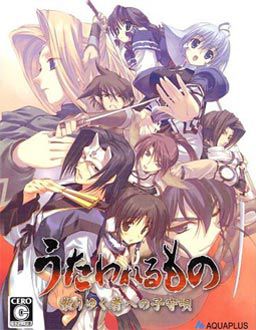
Suffering from a fatal wound, you have lost your memories and were taken back to Eruru’s village. The villagers not only gave you a place to stay, but also a new identity, Hakuoro.
To return their kindness, you helped them by farming and harvesting crops and doing small favours.
However this tiny north eastern village is under the iron clad rule of a difficult daimyo. This greedy person wants to take all of the crops you have worked so hard to harvest as taxes. Rescue the kind people who have looked after you and rise against the lord.












I can’t get this to work. Whenever I try to use the english patch it says: “Cannot find
Sorry… error caused it to post before finish.
“Cannot find Japanese DVD at specified location. Please insert disc into your DVD-ROM drive and enter full path to its root directory, for example E:\”
What am I suppose to do then? All the readme files are useless since they aren’t in english. Am I missing something?
u have to install the game first
Good Game.
I get the same error… ;-;
“Cannot find Japanese DVD at specified location. Please insert disc into your DVD-ROM drive and enter full path to its root directory, for example E:\”
What am I suppose to do then? All the readme files are useless since they aren’t in english. Am I missing something?
1. Go to control panel
2. Then click Regional and Language
3. Once there click the “Advance” tab this will lead you to an option to click in a box to operate non Unicode programs or programs that do not operate based on the language settings.
4. Click in the insert box and change it to Japanese this now allows you to operate Japanese programs.
5. Restart
6. Install game and enjoy.
Side notes: If you cant find Japanese in the box then you will need to add additional languages into your computer
How to:
Same as 1. and 2. Instead go to the second tab called “languages”
Near the bottom of the text there is are two boxes one says install files for East Asian Languages.
Click it will ask you if you have space in your computer and then ask you to install the file via disk or folder.
And you know that Microsoft installed all those programs into your boot up disc so put that in and it will give you the files.
It will probably ask you to restart so do that and change the setting to Japanese under the Advance tab and install the game and once again enjoy.
This is my best eroge so far….i really love this game.
hey guys, i need help! The password is erogedownload.com
doesn’t work can some1 help me. I copy adn paste on password and said wrong password. >.<
can someone give me a step-by-step walkthrough of HOW THE FUCK I SET THIS GAME UP!!!!!!…
this is the first game i’ve ever downloaded
Get Alcohol 120% or Daemen tools, unrar the 3 parts to one folder, mount the image that the rar gives you with the program Alcohol or Daemen tools, double click the image, click on the box that you think is the install button (sometimes you have to guess since it’s in japanese) and then after you install the japanese version, install the english patch to the .exe of the japanese version.
Hello Admin. I have a problem whit to change unicode to japanese since i dont have Windows CD-rom to change unicode programs. Exit other way to play Utawarerumono and other game which need unicode to play? I hope you can hjelp me to this one.
Thanks, Please tell me there is another TRPG (tactical role playing game) like this on this site?
Yes, you should check out Tears to Tiara and Castle Fantasia Renewal 2.
I need help!
I instaled all of them into my documents but i cant get it to work!
oh man cant get it to work ?????
HI thanks to this site I can finally start playing those well known erogame that I usually hear (or read).
So to speak Im kinda new on this genre. But Im willing to learn. Ok I finally download the 3parts and extracted them. I didnt download the English voice patch is that ok. Coz for me I still like the original VA (japanese).
Sorry for being a noob, if anyone can help me here: When I extracted the 3parts I manage to obtain One DVD winrar (1.2GB) and Utawarerumono English v1.1 so do I have to extract the DVD winrar then after whats next?
Thanks for the awesome site. But there’s a problem on my end can you help me Admin.
Im just following the step by step instruction of the English Utawarerumono then finally manage to get on this stage where its looking for the Japanese Game DVD.
To be precise: Locate DVD
Set up need to know the location of the Japanese game DVD.
SO what shall I do?
@Shin:
Check out this tutorial http://erogedownload.com/faq/mounting-cd-images-with-daemon-tools/
Follow those instruction to mount Utawarerumono iso image, then install it.
Sorry for the late reply. Thank you for pointing that out. So far I manage to install the game and play it (actually I finish it). So now Im trying to use the hard mode 1. Above the hard mode I know the battle will be tough so whats more to be expect about on this mode?
this game is really nice, one of the best eroges i already played.
i think i saw the anime of this
will this game work on windows 7 ultimate x64?
where is the iso file?
I have been downloading from this site for quite some time. I must admit that Utawarerumono is the abolsute best visual novel I have ever played. Epic plot, intricately designed characters and traits, expert voice acting and sound, tear-jerking music, brilliant colors and vivid artwork – all are factors, of Utawarerumono, that have served as the support pillars to an amazing game. Mirror Moon/Soylations’ English translation patch is nonetheless superb for a spectacular Japanese visual novel. Utawarerumono is legend. Utawarerumono is The One Whom Legends Are Sung.
I have been playing this for a while, but it does not seem to work halfway when the main character becomes king. Why?
i downloaded this the other day im running linux(fedora 13) ive mounted it and have hit a snag: the setup.exe wont run (i use wine and have run a few games no problem but this one doesnt even open)
anybody know a remedy?
Thanks!!
HotFile is a pain because of the 30min waiting period between downloads other than that love the site
Ok here is the overall problem everyone seems to have, they dont know or cannot operate the install for this game, or cannot change the language to Japanese due to missing discs(who actually has OS discs on them?).
So this game is, um, difficult to even install.
Ill try some other way but yes it may be unplayable to some.
Awesomeness. Story is the best, gameplay isn’t bad. I’m liking it as much as the Anime. 5/5 Stars. To Admin: I think you guys should set up a suggestion box for this website. I for one would like to see a rating system. Game Info like release date, more indepth about gameplay and possibly more screen shots. Keep up the good work.
“Suffering from a fatal wound, you have lost your memories and were taken back to Eruru’s village. The villagers not only gave you a place to stay, but also a new identity, Hakuoro.
To return their kindness, you helped them by farming and harvesting crops and doing small favours.”
for some reason, this make me think of rune factory 3 : a fantasy harvest moon XD
This description is a bit misleading – that peacefull, quiet village life is only a smart part at beggining of game.
I downloaded it and everything, but in the game their are no voices in it, not even the japanese voices. How do I get the japanese voices on there. Help admin
Original game was unvoiced, however there’s a patch that takes voices from PS2 port of the game and uses it for PC version. You have link to it at the bottom of the post.
By the way, the voice patch works fine, thx to admin.
OK, it wont let me install the english patch it says “Error opening file for writing: C:\Windows\Fonts\sazanami-mono.ttf”
Please help…
ok thanks for first one, sorry im new at this
try to run patcher as admin – permission issues while accesing “protected” directories ( like /windows/ /program files/ etc.) sometimes mess things up
how do i install it????i dont find anything please give me instructions or something
damm when i put autorun it appears a lot of weird signs what is that??and how i install the game sstep by step if posible
the image seems to be in LAC format,cannot mount on alchohol or DT.
For some reason I can’t extract, it says that the second .rar file is corrupt. Is there any way to get around this?
Thanks in advance.
re-download. most prob incomplete download.
1.)Download all three files
2.)Unzip the first file and then it will automatically unzip the rest of the files. (so you don’t need to unzip the other files.)
3.)If you don’t have “Daemon tools,” my advise would be to download “Daemon tools” and with “Daemon tools” open it and mount the “ISO” or “UTAWARE_DVD” found in the folder “Utawareumono” from which the file you have unzipped.
4.)Once you mount the “ISO” into Daemon tools a another window will pop up and it will show you all the files that is within the “ISO.” You don’t need to do anything, but to close the window that just popped up because you only need to have the “ISO” mounted into Daemon tools.
5.)You can now open the program file “Utawarerumono_English_v1.1”
6.)Once it opens click “next.”
7.)”agree” and click “next.”
8.)click “next” again.
9.)This part asks you for the specific location of the “DVD” or “ISO”. If you see that “D:/” change it into “E:/”
10.)click “next” again.
11.)After this, it should start installing the game and if you have computer protection like me, you might see a constant flow of pop ups asking you if you should allow this program to continue, if so, keep clicking allow.
12.)Lastly have fun. ^^
Just downloaded the game & installed it, but it keeps crashing whenever I try to save or even at random parts in the story.
using windows 7 ultimate, anyone have any ideas as to why its crashing so much?
same here i am on windows 7 and it keeps crashing after a save. can anyone tell me how to solve the problem?
just wanted to ask why does it jammed at the last battle????!!!
Same problem here. I’m using Windows 7 and after I save it crashs. Anyone have an idea for a solution?
Maybe I haven’t gone far enough but, is there hentai scenes in this game?
Yes there are.
mmmmm….any other game like this kind????
i like this game…..
i thinks it’s SRPG type…..
I love this site first of all ^^
I am also having the save issue, I saved once, but now any time I save, it crashes, so I keep having to go back…anyone figure out how to get around that?
ahh okay. I feel lame. for those having trouble saving, I found a solution on the Tears to tiars page. If you click properties and run it as “windows xp3” it will save okay without crashing
this was my favorite anime bk in the day.. how many endings do this game have??
Just one. it has linear story.
Does anybody know what to do with the LAC file and what I should do to get the ISO file?
Dont worry I found it.
the password does’nt seem to work help pls!