
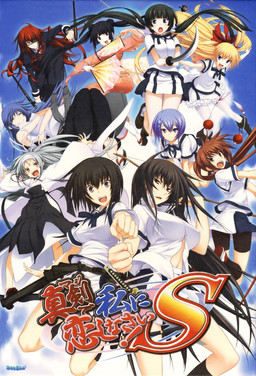
Majikoi is back and better than ever in this sequel to the hit 2009 visual novel. Majikoi S takes place after the events of Majikoi and lets you choose which of Majikoi’s many endings to proceed from. Choose your favorite heroine and enjoy new romantic events with her, or choose to start with no commitment and romance one of 5 new heroines.

















i have censored how i can delet this censored ? (sorry for my EN 😉 )
I keep getting error messages when I try to install the game, first it asks me to confirm something about the directory and if I click “Yes” I get the error and if I click “No” it doesn’t install!
Could you help if possible please?
I got the same problem too.
change your locale to japanese and it should work.
windows 7:
Control panel -> Clock, Language, Region -> Language and region -> Administrative -> change system locale -> japanese
windows 8:
Control panel -> Region -> Administrative -> change system locale -> japanese
AFter installing the game, would it still work if I change the system locale?
it usualy does, so it should work
How do you do this for Windows 10?
Control Panel -> Region -> administrative -> change system locale -> select Japanese(japan)
Ive done this and it still shows gibberish when it shows the installer.
Hi!
Where can I get the uncensor patch?
I would really appreciate a link.
Thank you!
(I really need to enjoy the Kokoro route!!)
No such patch exists, at least to my knowledge (feel free to correct me if I’m wrong, and I’ll add it here).
Yeah.
It’s just out yet, but it’s being worked on over at Fuwanovel by Helvetica Standard, which is great!
I’ll just have to endure and wait for it to come out and that re-play the game. (Which is perfectly fine with me, since this game really is worth those 33 parts.)
Well, thanks for replying so quicky!
Have a nice day.
Guys, i finished Majikoi S and my game isn”t censured, I have the version uncensored.
That shouldn’t even be possible, can you prove it?
another server where we can download please?!! mediafire?,mega?torrent? that are some place’s where the parts wont be deleted are faster to download them!!!
I used mediafire in the past and got banned twice in one week due to excessive bandwidth usage…
Try MEGA i have downloaded many animes that were uploaded on MEGA and never came across deleted files + the speed is nice.
Again, how many downloads did the mega links you encountered had? 1000? 2000? On average day, this site users download around 6-8TB of data… MEGA free account allows 10GB of bandwidth/month, which means files would be accessible for few minutes before quota expired. Even most expensive “Mega III” storage plan gives less bandwidth/month than users download in a day. (Refer to older comments, where I presented exact data and calculations. Long story short – using MEGA is not possible.).
love that you give us free games so dont wana make you think we not loving what you doing but seeing how alot of people asking on alot of games you come out with asking is this censored or not maybe in the title put (uncensored) or (censored) that way question wont be asked anymore
“Uncensored” might mean different things, especially with recent trend of making all-ages versions of games, in order to distribute them on Steam. Generally, I try to get as most “uncensored” version as exists, and if there’s demand, I also post alternative versions ( recent “Starless” upload for example – many people found the game “too extreme” and wanted “toned down” version as well.
Generally, I think you’re referring to pixelated genitalia in h-scenes – I’ll try to include information about those with new uploads and add appropriate tags retroactively.
hey guys the censored ver means only the mighty MC’s excalibur and heroines’scabbard are censored right?
Yes. That’s the law in Japan.
I get sent to a software support website 0_0 Help
I have the same problem, also this website is all in japanese.
Can’t understand anything…
\Copied from another comment\
https://www.dropbox.com/s/ndiavmvoffyv15q/alsignup_101029b.rar?dl=0
Put it in the VN directory, double click it, let it do it’s thing, if it closes right away that’s fine. Now try launching the VN again from the japanese exe, should work.
Worked for me!
Thanks!
It says that i have not enough space to put into the VN directory, and i cant delete anything inside either. help!
od visual novel, I love the anime parts when there’s a fight. Good characters and environment. Reeaally like this one and the prequel
I meant ‘good’ at the beginning.
I got a problem during the setup, when i’m installing the game, an error pop-ups concerning effect.pac and then it stops the installation, anyone had that problem and if yea how do you solve it
While i’m at it, the link to AlphaRomeodIE brings me to a japanese site named testpage, i can’t download anything there
also the link for the alpharomeodie brings me to a japanese site where i don’t see any downloads. it says it’s a test page
hey admin i get a crash with the kazuko route in october 31, could someone help with a fix for that?
I’m not an admin but my friend also have that problem maybe there are some corrupted file in your instalation, just copy all file from both disk to your instalation folder. Also patch it again if it turn back into japanese, it works on my friend
I got a problem in opening it…
it’s 1503 error….. dunno
What to do….
and I can’t find a AlphaROMdie
AlphaROMdie, whats is that?, i just run the game with appocale
Hmmm I had to use applocale for both the Regular install and the patch install.
When I use it to start up I get an error sends me to Alpharomdie website as well. If you install without applocale it’s impossible because the moment you do a config error pops up and it closes.
I ran it for both times with a custom directory doesn’t work for me maybe windows is messed up?
after install, you try to run the game with appo too?
Yep ran it with Applocale and it gives me a 1503 error and sends back to alphaROMdie website for troubleshooting.
The English installer also will not uninstall from control panel only when you run it with applocale.
Oh well… back to playing the first game.
Majikoi done, Majikoi S done, now waiting for Majikoi A to come out
This is Uncensored one right?
I actually got the same problem, no Idea how to fix either
They finished this already? I checked their Fuwanovel page right after Majikoi came out and they had only just started! It feels like they finished this in only a couple months, impressive work.
I have a problem during installation. everytime i try to install the game i get a error message for the same file.
[some japanese letters.pac] and the installation cancels. my system is set to japanese locale
sorry but there will be people that someone could tell me if this game majikoi S this uncensored or not, because if I will not download, and now that administrators of the website is my request because I’m here and the interior of another country where internet and slow and where these pages to download this website are falling all the time here because administrators do not exchange Linkis to other sites as Deposifiles and Mega .They are much faster, much safer and where there is in that web of bullshit drop a little bit that makes downloading and lose all rather than you get from where you left off you may not have to start all over again here in patience battle 4 hours so long to download 200mb which to min not of at least each of the gamesIt had to be a 100mb each
Someone just called me Satan himself.
Got 666 on my part 30 Captcha.
gg
http://imgur.com/oiZqmqV
How do i open a cdi file? after i extracted everything it only shows two file named “mks-1.cdi” and “mks-2.cdi”
Download something like PowerISO or DaemonTools (I believe? I use PowerISO).
Right click the files and mount them to a drive, then extract them to a folder.
Download that alsignup thing mentioned somewhere in the above comments, drop that and the english patch into the folder you extracted the files to, use the english patch, then use the alsignup thing.
So is this full english patch? Since I’ve played only partial patch so i wanna play the full one.
I only post fully translated games here.
When I try to setup the game there is a disc1 followed by a bunch of japanese letters error
For some reason, my version is NOT the translated one. How do I repatch it?
There’s patch link right below game download. You need to apply it to installed game.
Yeah, noticed that just now. Feel like an idiot. Thanks for the speedy response.
Clicking on the spoilers just reloads the page. Can’t get the download links. Guys please help.
Disable adblock – it’s blocking jquery library that’s used to “draw” the tables.
I’m not able to play the game when he is installed, it’s normal ?
Duh? Of course it’s not normal… I only post working games here.
Post the error/issue you’re having here and me, or some other user will help you.
I download the english patch and when i go to install it to the game, the next button is grayed out and it dosent let me proceed with the patch installation, also the folder selected by default is in japanese
Nvm i solved this problem, i installed the patch but now im getting an error 1503 with japanese text and it takes me to a tab in a browser, what do I do?
how you solve it mine is still blanked out
Keeps telling me unknown or currupt image file and their was no issues during downloads they all downloaded correctly not quite sure this is a first for me normally never have any issues with the Iso’s. any thoughts besides redownloading all 33 parts and re extracting again?
Guess i’ll redownload all 33 parts an reextract and see if it lets me mount the iso’s after a redownload if not then not sure what i’ll do never had any trouble with any other games before this is a first for it telling me the iso image is unknown or currupted.
I get a crash message that says \nexas has stopped working\ while im doing the kazuko route. anybody knows how to fix this?
FIX FOUND: if you have this problem here is a way to bypass it. Long story short, I used the skip to next choice option (make sure you can skip unread text via the options menu) to bypass the moment where it crashes. You can quick jump backwards so that you can read what you skipped if you want to.
If this doesn’t work, I tried copying and replacing the contents of both ISO CDS in my installation folder before doing this BUT it didn’t fix the problem. BUT it might me a step in doing so. Hope this helps some of you!
i alrdy install 33 file and extract how can i open game? teach me senpai
You have to mount the ISO’s to a removable drive not a USB, its a downloaded program that lets you read the extracted file images as a CD like PowerIso or AnytoIso which is also where I’m having trouble myself the ISO’s say corrupted for me. So i’m redownloading it all and hoping that they dont need reuploaded.
I’ve installed it already but i don’t know how to open the game. Whenever i open something it always redirect me to the support site.
Admin the Files are broken and probably need reuploaded I’ve redownloaded 4 times extracted multiple times with different programs and more and the iso’s are corrupted and or broken. if you manage to get it to work by all means Love to know how this is the only game i’ve ever had trouble with from your site though. sigh I may just have to break down an buy it so expensive though lol Unless you can get it fixed which would be nice.
i have a problem with the ingame movies. My locale is set to jap and i can see the opening but none of the ending movies or any other animated sequence in the game will play for me. They just freeze and only the audio plays even in movie mode. Does anyone knows how to fix it ???
Seems like lack of codecs issue. Install “CCCP codec pack”.
I dont know but is the game fully uncensored yet before i download it?
Hey uh, everytime i press setup.exe in the disc 1, it keeps on giving me config.html after i set the game files to c program files. PLEASE admin or any expert, help me please. I have dealt with the error message, but now this thing is blocking me from installing Majikoi S. PLEASE PLEASE HELP! ONEGAISHIMASU!!!! And yes i have set language to japanese, but it just give me weird computer language.
1. Open disc 1 with daemon tools
2. Open DirectX Folder in Majikoi’s Folder
3. There is a directx’s installer there, install that before you click the setup.exe
hope my answer can help you :’))
I downloaded all files but if I start the game i come to a support page in the internet and if I try to install the english patch the next button is greyed out.
Solved the first problem but the english patch still dosen´t work
How did you fix the first problem ??
hey guys can you tell me why i cant open this i use alpharoom but it error and i use applocale it give error code 1200
I get failed to check CRC error when extracting part 1 with winrar. How do I bypass this error?
when i start the setup for the English installer the next button is grayed out. how do i fix this?
p.s i downloaded the game before the full english came out, someone said that it will work with it.
When I launch the game, it asks me in japanese to insert DVD 2 and shows a button that redirect on a support site.
Is there a no-CD crack or something? Or did I miss a step in instalation?
By the way thanks for uploading
I’m having this exact problem. It might be due to the 2nd dvd having nothing but movies in it.
I’m gonna try and get download the game from a different source, as it’s possible this one is corrupted.
Nevermind. Found the solution here: http://erogedownload.com/downloads/majikoi-s/comment-page-2/#comment-675976
Hello
I just download and installed (using power ISO) the game but it won’t start.
No error massage no nothing. In windows task manager – processes there is a ” S” but that it is. Each time I try again the game, another ” S” shows up but nothing else
I did install Direct X, Try without the English patch . My windows 7 location is set to Jap and I had had never this problem before with VN.
I tried alphaRom but it ony say “\SETTEC\AlphaDiscL Jap letters Alsign.sig Jap letters” and nothing happens
Please help as I don’t know what else to try
I’ve installed the game and also the patch
but when i try to play, it give me error 1503 w/ some of japanese word which i don’t understand ==
How to solve that?
thanks for help
I believe you need applocate if your not using it.
sorry i can’t be much help
Hi i need help when the part i need to choose a folder that will put the game on (installing) it wont next but my memory is good PLS HELP ME I WANT TO PLAY THIS :'(
i’m having this problem as well. if anyone has the solution please feel free to help.
It saids I need to insert disk 2
How do you setup the majikoi S English patch? I’ve been trying to set it up but when I set a destination folder, the next button doesn’t highlight.
I try to install the game but a config error keeps popping up. Help would be appreciated.
it’s a config.html error with a bunch of other symbols and letters that aren’t in Japanese.
i cant watch the movie mode.
and when i finished a route, the ending credit doesnt appear.
anybody having the same problem ?
Hey guys 🙂 I have a big problem: when the installation is finished and I launch the game, i get to a web page and i have to put a key 🙁
P.S. Sry for my bad english :p
When I extracted the zip, it only has the mks-1.cdi and mks-2.cdi, what do I do with it?
So I am getting an error. I have installed the game and patch correctly but when I click the game to play it, I get some [1200] + Japanese thing and the game won’t open. I have no clue why it won’t play, since I can’t read Japanese.
I installed the game but when i try to start it i get error [1503] in japanese.
How can i fix it? I already have set japanese locale.
Now i get error [1200] in japanese.
How o i fix it? I can’t play…
Anyone know if Moro´s charade (about throw money at sea and if water level will increase or not)is on Majikoi S or Majikoi?