
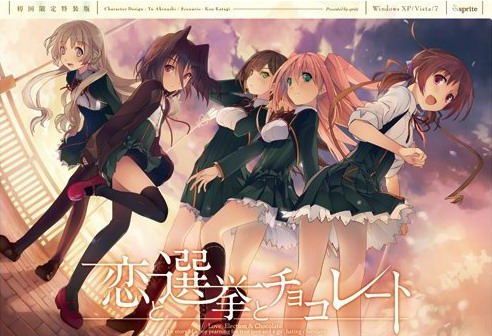
Yuuki, who wants to fall in love, and Chisato, who doesn’t like chocolates. They are lifelong friends and students of the same school. They both belong to the food club with Mifuyu, their classmate. Actually, they don’t do anything everyday, just enjoying chatting… But one day, Satsuki, president candidate of the student council, promises to close the clubs that do nothing. To stop it, they decide to run against her… But who will they send out..? Yes, Yuuki is forced to run for the election… To save the club, he will just need to be the next president!
















i cant seem to be able to play the game after extracting the files correctly and downloading it, when i try to open up the application i am shown a ???????? error and brought to the adobe shockwave page, is there a way to fix this or am i downloading it incorrectly?
Same here, thing is I get the exactly same error using appLocale and not using it.
You find a solution for it yet? I have the same problem.
East Asian Language ? do you guys set your Computer Language to Japanese ? if not , go to Control Panel -> Regional and Language Options -> Languages -> Install Files for East Asian Language , after that go to Advance section and set your Language to Japanese then Apply (you need to restart your Computer to make it work)
Tutorials :
Windows XP – http://erogedownload.com/faq/installing-japanese-support-for-windows-xp/
Windows 7 – http://erogedownload.com/faq/changing-to-japanese-locale-on-windows-7/
Vista – http://erogedownload.com/faq/installing-japanese-support-for-windows-vista/
well that’s how my game work ^^
same problem here, though i ve downloaded it from somewhere else. Actually, it was the pre-installed version of game, is it same as yours? Did you downloaded it from here, or from somewhere else as well? i am excited to play it but unable to, and apparently i’m not the only one.
I tried to run the patch but a little window appears and says
“NSIS Error Error”
“Error launching installer”
I do not know what to do… have windows 8.1
Thanks for putting this up! Have a problem, though, when I try to run the game the game screen shows up and does nothing.
Neither “start.exe” nor “恋と選挙とチョコレート.exe” allow me to install the game.
Did I miss something or is there a missing file ? I tried on my two hard drives and before/after ibstalling the english patch (and yes I have set my local setting on Japan).
Please answer.
Same problem..
I had an issue with the patch, where the nipples on chisato’s tits in the bath were censored. Read somewhere I need to replace a patched file with the original one and that removed the mist, but now I’m at the first sex scene where she wants to wank Yuu-kun off and his dick is pixel-censored. Is that regularly done, even in the 18+ version?
Fast answer would be appreciated.
I found the absolute fix for “Insert DVD”. Being in Japanese Locale mode is not enough. Use Locale Emulator and set it to run in Japanese mode with Administrator rights and it will run every time when you press Yes to continue.
Sadly it’s still not working for me, it says g.exe along with some Japanese..
Than you are not running start.exe or you don’t have the English Patch installed there should be no Japanese window. When you run with locale emulator as I stated you will still get insert DVD but click yes and it will play.
Ah, turned out I deleted the translation file when I couldn’t get it to work the first time. However, now it says it couldn’t find Koi to Senkyo to Chocolate, and none of the file I downloaded has that name. Do I just change one of the 恋と選挙とチョコレート to English name? Sorry about this stupid questions, and thank you.
I have the same problem…I downloaded the amulator but it shows a black window with some Japanese.
I must have deleted it too.
So that means I have to redownload the Patch right?
Yeah I know ‘s a stupid question..
For your problem I think you need to install the game again.
Of course I might be wrong.
did you fix this problem?? My program still say g.exe along with japanese, if you fix it pls tell me how to fix it
If you are still having this problem, you need to set your language for non-unicode programs (system locale) to Japanese. Had the same problem asd this fixed it.
As well as run the start.exe and put in the serial BEFORE running the translation
Nah didnt work, i used locale emulator on start.exe and i have the patch installed but i still geg enter dvd in english and it keeps popping up.
for those that have problems starting the game i started it by:
running start.exe
putting the serial:Q6ZL-HRH8-PZJF-Q2RE
only use start.exe for playing the game not the other exe
thx bro with your code i can play it hahahahah i have no problem now lol that because of you
Thanks bro
u da real mvp
I have no problem instaling…pffftt…tehee…
How many KB is the English patch supposed to be? 33 939 KB?
Nothing at all can get this game to work on my computer.
Is there a solution to the enter dvd thing? at first it worked but when i turned off my computer and tryied to play it didnt work anymore. I tried to find a place to buy the game so it wouldnt say dvd anymore, but i cant find it anywhere on the internet.
dont know if censored or if its just this one scene in the the bath with the first girl but that part is censored.
I need help with this. When I open the patch file, it takes me to somewhere in Program Files, but since I don’t have the game there, I redirect it to the folder where I unziped the game. But when I click Start.exe, it says: ヌミ・冐ヌミノ`ノ睨Rノ蠻[ノgヌミ・冐ヌミノ`ノ睨Rノ蠻[ノg.exeヌ吝ゥヌャヌゥヌヒヌ局ヌメナB鍼・ヌオヌ局ンナB.
Anysolution?
It’s been 20 days and I tried everything
I turned off my antivirus
I located my computer on Japan
But still I can’t start the game
First I wanted to point out that in the folder it doesn’t write ”start.exe” but ”start”
I reall ywant to play this game and I’m trying really hard.
Anyone can help me?
it’s censored and got first h scene with Chisato even thought i don’t want it >.< Aha!
oojima roll~
This is normal. Chisato is the neutral path so u hv a high chance of getting her route. Cause there is no indicator I didnt even know I was on her route until much, much later.
If only There’s hazuki sensei’s route..
I had the DVD problem and I just solved it. I dont know if the local emulator helps or not, but do that. You will also need this code : Q6ZL-HRH8-PZJF-Q2RE. Get ready to copy and paste this. Move your translated folder into ur C:\ directory, and then open start.exe. Click yes when it tells u to insert dvd, and it will bring u to this console like screen. paste the code above, and then you can make a shortcut of start.exe to desktop. hf
I needed to get the emulator for this to work. Thank you for the code guys!
Needed emulator even after translation was done.
I’ve finally figured out the proper way to install. Firstly you extract the parts. After that click start.exe to start it. There’s a white box with Japanese words all over. Copy Q6ZL-HRH8-PZJF-Q2RE and paste it there. Click to first clickable button and it’ll start. Finish the opening song and wait for the time you can save. Then after you saved, start the translation patch and save it in the same folder as your start.exe. Everything should be okay after that.
The full screen is the same size at the windowed one is that normal or a bug of the game ?
Kay I’ve managed to have the installation working myself and here are some simplified steps that worked for me on windows 10:
1. Extract rar file into C:/Program Files (86x)
2. Run the start.exe application BEFORE you install the English patch
3. Click yes when it asks you about DVD
4. Paste the code Q6ZL-HRH8-PZJF-Q2RE, then click the highlighted button
5. close the game
6. Run the english patch
7. Done, just don’t use that start application everytime you want to launch the VN
This is all done assuming you already have Japanese locale set
FOr nstep 7, i meant to USE that start application, my bad…
How do we get this upvoted to the very top of the comments section??
Your advice was usefull, it worked perfectly, and now, TIME TO PLAY THIS GOOD GAME!
I can’t get the start.exe file working on my windows 10. I was wondering if you know how to deal with this.
why do you use that download server?! it’s so scaming us… why should i download that many partial when the only file exist?!
Can someone help me because I’ve beat Chisato route and have no h scenes. Don’t know what happened
Never mind I fixed it. In the backup file
I just realised…To whoever has the problem with the black screen..(We are not many)
That before I installed the patch.
It shows the same thing.
The Black window and the text.
Am I doing something wrong?
I installed the patch, I changed the location to japan, I downloaded the amulator.
What am I supposed to do?
Also I can’t the files on C:/Program Files (86x)
Unfortunately for me, everytime I clcik start nothing happens.
This is on Windows 10 and I tried all the stuff you guys suggested.
Helpu??
in win 10, search for ‘region’ in control panel, ‘administrative’ tab, change system locale settings to Japanese then run, emulators don’t work somehow
Using Windows 10, too. I already set the region to Japanese, still nothing happened, once I try to start “start.exe”.
“恋と選挙とチョコレート.exe” gives me an error to install Shockwave player, what I did anyway.
Same deal for me.
I’ve given up I haven’t found anything that works for me. I simply can’t run the start.exe no matter which order I install it or folder I put it in. Neither my antivirus or applocale seem to have anything to do with it.
I’m using Windows 10 and to get this game to work first you should download the locale emulator (google it and for me I use Xupefei’s emulator). Whenever you want to play the game, go to the Region and Language settings and at the Languages section, set the Japanese Language as default(download the language pack from windows first of course). There is no need to sign off for the changes to take effect. After that, open start.exe with emulator. Once you’ve done playing, set the original language back to default.
is it supposed to have chisatos nipples censored?
Yeah I can’t get this to work. People keep saying to paste a code in somewhere but I never receive a prompt to input such a code — I just get the missing DVD error, and clicking Yes just brings it up again ad infinitum.
Do I need another program or something to be able to input that code? I got Locale Emulator just in case but still no dice.
I think the “start.exe” crack file is faulty or something. After about an hour of messing with it I finally got the popup to input the code and the game actually started — unfortunately I didn’t have the English patch loaded at the time, and when I restarted after installing the patch it kept giving me the NoDVD error again. I just kept trying and eventually the game launched again.
I have no idea how to fix it so it’ll run every time though…
In regards to the Chisato censor in the bath.
/V/ answered it. I’ll just put it here.
“the TL group fucked up and included the censored version of that in the normal patch.”
“is that the only error in regards to censorship?”
“Yeah thats the only one. It happened for me and I still got H-scenes and stuff. It’s not really a big deal.”
he notice me too the DVD problem and i’m download completly, the game’s parts and i’m deceived for that…
I can’t unzip the file. Using 7zip and get the following message:
1 Data error: Koichoco/KSC-VOICE.cct
Ok so finally got past the previous error. Now when I try to run the game it says the following:
KSC-VOICE.cct is not a Director File
My game runs fine except I have no voices… How do I fix this?
Just a newbie question… Is there a way to expand the game window? I dont want it to run full screen but the default game running in a 800×600 window just feels too small.
how to run in case of fuckup
1. Extract rar file anywear desktop recommended
2. Run the start.exe application BEFORE!! you install the English patch
3. Click yes when it asks you about DVD
4. Paste the code Q6ZL-HRH8-PZJF-Q2RE, then click the highlighted button
5. close the game
6. Run the english patch and when it finishes dont run it just finish it
7. and Done, just go and use that start application everytime you want to launch the VN not the icon one with the japanese leters
next to it if you do you will have to start from the beginig and delete the folder
also This is all done assuming you already have Japanese locale set
alllrighty ive tried literally everything ive read every single post on here. I cannot get past step 3. ive sat there and spammed the yes button for like a solid minute and nothing happened. also the file is “start” not start.exe does that matter at all?
HOLY JESUS I GOT THIS TO FINALLY WORK. Thank you Windows 10.
Just another person to say that when I try to start this game I get the “Please insert game disc into you DVD drive”. I have JP Locale, Extracted in x86, I’ve tried both the “start” and “恋と選挙とチョコレート” applications both normally and in Run as Admin. Tried it with and without KSC-License and makes no difference. I just never get to the prompt where I need to paste the code, just an endless loop of clicking yes.
I’m pretty sure people can get around this issue, I just can’t seem to. Any ideas?
Hello guys, I’ve decided to try and help some of the people that are having problems with running Koichoco just as I did before I dug up solution.
Here is what I did to get it finnaly to work:
Go to control panel > Region and language > Admin > Unicode settings > Set it to japanese > Restart computer
After this I was finnaly able to make it work . Hope it helps you as well and have fun reading 😉
Of course, run it with start.exe not the other one.
How do i install the english patch? Do i just run the English Patch after downloading all the parts?
Hi!
I was moved…. this game is good! I want to have their bgm, but I could not find it in Google. Does anyone know how to get their bgm?
Hello
I managed to get it working after renaming start.exe by koichoco.exe. Now my new problem is the infamous black screen after the intro… If someone can upload a save right after the video, it would be much appreciated.
Thanks
Solved. I rename the opening file after starting the game and no black screen occur.
So for Windows 10 users who have problems for playing, here are the steps i follow:
1) Put the system in Japanese locale when restart
2) Extract the game in folder Program Files (x86)/Sprite/Koichoco
3) Rename start.exe by Koichoco.exe
4) Remove KSC-LICENSE.dat in the Config folder. Launch Koichoco.exe and write the code Q6ZL-HRH8-PZJF-Q2RE for the dvd
5) Install the english patch.
6) Now the game start properly in my case. If you see the black screen after the opening, follow my tip above.
Hope it helps.
i dont find any KSC-LICENSE.dat tat u mention above.
this worked for me when nothing else would, thanks brother
Hi
the+start.exe+is+not+running,+i+open+the+applocale,+search+the+start.exe+file+opening,+and…nothing+pls+help
Ummm… just a question…
.
.Is it just me or is the download server so slow…
I mean my Pc’s average download speed is 100kbps But everytime
I’m downloading from this server the download speed goes down
to 30-50 kbps…..
has anyone found a windows 7 fix for this game yet?
Having trouble getting Koi to Senkyo to Chocolate to install
– Running on Windows 10 x64bit
– Set [Region and Language] to local Japan, added Japanese language, then Restarted computer
– Extracted the 17 .rar files using 7-Zip
– Tried running start.exe as Administrator and nothing happened
– Tried running start.exe in compatibility mode as Admin and nothing happened
– Tried renaming start.exe to Koichoco.exe [as suggested] and repeated above two steps, nothing happened
Not sure what to do at this point, any help appreciated
I tried to play but a message appeared that said if i could insert the game disc in the DVD-ROM drive
What proceeds in this situation?
Windows 10 64bit | start.exe does nothing, possible solution
Windows 10 64bit has a few places to “Set to local Japan” I had already done 1 and 2 but 3 had me stumped for a while and when I made that change a number of games started working for me
[1]
* Hit [Start] and start typing “Region & Language Settings”, select that when it pops up and make sure your under [Region & Language] on the side bar
* Under [Country or region] there is a drop down, select [Japan]
* Restart computer
[2]
* Hit [Start] and start typing “Region & Language Settings”, select that when it pops up and make sure your under [Region & Language] on the side bar
* Under Languages click the grey [+] button next to “Add a language”, scroll until you see “Japanese” and install
* Restart computer
[3]
* Hit [Start] and start typing “Run” to open the Run command prompt and paste “Control international” without the quotes and press Enter
* Go to [Administrative] Tab and click on [Change system locale…], from the dropdown select [Japanese (Japan)], hit [OK]
* Restart computer
For those who downloaded the game via the 17 different parts, make sure to move all of the files into one single folder before running the application.
For those who get
ヌミ・冐ヌミノ`ノ睨Rノ蠻[ノgヌミ・冐ヌミノ`ノ睨Rノ蠻[ノg.exeヌ吝ゥヌャヌゥヌヒヌ局ヌメナB鍼・ヌオヌ局ンナB.
(like me), here’s what I did:
I found a useful app called “Locale Emulator” (google it). Basically, you ran a jap lang games by right-clicking the usual .exe file and then select “Locale Emulator” then “Run in Japanese”. I play most VNs using this method and it works wonder. FYI, I don’t use AppLocale. (My PC runs Win7 Utimate 32bit)
1. Install the game like usual
2. Copy “start.exe” inside “No DVD Patch” to the game’s installation folder.
3. Install translation patch to the game’s folder
4. Change system locale to Japanese under “Region and Language” setting, then restart the PC
5. Run “start.exe” using “Locale Emulator” method; when it asks for serial code, copy and paste the code mentioned in this page, confirm, and then voila, the game plays.
(note: if these steps don’t work for you, try installing the translation patch AFTER you insert the serial code)
In my case before I tried this method, I tried to play using “Locale Emulator” WITHOUT changing the region, because, like I said above, most VNs I have can be played using this emulator, even untranslated VNs. I don’t know why, but it seems that this particular game have to be played by changing your region first and then use the emulator.
Hope my method can help you.
I got a problem with saving the game, I just started and when i try to make a save file it works but when i try to go back to the game the back button disappears after i press it and I’m stuck in the save screen with no way out. Anyone got any clue how to fix it?
This game is tremendously disappointing.
The writing isn’t bad, but it anything isn’t special. The relatively unique art is nice.
However, you are forced into the Chisato route first no matter what you do, and Chisato is a horrendously irritating character especially considering the MCs meekness when dealing with her bullshit. It just kills my enthusiasm right out the gates.
Not only that, but the game cooks up and hints at weird shadowy drama that it never actually fleshes out.
Finally, the absolute worst part of the game that completely ruins any enjoyment I could have gotten out of it… HAZUKI DOESN’T HAVE A ROUTE! WHAT THE FUCK? I mean seriously, why. She’s heavily involved in multiple routes, they spend a lot of time together and they have history. Why in the fuck does she not have a route?
Bravo, you raised my hopes and dashed them quite expertly, game. 0/10 DIAF
Hello. Has anyone encountered this problem?
Finnaly got the game to work after following the instructions with locale emulator, but after a hard save (I don’t like quicksaves very much, sorry. Bad experiences with other games… ) the game crashes. this is what happened:
1. Selected the slot and saved in 1
2. Now, game didn’t let me return to the game itself. No right clicking or button or anything changed that. I was stuck in the save file screen.
3. Deleted the saved game and tried saving again. And now you can’t save at all, anywhere at all.
4. After a bit more of clicking and changing saving slots to see if anything worked, still not saved, then the game just commited CTD.
I haven’t tried the quicksaves, surely they work, going to try them now if I can get the game running again. My system is windows 7, by the way. Just wanted to point out this bug and to see if anyone can tell me if it can be fixed.
Thanks, and have a nice game.