
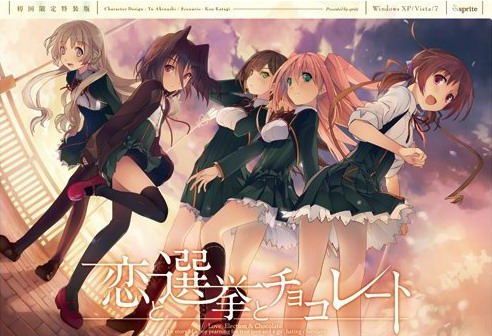
Yuuki, who wants to fall in love, and Chisato, who doesn’t like chocolates. They are lifelong friends and students of the same school. They both belong to the food club with Mifuyu, their classmate. Actually, they don’t do anything everyday, just enjoying chatting… But one day, Satsuki, president candidate of the student council, promises to close the clubs that do nothing. To stop it, they decide to run against her… But who will they send out..? Yes, Yuuki is forced to run for the election… To save the club, he will just need to be the next president!


















I have literally tried every solution given to get this game to work and had no luck at all just get the DVD error message and no way around it
Well, it worked to me running the “Start.exe” on Applocale. When the game started, the box with the DVD text appeared but I only clicked “Yes” and another box showed up, just clicked on the first option and the game ran without problems.
finally~
Can you guys help me? When I click at start.exe, nothing happens… I tried a lot of solutions in the comments, but none worked. Ah, and I use windows 7 (x64)
I am using Window 10 and have same problem. After running start.exe, nothing happened. I read all the previous comments but still can’t fing the solution.
can someone put up the file for the start exe mine just deleted itself all of a sudden.
Start the game with ”start”exe not the Japaese.
Select the first option and play.
Thank you for the upload, Admin ^^
It just screws up for me too. the ‘insert dvd bullshit’
What a worthless release when 9/10s of people can’t even run it.
If that’s all, then your comment is worthless. All you have to do is use Star.exe. Also, calm down, dude. It’s just a game, no matter how much time you spent downloading it (We’re not even paying for this).
Uhh how about no? Just look around on the comments and even the forums about this game. There’s dozens of people who have the same issue I do. It doesn’t work with the start thing either. And I am plenty calm, but I don’t appreciate spending hours downloading this because of so many parts and having to wait between downloads etc, only to have it more or less impossible to run. Free or not that’s still time that is completely wasted because the release sucks.
well then just get the fuck out of here. ungrateful shit
Jesus, what’s it to you, you dick?
Did he blame the admin? No. He blamed the game that is not working and he blamed the release.
Was that justified?
IDK, but after how long it took for the patch to be finished, then going through all the trouble downloading and installing it, just to find that it doesn’t work for you, no matter what you try, that’s incredibly frustrating.
You are basically at the goal but you can’t make it.
I really don’t get why so many of you are so defensive, when the admin isn’t at all. No one needs you and your cohorts to fight for them, you are being way more of a dick than the people complaining.
Got it to work by running as administrator. Worth a shot if you’re getting the DVD problem.
Game is still not working. Any solutions?
Might be a hint for people having trouble:
I cloudn’t get the game to run on my windows 10 Laptop, so i installed it on my PC using windows 7/or Vista, not quiet sure, not the point. Anyways installing it on the other PC i noticed, that the patch created more files and folders than on my laptop. I’m using Avast on both computers (maybe its not updated on the older one), so i’m not sure if it’s the Antivirus that’s blocking the files or something else, since i got it to run on the older PC i’m not looking into it, but if you have trouble maybe try turning of your antivirus while applying the patch.
regards.
i don’t have problems about the game but i want to ask how to create shortcut from applocale? i have tried so many times but i still have to open applocale every time to enter game.
C:\Windows\AppPatch\AppLoc.exe “C:\Program Files (x86)\CROSSNET\Memoria\MemoriaEN.exe” “/L0411″
use that..thats my applocale shortcut for hoshizora just enter the Chocolate path inside the ” ” and make sure to add “/L0411”..if it doesn’t work than just change your locale to japan…IM BAD AT ENGLISH
It’s work! thank you so much.
I’ve tried everything to try to get this stupid thing to run. I get either insert disc… I download an actual disc image, and then…it crashes after the loading screen. And apparently this problem is prolific among many, many, many people. If you have windows 7 64 bit it seems like this one is a lost cause.
It is working perfectly fine on my windows 7 64 bit though I am using a way older version of the game( I had this game on my hard drive when it first came out, not sure if they had patched it since then)
In me when open start.exe nothing happen any solution?
I install the patch and i click\start\but nothing happens. So how I can resolve?
Hey admin, thanks for uploading this. I love it very much. Can you suggest me on what should I play next? I’ve played koichoco, Grisaia no Kajitsu, Deardrops, and If my heart had Wings.
Thanks again!
Alright i found the problem,its seems like the script.cct were using the updated one,and that update unfortunately didnt work with all operating system(i.e 64bit windows 7 or other)…
Thus i sugest you to roll script.cct back to the previous version..by find it on other place,such torenting…and dont do update..
The downside is there are some bug exist..but its should not disturb your play experience,you shoud not worry
So, we should just find an older version of the game?
Could you (or anyone reading this who found an older version of script.cct) please up that and point us to it? Seems to be the actual issue with x64
So I was able to get it to work. I use windows 7. All I did was delete the config folder when it asks for a disc (it doesn’t work if you just delete it whenever. You have to be at the pop up window asking for the disc). After deleting I clicked no and it took me to another window for the serial then I was able to play. Hope that helps someone!
sorry i want to ask
i install the game use the start.exe and give the serial code
i playing it normaly but even though i already finish chisato route i still cant access Extra
anyone has the same problem??
and how to fix it?
Extras will unlock after completing all the routes
I click at the file named “start” but nothing happens… What should I do?
Hi guys, how can i enable fullscreen? When i click on fullscreen option, the screen broke in two parts.
How come all cgs seem to be censored (even boobs are blurred by steam) and there are no h scenes?
Is this an all ages version of the game or something?
Same for me
I’ve done almost everything that has been suggested in previous comments, but I still can’t get it to get past the DVD prompt. I’ve deleted the config folder (which was empty for me), I’ve checked the save folders (also empty), moved the folder to Program Files x86, replaced the start.exe, deleted the internet shortcut, everything but running it on a different computer.
Is there something that hasn’t been said in previous comments that has solved this for anyone? I’ve never had this much trouble trying to install a VN before.
so i try opening the start, using as admin, and some other things you recommend me, but it dint have an effect, should i download the older version of this?
i dont even got the “insert disc” message you guys talking about, it just do nothing..
can someone helps me? i really want to play this game
i changed my region to japan so i can play it with no problem
ok umm trying to get pass the CD thing here is how i did it, just figured it out
use applocate on start.exe
When u see the CD required thing click yes atleast 3 times and if u see it again still click no
Then use applocate again on start.exe
repeat the yes until it the program basicly say fuk it and lets you play
guys I’m new__ I have same o problem here as the others are__ I’m using windows 10 x64 bit__ I’ve tried the basic functions in opening this kind of game, after opening it a picture appeared__ behind the picture, I can’t understand anything about Japanese but it is requiring something a box appeared about \director player**\ then below some characters (by the way how do you write the Japanese characters here?)then ‘Movie01=Pathname.dir’ and more characters. I opened the start exe__right clicked in Locale Emulator.. Do this have a solution ??? this happened second time now from \ShinigamiNoKiss\ I just can’t make it install, anyone ??
THANKS ADMIN WAITING FOR THIS!!
Is this in full japanese or it have a patch or something?
cause when I open it it appears everythhing in japanese… help
(sorry for my bad english).
Well, if you look closer at the post, the third link is for English patch…
man, this was a really good game, best i played in a while.
Not all routes were great, one was rather poor (special trained assassins and spies in a normal school setting…come on…) but the last i played was absolutly great (Mifuyu). I find these games often get boring after the confession/getting together, they add some forced drama after that but its usually not very interessting. The Mifuyu-Route was the first i played after quite some time which didn’t drop in quality on the way and had a very relateable drama-component which added tension to the game.
Very nice game, Thank you for the upload!
Don’t want to spoiler much but I have to say in a school-setting where are Keitokus and how they are seen/threated and the entire studend council holding quite some power it isn’t really far fetched. In my opinion all storys are very good and two characters even moved me deeply. Though I started to hate Chisato in the beginning after playing all routes I have a slightly better opinion of her now.
Finally!delay after delay just for editing when translations were finished ages ago!finally!
What is the activition code!!!i cant open the game
Amazing upload..thanks a lot admin.
Remember you’re all locked to Chisato on the first playthrough since that is the ‘true’ story so to say. You’re able to choose another heroine after you complete your first playthrough on your next runs.
Some pretty deep feels on all the story-lines to be honest..Michiru one made me shed some tears.
A gem. <3
They probably did that, because half the people wouldn’t finish her route otherwise. Annoying bitch that she is.
Hey admin
so to start it up, do i just open the ‘恋と選挙とチョコレート’ file? cause if so… i have, and it comes up with a pop up box with question marks, and when i click ‘ok’ leads me to download adobe shockwave player when i already have it? am i installing it wrong?
no, you’re supposed to start the game with start.exe
non chan so cute *nosebleed
When I try to open the game by the “start” it don’t open and when I try to open it with the japanese exe it redirects me to download shockwave, I tried to download it but nothing changes, if someone could help I’d be happy ^^
Every time I want to open the app it says to insert the disc what do I do
my game just stays on a black screen after the op. Is someone having the same problem? if you’ve fixed it, how did you? ive left is for a couple of hours already and its still a black screen. tried restarting the game and reinstalling the eng patch but does not work
no crack for this game I guess?
Or is there something within the download I just can’t find?
hi, admin, i have a problem. when i try to start the installation, i have a choice between two application, being either start, or 恋と選挙とチョコレート. neither of them allows me to get the installer working. can you give a hand with this one please?
n
thanks
Is there a way to bypass the “Please insert DvD” message?
Yes, start the game with start.exe file, not the と選挙とチョコレート.exe
i downloaded all the parts and tried to start up but it would open game but game box would be black then comp would freeze.The patch when tried to load would say cant find the game
also in the folder i have start not start.exe
Maybe your antivirus deleted it?
what should i do? everytime i pull out start.exe it changes to start
could my problem be because all my downloads go through winrar
none of your downloads go through winrar, since winrar is no downloader.
And as long as it works with a format, whether you use winrar or 7zip or any similar program shouldn’t matter in any way.
Hey admin, i’m having a problem here.
After I patched, a window of the game popped, but a message of “please insert the koichoco dvd” appeared, and if a try to tap yes, it just reload, if a tap no, the window are force-closed. How do I fix it?
can anyone make an installation guide for this because i am having errors involving “insert the disc”, i cant do that because there is no image file that is provided after i downloaded all of these parts. not only that but i dont see the serial txt. that supposedly is in the files that i downloaded.
LMAO!!!!! OMG, by far one of the most entertaining VNs i have played through. thank you admin for allowing such a low life form such as i, oglop the oglop slayer, enjoy this.
It say I need to put the koichoko DVD and I can’t find any .iso to mount in demon tool…Please help
heres what i did and it fixed that problem
1. A fresh install by deleting extracted game files and not the rars. after that go to control panel and uninstall english patch there
2. Extract the rars again then follow usual procedures by running patch with admin and finding and applying it to where the folder of where the game is located
3. After you applied before you click “Finish” make sure that you delete the “Config” folder if it is empty
4. Then delete the backup folder then click “Finish”
5. If it asks you to “insert dvd” or anything similiar to this then just press ok
6. If a text box pops up asking for some type of serial code just click the the button right under it and the game should start
Thanks, this really works!!
If this helps anybody, I was following these instructions with my region in japanese.
All I can say is, I absolutely understand why you have to do the Chisato route before you can play any other one. CHisato with her fucking jealousy would definitely be a candidate for me not wanting to finish a route for the very first time. So incredibly annoying.