
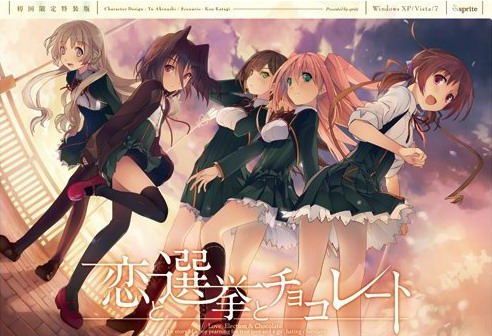
Yuuki, who wants to fall in love, and Chisato, who doesn’t like chocolates. They are lifelong friends and students of the same school. They both belong to the food club with Mifuyu, their classmate. Actually, they don’t do anything everyday, just enjoying chatting… But one day, Satsuki, president candidate of the student council, promises to close the clubs that do nothing. To stop it, they decide to run against her… But who will they send out..? Yes, Yuuki is forced to run for the election… To save the club, he will just need to be the next president!




















to all the people having problems starting with start.exe, try to turn off your antivirus, it worked for me
Excellent. Thank you very much, this worked for me.
Should be noted that I also moved the folder to Program Files (x86) as another person here suggested so I don’t know whether or not that was necessary but your suggestion certainly did the trick in my case. I’m using Windows 8.
What antivirus are you using?
Avast.
Did not work for me. Turned everything off on Bitdefender, changed the location to Program Files, tried compatibility mode because why not, etc.
Oh, and of course, changed to jap locale. Maybe it’s a windows 10 thing?
Nope. Works on Win10 – I posted screenshot in comments already. Starting from fresh Win10 install, the only thing you need to change is JP locale (don’t forget to restart PC afterwards).
How do you install fresh? What I downloaded fr omg your site was already setup
I think admin meant a fresh install of Windows. As in, just installed the OS then the game.
Unfortunately for me, that’s not possible to to atm.
Yes, that’s what I meant.
I use virtual machines for testing of my uploads, so that I can wipe the system clean for every new game with one click of a button, to make sure previous installations don’t interfere with process, as well as to determine eventual components (codecs, DirectX, locale…) that might be needed to run the game successfully.
Try running JP version, without English patch first maybe? Do you get any errors?
Without the Patch? Same error, except in japanese.
Applying or not applying the patch, it shows the “insert dvd” dialogue, followed by something saying the game will shut down. Very sad.
I’ve tried placing it in program files, different drives, different hard drives altogether, and nothing.
Just to make sure, you’re running start.exe, not 恋と選挙とチョコレート.exe ?
Just tested again on Win7 x64 and it runs without problems. During first run, it prompts you with this dialog box – just click first button. Game runs without problems.
You know what, I’m probably doing something incredibly dumb, overlooking something simple. I’m sleepy as hell and have a doctor’s appointment in the morning. I’ll see this tomorrow. Since I forgot to say this, thanks Admin for the upload.
Oh I see. Well, I’m on win10 64, japanese locale, no antiviruses ON, apparently nothing in the way. Still get the dvd check. Dang.
I seem to remember that in an earlier post you said that you ripped this from an iso and saved about 600MB while letting us install it code and disc free. I was wondering if you could put a DA-Free game download 2 up that had that was the complete ISO. I am another of the windows 7 x64 users that this wont work for and none of the other suggested solutions have worked so far so I was hoping that either there was one thing critical for 7 x64 that was missed in your upload or that I could at least mount the complete ISO every time I start it as a slightly more annoying solution. Either way I very much appreciate all your work on this site.
I don’t know if anyone answered how to play without the dvd (I can only see 6 posts) but I was wondering how I can play with out the disk.
getting the same error, it’s asking to input the dvd after doing the patch. i didn’t see an iso or similar extension so i thought i needed to manually install. tried to just delete completely, remove patch, and start over, but still getting the dvd error.
any ideas?
I just pressed yes, and it let me progressed like normal. When it asks for some sort of code, I just selected the first option, and again, progress like normal.
even after selecting yes, it just keeps coming back. how did you do your install? just extract and add the patch?
1. Extract the files
2. Install the game
3. Run the patch
4. Now there will be most likely an erroe saying that you have to put in a disk
>close the window and start with “star.exe” and not with the applicant which has an image(this solved it for me)
Try deleting the “config” folder. That made it work for me. It’ll ask for a serial, but you can just leave it blank.
Also- Apparently, going through the actual SystemSaveData and slashing out the KSC-Data Read got me in after doing what Anon did, which is removing the Config folder, so if you experience the problem I recommend you do the same. (After rerunning to make sure I can play it consistently, I had to redo the procedure for each time I needed to play it, but suddenly I was able to rerun the game without doing the procedure further. Strange.. It kinda invigorates me to see others on the same date too! Glad we’re on the moe-hype train! c:<
((Also, the first option under the serial code is the one you need to click))
Well, since Admin decided to check again, I decided to try once more so the efforts of trying to help me wouldn’t be in vain 😉
Apparently, the one problem I had was actually trying to put the damn thing on C:. At least that’s what I did different right now and it seems to be working. When placed on C:, no matter what, I’d get the \insert dvd\ screen, and yes, I was running start.exe, even with admin rights.
Sorry for so many comments, Admin. Thanks again, both for the upload and for the help!
Then again, I had placed it on another drive before and nothing happened. I’ll look into it again and try to remember what I did wrong in the morning. Damn. I’m polluting the post too much. This is the last one, I swear.
This is for anyone who are having problems getting the insert DVD error. First move your folder to Program Files (x86), than run the patch. Once you do that click on run.exe not 恋と選挙とチョコレート.exe, Then when the error pops up click yes, this time something else should pop up. click the first option. Now the game should work.
If it’s still not working turn off your antivirus, Plus it could also be that you didn’t put on japanese locale.
I’ve input the serial code and played Koichoco for an hour without any problems. But when I exited the game and tried to start it again later, I got the insert DVD error. I don’t know how to get it to go away. I’ve moved the folder to C: and I’m running start.exe as an administrator. Any ideas?
I don’t know whether this will work for everyone but I’ve looked through the comments (and got mine working eventually) and here are the steps that worked for me.
Basic Installation:
1) Extract everything into a folder.
2) Keep a backup of the start.exe file.
3) Apply the patch.
4) Replace the start.exe file with the one you backed up (or the one in the winrar you downloaded).
5) Run the game with the start.exe file. When it asks for a DVD, simply select “yes”*. It then asks for serial key. Click the top option of the two. Game should run then.
*When you select yes for the DVD check, it should then asks for your serial key. If the game instead asks you again for a DVD check whenever you select yes, check the suggestions below for potential solutions.
Things to try if you cannot get pass the DVD check in step 5:
. Move the folder somewhere else (Program Files (x86) worked for me and at least one other person.)
. Disable your antivirus software before running start.exe (this step got me pass the DVD check).
. App Locale, Admin’s Access and Compatibility Mode.
I’ve tried all of this, and the only difference is that in compatability mode, it shuts down after a few “yes” clicks.
I can confirm that this procedure worked for me. I am running Windows 8.1 (64-bit). Thank you so much for figuring this out! I have heard a lot of good things about this game and I look forward to trying it out now that it actually runs! =)
Does anybody know how to get successfully run the game? I downloaded all the parts of it and the English patch, but after I unzipped the game and installed the English patch it’s asking me to please insert the Koichoco DVD in the DVD-ROM drive after I open the start.exe application in the game folder.
No matter how many times I click ‘Yes’ the text box doesn’t go away, and if I click ‘No’ the game immediately shuts down. I tried to look for a virtual CD image in the game folder, but found none. Usually I have no trouble at all when it comes to visual novels, but I’m a bit stumped now.
I have a Windows 7 x64 operating system, if that has anything to do with it. Maybe I need to run it in some sort of Compatibility Mode…? Any assistance would be greatly appreciated. Thanks in advance.
i think ur best solution to use VM with XP or 7 x32, these 2 OS is best fits for any VN atm. Pros when using VM is u can play any VN game with cracks or whatever without fear of virus or the need of changing locale ur main OS
Admin this is a repeat of an earlier comment that I meant to post as a reply to one of your comments but since I am not used to commenting here I think I may have replied to the wrong person or just posted it with no indication it was meant for you. this is not meant as spam and will not be posted a third time.
In an earlier post you said that you ripped this from an iso and saved about 600MB while letting us install it code and disc free. I was wondering if you could put a DA-Free game download 2 up that had that was the complete ISO. I am another of the windows 7 x64 users that this wont work for and none of the other suggested solutions have worked so far so I was hoping that either there was one thing critical for 7 x64 that was missed in your upload or that I could at least mount the complete ISO every time I start it as a slightly more annoying solution. Either way I very much appreciate all your work on this site.
Hello,
I really can’t get the game to start.
I’m using windows 10 x64 and have been following all the steps.
Extract to a map, replace the start.exe after the patch, JP location, turn avast off, move to program files (x86) and compatibility mode but the game simply does not start.
when I try to open start.exe it just stops. it doesn’t open anything, just a loading circle for 2 seconds and that’s it.
Any ideas I could try?
yea, i get the same problem, except im on windows 8
mine on windows 7 x64 works, i’ve done every step as everyone did here and had the same problem (still need to insert cd even after using start.exe), but then i tried to delete the start.exe first and copying a new one from the zip file instead of overwrite it, and it works (perhaps overwrite file didnt work perfectly). thx guys and for dear admin too ^^
For people complaining about the game asking for the dvd, here’s is what I did. When I used start.exe and the game asked for the dvd I simply clicked “yes” and that game loaded after that.
so admin, IIRC, this game was posted in the list of “unfinished translation” or so.
considering you posted here, that means it is fully translated?
sorry for my english, thanks for your support for those who cant read japanese
Can you help me …. to upload some file … sorry for bad engglish …
Yes, all games I’m posting on this website are 100% translated.
Windows 7 x64, tried everyone’s suggestions and still couldn’t get past the CD check.
I didn’t get the screen that asked for a code at first but then i change my location from japane to the one i’m at and then i got the screen. I’m using win 10. Hope it fixed your problem.
The steps already mentioned by others is what has to be done.
Basically, if you did them and it didn’t work, then it’s some specific software you have in your machine. So it’s hard to identify what it can be for each of us.
I moved it over to a windows 10 laptop and it just worked fine, it didn’t work on the 7 x64 even with the same steps.
Probably the best way to save some headaches is doing what admin did for testing, make a vm and run it there.
I don’t know why this always happen to be the case. Every single time I use this website to dl a visual novel, there’s always an issue when it comes to making the game work. One of the things that should always be done first is to delete the \internet shortcut.\ I tried every single method as listed above and it wouldn’t work. However, immediately after I deleted the shortcut, it worked right away. This is not the first time it happened. Keep that in mind.
TLDR; delete the internet shortcut.
What antivirus are you using?
I usually use Avast on my computers. However, this time, I installed in on my laptop. Nothing worked. In the end, I uninstalled Avast on my Windows 10 laptop, and then promptly attempted to play the game. It didn’t work. The final step I did was to delete the internet shortcut and it worked miraculously.
The weird thing is I tried to do the same thing on my desktop but it didn’t work. I’m confused as to why this happens. Well, my desktop is Windows 7. I’m not sure if that is supposed to make a difference.
Personally, I’ve given up trying to figure out why it’s not working for some people. Few thousand people downloaded the game, around a hundred report some problems on systems that I personally tried it and where it runs without problems for me.
Apparently, going through the actual SystemSaveData and slashing out the KSC-Data Read got me in, so if you experience the problem I recommend you do the same.
I have a problem. Whenever I try to play the game it asks me to insert the DVD into the DVD drive. I have tried with the normal .exe and the start.exe and neither work. I have tried before and after the english patch. I have tried with a version of the game not from this site (desperate times call for desperate measures). I have tried without antivirus on, and with it on. My computer non-Unicode is set to Japanese.
Anyone have any idea why it won’t work?
Also tried Program files (x86) and replacing the start.exe after installing the english patch, didn’t work. I have an .mdf image file that I can use, but it’s inconvenient that the noDVD .exe doesn’t work for me. I can still play the game, but not with that.
Are you willing to disclose where you found the image file? Or upload it to a file sharing website?
Can anyone do me a solid and tell me wtf this error means?
http://i.imgur.com/9i1ns1J.png
I can’t address it if I don’t even know what its trying to tell me. Can’t even get to this “insert dvd” part that everybody seems to be having trouble with.
OMG yes thank you so much admin I’ve downloaded quite a lot of games from u and you never fail to amuse me, loved the anime from this so I’m looking to the VN
Well admin thankyou for posting eroge for all these years.It really helped to drift my loneliness away.Keep posting more and more games.
I downloaded it got the patch. And got to the point where the patch says finished and put game on start menu and that read me message. But nothing comes up afterwards. I only got the message. I got Kaspersky Antivirus Software. I tried doing the exclusion thing and i deleted the internet shortcut. And still nothing comes up. What do I do?
what does overwrite start.exe means and how u do it?
My game runs fine, but for some reason all menus are not translated while the ingame texts are.
and the texts only use half the text box, any long text will just be showned half, and it’s really frustrating
anyone know how to fix this?
Strange. I used Windows 10 64 bit myself. Jap locale.
And I have no problem running it at all.
I put the game into C:\Games
I run start.exe without administrator permission
No problem at all.
I used panda antivirus, and I didn’t turn it off.
I suggest you guys download “CodecTweakTool” and use it to repair / manage your video codecs and audio codecs.
I experienced a lot of problem with games in the past because my ogg files was configured to use LAV Filters, while Windows can play ogg files by itself just fine. And the video games want that too.
Uhhhh,i follow instruction and it feels like a gamble,sometime it works,sometime the the error massage show up again,and sorry for my bad english
Hey there.
I’ve been having problems trying to run the game, similar to many before me. I even tried running the game without the patch but I get the “Please insert DVD” prompt and pressing ‘Yes’ does nothing but bring it back up, while pressing ‘No’ closes the game. I’ve changed my region to Japan and I’m running it as admin.
I was wondering if anyone has figured out what could be the problem?
Thanks for any responses. I really want to play this game.
hmm, I don’t know how how this worked for me but for whatever reason I have to drag the dvd check window off the koichoco.exe window then press OK for it to work. I have been able to replicate it multiple times, granted it did take me a few times in between each success.
using -windows 10 home x64
Doing this, moving the window prompt out of the screen, managed to bring me to the serial input window. From here, however, I still haven’t managed to move on. Pressing the top of two choices below the text box leads to another prompt with the “OK” button. Pressing the said “OK” button just brings back the serial input window prompt.
To the magnificent comment that made my game run in three lines, after 3 hours of pointless effort: THANK YOU!!!
I had/have a other problem,
first time i played (fullscreen) i could not leave the save menu and save file didnt work
had to exit the game with the windoows tab
second time (fullscreen) i could not exit as well
thirt time (windowed) i could leave it and play furhter
fourth time (fullscreen) no problems so far
have to continue observing that \buglike\ thing
seems to happen when i try to save at the “choises”
the savefile did work
but the load menu did bug as well
how the hell am i supposed to finish the game if i cant rely on saveing the game
game dont work for me i did everything and it still says this ???? or sends me to shockwave page plugin
are you not using start.exe? The 恋と選挙とチョコレート send you the ???? message which then sends you to adobe shock-waves page.
“????” message = lack of japanese locale. See the site’s FAQ.
can someone help me i using windows 8.1 and i already done the following
1.change locale to jap and antivirus turn off
2.extract rar
3.apply patch
4. copy back the start.exe from rar
5.already run it in admin mode and compability mode.
still not working
Seems I have a problem I haven’t seen anyone else have lol.
I don’t see run.exe(or start.exe) just the regular 恋と選挙とチョコレート file.
I kept trying star.exe and pressing yes and if it didn’t work then i pressed no and tried again until it worked.
I meant to write start.exe not star
couldn’t get past the insert DVD without the iso, after having it I was able to get to the part asking for the serial # so it
Anyone know how to change the resolution of the game? For me its either reading in a tiny box or really stretched out on my wide screen…
Some solutions that might work, collected from the comments.
-Try deleting the “config” folder. That made it work for me.
It’ll ask for a serial, but you can just leave it blank.
Also- Apparently, going through the actual SystemSaveData and slashing out the
KSC-Data Read got me in after doing what Anon did,
which is removing the Config folder, so if you experience the problem I recommend you
do the same.Also, the first option under the serial code is the one you need to click.
-This is for anyone who are having problems getting the insert DVD error.
First move your folder to Program Files (x86), than run the patch. Once you do that click on
run.exe not 恋と選挙とチョコレート.exe
-Disable your antivirus software before running start.exe
-delete the internet shortcut.
-hmm, I don’t know how how this worked for me but for whatever reason I have to drag the dvd
check window off the koichoco.exe window then press OK for it to work. I have been able to replicate
it multiple times, granted it did take me a few times in between each success.
using -windows 10 home x64
“This is for anyone who are having problems getting the insert DVD error. First move your folder to Program Files (x86), than run the patch. Once you do that click on run.exe not 恋と選挙とチョコレート.exe, Then when the error pops up click yes, this time something else should pop up. click the first option. Now the game should work.
If it’s still not working turn off your antivirus, Plus it could also be that you didn’t put on japanese locale.”
I have done all of this, and followed the various suggestions on here. I’m on Windows 7 x64. When I click “yes” on the insert dvd window it just keeps coming back. I would really appreciate it if you could upload the iso, Admin.
I played the game whitout any issue but then ending chisaia route? credit off dont unlock the extra option in the menu screen… can some know why?
Is there a non-chan route here ?
No.
First of all thanks for the game!
Second… I’ve tried to install the game on a W7 x64 bits VM and nothing, I’ve followed all the suggestions (Delete the config folder, move the game folder to C:Program Files(x86) before the patch, replace the new start.exe for the previous one, execute everything with administrative rights and even delete the internet shortcut) but the game keep asking for the dvd even if i select yes… for a hundred times.
Anyway… what i had to do was install a new W8 VM and follow the exact same method, this time… on my last try (replacing the start.exe) when it prompted asking for the dvd i select yes and voila it worked! i don’t know why, i don’t know how! but meh, anyway that “solve” my problem so thanks again!.
Hey guys. I just cant seem to download the file. I keep getting \The web page is not available, err_invalid_response\
This problem has happened for weeks already.
Please help. Thanks
could NOT get this game to start, kept getting the Insert DVD error… did a clean win 7 install on a VM and tried again and works perfect.
Tried everything. Turned antivirus off, moved the folder to Program Files (x86), deleted the empty config folder, replaced the start.exe with the one from the rar, dragged the dvd window outside the exe, yet I still can not get passed the insert dvd window. Even tried deleting the internet shortcut.
I am using Windows 7 x64. If you can help me, thank you in advance.
Just mount an iso
Where can i find the iso for this game?
Is this an all-ages version? I played it through 2 routes, and no scenes, as well as nothing in the extras.
Heiya folks, If everything that has been recommended has failed like it did with me a viable solution (the one I found) was to dowload the Iso/Mds file (dunno if I can post links or not here so ill just say google is your friend, aint that hard to find) and load it up on daemon tools or the like, bit annoying since you have to have it loaded up to play but it works reasonably well enough.
idk why but its worked for me x.x
Not a single thing on this page is allowing my to bypass the dvd insert. not sure how all of your pc’s are allowing it.. even tried converting to an ISO file and still no luck. fml help
1. Extract the files
2. Install the game
3. Run the patch
4. Now there will be most likely an erroe saying that you have to put in a disk
>close the window and start with “star.exe” and not with the applicant which has an image(this solved it for me)
>set your locale to Japan(if not done yet)
All of these steps were posted above and does nothing, I’ve:
-Tried your basic steps
-deleted config folder
-moved from d: to c:
-my locale is on Japanese
-used original “start.exe” and the one that’s with patch
-deleted internet shortcut
-disabled antivirus
-moved the popup insert dvd outside of window then clicked yes and still nothing
-Ran in administrator mode
That’s all I can remember off the top of my head, but I’ve literally done everything besides upgrade to windows 10 and try it
To everyone who has problems starting the game:
1. Extract the files
2. Install the game
3. Run the patch
4. Now there will be most likely an erroe saying that you have to put in a disk
>close the window and start with “star.exe” and not with the applicant which has an image(this solved it for me)
>You have to set your locale to Japan!!!
Got it to work afte running and force closing 2 times .. it just worked..lol..
how do you get to non-chan route ?