

Yuuichi Aizawa, a high school student, returns to a town that he last visited 7 years previously to live with his aunt and cousin. For a reason he’s not quite sure of, he can hardly remember anything about his last visit, but initially this doesn’t seem to worry him too much.
The day after he arrives he goes into town where he (literally) bumps into a girl named Ayu Tsukimiya, and Yuuichi’s memories slowly begin to return.









319 comments
searching for "How to install Kanon with English patch".
For anyone who aint's gots times for no YouTubes:
Primary Game Install:
1. Download all available files
2. Extract all available files
3. Mount the Kanon_SE ISO in a virtual drive of your choosing
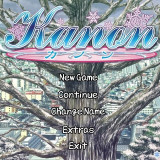
4. Run from the virtual drive
5. When the start screen pops - Click the left button
6. On the next box - Click the left button (the longer one)
7. Follow direct X prompts
8. When the start screen pops up - click the right most button
9. The game will start with all menus in Japanese - use the bottom most button on the main screen to exit and then select the left button on confirmation window
English Patch Install:
1: Locate game file (C:\KEY\KANON_SE by default)
2. Copy all files from English patch (11 total)
3. Paste into game file
4. Overwrite all/replace all/yes to all
5. Install the supplied DejaVuSansMono as a system font (Google how to install a font if you have to)
Voice Patch Install:
1. Paste KOE File into game folder
2. Click reallive-patch
3. Hit the Patch button
*Note: reallive-patch gets detected as a virus by some anit-virus programs, so you may need to disable real time scanning to open the file and create the voice patch
To Play:
1. Use the REALLIVE.exe
2. Rename as desired
3. Change the icon as desired (a KANON icon logo is available in the game file - right click the exe/properties/change icon/browse to desired folder)