
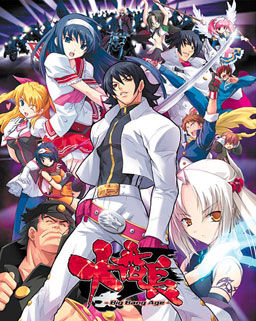
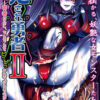
In year 200X, a black hole that would later be called “hellhole” appeared in the center of Japan. Shortly thereafter all contact between Japanese archipelago and the rest of the world got lost.
Giant crystal onyxes named “Crystal B” appeared. Contact with them increased human bodies “B power” and paranormal potential, “special student body” is used to describe those powers young people gained by this change. Emergence of such powers caused panic in the masses and a dark age of violence began.
A few years later a powerful organization appeared, gathering those with the “special student body” to form the nationwide “Students Union” to bring out Japan out of the dark. But the battle was just starting…














So, can someone whos played give a better summary?
also, took a look at the HCG, and it seems theres rape, s that avoidable? Imma pure vanila man, cant have that .
It’s an Alicesoft product Grim…If your familiar with their work then you know what that means…If not, well…Yes, they usually have rape HCGs…Most are avoidable, for example: in Sengoku Rance, when you go to war with a certain clan you have two options when they offer peace…If you kill the messenger, and then don’t defeat them before 5 turns (if I remember correctly) pass then the rape HCG happens…But if you defeat them you get basically the strongest sword unit in game (base combat stats wise).
the patch seems to be broken.
if you have any problem you can find the working one here:
http://games.seiha.org/viewtopic.php?f=5&t=7&sid=60a60a4bcaac8b2b7cb007517f01323f
Hmm…trying to install this in windows 8.1 but cannot seem to finish installing it, got blank message error, change setting to japan local already and running with admin permission..is there any way around this?
so i was having trouble getting this game to work, i install the game extract the english patch, but there was an error and after seeing the intro of the game, my game went into a black screen and it didn’t start.
here’s how to get this game to work properly, well for me anyways:
1:install the game, choose any location you want (B), start install with (R) button
2:then once you’re done with installation, close what ever pops up
3:delete the game folder you installed, by going to the location you installed it in
4:install it again, click \yes\ and it should automatically install into the location you previously installed
5:click (S) after the installation, it should launch the game in japanese, if it works, you did correctly so far, if not, then idk
-now for the english patch i didn’t get it from here, i got it from another website, there was the english patch + text fix
6:extract the english patch into the main game folder
6:(optional):extract the text fix into the main game folder
-now the game should launch in english and bypass the black screen
enjoy i hope that helped anyone having the same issue i was having
why does both files only have the 2 mds files it is niether a .ISO file nor has it an .exe file ?
.mdf/.mds file pair is different format for game disc images (kinda like .rar and .zip for compressed archives) – any disc emulator software should be able to open those.
Alternatively, you can try renaming .mdf file to .iso and open it that way, but I don’t guarantee it’ll work.
it seems changing it to iso does work as long as you dont choose mount itself
but view disc images and from there install it works for me atleast
i got problem with english patch seem like missing dll SurfaceFactory.. anyone can help?
same problem
problem can be easily solved
simply copy the files and map in the english patch and paste them in the GAMEDATA folder to replace
so i was having trouble getting this game to work, i install the game extract the english patch, but there was an error and after seeing the intro of the game, my game went into a black screen and it didn’t start. Can somebody help me about this. What i need to do?
you must rename it pacth before you copy to folder game data
which file do i need to rename?
Devilsraging Thank you very much for your walkthrough on how to install the game. I had the exact problem of a black screen and did everything you said. Game works great.
Again thank you for your help.
For ppl having black screen problem,
I got quite a big headache in dealing with the problem after installing the game and not being able to play.
After about 5 or 6 times or so installing and uninstalling the game, and trying various methods, I managed to make it work.
1.Install the game. (R)
2.Extract the English patch in a folder before copying into the main game folder.
3.RENAME the three files in the Eng patch with 大番長.ain,大番長DA.ald and 大番長GA.ald CORRESPONDINGLY. You will most probably know which files you must rename by just looking at the characters.
4.Then copy and replace all the files in the patch folder into the main game folder.
5.Start the game and enjoy!
Thank you so much for this.
I too ran into the same issue with the black screen. After half an hour of uninstalling and reinstalling like a moron, I noticed some discrepancies between the characters used in the patch’s file names and the original’s file names. Since the characters in the patch don’t line up with the original files, you end up with a bugged mess that won’t run properly. To fix this, rename the files in the patch to match the original ones. Alternatively, you could just download a version of the patch that didn’t botch things in the first place.
i need help with numbers in income phase coming up as bars along with few words. any suggestions on how to fix this?
Love it when the patchmakers themselves don’t know how to properly put together a patch. I’ve tried multiple times, it doesn’t work. We need a different source.
How install the game in Windows 10 I see ??? the it install
come a Window with blue “i” but I do see nothing
Can we get a way to download this that doesn’t require paying to someone who is likely to steal our credit card information? Tried to download the game and it didn’t let me when I went to free. Thanks!
what I do is either do the free download links despite it having even more than 30 parts on some gaames. Or if I really need the files fast, I have a throwaway card I load just the amount on to and no more. For me that card is a bluebird AmEx I got at walmart. that way I don’t have worries about my information or money being stolen.
Just as an fyi, I’ve gotten a week of premium on 3 different occasions and nothing of mine has been stolen. If you are concerned about that, you could always use PayPal instead (it’s an option).
I need help. I try to install this game on Windows 10. Wen I start System4.0 it says DLL [SurfaceFactory] and something japanese I don’t Understand. Please help me…
Instalation:
Installe the game.
Download the patch in a folder named patch or something.
Rename the patch files to their japanese contraparts in the game folder: The files in the english patch have their names wrong for some reason, but they still say something like Da, Ba and .ain at the end so use it as reference. Really you only need the change the corrupted part of the name to 大番長 and leave Ga or BA. It should be enough. I could play the game without actvating compatibility and i’m in win 10.
Once you have corrected the files in the patch folder just pass everything there to the game one, duh.
I just get a black screen after the initial studio logo .. Anyone have the same figured out a fix? Already tried compat settings.
HI! I’ve patched the game but saving doesn’t work at all please help, I love this game and im totally hooked without option of saving the dame it’s a nightmare
this game looks really good, i can’t wait to ass it..
This is an extremely high quality game and should have been treated as such.