
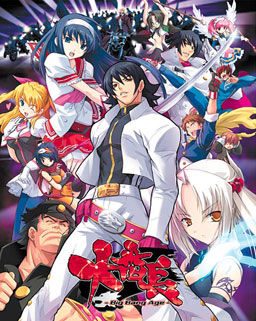
In year 200X, a black hole that would later be called “hellhole” appeared in the center of Japan. Shortly thereafter all contact between Japanese archipelago and the rest of the world got lost.
Giant crystal onyxes named “Crystal B” appeared. Contact with them increased human bodies “B power” and paranormal potential, “special student body” is used to describe those powers young people gained by this change. Emergence of such powers caused panic in the masses and a dark age of violence began.
A few years later a powerful organization appeared, gathering those with the “special student body” to form the nationwide “Students Union” to bring out Japan out of the dark. But the battle was just starting…
180 comments
also, took a look at the HCG, and it seems theres rape, s that avoidable? Imma pure vanila man, cant have that .
if you have any problem you can find the working one here:
http://games.seiha.org/viewtopic.php?f=5&t=7&sid=60a60a4bcaac8b2b7cb007517f01323f
here's how to get this game to work properly, well for me anyways:
1:install the game, choose any location you want (B), start install with (R) button
2:then once you're done with installation, close what ever pops up
3:delete the game folder you installed, by going to the location you installed it in
4:install it again, click \yes\ and it should automatically install into the location you previously installed
5:click (S) after the installation, it should launch the game in japanese, if it works, you did correctly so far, if not, then idk
-now for the english patch i didn't get it from here, i got it from another website, there was the english patch + text fix
6:extract the english patch into the main game folder
6:(optional):extract the text fix into the main game folder
-now the game should launch in english and bypass the black screen
enjoy i hope that helped anyone having the same issue i was having
Alternatively, you can try renaming .mdf file to .iso and open it that way, but I don't guarantee it'll work.
but view disc images and from there install it works for me atleast
simply copy the files and map in the english patch and paste them in the GAMEDATA folder to replace
Again thank you for your help.
I got quite a big headache in dealing with the problem after installing the game and not being able to play.
After about 5 or 6 times or so installing and uninstalling the game, and trying various methods, I managed to make it work.
1.Install the game. (R)
2.Extract the English patch in a folder before copying into the main game folder.
3.RENAME the three files in the Eng patch with 大番長.ain,大番長DA.ald and 大番長GA.ald CORRESPONDINGLY. You will most probably know which files you must rename by just looking at the characters.
4.Then copy and replace all the files in the patch folder into the main game folder.
5.Start the game and enjoy!
come a Window with blue "i" but I do see nothing
Installe the game.
Download the patch in a folder named patch or something.
Rename the patch files to their japanese contraparts in the game folder: The files in the english patch have their names wrong for some reason, but they still say something like Da, Ba and .ain at the end so use it as reference. Really you only need the change the corrupted part of the name to 大番長 and leave Ga or BA. It should be enough. I could play the game without actvating compatibility and i'm in win 10.