
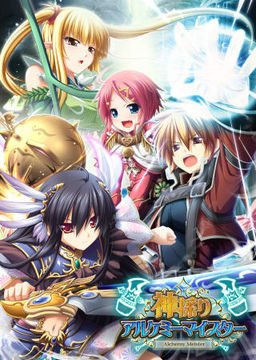
In the Setetori region of the southern part of the Raulbhach continent lies the Mikelti Kingdom. Among the seven major cities is the artisan city of Yuidora. This is where a young orphan named Wilfred lives, pursuing his dream of becoming an alchemist. As tensions between neighboring nations rise and a threat of war looms, three girls in distress come to his place and he helps protect them. Using a new technique that he discovered and with the help of other races, will they be able to restore peace to the lands?
Kamidori Alchemy Meister
- Kamidori.part01.rar - 199.3 MB
- Kamidori.part02.rar - 199.3 MB
- Kamidori.part03.rar - 199.3 MB
- Kamidori.part04.rar - 199.3 MB
- Kamidori.part05.rar - 199.3 MB
- Kamidori.part06.rar - 199.3 MB
- Kamidori.part07.rar - 199.3 MB
- Kamidori.part08.rar - 199.3 MB
- Kamidori.part09.rar - 199.3 MB
- Kamidori.part10.rar - 199.3 MB
- Kamidori.part11.rar - 199.3 MB
- Kamidori.part12.rar - 199.3 MB
- Kamidori.part13.rar - 199.3 MB
- Kamidori.part14.rar - 199.3 MB
- Kamidori.part15.rar - 199.3 MB
- Kamidori.part16.rar - 199.3 MB
- Kamidori.part17.rar - 199.3 MB
- Kamidori.part18.rar - 199.3 MB
- Kamidori.part19.rar - 199.3 MB
- Kamidori.part20.rar - 199.3 MB
- Kamidori.part21.rar - 199.3 MB
- Kamidori.part22.rar - 71.3 MB
- KamidoriPatches.rar - 346.1 MB
- Kamidori_1_1.zip - 30.4 MB






2336 comments
S++++ for the game play
A- for the ero (something is lacking or is it just me? esp. in h scenes D:)
A+ for the characters (except for the loli)
S for the story (who doesnt want a story with gods,angels,monster etc in it?)
i maybe biased but i didnt spent a month for this game if it wasnt worth it.
I+tryed+applocal+and+region+changing+(to+jap)+nothing+worked.
I+read+through+the+comments+and+noticed+the+part+about+ntlea.
ntlea+finaly+worked+changed+the+Fonts+in+the+menue+and+got+no+more+error.
maybe+it+will+help+someone!
kami_ap02.exe
kami_200.exe
I cannot get the english autopatcher to ever find the game, and even if I manually patch it, the game still says it's a different version than a previous install meaning I can't access my old saves I'm really at wits end here wondering if I'm doing something wrong of it this is an issue with installing it via windows 10.
The sound,music, all of it seems fine, but only the voices that didnt come out
any idea about this?
1. Click control panel.
2. Select Time& Language.
3. Select Country or region right at the top and pick Japan.
4. Scroll down now to the option Administrative language settings.
5. In the Administrative tab select Change system locale...
6. Here again Select Japanese and press okay.
7. Restart your computer and see if you can install the game properly now.
This is what worked for me on Windows 10, I hope it was helpful for you also.
> Go to control panel
> Go to clock, language and region
> Click change location
> Go to Administrative (last)
> Click Change system locale- change to japanese
> This might require you to restart your pc, do so.
Extract all 22 parts
> Gives 2 files both named KAMIDORI
> Mount (4.27gb)
> Install it
> Makes a folder inside your hard drive named eushully- inside it is a folder in japanese text, rename it to Kamidori Alchemy Meister.
Extract KamidoriPatches Part 1 - 2
> Makes a folder named Patches- inside it are 3 files (kami_200, kamiap_01, kamiap_02)
> Drag those three files inside Kamidori Alchemy Meister Folder (the one that you've renamed)
> Install 3 of them (i did it in this order: ap_01, ap_02 and 200)
Extract the rar file Kamidori 1_1
> Gives 1 folder named patch, a bunch of AGF & bin files, 1 readme txt, and the Kamidori English exe file
> Copy all of it (or drag) to the Kamidori Alchemy Meister Folder.
> Run Kamidori English exe
> Play and enjoy
By the way if you encounter: 'there is already a file with the same name in this location' notice. Just copy and replace...every encounter.
You may need to install Windows 10 Japaneese fonts but it works perfectly with both patches installed.
I'd ask on VNDB, but the users there a such dicks, hardly ever helpful.
Thanks.
Like everyone at the bar treats her as a regular, and the whole town knows Wil is smashing her, so she must be at least 18 right?
Basically, while the intent of the artist is obvious, the established laws of said fantasy land more or less give it a pass so we should not think too much about it. I mean, if you are going to stress about it there are several other characters that will raise a lot of questions even in the game itself, like Aht,who is quite literally an infant since we actually are present for her conjuring, or the water spirit girl who is stated to have been born when Will's dad purified the lake, and the two dryads-like characters who are quite literally reaching adulthood IN THE MIDDLE OF THE DAMNED GAME (and this is even the segueway into their scene). Yeah, plenty of other more weird age situations which people ignore because they are spirits or otherwise non-human.
I'm using a VM for most VN's to avoid compatability issues. I got an XP and W7 VM running. Most games I can get to work without issue, but with kamidori I get a "DirectXGraphics" error the moment I try to launch the game. I installed the redist for DirectX, that includes the required 9.0c for this game.
- Locale is changed.
- Having the exact same issue on windows XP and windows 7 VirtualMachines. I have not tried on my host yet (windows 10) because I rather not change it's locale. If it helps I'm running the VM's using the "VMware" software.
- The required DirectX is installed.
- Patches are installed starting with ap01, ap02, 200, Kamidori English.
- Even tried launching a fresh instal without patches, same error.
If anyone is a wiz with this stuff please throw some suggestions my way. Played this game years ago and would like to do so again.
I hadn't installed "VMware Tools" yet. A quick google search brought me to a guide on how to instal it (for windows and other OS). After doing this the game launches for me.
Things to do before installing
1.Change Location to Japan
(Control Panel -> Clock and Region ->Region -> Administrative ->Change System locale to japan
2.Search for Settings (Date and Time)
Set time Zone automatically must be turned off ( This was the issue for error 1155 wizard installation)
3.Search for Settings (Region)
Must be in japan (If still got error 1155 )
The typical region setting to Japan ofc first, but now most important => copy your iso file to a folder first!
Then change the setup.ini file in this folder as following:
Look for the [Languages] and change everything in it to:
[Languages]
Default=0x0411
count=1
key0=0x0411