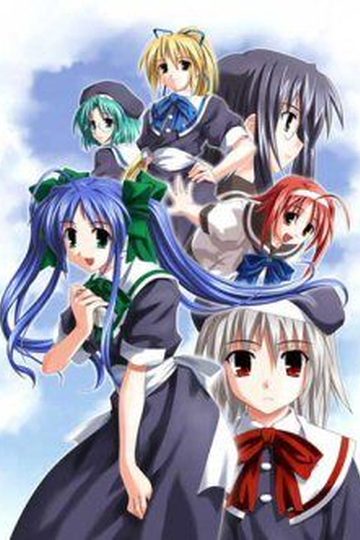
In the near future.
In a not so distant place.
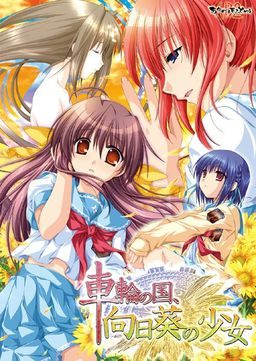
There exists a society where law is based upon deterrence and criminals are assigned “obligations” fitting for their crimes.
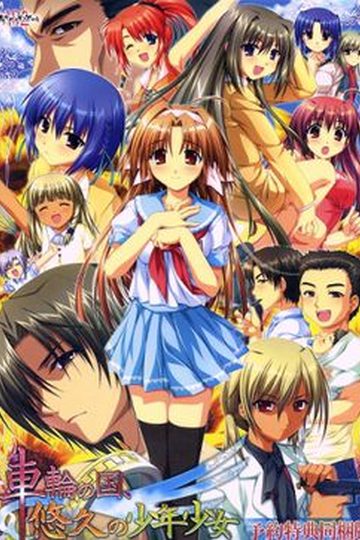
Within this society, a man named Morita Kenichi aspires to the position of Special High Class Individual, one who holds authority over said criminals.
For the purpose of fulfilling his ambition, Kenichi returns to the town he once called home. There he will encounter three girls bearing “obligations” and there he will encounter the past he left behind.
Won’t you join him in this story about how people relate to their society?
In this story about how a society relates to its people.
In this story about the girl amid the sunflowers growing in the country spinning like a wheel.
“Sharin no Kuni, Himawari no Shoujo” related links:
Sharin no Kuni, Himawari no Shoujo HCG


Posted in
Tags:
how to install the patch the game is ok but still japanese
the patch rar dosnt work
Do I need to change the locale to the japanese one for this game because I didn’t have to on all of my other games even though they said I had to. I’m asking because it’s the first time I encounter a problem while trying to run a VN.
P.S. the other ones were Devil on G string(G – Senjou No Maou), Heartwork, Bazooka Cafe, Katawa Shoujo and Soul Link. Also I’m running Win 7 Professional if that helps.
Thanks.
Gsenjou uses the same engine as this one, so if it works for you, then this one should too.
Well this doesn’t work. I mounted the ISO with Daemon tools, ran the setup, installed it, extracted the patch.xp3 file and copied it into the directory that includes the aplication and the uninstall application(I’m pretty sure this is were I’m supposed to put it) then I start the game and it gives a small window(titled Sharin no Kuni, Himawari no Sho…) with a big red circle with an X on it with an ok button, another window with a blue background and writing I can’t even begin to understand(something about the click function and click waiting) but even then there’s like a couple hundred other lines of other stuff. I’m no expert but I think it might be tha games coding(just a hunch).
Seriously I really liked G Senjou so I want to play this. Any help is very much appreciated. Thanks.
I get the same error you mentioned, how i can fix it?
G Senjou works fine but when I install this then the patch and run the game it gives me a window with a big red circle and an X on it and an ok button(nothing is written in the window). It also gives me another window full of code(I’m no expert but I think it’s the games coding). Almost forgot it also gives me yet another window that has five buttons: 3 of the look like paper pages with different blue emblems on each. ex: arrow, a + and – on top of each other and two ~ also on top of each other. The last two are yellow arrows pointing in different directions and the last one is a red circle with an x on it which closes the window. None of the buttons appear to do anything.
I really want to play this so any help is very much appreciated.
Thanks.
WOUHOU!
After a bit of searching I finnally got it to work.
If anyone has a similar problem I’ll be gald to help.
i have the same problem just like you but i dont know how to fix it anymore. can you tell me how yo fix this
I have the same problem… plz help me to run sharin no kuni T_T
http://erogegames.com/eroge-visual-novels/eroge-tech-support/304-tutorial-how-run-japanese-games-applocale/
I used that program.
I think I also used the normal or original applocale(downloaded from microsoft) in tandem with this but I’m not sure if you need both.
Hope this helps.
I changed the locale to Japanese but it downloads the same thing before when I didn’t change the locale. Do I have to install another thing for it to work. Please help.
Nevermind, I found a way to solve the problem.
Think this could be torrent download too?
Sorry to bother you but I have the game mounted in DAEMON Tools and had the patch inside of the folder where the game is, but it’s just keeps the same old 5 characters the blue plate and error sign what do I do to get it work and do it in English?
part 3 of this download seems to not be working for me..
I can’t get the patch to work I extracted the file ok, then extracted the patch to the folder that appeared after but its still in japanese after I mount and install and play. Help.
HEY. CAN SOMEBODY HELP US? we’re stuck with the three windows. and we can’t even play the game. anybody??
Part 2 is down…please reupload D:
Ok I installed it, however whenever I play, it pops with 3 windows, they seem to be the actual engine, or something of the sort I’m not sure, there is a blue window with some programming language in it, and a blank window with nothing but a red x in it, anyone have a similar issue and find a fix?
I install this then the patch and run the game it gives me a window with a big red circle and an X on it and an ok button(nothing is written in the window). It also gives me another window full of code i cant play
Okay so I went nuts for an hour cause I was getting the same error as most others. Let me explain. I changed my locale to Japanese and installed the game. When I ran it without the the English patch the game started running fine which was a sign I did everything right till here.
Now the moment I put the patch in I started having the error “blah blah cur.cur blah blah” in Japanese and cur.cur was the only thing that I could understand. After reading here in the comments section somewhere I felt an alarm bell go off at the back of my head. Someone said “Click sharin.exe to start the game.” I was like “huh” I have yukuyu.exe not sharin.exe and then I realized the fvk up on my end.
I ended up downloading Sharin no Kuni, Yuukyuu no Shounenshoujo INSTEAD OF Sharin no Kuni, Himawari no Shoujo which this is. I used a torrent to download and so ended up screwing things up by misinterpreting it >_<! Anywayz the reason you guys are getting cur.cur error is cause you are all using the wrong patch mentioned here. Please check the game you installed cause I am almost 99% sure you download the game from somewhere else and ended up like me looking for help here. No use asking help from here cause I am sure even the admin will be baffled since the patch works perfectly.

*REPOST*
*FOR WINDOWS 7 USERS*
In case people are still having trouble. Proper steps to get this working from start to finish. ~Windows 7~
1. Download all five parts, and the patch.
2. Download Applocale
3. Mount the .ISO using Daemon Tools, or whatever you prefer
4. Run applocale in Administrator mode, then run the install file on the mounted CD using Japanese. INSTALL
5. Move the patch.xp3 file to the main directory of the game
6. Run the game in Applocale, use Administrator mode again with Applocale.
Can’t see how anyone can’t get it working with those steps. Hope it helps.
i cant seem to get part 6 and the English patch to download. i get the link and after the countdown and the captcha it goes to a webpage not found.
i really wanted to play this game too
yay its working again
I was having the same problem as Caelistas with this: http://i240.photobucket.com/albums/ff99/Cedric5859/Game/fefg.jpg
I tried downloading a torrent, but it just had an identicle .ISO file, but it also had a file that said “[NoDVD patch].exe”. I put that file in the main directory, and ran it, and it fixed the problem!
I uploaded the file here:
http://www.sendspace.com/file/whg97x
part 5 of the download won’t work. how do you get it to work???
part 6 didnt work either!
i can´t get the patch to work and i already installed the game and placed the file (that was inside the patch) in the game directory….
@ALL WIN7 USERS
If you’re having problems running the program (blue window/errors) you need to follow these steps (make sure the ISO is mounted before starting, just don’t install it):
1) Download and install “AppLocale” (free aviable from Microsoft) but DON’T install it;
2) Go to start menu and search “cmd.exe” DON’T PRESS ENTER then right click the icon and “Run as Administrator”;
3) Now you can use cmd to install AppLocale, write the path to the installer (ex: “..Desktop\AppLoc.msi”) then press enter;
4) In AppLocale click browse and select the file “setup.exe” which is inside the ISO you mounted before (in the virtual device);
5) Click next untill AppLocale asks which language you want to use, select the very last in the list (日本) then click next again and run it;
6) Just install it, everything should be fine (click always Next) and when it’s finished don’t run the program;
7) – IMPORTANT – Open CMD again as administrator like before and run AppLocale (NOT .MSI) from the console (it should be in “C:\Windows\AppPatch\AppLoc.exe”);
8) Click browse and select “syarin.exe” which is inside the installed game folder, then click next and select “日本” again;
9) Have Fun!
Remember: from step 1 to step 9, the ISO must ALWAYS stay mounted, if it isn’t then you get “something something DVD something something” error.
And yes you’ve to always run the program from CMD and AppLocale every freaking time.. it’s boring but it works, just read again from step “7″ if you don’t remember how to do it. To install the patch extract the archive in the game folder.
-mike
Damn error in the first like “download and install but DON’T install” so lame… obviously you must not install it, just follow the guide.
Yes yes, Sharin no Kuni is a masterpiece like it’s successor G-Senjou no Maou. But Kenichi is much more better than Kyousuke. Is there another Akabeisoft2 product which is good and available here?
A Profile was made by the same company, Storyline was good, endings were ok…
Is there a .exe crack? I went to the TL site but found nothing. (Even though they say the crack is included)
Alright! So I’ve been getting the “3-box error” described by several others here. I’m just wondering if anyone has figured out a solution to this.
I’ve tried running it with Japanese locale and I put the English patch in the correct folder. I’m running on XP Home, if that makes a difference.
I changed my system to Japanese locale instead of using AppLocale and that fixed the error. Unfortunately, the English patch hasn’t made anything English. I have it in the game folder, so I’m not sure if I’m just missing something here.
Any help would be appreciated.
Nevermind. I simply made a mistake. Sorry for the wasted space!
Does anybody have a NoDVD .exe file?
Forget it
I already found one.
wow reading the comments gives me new respect for the admins here, always helping out and such.
is there any way to support this site and the people who make it possible?
I got every thing working properly.
until my system found a trojan in the files (syarin.exe)
and then he delete everything
and I became sad TT__TT
avg also said it was trojan for me :/
This game needs a ridiculously large tag that says RETARDED BEHAVIOR INSIDE!!!
Anyone got noDVD patch?
Nvm. Lelouch24 already upload it.
This one is one of the toughest ones I installed.
Here are the steps….
1)Download all the files and extract.
2)Mount the iso with any virtual image device(preferably one that’s compatible with your os)
3)Use applocale to run the installer.
4)Install to your preferred drive.
5)Then copy the patch to your game directory.
6)Also you have to keep the iso mounted to play.
P.S: This is one of the more frightening and unique VN’s.
Well the did make G senjou maou so I guess it’s expected.
I followed all the steps that the people here have posted but I keep getting this missing dll error, apparently the one it is missing is krdevui.dll how can I fix this
does any1 else have a problem playing fullscreen?
I have the same issue with Utawarerumono, when I chose full screen, it just expands a black screen all over my monitor, and moves the picture to the corner, without changing the size
any help please?
Just finished one play through…
Just WOW, nothing else I can say.
I played and finished 90% of the games on this site and much more besides that but this one is just amazing.
Very similar to G Senjou no maou, but doesn’t come close.
Just amazing.
Thanks for giving me the opportunity to play such a game.
Just wondering, I already have my computer set on Japanese locale, so I don’t believe I need AppLocale to run this.
However, when I try to run the .exe, it comes up with some random error where everything is in Japanese except for “DVD” and so, I’d like to know, any help? Please?
Hello everyone…
Can someone please upload the nodvd patch..
Thankz in advance…
what happen or Not found DVD Patch someone please help me
Mount the image and run it.
Hey so I think I’ve come across a problem that hasn’t been mentioned thus far. I’ve completed the 1-9 step program and everything has gone well, and I’ve made sure to keep the ISO image mounted. However, after I run syarin.exe through Applocale the final time instead of the game starting I get an “information box” that pops up and says the name of the game and something in Japanese. Has anybody else encountered this and/or have a solution for this problem? Thanks in advance!
Please disregard this question as I have got the game running now. Thanks for the help!
How did you get rid of the inforation box?
oh, you must run the patch in full Japanese system locale..haha
What… run the patch? How do you install an .xp3 file? Because that’s the only file in the patchfile.
http://i240.photobucket.com/albums/ff99/Cedric5859/Game/fefg.jpg
You don’t “run” it – just place it inside game folder.
*reads the katakana*
try mounting the disk image while you run it
I had the same prob, you just need to keep the image mounted on DAEMON Tools or whatever program you used.
If you liked this one then you should definetely check out “Devil on a G-string”/”G-senjou no maou” ( available for download on this site) which was made by the same company and got kinda similar plot.
ah i had no ide you had to get the bad endings to get a full cg…..right…..