
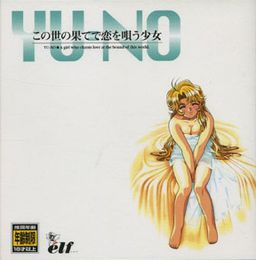
Takuya Arima is a young student whose father, a historian who has conducted various researches, disappeared recently. During a summer vacation Takuya receives a peculiar package from his missing father, along with a letter containing information about the existence of various parallel worlds. At first Takuya doesn’t take it seriously, but soon he realizes that he possesses a device that allows him to travel to alternate dimensions. Is his father alive, after all? If so, where is he?












Got stuck at the part where you’re at the cafe with his foxy mom after following the old professor. No matter what I clicked I couldnt leave.please help me i don’t no what to do?
Click on foxy mom, you’ll see her looking at the old professor. Then she’ll see you but she’ll say she doesn’t know you. Try a few click on her cigarette and then chat with her. These would help you through the scene.
Can someone please recommend some point-and-click visual novels similar to this one? Thanks in advance.
Almost all C’s Ware game in 1990’s adopt this kind of system (point and click adventure). Try Eve : Burst Error, Adam : The Double Factor and Desire. The character design is somewhat similar too
Played Desire and EVE: Burst Error and loved both. Thanks!
Um.. How do you install it? I already extracted it all into a one file, patched it. And then, i tried starting it, and it said, please install the game. Help?
2 quick questions
1. How do you get the jewel in the Eriko/sub teacher route? The one that requires interaction with the storehouse right before you meet the teacher at the well. I think it’s gotten via opening the door in the back but I haven’t managed to get to/find it.
2. I’m at the part in Mio route right after the thunderstrike and the crowd pelting Ayumi wth eggs. Left geotec, went to the gate and saw the Foxy mama. The site guide is telling me to see the sub teacher and mio in the schools second corridor but I’m not getting anything when I head up there/search.
I’ve read both this sites walkthrough and the admins walkthrough that was posted on this earlier and I still can’t figure this out. Can Anyone help me?
Is there anywhere where I can download the soundtrack? I love it.
Never-mind, I got a hold of it. Although none of the tracks have the song titles… But oh well!
how do you save the game??!! i cant find any option!!
uhh there’s something wrong with my eng patch, I’ve put it to the folder and the game works but the text going straight to the right untill over the text box so I cant understand some part of the stoy or dialogue, could anyone give a suggestion to fix this?
I downloaded the English patch, but my antivirus detected malware.
Nothing here contains anything malicious. It is 100% safe.
Got stuck in the Triangle Mountain cave, what am I supposed to do? I pressed the bottom on the wall but I don’t know what to do.
Yu No, this game is pretty good.
Thanks.
Thank you. this website is AWESOME!!!
Only a jewel remaining, no idea where is it. It’s the top right jewel but I don’t know how to get it, I think it’s in the storehouse back room but I got stuck in that part. What am I supposed to do? I’d appreciate help.
The very top right jewel would be the one on Kaori’s route. Assuming you grabbed that one, if you mean the one on the Mitsuki/Ryuuzouji route, you can’t get it right away. You’ll have to explore around the mansion near the end first. There’s something rather peculiar hidden away that will help you get it. Hope this helps without being too spoilery
I don’t understand. Whatever I do, I seem to be unable to play this game. I’ve installed it but when I try to run it I get a pink screen. Sometimes I get past this, but then the screen turns black instead, and it stays that way. There is music in the background though. The japanese exe file works fine, I can get to the main menu with that no problem, but unfortunately, I cannot read japanese. Help anyone?
took me some time to experiment the issue. apparently the zBG.arc file is corrupted.
download the classics, from the YUNO file, copy the BG.arc file into the english YU-NO folder and delete the zBG.arc file, then go to the settings(AI5ENG) and change the ARCBGNAME from ARCBGNAME=zBG.ARC to ARCBGNAME=BG.ARC
Can confirm this works.
1) Copy “ClassicsYUNOBG.ARC” to “ClassicsBG.ARC”
2) Edit AI5ENG.ini and change “ARCBGNAME=zBG.ARC” to “ARCBGNAME=BG.ARC”
3) Run AI5ENG.EXE.
FUCKING HELP. I’m on Mio’s route, and I’m deep under Sword Cape. I’ll try not to spoil anything, but I’m in the burial room, and I cannot figure out the fucking puzzle. HELP.
I am always stopped by the pink screen at the very beginning I startup.
Right after clicking “play with colors”.
I would love to be able to play this VN.
What operating system are you running? Did you install to the default directory? Have you tried reinstalling (preferably not to default, and avoid non-english lettering.) Can’t really help you much since I don’t know how your stuff is configured 😛
change your local system into japanese, maybe ?
this happens with a lot of older games and no-cd patches. You pretty well have to assign the game as an exception so your anti-virus software will stop generating a false positive.
I did everything the instructions said. The English patched version has no sound, only the little beeps when you click on the menu but besides that no music or voices. Help will be greatly appreciated, thank you.
The game is great, but the only thing that bugs me is that you HAVE to occasionally check the shrouding to progress the story.
Just finished the game, it’s good, but i certain you’re going to have some short of Bone Disorder after finishing this game 100% clear game.
I’ve run into a small problem, while playing the game I clicked on the full screen option. Now t doesnt actually fit my screen and no matter what I do I cant get it back into window mode. I’ve uninstalled and deleted everything or atleast I think everything atleast all that was in the folder besides the voice folders and english pathc any help would be appreciate it
A little late but here’s how to fix it:
1.go into the folder where you installed yu-no.
2.open AI5ENG.INI in notepad.
3.Somewhere in there should be something that looks like the following:
[MONITOR]
SCREEN=1
4.Change SCREEN=1 to SCREEN=0
5.Save and exit
That will restore Yu-no to windowed mode.
Reply
The other advice didn’t work, and Google didn’t help. After trying everything from hex editing to reinstalling, I realized a simple fact.
You can just scroll with the cursor to the top of the screen, even in fullscreen mode, to see the settings again.
Whoops.
That was really helpful lol, thanks Helper!
The game wont play for me. After I choose whether I want to play it in color or monochrome it goes into a blank screen and I can only hear the music. Can anyone help?
What operating system are you using?
i know it’s 2 1/2 years later but i’m having the same problem except i don’t hear the music
windows 8
plz help
A little late but here’s how to fix it:
1.go into the folder where you installed yu-no.
2.open AI5ENG.INI in notepad.
3.Somewhere in there should be something that looks like the following:
[MONITOR]
SCREEN=1
4.Change SCREEN=1 to SCREEN=0
5.Save and exit
That will restore Yu-no to windowed mode.
Hey, I can’t download the 2 word number passphrase? wtf am I supposed to do here?
ooooooh!!!! it’s just wording the numbers, my bad! 😛
Ummm…..this VN is the best IV played and probably the GOAT
tyler how did u fix it
I have some problems, for example, managed to install the game from the original ISO and then apply the patch in English, up there all right.
But when I started playing the game I noticed I had no sound of voices.
No voice or Japanese or English, nor have the “AI5ENG_VOICE.exe” file.
I’m playing the game using the “AI5ENG.EXE” file.
Note: I had trouble installing the game because I had several options to choose, and I chose to “500mb-600mb” something, later, in the other options I do not know what I chose.
I also found two folders of other games that came included with YU-NO Game, and are: SH1 and SH2 meaning ?, I delete them or how I can play ?.
Note: Each folder of SH1 and SH2 containing the executable “AI5WIN.EXE”.
Furthermore, I would like to know how to increase the resolution or increase the size of the game in “windowed” mode.
I would also say that I can not record video in the game when I use “fraps” and other programs to record videos of your games.
Note: anyone know if there is any texture pack or know how I can replace the other images of the game improved?
I personally did these images:
https://i.imgur.com/nW4AVpe.jpg
https://i.imgur.com/7eD1X6U.jpg
There are two addon-packs for YU-NO. One, with full voice coverage is already included in this package. Another one contains better quality soundtrack. Its MUSIC.ARC is roughly four times bigger than the original one and also it has its own version of AISENG.EXE within. As peacefire said, there is no visual improvement pack available, AFAIK.
Hello there I’m new to the whole eroge world, and was trying to have this game as the first game to begin this experience. I got the DA-free download and winRar to play the game. Now I’m having a problem with what the game (I’m assuming it’s classics.bin) needs to be opened with.
The .bin file is basically a copy of the game’s original CD. Generally any disk image mounting software will work. I recommend Daemon Tools Lite.
Be warned, the installer is in Japanese. You’ll probably have to use applocale or change your regional settings to install it.
great
on earth
what happened
SH1/2 are different games bundled with the cd. They’re kind of a hentai version of Langrisser or Fire Emblem. Completely in Japanese.
Can you hear the regular background music/sound effects? Either way you don’t have the voice pack installed since there’s no ai5eng_voice exe. It comes separately. There’s a link for it up there.
And no, there is no way to ‘improve’ the graphics, short of redrawing them from scratch. There is probably a way to force a new resolution, but even if you did it would likely make the game look worse, not better.
FRAPS won’t work because it’s a really old game. Screencast software should work if you’re trying to record the gameplay.
Not able to run game in Windows 8.1 Bing edition. It tells “Failed to initialize window” no matter what compatibility settings used. Any way to fix that?
I have it running on Windows 10, so there should be some way to get it to work. Try reinstalling or messing with compatibility settings.
I installed this and patched it on Windows 10 X64 and it works fine except for the in-game text. The text is displayed longer than the text window and when text is too long the right part will go out of screen (doesn’t stop at right margin) and I can’t watch what it says. I tried messing with compatibility settings of windows but I get the same.
i have trouble with the AI5ENG_VOICE.exe file i disabled my antivir and re unzipped everything game and patch but cant find the file Pease help
Have you downloaded the voice patch? You need to download voices separately if you want them. Otherwise, just run AI5ENG.exe instead.
i downloaded it long time aga. it worked. and nice game
a good chance oor learning english and japanease.
Hello,I’m a chinese translater of YUNO.I have some problem in crack the game and I can not contact our creaker.So do you have any tools to help me to compression and decompression the text?
I’m sorry to trouble you.
Hi.
Do you have any tool to extract the MES.ARC(many mes)?
And how to packet the MES to MES.ARC?
Because I need some tools for translation.
Thank you.
I was able to install the game, patch it with the english patch and run it well. However, for whatever reason the game is mute. I can’t hear any music at all. Is there a way to fix this? Any help would be greatly appreciated.
I had this same problem. What I did was copy the one of the MUSIC.ARC file from the ISO into the main game folder on my computer, it worked for me.
I seem to repeatedly get corrupted save bugs and stack overflow even when I exit the game correctly. Searched around on google and apparently no one else has this issue?
Admin, after I installed the voice patch I would get “buffer overflow” whenever I tried to load my game. How is this fixed?
same here, stack buffer overflow error every time i load previous save, what i can do?
I tried your method to change SCREEN=1 to SCREEN=0
but it didnt work :<
Are you trying to run Ai5Eng.exe or Ai5Win.exe? If you’re running AI5WIN (the original japanese version) you’ll want to edit the AI5WIN.ini file instead.
That’s the only thing I can think of.
Hey you guys just a general question. How do you go about playing this?
I can tell this is a HUGE branching vn but is it really hard to keep track of the story/choices/routes? I ask because I looked at the walkthrough and I audibly yelled out holy shit at the sheer number of different possibilities. Did you guys go in blind and enjoy the ride?
I absolutely did. I didn’t even look at the walkthrough. Just keep track in your head. You’ll miss a few important spots, which will lead to sucky endings, but next time you’ll know better.
hello i have installed the game using daemons tools and when i run the patch i have a yellow screen and a black screen and the game doesn’t load !!!! do you have an explication ?
Heard they were going to release a re-make of this soon. Gonna play this before the re-make just to experience the delight of the original. I just opened this for a bit and already, I think it’s really cool. Just have to download the English patch, and I’m going in for a great ride. Thanks admin! <3
Just done talking to eriko-sensei and about to save but it says “failed to read files”. Well when I exited to main menu there’s no continue button. “Failed to read files” also appears when starting a new game and trigger ing the demo.
Someone PLEASE PLEASE help me!! I’m new to installing games and thus I’m really bad at stuff like this the only game I installed and played was 999.. I installed the 3 parts and I mounted the classics image but the install.exe didn’t work?? It seems after I read all the comments that a file called (AI5ENG.exe) is missing from what I downloaded.. what can be the problem? Someone please help :c
I downloaded the music pack for this game and now it seems a weird error happens. I was on eriko/mitsuki route, close to end, I use jewel save, game gives “file error failure to open/close file” When I try to reload the jewel save, I get numorous “failure to open/close file errors”, the game quits, deletes my save data and I have to start the bloody game over.
HELLO! thanks this game is wonderful.
I finished the game and just want to know one thing, idk if a i misread something or the game just never tell u who made the message/code at the twin stones (sword cape).
Does anybody knows this?
and if someone want to share relate info about the story that game doesn’t directly tell us. thank u great game!
Can someone tell me pls on how to install this game?
I just watch this anime very recently and it reminds of Steins Gate. By I was informed that Pink Pineapple produced and released a four-episode hentai anime original video animation series during 1998-1999. Maybe someone has that file here. Pls share. (^_^)