
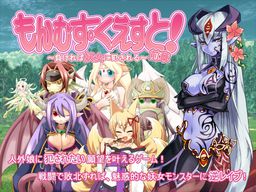
Toro Toro Resistance presents a massive fantasy RPG adventure game!
The story of being reverse-molested by sexy inhuman vixens!
Sweet monster girls seduce and pleasure you!
Lose and you will be raped!
You are the hero, a young boy.
Battle sexually with diverse characters in a world of humans and creatures.
All the creatures are sexy girls of some species or another! Find them all!
It’s an epic quest. Will your dirty dreams come true?

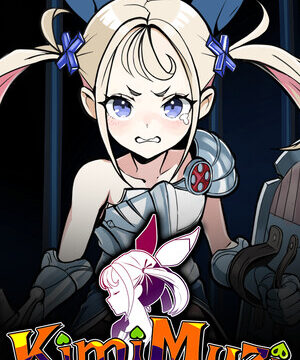













>Lose and you will be raped!
BRB, losing.
LAWL XD
is it just me or is file nr. 3 corupt ???
Sorry, but is it unvoiced or i fail (again) in make a game work?
Only a few female monsters are voiced.
which ones are supposed to be voiced? cause i have to put the game together, and i need to know which ones are supposed to have voices
Only Alice’s voiced during her sex scene
Actually, Alice, the four heavenly knights, and Illias are all voiced during H-scenes.
is the patch done? thanks
hrm… is this only part one?
ah! don’t mind me, i’m just blind
it seems that IM blind, help please? just finished part 1 🙂
part 2 is in the ‘related links’ section on this page
were are the instructions for the game cause i downloaded the english patch with the japanese one and when i played its japanese and mine is in japanese locale
To get it in english, get the patch and do what it says in the readme.
the locale just says is “Extract everything from the .RAR you downloaded into the game folder (Where mon_que.exe is).
If it asks to overwrite anything, say yes.” . i have the same problem as her and i dont understand what this is saying. its just too vague
when i try to press new game the game just automaticly gives me a stange notice and when i press okay anyone know why?
edit: when i press ok it closes the client
when i press ok it shuts down
Change your locale to japan
i dont know why, but when i extracted the game and it asks me if i want to replace an existing file named “MonsterGirlQuest/se/fanfale.ogg” i tried replacing, not replacing, renaming, i dont know what to do. And when i click the application “mon_que” it starts and tells me
099.txt line: 81533
save off
isp 107,”:a;system\logo.bmp”,79,100
please someone help me 🙁
Did you try changing your local to Japanese? Alot of Japanese
games require that and it kinda sounds like its your problem.
*Locale
Yes, i changed the locale and still the same error pops up, maybe it downloaded wrong?
And does the 2nd monster girl quest go with the first one, or is it a whole other game by itself?
I figured out my problem, it didn’t extract to its correct folders. now i have to manually place all the contents in their proper folders T-T
help! i thik i did the same thing you did, and i dont know where to move the files
its a real hassle, but if you can see the contents it will be a lot easier. ency is encylcopedia, bgm is background music, se is sound effects, all the .dat files and glovalsav go into sav file, place all things like bgm_bookmark & bgm_on, c_select, config, cursor, ef_white, ef_black, the encyclopedia pics (without text), face, gagee,only the lngtwave.dll, logo, mask, menu including mini_ ,return, save_new, saveload , spm, system, select_window, title, window, and anything related to the display into the systems folder. all other .dll files stay out with the mon_que.
all audio is either bgm or se. i cant list all the bgm, but youll have to seperate the long audio and short audio. the short are se, the long are bgm. all the ero_ and hsean go into se, plus i still cant find the voices, so try to organize.
Just curious… why is this in 2 parts and where does it split?
When you get to the Earth continent and fight gnome
I tried to save my game, but its not allowing me, any help?
I left the save game name the same, yet still not saving.
What is happening with the save?
If it is just not letting you save the the only problem I could think of is if you’re not saving where it says says “Save Location”
I had a problem where my saves deleted every time I closed the game, I fixed that by backing up all of my saves in another folder.
Does anyone know how to get the last ??? at the end of the Ency? I have every other one and that one is bugging me…
That is the godess Illias. You get her by doing evaluation 50 times.
Thanks bro!
anyone have a walkthrough for it?
i’m new to the whole downloading games like this and playing them so i need some help. here are my questions: 1,after downloading the game (using the mediafire links) how do i unrar the files. 2, after that how do i start playing the game. if someone can help please do if it isn’t too much trouble.
Use “Winrar” to un-rar files, once you do there should be an executable in the folder created. Use “AppLpocale” to run the game in Japanese locale or you can change it manually from the control panel but this isn’t recommended as it will affect other programs.
thanks for the help, now i just need to figure out when a save is useless or not in the game
I have downloaded the English patch, but i don’t know how to make it English. and i get the errow 099.txt.line81891
To make the game English Un-rar the patch into the game’s main folder. Make sure to run in Japanese locale or to download AppLocale. It became a problem once I patched the game.
I can’t manage to download the part 3 please help me
What kind of error are you getting?
T.T had full monsterpedia and lost my file
someone want to give me one plz?
I’ll give you a cookie (>’_’)>o <(^_^<)
Me You
Can anyone post a complete ency? I’m having trouble completing it…
Thanks in advance.
If I download from mediafire separately, do I have need to combine them 3? (Including the part 2)
If yes, how?
i cant get it to work, i did all the normal stuff to get a game to work, but when i click it. it gives me thing that says saveoff lsp 107,”:a;system/logo.bmp”.79,100 bg “bg/bg001.bmp”
I’m getting that error, too. Did you figure it out…? Someone else mentioned having an extraction problem, do you think that’s it? When I extracted the files it said there was something corrupted. Did that happen to you, too?
it is an extraction problem, i was using 7-zip, and the stupid thing never keeps the items in the right folders, i used win-rar and it worked like a charm. sorting the items is not fun at all, try using another extraction program
When will the MGQ 3 coming out?
I am attempting to use WinZip to un-rar the files. Everytime i try it says “please insert disc containing” and tells me if i downloaded it to redownload it. What do i do?
Hey! Ive got the game running with applocale, however my english patch only appears to be partly working… For example; the options in configuration, and the main menu, are in english, however when beginning a new game, everything is back in japanese! Anyone else encountered this? Any ideas for a fix? 😛 Thanks for your time!
This game is a work of art, shame not all artwork has the same superior quality as Alice’s and some other monsters.
Part 2 is already in english, and I bet admin will have it here in a very short time!
Thanks for this worderful game!
I get extreme delay when playing is there any fix2
Fixed it was a extraction problem
I actually figured out how to save anywhere on monster girl quest, and it works on mine. if you play in the windowed screen and press save, you get your save data screen, choose any. after you get the screen that reads “dont change the text” press save at least once and youll get an error, since the small window has no close button, dont panic. make sure the game is the current window open and press ESC. it should work, if it doesnt, it must be just my luck. tell me if it works
HELP!Anyone can help me to defeat Nanabi?Plis!!!
Help. I followed the instructions here. Got the game, installed the patch… and all the text is ‘squashed’… like they would say ‘hello’ but the ‘ell’ part is all mangled into one weird letter.
I’m on windows… any one else with this problem?
uhh excuse me but is there a voice in it??
I downloaded the game, installed patch, changed locale to Japanese. The game text is still in Japanese. I don’t know what’s wrong, i think it has to do with the extraction in
WinRAR, it won’t let me extract ANY file in the MonsterGirlQuest.part1.rar though, I followed all the instructions in the readme.txt.
When i drag files into the MonsterGirlQuest.part1.rar it says
“Cannot modify volume*
Can someone help me? 🙂
Edit: Is there something to do with WinRAR? Do I have to unblock something or what?
I’m also having problems saving. I try to save when it tells me too but the screen has a half second click and it wont register the save. No error will pop up but it wont save
Get some rape
lol who else came here cause of gabriel blessing?
Me! Blessing’s so aweshum!
mediafire says i cant download it and the other one wont let me why???
The media fire download no longer works, and it is too big to DL from the other…
The links are dead
Dead End XP ZZZZ
Can’t Download :'( zzz
I can’t get the english patch to work, I put it in the games main folder and have it fully extracted. If it helps I’m running it on linux, ubuntu specifically, and am using winetricks but I don’t think that should cause an issue.
hey everyone can anyone help me please,as soon as am starting a game,im gettin a strange eroor saying something about a text line.whats wrong what do i have to do
The first part keep error at the 99%, any advice?
I downloaded the game, installed patch, changed locale to Japanese. The game text is still in Japanese. I don’t know what’s wrong, i think it has to do with the extraction in
WinRAR, it won’t let me extract ANY file in the MonsterGirlQuest.part1.rar though, I followed all the instructions in the readme.txt.
When i drag files into the MonsterGirlQuest.part1.rar it says
“Cannot modify volume*
I’ve done everything i can but it doesn’t seem to allow me to transfer the english patch over to the part 1.
i can’t modify volume. there was also a password to the files and i was wondering if you could give them to the community so we can all fix this per chance if it happens to others.
The download link for part 2 is dead.
The download link for part 2 is down.
the download link for pt 3 of the rars appears to be broken
Can some one please give me a working link for part 3?
I had to get the part 3 download in internet explorer while parts 1 and 2 worked in google chrome.
I have a question.
This game is censored, is there any way to change that?
Btw. This is my first game so i don’t have any experience 🙂
when i try to download with downloadani it always give me wrong ip can someone tell me how to fix this?