
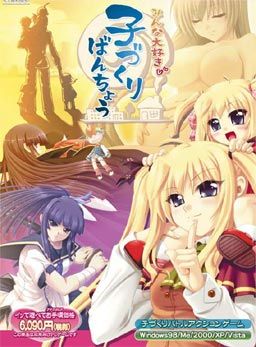
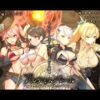
To counter the declining number of childbirths, government decides to activate a plan. All schools across the country will enter contests against each other. The losing school will be shut down and its students will enter the service of the winners. Thus re-igniting the spirits of the lost young generation and hopefully producing healthy couples capable of childbirth again.
The protagonist realizes that this is his chance to realize his dreams and makes a grand plan. First he “acquires” the help of the goddess of fertility, allowing his children to grow up in weeks instead of years. Then he starts leading the fight against other schools and “collecting” girls to grant him superior children on the battles to come…
Gameplay is divided into two modes:
Global mode plays like an adventure game where you talk, date and have sex with your followers. There is a minigame to make babies and also the simulation part is here as well in which you configure your troops and select which school to attack next.
Arcade mode is where you lead the contests and fighting against rival schools. Leading your hero, who doesn’t have any special powers at the start and making yourself a team with the mothers and children, who actually grant bonuses to mothers and special powers to you.
















Admin, I just gotta say: YOU’RE AWESOME!!
No.1 yay thanks admin
wut why im getting garbled text? already tried running it with applocale
Try running in japanese local then
FKIN YESSSSSS!!!! UPDATEEEE!!!! LOVE YAH ADMIN!!!
IVE WATCHED THE H-ANIME OF THIS AND IT WAS GOOD~ THANKS~
I looked for the H-ANIME of this and could not find it do you know the exact name of it?
I also looked an had no luck finding it does anyone have any idea on how to find it ???
It doesn’t exist guys. Loquerz probably just mistook it for something else.
I think i figured out what they mistook it for its called Honoo no Haramase Tenkousei – Flaming Impregnating Transfer Student.
Its basically about a boy who wants to take over the world by making as many kids as possible
Thanks I have already seen that one though I did really enjoy it.
Love U ADMIN…. Damn really like this website.. but admin mind to post walkthrough for this game if got.. thanks
Thanks Ivan.
Wow nice update, downloading as I type, This is why i’ve been coming to this site for so long 🙂
Although I’m not too happy with the downloading site.
and the admin said upon his children “LET THERE BE PORN”*angelic chorus* thanks admin
Every couple minutes I get some sort of error message popping up. If I just hit ‘yes’ the game continues playing and if I hit ‘no’ it quits immediately. How do I make it go away?
please answer this guy same problem
now then …. it this to pull ALL NIGHTER AGAIN~~~~
…it is time to pull …..
ARCGameEngine has stopped working.
It happens immediately, just by clicking the EXE.
I am most definitely in Japanese locale so don’t bother with that ‘fix’.
But seriously someone please help, I’ve wasted two hours both downloading and trying to get it to work, don’t let it be for nothing.
Also having this issue. Any help would be appreciated.
Having the same problem. Tried running as admin, didn’t help.
i start it up and hit begin show and the it goes to the next screen and a message pops up. the text is all random and it has a yes and a no button at the bottom. if i hit yes the error message goes away but the game freezes and doesnt let me click on anything and stops responding. if i hit no the game closes. im at a lost on what to do.
holy shit! it’s here..! thanks admin!.. may the ero god smile upon you!
Just a tip to help others. Once you have the girl, do not bother getting love up to 100%, the first map to get her pregnant is very easy if you know what to do.
O
….
. Thats the blocker set up more or less. Ignore the upfront one, and the side ones. Go for the middle two, you can go at an angle. Get the up weight and speed at the beggining, and with very little skill you can get it in a few tries (Only spend 10 points per baby making attempt. Also once unlocked, make use of the dojo. Only main hero = 40 points per very easy win, and its repeatable, infinitely. Use the points to buff up, get ending, etc.
The game is showing a strange text format that seems to cut out letters. What’s up with that?
I take it back, what is happening is the text is overlapping for some reason. How do I fix that?
Admin i love you
My brain just wants to keep calling this “Battle Bumper cars for the sake of baby making”…sorry I just had to get that out lol. That aside runs fine on my computer I do get that repetitive error message mentioned by Urruah but thats it
I can’t install it. if I try to play it directly I can’t save
Apparently you need to do a few things to get it to work. (At least for me anyway with a windows 7 home 64 bit).
1. Japanese Locale – region and language settings. Something you should do by default for every japanese VN out there.
2. On the application/exe of the game, right click – run as admin. Should give you a popup window with a few checkboxes. It’s japanese but basically tells you that you may need to change your settings due to the error of the game. It gives you the option to choose all 3 solutions that automatically adjust the game – 1. set game on 16 bit resolution. 2. set game on windows mode. 3. i couldnt understand what it was.
Press okay brings you to another popup. For the screen size pick the second check box (not the full screen option), and pick 16 bit resolution. Confirm and the game options should change to windows mode and 16 bit resolution, which lets you run it. If you need a screenshot I can try but it’s working for me 🙂
I don’t know why but I’m not getting the popup winder when I start as an admin
admin can you give the walkthrough
If some of the text doesn’t appear, try upping the message speed. Worked for me.
So I’m trying to play the game and every few minutes there’s a popup in Japanese with yes/no options. If I hit no the game closes, but if I hit yes the game continues but the popup still keeps happening.
Anyone know what this is and how to fix it?
+1, halp!
Nvm, solved.
just execute Crack.exe using the command prompt and paste the game directory.
Same it too. But the file crack.exe doesnt seem to be working. T_T Anybody help me!!!
Thx i fixed mine just drag the crack exe
what do you mean by drag
“Data is broken. Please reinstall the game.
Continue?
Yes \ No”
A walkthrough would be great.
Admin I must say I LOVE YOU (not in that way)
is this censored?
Yea it is.
having the same problem and my crack.exe doesnt seem to be working can someone upload the cracked launcher please
Okay, here’s the rundown:
The pack uploaded here is not working properly. The Crack.exe included simply doesn’t work, as it doesn’t turn off the DRM, which in turns makes annoying pop-ups appear at random intervals. The game is still playable, but I would hardly call it enjoyable, I’m looking into solutions right now, I’ll be back if something turns up.
Admin ur my Hero!!! im getting bored playing WOT so tnx for this nc post!! you are our savior!
ARCGameEngine has stopped working.
Game crashes both using japanese localte and applocale…
So yeh…
how come i havent heard of this game being translated?
Anyone has any idea of the translator?
seiha
Hello when I press any of the executables the game just crashes… “ARCGameEngine has stopped working.” This i all I get I tried running has a admin tried using applocale and even turning my pc into japanese nothing worked. Could someone help me ?
Hi disable the Data Execution Prevention for the exe it should work ^^
much obliged
Be In*
Just scroll your mouse to the bottom of the screen.
doenst work either… the game just turn black screen,
How do you save in this game? The top menu is still in japanese, i don’t understand a thing.
its on the bottom. move your mouse to the bottom of the screen.
I have that pop up error too, but none of the “fixes” work so far, nor do I understand all of them.
Garibaldo says:
March 25, 2013 at 5:51 pm
Hi disable the Data Execution Prevention for the exe it should work ^^
how do I do that?
uncensored?
Is it possible to get an english patch only link please?
I already have the game and I can’t use the provided download links as I have no premium account (and 2 gigs on a free account is too slow :s).
why is it there is all these people asking for help about the pop up issue, then they say “oh nevermind its fixed” but don’t tell anything to the others also trying to fix the problem T.T
disable the Data Execution Prevention for the exe doesnt work, any ohter ideas?
To get rid of the DRM do the following steps
1. open Command Prompt
2. Type cd What the file path your game is in
3. Type crack MinnaDaisukiKozukuriBanchou.exe
You may or may not need the .exe at end but that’s how I got it to work.
thanks for this. Game is still working the same with that pop up every minute or two though, also the crack still didn’t do anything/it just kinda pops up and shuts off immedately without doing anything. I am wondering if there really is a solution, but this was helpful at least~
A frigging pop-up keeps appearing every second. It’s unplayable.
Does anyone know a solution?
i do it like Richard Delancy said, but nothing is happening… oh well, i can live with the pop-up
go to the erogegames forum and look at the tech support section and you’ll have the solution.
errr, the thing is…
I changed locate to japan, clicked on the game and a pop up appeared with just the “OK” option.
I then changed the location from japan, clicked on the game and i’m running it just fine, except for the overleaping text.
was it supposed to happen?
oh, and I can only play in the fullscreen mode, no idea why…
Saving game impossible, every time i try to save the
game freezes!
Anyone have some advice?
thanks a lot!!!!!!!!!!!!!!!!!!
Is crack.exe safe? Anti-virus detects it as a trojan called Virtumonde. False alarm?
Thx for help Richard Delancy, but your explanation is quite undetailed, so many guys don’t get it. I try to explain it as simple as I can.
In most cases you will see an Yen sign instead of . But don’t worry it doesn’t matter, just use Backslash or Yen. Important you mustn’t mistake a Backslash for a Slash and the second thing is you can’t copy and paste the text bellow.
1. push the windows button
2. type in cmd and click on it or simply push enter
3. Now you see C:UsersYourUserName>
4. type in
cd C:UsersYourUserName [the file path your game is in]MinnaDaisukiKozukuriBanchou
(example: C:UsersExxEDownloadsMinnaDaisukiKozukuriBanchou)
use your Enter-button.
5. type in crack MinnaDaisukiKozukuriBanchou.exe
now you did and its working fine. Just say thx if it solved your problem.
Thx for help Richard Delancy, but your explanation is quite undetailed, so many guys don’t get it. I try to explain it as simple as I can.
Warning!
(can’t post Backslash without the marks so forget the marks everywhere in this post).
In most cases you will see an Yen sign instead of “\” Backslash without marks.
But don’t worry it doesn’t matter, just use Backslash or Yen. Important you mustn’t mistake a Backslash for a Slash and the second thing is you can’t copy and paste the text bellow.
1. push the windows button
2. type in cmd and click on it or simply push enter
3. Now you see C:”\”Users”\”YourUserName>
4. type in
cd C:”\”Users”\”YourUserName”\” [the file path your game is in]”\”MinnaDaisukiKozukuriBanchou
(example: C:”\”Users”\”ExxE”\”Downloads”\”MinnaDaisukiKozukuriBanchou)
use your Enter-button.
5. type in crack MinnaDaisukiKozukuriBanchou.exe
now you did and its working fine. Just say thx if it solved your problem.
For the executable “crack.exe” to work, you need to give the current folder as argument.
what font pack does this use?