
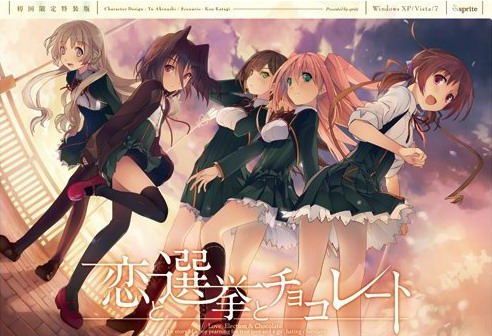
Yuuki, who wants to fall in love, and Chisato, who doesn’t like chocolates. They are lifelong friends and students of the same school. They both belong to the food club with Mifuyu, their classmate. Actually, they don’t do anything everyday, just enjoying chatting… But one day, Satsuki, president candidate of the student council, promises to close the clubs that do nothing. To stop it, they decide to run against her… But who will they send out..? Yes, Yuuki is forced to run for the election… To save the club, he will just need to be the next president!















“Enlightenment is when you realize hating Chisato is
what makes you love the other girls that much more.”
-lostmynic-
Glad i am not the only one who felt that way.
Try downloading the koichocohook.exe “@saber is love, saber is life”
mentioned in this comment section.
-Install the game patch 1.01 to the folder you extracted the game into
-open the backup folder
-copy the contents in the backup folder (SCN folder and some .cct AKA Everything in the backup folder)
-paste into the folder with the game and patch
-when prompted select to replace everything
-extract the koichocohook.exe and its extension into the game folder
-run koichocoHook
-use the pin ( Q6ZL-HRH8-PZJF-Q2RE ) and press the top button
The game should work now! (you may need to reinstall the english patch). Hope I helped.
what is koichocohook.exe i cant find it anywhere?
This
https://drive.google.com/file/d/0B8JmuBZ7hC7wUlhUNW5MUFkyMjg
I followed your instruction but when ever I Run KoichocoHook, I’m getting an error… how can I make it run?
i just instal english patch but the game not have english translate, can help?
This is one of a few VN that show and portray the main heroine as a Bi*ch in every route, including her own.
I’m having an in game issue. The game runs, everything is fine just the ESC button doesn’t work once I start playing. Clicking or pressing Enter doesn’t bring new speech. It plays on Auto.
Does anyone know how I can fix that?
I was being impatient lol. So that’s how it is until the intro is over.
I posted for nothing :3
Okay I had a massive pain in the ass trying to get this game working, but figured I’d post my struggles for people who might download it.
I’m running Windows 10. First I downloaded the .rar files (a total of four of 500mb each, all the extant game files still up for downloading are probably the same by 2019, but ymmv). Extracted them using 7zip. So far so good. Double clicking on start.exe did nothing. Trying to use the icon with Japanese characters resulted in a string of errors. Just a bunch of ???????????????? on all .exe options. Deleted everything and started over.
Changed the region and language to Japanese. Tried opening start.exe again.This time I got a strange bunch of Japanese characters and a ‘g.exe’ error. Did more hunting and got a locale emulator. Used it on start.exe and……”Please insert DVD” FFFFFFFFFFFFFFFFFFFFFFUUUUUUUUUUUU!!!!!!! This error went on to infinity.
Did more hunting and changed the Unicode options in the Advanced/Admin Language tabs in Settings. Still no good. Downloaded the “Koichoco Hook” (an .exe and .dll combo, Ctl+F it to find it in this thread), extracted them into the Koichoco file directory……………
SWEET VICTORY IS MINE!!!!!
Thanks admin! This game is fire. Chisato is demented but I love her anyway. Satsuki is best girl, and I’m super pissed Hazuki gets no route. Enjoy, my fellow degenerates!
damn. shame sensei didnt have a route. what a waste.
For those with problems running this thing on Windows 10, here’s a quick guide:
1-Download it all(17 parts)
2-Download the 1.1 ENG patch(google it)
3-Download the Hook(look down at the comments)
4-Extract it all
5-Install the patch and extract the hook in the game folder
6-Change the OS language to Japanese(don’t reinitialize the PC)
7- Enjoy
does anyone know how to fix the director player problem?
it says:
“Unable to load movie playlist. Does the .INI file exist? It must contain a section ‘[Movies]’ with an entry ‘Movie01=Pathname.dir’. ”
“This projector is stopping. ”
“Application Error. This application cannot run.”
Can anybody help my with the “‘Movie01=Pathname.dir” error I’m having?
can no longer find koichoco hook file. looks like it was removed
Can anybody get this game to run at all on windows10 in 2020? I have been trying on and off for months now, at least putting an hour a week into finding a few different downloads to try and many days I am there for more than an hour and my results never change. The amount of times I have downloaded this game could very well amount to a terabyte of space by now. However it seems my problem is unique and has no solution. I have been able to solve any errors that do show but my problem is that when everything else runs smoothly the game IMMEDIATELY closes upon show the very first black screen with “NOW LOADING” for not even a second. I get no error message, just a closed program with no show of what I launched in my task manager either. I have put days of time into trying to just play this game and nothing. Ugh, I typed a whole damn lot but can anyone help me here? Please, I am just a lowly weeb that wants to play this damn vn.
Do not fret, weeblet. Just got it running on Win10 myself and I’ll tell you what I did.
1. Download all 17 game files from here, if you don’t have them on your PC already.
2. Extract the Koichoco folder to a SHORT directory and don’t rename it, in my case it was D:\Games. There is a limit to path length, and the game won’t work if it’s too long!
3. Google Koichoco 1.1. ENG patch and download it from the wordpress of the translation group. Install it and select your Koichoco folder during installation.
4. Open windows settings and click the region and language settings tab. Click the column “Region” on the left and select Japan. Click the column “Language” directly under the region column, click the grey cross and add the Japanese language pack. You don’t need voice output or text recognition, just the pack. Wait for it to install. Once done, close the settings window.
5. Hit windows key and R to get into the run command prompt. Type in “Control International” (without the quote marks of course) and hit Enter. Go to the “Administrative” tab at the top and click on “Change system locale”. Click Japan, hit OK and restart the computer when asked to.
6. Almost there. After restarting open your Koichoco folder, right-click start.exe, click run as administrator. The game will load a bit and then give you a Japanese text box. Enter a CD-key into the box (eg. Q6ZL-HRH8-PZJF-Q2RE). Klick the upper confirmation box directly below it, the highlighted one.
Done! Works like a charm for me. Hope that helps! BTW Satsumi best girl.
Can it be done somehow with locale emulator ?
YOU ARE A SAINT! IVE BEEN TRYING TO GET THIS TO WORK, FOR SO DAMN LONG, THANK YOU MY KIND SIR, AND MY YOU HAVE A WONDERFUL LIFE, I HOPE ALL YOUR DREAMS COME TRUE, I HOPE YOU FIND THE LOVE OF YOUR LIFE, DAMN THANK YOU SO MUCH MAN!
BROOOO< you saved me, thank you so much
Is this the uncensored version?
For Some Reason I Cant Find The Start.exe Is There A Problem On The Rar Files,, Because I Downloaded All The 17 Files Yet No Start.exe After Extracting Them All. Please Help Im So Desperate To Play This VN. Thanks In Advance
hello guys if u ever have a problem in start.exe here was my fix:
so for my case start.exe seems to disappear after it gets extracted and in some cases it doesn’t show up at all. First you may wanna keep trying to extract it until it shows up then keep opening it , make sure to not stop like u will keep having an error because all the files aren’t extracted yet but after the exe closes due to the error make sure u launch it again ( i think this avoids the start.exe to disappear). Wait until you get all the files extracted then while its still open go delete the licence at the “config” folder (there should only be 1 thing to delete there so i doubt you’ll get confused). then after that copy paste the serial number “Q6ZL-HRH8-PZJF-Q2RE” then paste it once u open it again because the game will ask for it.
take note that this is after i set the locale system to Japanese, this may also take a lot of do overs because start.exe sometimes wont show up , the main thing u need to avoid is for it to disappear.
ALSO THIS MAYBE ONE OF THE REASONS WHY IT WORKED BUT BEFORE I EXTRACTED THE FILE I RENAMED THE FILE”start.exe” to “koi.exe” i dont think it matters what name u put but i did that because when i renamed “恋と選挙とチョコレート.exe” (the exe that gives u the dvd error) to “start.exe” it vanished right away lol (same case for renaming “uninst.exe” to “start.exe” make sure u rename it at the RARfile and not at the folder ur putting it once it shows up. i think if u did all of this at once u will have a a great chance of launching it. it works like a charm for me so i hope this helps y’all and sorry for being confusing cause the way i solved my problem is really mess
like once you see the start.exe( which i recommend you rename on the RARfile) start launching it in the middle of extraction until all files are fine ( this will make sure that it won’t disappear) sry for my bad english
YOU ALSO HAVE TO DO IT AGAIN ONCE YOU QUIT THE GAME THIS IS NOT A PERMANENT FIX AT SOME POINT START.EXE ( or what ever u name it)WILL STILL DISAPPEAR WHAT I DID HERE IS OPEN IT BEFORE IT GOT THE CHANCE TO BAIL
hello guys if u ever have a problem in start.exe here was my fix:
so for my case start.exe seems to show up in a middle of extraction and disappears after all the files gets extracted and in some cases it doesn’t show up at all. First you may wanna keep trying to extract it until it shows.then if u saw start.exe u must keep launching it even tho all files are not yet extracted , make sure to not stop like u will keep having an error because all the files aren’t extracted yet but after the exe closes due to the error make sure u launch it again (i think this avoids the start.exe to disappear). Wait until you get all the files extracted then while start.exe is still open go delete the licence at the “config” folder (there should only be 1 thing to delete there so i doubt you’ll get confused). then after that copy paste the serial number “Q6ZL-HRH8-PZJF-Q2RE” so later you can paste it because the game will ask for it.
take note that this is after i set the locale system to Japanese, this may also take a lot of do overs because start.exe sometimes wont show up , the main thing u need to avoid is for it to disappear.
ALSO THIS MAYBE ONE OF THE REASONS WHY IT WORKED BUT BEFORE I EXTRACTED THE FILE I RENAMED THE FILE”start.exe” to “koi.exe” i dont think it matters what name u put in, but i did that because when i renamed “恋と選挙とチョコレート.exe” (the exe that gives u the dvd error) to “start.exe” it vanished right away lol (same case for renaming “uninst.exe” to “start.exe”) make sure u rename it at the RARfile and not rename it while extraction is occuring.(I DONT THINK THIS DOES ANYTHING BUT IM GONNA TELL U IN FULL CONTEXT OF WHAT I DID COS IM NOT REALLY SURE WHAT CAUSED IT TO WORK BUT IM MORE LEANING TO THE FACT THAT I KEPT LAUNCHING IT DURING EXTRACTION BECASE IT HAD NO TIME TO DISAPPEAR SINCE I KEPT DOING IT) i think if u did all of this at once u will have a a great chance of launching it.
THIS IS NOT A PERMANENT FIX YOU’LL HAVE TO DELETE EVERYTHING AND DO THE TRICK AGAIN BECAUSE START.EXE WILL GO AWAY.i think what i did here is open it before it goes away which makes no sense how i am still able to play it( but hey it works). so keep the rar file and make sure you put your savedata on a different path(before u delete everything) so u can return it later and not lose ur progress. Also u can add ur save data once ur on the menu of the game.It works like a charm for me so i hope this helps y’all and sorry for being confusing cause the way i solved my problem is really messy.
HERE IS A BETTER EXPLANATION
I FOUND A BETTER FIX: GO EXTRACT THE FILES EXCEPT FOR START.EXE then you should extract it last so it doesn’t disappear right away( this will allow you to acces start.exe before it disappears) start.exe shows up more if i extract it to my localdisk “D”
MAKE SURE YOU COPY THE SERIAL AND DELETE LISCENSE SO ALL U HAVE TO DO IS LAUNCH START.EXE( if start.exe Doesnt show up just keep extracting it and try it at different paths)
Just installed this but i keep clicking on start.exe and it doesnt load. any help to this?
Say, is there a difference between the 2010 original and 2020 remake, like a Non – chan or Hazuki route?
– Resolution converted to 16:9 (4:3 unavailable)
– Adds some CGs from the console port
– No longer locked into Chisato’s route for the first playthrough
– Removes forced autoplay for certain parts of the game
So, there’s a small difference, but nothing more. Meh, i will keep the current version.
For those wondering, yes, it still works and is playable!