
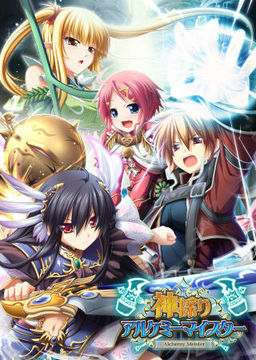
In the Setetori region of the southern part of the Raulbhach continent lies the Mikelti Kingdom. Among the seven major cities is the artisan city of Yuidora. This is where a young orphan named Wilfred lives, pursuing his dream of becoming an alchemist. As tensions between neighboring nations rise and a threat of war looms, three girls in distress come to his place and he helps protect them. Using a new technique that he discovered and with the help of other races, will they be able to restore peace to the lands?













I’ve set my language and local to japanese, installed the game+3 other patch + english patch. I play the game until chapter 4 then my ARC game engine suddenly stop working. I’ve reinsttaled the game but the game engine still doesn’t work. Please give the sollution…
i have the same issue that some dude above mentioned.i mount with daemon tools but when i try to install the game an error pops up and after downloading it for a whole day not getting to play the damn thing would be annoying.any probable solution to that would be appreciated
What error are you getting?
some gibberish from “install shield wizard”.if i install the english version maybe it will be in english if u need to know what is says exactly?
I’m having this exact same issue…I had the game on my old computer but it didn’t transfer to my new one. I have daemon tools lite installed, I mount it and click the install button. My computer asks me if I want to allow the program to make changes, I say yes, and then I get an installshield error. Can anyone please tell me what I’m doing wrong here? I’d really like to play this game again.
Wait, problem solved! You have to change to Japanese locale first, derp. I totally forgot about that. Just go to the FAQ on this site for how to change to Japanese locale and it should work then.
I have the exact same error for windows 10, but it still won’t work, even when I have the Japanese local on, and have installed the Japanese fonts. I also have Daemon tools installed as well.
I have an issue,I set the local and language to japan before downloading it,when I try to install the game a red arror window open up,it is in japanese and has “???” in it,after I click ok I get an error 1603 window and then the installer stops working,can someone plz help me?
I start the game, and everytime i put start game appear an error saying : arcengine stop working, something like that, i didn´t change to japanse locale(idk if is that the problem)
Hi, I managed to install the game and it seems to work in japanese. However, when I try to play with the english patch, I get this:
“SYSTEM4.BIN” , something in japanese, “and ERROR CODE=2”
Can someone help me?
can anyone help me with this? the animation keep open up in new window. i try everything bu no avail. pls help.
Many of the install problems here most likely happen because language setting weren’t set up properly. There are TWO things you need to do before installing. People easily miss one step. I’ll try to explain properly:
1. Install the Japanese language pack for Windows to understand the characters and file names. In Win7 this is in Control Panel->Region and Language->Keyboards and Languages->Install/uninstall languages (or you can do it directly from Windows Update). To make sure this has been done right, try choosing the Uninstall option and make sure Japanese is in the list of installed languages. However, leave English as the display language. It is enough to have the pack installed.
2. Set the Japanese language for the installer and the game by changing the system locale. This MUST be active both when you run the installer and when you run the game. Control Panel->Region and Language->Administrative->Change system locale…->Japanese
It is best to install the game in stages to make sure you know what goes wrong.
1. Set up languages. I explained this in my last post today.
2. Extract the game. Mount the disc image. Install the game. Run the game and start a new game to see that it works in japanese. Errors here indicate either a corrupt download or mistakes in setting up the language.
3. Extract append patch 1. Copy the exe to the game folder and run it. You can delete the exe after to free space.
4. Extract append patch 2 as above. Can delete exe after.
5. Extract the version 2.00 patch as above. Can delete exe after. Launch and start a new game to verify that it still works in japanese. Errors at this stage usually indicate corrupt patch downloads.
6. Extract the english patch and copy all files to the game folder. With older versions of the language patch, run Kamidori English.exe. Launch the game. If the game crashes, your languages aren’t set up right. Refer to my language setup post. If you experience crashes or corruption later in the game, make sure you installed the appends correctly and make sure your MPEG codecs are up to date.
Good luck installing and have fun playing!
trehek you are the bomb take a bow sir!
so.. we have to extract all of the rar files except the patches first?
sorry i’m still new here..
Hey Trehek,
I’ve downloaded and finished playing a couple of games from this site already so I have the language patches working fine.
I extracted and it worked. I ran append patch 1 and then append patch 2 and then patch 2.00. Everything works fine up to this point. When I extract the English patch and copy all of the files into the game folder and I try to run Kamidori English. The Autorun.exe which is in Japanese still works fine. Could you possibly tell me what’s wrong?
This is the error I see:
http://i988.photobucket.com/albums/af6/astray71/whatiswrong_zps9e1c289c.png
what are you talking about when you say “game folder” ? are you referring to the computers original games folder? To create a new folder and call it “game folder”. Would you mind explaining please?
few key points: RPG (leveling up, better items, etc.) , a lot of tactics during battles (good), and perfect idea of implementation of Alchemy.
3 different routes:
Yuela – Definitely best route
Serawi (Elf-tit route) – working title \NOTHING REALLY HAPPENS\ route – Yes, this one sucks xD
Emilita (Loli route) – unlike Serawi, this one is good (but of course not as epic as Yuela route ^^ )
definitely the best game from Japan I ever played.
help i have a problem,
why there is a text
“no gamepad detected”
anyone can help me?
How do I uninstall this? Getting this whenever I attempt to uninstall after I failed install.
http://i.imgur.com/W4bkB67.png
Nevermind, finally manage to uninstall it.
umm my game freezes when i go into combat in the tutorial dungeon any info?
I have the same issue, every time I try to either get into combat or pick up the feather the game just freezes going into a “Not responding” state for both and only coming out of it for the feather which causes it to no longer allow me to do anything.
really..
I still dont understand how to install English Patch fot this game..I already downloaded english patch from this website
But..after I extract it,I found many files that make me confuse..
so..anyone can you please help me..
anyone can tell me how to change shortcut in this game?
Thanks for the game ^^ works perfecly here after doing the japanese local set.
just gotta ask but how do you get spoileral to work with this i cant seem to find the SSG (ya I’m a cheater crucify me sometime later will ya) that will work with this version. i really dont want to grind through another new game plus (third time through) so could someone give me instructions.
This has included expansion data ???
Kinda confused here.
what patch do I need to use/DL?
the 346.1MB, the one with 2 parts or the one with 30.4MB?
the one with 2 parts and the 346mb one contain the same files – 2 parts split is due to 200mb filesize limit for free users. You need to install japanese patch first ( 2 parts one) then install english patch ( 30mb one) on top of that.
oh I see. so first, I need to use the one with 2 parts then after that the english patch with 30.4 mb, right?
Thanks for the help 😀
This is actually my favorite game on this site. But are there any other games like this here, or games from the same company? I need more games with actual story, games that really pull you in to that world.
mine’s working properly, but the only problem is, when in the battle mode, it became so laggy, is this normal or somebody know how to fix this?
Does this work on windows 8? I keep getting the error .msi or something and I cannot install it.
Yeah, me too. I keep getting the same error too.
I have Windows 8 and it works just fine for me
How did you do it? Whenever I try to install it, I keep getting an error message that has the letters msi. Is there an extra program or something else that I need in order to install this game?
Hi great job again Ivan \(>.<)/ I finished it and I was wondering can you get any of the other Eushully rpg's?
Yeah…googled it, if anyone ever makes a translation I hope to see it up on the site 🙂
Can someone help me installing this correctly,first of all, I don’t even know how to install it, how do people install hentai games in the first place, its so confusing. I don’t know how to do anything, I have tried downloading so much eroge games, but i never know how to. Thank You so much in advance, this is the first time I thought of asking for help with this.
does this include all the expansions
Yes, those are listed under “patches download” links.
Can anyone give me the walkthrough for this game? I’ve lost mine.
help me please
when i install kami_200/kami_ap01/kami_ap02 it show me 2 japanese option, if i choose the left one it will shown me a error message, if i choose the right one the installer will be gone but nothing change. please tell me what should i do?
Guys, how do store and workshop lvl ? Getting stuck in chapter 1 not being able to up rank >.<
could someone give me detailed but easy to understand instructions on how to get the English patch to work? I don’t care if I gotta install it again. I just want to play the game
I just checked around the web and apparently someone has recently released a interface translation for Himegari Dungeon Meister, saw it on vndb. I dunno if its good or works, but it seems promising for the translation of himegari. I’m extremely sorry if i’m wrong though, because i’m not sure if it’s legit. I’ gonna try it though, since the Kamidori game was fing awesome. Please notice and verify if it’s true Admin.
Yes, I saw it almost as soon as it got released. It’s machine translation and it’s not really readable.
Damn, i almost got my hopes up. Anyways, thanks Admin.
admin do you have news if there are other eushully games that are being translated? (not machine translate) because I love kamidori so much and am itching to play their other games(specially madou koukaku and soukoku no arterial), thanks and sorry for the trouble
Minna Daisuki Kozukuri Banchou is out, it was made by Eushully. It’s a lot shorter than this, but I still enjoyed it greatly.
Can someone please check the source files,
I have download all the part twice but files fail CRC check with 6,7,8,9,10 and 20 report being corruption on archive testing
I used 7-zip testing, it reports 14 errors in Kamidori.mpf
While the file still unpacks it give windows sytem incompatibility errors which I think are due to the corrupted mpf.
INSTALLATION GUIDE!
You want to know how to install this game, because you suck with computers even more than i do? Then here is the installation Guide for Windows 7!
FIRST YOU NEED THESE PROGRAMS:
CCCP, Daemon Tools lite (You dont need deamon tools if you use Windows 8) and WinRar.
then You have to do this THIS:
http://windows.microsoft.com/en-us/windows/change-system-locale#1TC=windows-7
THEN YOU NEED TO DO THIS:
http://www.coscom.co.jp/learnjapanese801/japanesefont/nonunicode_win7.html (This should make most of the games that didnt work for you make run)
Everything done? Then lets start!
1. Download all the Stuff, make sure you downloaded everything, means: The 22 archives of the game, the 2 archives of the patches and finally the english patch.
2. Extract the archives you downlaoded under \DA-free: Game Download\, its names are Kamidori.part[1-22].rar (22 parts). You dont know what im talking about? Then here for the supern00bs: You need WinRar to be able to do something with these files, i explain it for Winrar, its free by the way. So, open ONE of the files with your WinRar!(Just doubleklicking it should be enough.)
It will show you a folder named \…\ and the \Kamidori\ folder, this on is unimportant. Click on the \…\ Folder, then you should see the directory you downloaded it in (normally the \Downlaods\ directory. Look out for your 22 Kamidori.rar archives.
Mark all 22 parts (so they look blue)and press the big \extraxt to\ button (the one that looks like the folder-icon)and then choose where WinRar shall extract it to.
3. When the extracting is done, Mount the .ISO file you get with Daemon Tools Lite, just doubleclick the .ISO file. It should open a window that shows you some files, click at the \Autorun\. A little window appears with 5 buttons, there is japanese written on them, click the second line to install the game. To get through the installation, just click whenever possible the \N\. When the game is installed you`re halfway done! Hurray!
4.Do the same you did with the 22parts of the game with the 2 parts called \Kamidori.patches.part1/2\. Extract them both somewhere, but NOT in the game directory! When the extraction is done, you should have a \KamidoriPatches\ folder. Open it and copy all the files(3)into your game directory (NOT the the \Eushullly\ but the folder called \神採りアルケミーマイスター\(its in your \Eushully\ folder)).
5. Run the 3 files in your game folder \神採りアルケミーマイスター\ in this order:
1. kami_ap01
2. kami_ap02
3. kami_200
6. Now you extract the Kamidori_1_1.rar archive somewhere, but NOT in the game folder. When the extraction is done, doubleclick the folder you got (Kamidori_1_1) so you can see its inside. Mark EVERYTHING inside the folder and copy it into your game directory \神採りアルケミーマイスター\. It will ask you if you want to overwrite files, allow it do overwrite every file.
7.You’re fucking done it! It should work now and in english! To play the game run the \Kamidori English\.exe in your game folder!
Special thanks to me, for being the genius insane mad scientist, with an IQ of over 170, Hououin Kyouma!!
I have a problem. Even though I followed your directions, the game will not open with the Kamidori English.exe. Do you have any ideas what it might be?
I don’t know, information would be good
Never mind. It works now.
How ?
I think i have the same problem you had. I did everything that was said and i can start the game in japanese but not in english, the game doesn’t open with Kamidori English.
It’s maybe because there is no files in \神採りアルケミーマイスター\ so of course i can’t overwrite them (since they aren’t there).
And also, there is no difference between the two link in the instruction rigth ? It has the same result.
Please Help
PS: i am french so sorry if i don’t speak well
How did you get yours to work because I’m having the same problem
I’m trying to install this game, but everytime I try, there’s this error I keep getting that has the letters msi. I can’t get past the installation part because of this error. Does anyone know what that means?
Me too dude.
i tried to install it through Autorun, there’s this error I keep getting that has the letters msi too.
Used this to fix my game after transferring it to a new computer, worked perfectly. Thanks friend.
The .rar file appears to be missing. It is what I originally used to install Kamidori on my previous computer. Recently, however, I switched to a new one, and I tried transferring all my data directly from my computer using an external hard drive, but it’s not working. I assume this is because I originally installed it on a Windows 7 computer, and am now using XP. I didn’t think it would be a big deal, since I could just download the disc image file again and reinstall it, then use my old save data – but now the file that contains the disc image file is missing. Any idea where I can find it or what else I could try?
Okay, update. I found a download on the pirate bay with the file I needed so I could do the installation manually; after doing so, however, I got the same result. I figured it may have to do with my attempt to transfer the save, so I attempted to locate my save data to delete it (since I still have it on my external hard drive) and see if that helped. Oddly, I could not locate the folder that the save data is supposed to be kept in. I checked Application Data, but there is no Eushully folder there. Super confused right now.
I am having a problem when I play this game, after playing for more than 5/10 mins the menu on the workshop turns into white boxes, I can still click on it however but can’t read any of it.
I can fix it by restarting the game, it also pops up in other players such as covering the buy temporarily on the church shop.
Any tips on how to fix this? Everything else works fine. I can’t read the video settings since they revert to japanese when I open it. Is it a RAM/Graphics card problem?
Thanks in advance
It says \The file or directory is corrupted and unreadable.\ while halfway through the installation. I have downloaded everything without problems. I managed to extract all the parts without errors. So why does it say this?
Okay never mind, I solved the installation bit I think. What I did was, instead of mounting the .mdf file, I extracted it to a folder using 7-zip. And then I run AppLocale as Administrator and selected Autorun.exe.
I did all these without changing my System Locale and it installed without problems then. I’m now going to try applying the patches and finally, the English translation.
I cant install kami_app01, kami_app02, then kami_200.
After installation complete there some notice but, I dont know it. Then no folder from installation. Can anyone help ??
is this game not compatible with OS windows 7?
Yes, I had no problem running it on Win7 x64. Make sure to use Japanese locale tho (refer to site’s FAQ section for instructions).
This is one of the best eroge i have play. Even though i wish there was more optional H scene the gameplay is what make this eroge so great.
Excuse me and i dont know if you have already answered, but i cannot save my game, it pops up an error, it doesnt crash the game but makes me unable to save the game, please help D:! thanks in advance, admin or whomever helps me out n.n
excuse me i downloaded the game and it works but i cant save my progress what should i do
are the link still available??
Hey so i installed everything into my system but i don’t have access to the version 2.0 game changes that are in the new game option. I have the new playable characters part open though. Did i miss something?? Which file was meant to open this part?
hello. I just finished the quest of giving the fox queen (girl with 9 tails) the 100 stones. got her H scene, but this seemed to do something that has stoped my game from proceeding past chapter 5. I would appreciate some help. I am also on yuela’s route.
also I would like to add that I cannot activate the minsashall mission even though I am way above level 22 and have all the required things it lists
its needed to download the game, the patches, and english patches?
Someone explain me please
Hello,
I am am having trouble applying the english patch to game. I am just not quite sure how to do it. I downloaded the file and put into the same folder and a .exe play in english file was created however it does not run does anyone know how to deal with this?
P.S. I did install the other patches in the correct order
and my system locale is Japan
Does anyone know the exact location the patch is suppose to go?
I can’t load but i can save
please help me !!!!
It’s possible you might have to run the game with admin permissions to save? The game might be trying to save but the computer won’t let it, I’ve had that problem with games before. Not this one though so I’m not sure.
i cant install the patch it says error reading initialization file