
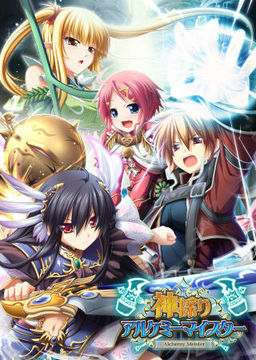
In the Setetori region of the southern part of the Raulbhach continent lies the Mikelti Kingdom. Among the seven major cities is the artisan city of Yuidora. This is where a young orphan named Wilfred lives, pursuing his dream of becoming an alchemist. As tensions between neighboring nations rise and a threat of war looms, three girls in distress come to his place and he helps protect them. Using a new technique that he discovered and with the help of other races, will they be able to restore peace to the lands?












How do I install the patches? Do I just double-click on them? Is there a particular order I’m supposed to do that? It game me 3 files that are applications.
kami_200
kami_ap01
kami_ap02
It’s in Japanese when I click on them, so I have no clue what’s going on.
When you have dobbel clicked on one of them, then it should run like normal, except it being in japanese, from there, there will most of them time be one option you can’t choose, then two options you can choose, go for the first option you can choose, most of the time that is equal to the “next” option, doing it like this worked for me.
(I know this is a long time after the question was asked, but it might help any that have the same issue.)
I’m getting a “missing .msi” error when I go to install it. Anyone have a possible fix for this?
I found a solution to that problem, now I am encountering a new one. After I copy the english patch to the game directory I receive no prompt to replace any files, as there are only 6 total files in the directory the .exe a file with an Icon that resembles the .exe, assuming the uninstaller, an unknown application in japanese marked アンインストール and the three patches. Going through the other comments I’ve read many tutorial and one inconsistency between mine and those tutorials is many say the game should have been extracted as an .iso as mine was extracted as an .mdf. I have no idea if this would make any difference but it is the only thing I can find, if anyone knows a solution please help.
I installed the basic game, version 2.0, append 1 then append 2 before I installed the translation because that was the order that they were in in the download.
Did I cripple my game because of the way I installed things? Will I miss out on some of the things in those 3 patches?
Hey Guys,
Quick question, doesn’t it have the on/off option for voice skip on click? I played if a few times already and i do think i remembered that i played it with this option .. i doesn’t like to play VN’s where i can’t set it off.
I’am really remembering it wrong oO?
I cant download the English Patch ?! Can someone send me an alternative download link? I think the link is broken 🙁
link 16 is broken
~ Install Guide ~
Step 1 and probably the most important – open control panel -> region -> administrative -> change system local (windows 8)(non-unicode programs) into japan (u need to restart your pc afterwards)(note that even if u install the game correctly and then u change it into what u had before, the game wont work)
– Extract the game in a folder u can easily find
– u need a virtual drive to install the game, the easiest way (for me) is to use Deamon tools lite (free program)
– after u install the game into the virtual drive u created, open the drive and run \Setup\
– the instrutions will be in japanese, try to install it as u would normaly install any game (next, next etc)(dont change the default folder) default location is :
(C:)ProgramFiles(x86)/Eushully/神採りアルケミーマイスター
– after it is done, extract the patches into a OTHER empty folder and run the patches in this order -> kami_ap01 -> kami_ap02 -> kami_200
– after u are done with the patches, copy-paste all the files from the english patch into the game folder (神採りアルケミーマイスター), run the \Kamidori English\ and enjoy
Thank you so much T-T i was completely lost.
Could you be more specific when applying the english patch please? I copy pasted the whole thing but it wont start. If you would tell me what I’m doing wrong, I’d be very grateful.
You have to wait for all the animations to load takes a bit…
THX sooooooooooooooooooooooooooooooooooo much!!!!!!!!!! I tried it and it worked, you are my hero now!!!!!!!!!!!!!!!!!!!!!!!!!!!!!!!!!!
Does it work with Windows 10? I’ve tried running the setup many times and it only shows random Alphabet letters and questions marks with only one option button below.
thanks bro, i’m follow your instruction and it works
download link not working ??? free> free download> where is the countdown 2mins>???
admin why I cannot download??? of course I know how to download I need to choose free:freedownload:w8 for 2mins: captcha but in my case when I click free download there is no w8 for 2mins and captcha??? pls help???
can i install the patches mid game? will my save from vanila game malfunction?
Is it just me or does the game crash if you try to pick up the feather in the tutorial
Please, can anyone give me a 100% save file? I’m in NG+ but i cant afford more time for the next weeks, and please not those brokendown Links form Mediafire those do not work.
EXTRA STORIES ERROR FIX
1. CHANGE YOUR SYSTEM LOCALE/LANGUAGE FOR NON-UNICODE PROGRAMS TO JAPANESE.
2. Unpack the disc image, append packages, 2.0 update and translation patch.
3. Mount the disc image and install the game by running the setup.exe inside the disk.
4. Run and install the append patches + 2.00 update patch in the following order:
kami_ap01.exe
kami_ap02.exe
kami_200.exe
5. Copy the translation patch to the game installation folder, run and install.
yo i downloaded the game and for some reason the font is all screwed up like the I is wide and other words are squished, also at the beginning of the sentences there is a u and at the end v. Words are also cut off at odd points so if anyone could give me a fix for that that would be useful, this is probably window 10’s fault but if someone could help me that would be extremely useful.
Do you have Japanese locale?
Yes I do have my system local set to japan.
Install NTLEA (It’s very easy to get) and run the game with it
Download NTLEA (It’s really easy to get) and run the kamidorienglish.exe with it
getting an error every single time after entering the “something” the MC is late for with his friend at the very beginning of the game. tells me to close program
sorry for not being specific much. i ddnt read the dialogues ‘cuz i skipped them
Everytime I start the game as soon as I click anything on the menu I get an error message saying ARCGameEngine has stopped working. Does anyone know how to fix this?
im getting errors whenever it tries to display a cg.
Please help
I tried to install this and run the setup on windows 10 after setting both the locale and the language to japanese, and downloading the language pack, but it just comes up with a windows installation wizard issue that is written in strange symbols and letters instead of japanese, it does the same in english, the only thing that isnt in the strange symbols is Installation Wizard, and i unpacked it with 7zip and mounted it on alcohol 120% free edition if that helps at all, i tried unpacking it while on japan locale as well, did nothing to change what happened.
ARC ENGINE HAS STOPPED WORKING (crash after game launch)
The issue I experienced was the above crash; the installation wizard text and the direct3D options text was also messed up, appearing as random vertical black bars.
I noticed the direct3d options menu said that I was running Windows 7 Home Premium. I was in fact running Windows 10.
The fix:
It seems the issue here is indeed a missing font file, but it cannot be fixed by simply changing the system locale to Japanese (I already had that set, and later tried changing the windows UI language to japanese as well–no luck). Rather, the problem is that Windows 7 (and 8) used a different font family to display Japanese text than Windows 10. Windows 10 uses Yu Gothic UI, while Windows 7 used Meiryo UI. To install Meiryo UI:
Windows button ->
Settings ->
Search: “Manage Optional Features” ->
Add a feature ->
Select “Japanese Supplemental Fonts”
After installation of the package finished, I restarted my computer and the problem went away. My system locale was still Japanese, but my display language was English. The game no longer crashed and the black vertical bars were gone.
Alright so…. I rebuild and changed parts of my pc recently and I had to reinstall Windows. Since Windows 7 would not work I took a crack of Windows 10. But the “Japanese Supplemental Fonts” are nowhere to be found because of that.
Is there a way to download these on the internet somewhere? I did some research and nothing came up.
Alright, so I was able to take the missing fonts from my Laptop (Which has Windows 8) and simply transfer them over and now the game is working.
I did exactly what was said in the manual and my english patch is not working. After launching Kamidori English 1_0 it says that \Software is current\ and that I already had instlled the eng patch. What should I do? ;__;
Whenever I interact with \Kamidori English\(whenever I launch it, or paste it else where) it just disappears.
Just a warning but ALL versions of this have some NG+ content thats not translated
The Link for the english patch seems broken (after going for the freedownload with captcha etc. instead of downloading the file the link redirects to a broken page)
If possible either fix it (or if it’s a problem with my pc explain pls^^)
Problem fixed, just can’t download more then 2 files at the same time^^
I want to play this game in japanese and this is the only place I find download links working. If I don’t install the english patch, does it work perfectly in japanese?
Nvm, I just found out it does. Thank you so much, whoever is uploading visual novels in this site.
umm… is it working fine in windows 10? and how to install the patches?
If trying to install this on Vista (and possibly others), you might have to manually create a \ C:ProgramDataMicrosoftWindowsStart MenuProgramsEushully神採りアルケミーマイスター \ folder, right click on the folder, and select \Take the Ownership of this folder\ before or during the install. At least that’s what I had to do.
I don’t suppose one of the patches includes the text fix for the Quest 105 \Demonfolk\ (which is displayed in japanese otherwise).
I’m not sure if I can post links here, but this comment is for you anyway.
http://games.seiha.org/patches/Kami_Textfix_1_0.zip
I used to play with the 1.0 English Patch, so I’m really not sure if the 1.1 fix this. Couldn’t find any log of the sort either. This happens in Chapter 2 NG+, so I may give it a look later.
I’m following this site for what? 5 years? Keep up the hard work. We all thank you for this.
is downloadani not working?
ive tried installing the game but after mounting it with Daemon tools,it wont let me copy the english patch files over to the new drive because of not having enough room.
Any+Help?
I tried to install this and run the setup on windows 10 after setting both the locale and the language to japanese, but it just comes up with a windows installation wizard issue that is written in strange symbols and letters instead of japanese, it does the same in english, the only thing that isnt in the strange symbols is Installation Wizard, and i unpacked it with winrar and mounted it on daemon tools lite if that helps at all, i tried unpacking it while on japan locale as well, did nothing to change what happened.
Thanks guys…its working
So,+I’m+wondering+how+which+of+these+other+games+have+either+an+RPG+element+like+this+one,+or+a+*VERY*+in-depth+and+story+like+F/SN.+Mostly+because+there+are+far+too+many+games+to+sort+through+and+they+aren’t+tagged+that+way.
I+like+my+ero-games+to+be+actual+*games*+after+all.+Not+really+looking+for+VNs+except+the+*really*+special+ones.
Wow that got distorted. Let’s try that again.
So, I’m wondering how which of these other games have either an RPG element like this one, or a *VERY* in-depth and story like F/SN. Mostly because there are far too many games to sort through and they aren’t tagged that way.
I like my ero-games to be actual *games* after all. Not really looking for VNs except the *really* special ones.
It’s now possible to download large files, without waiting, at maximum speed, being able to download multiple files at the same time, no captcha requested, automated downloads and of course for free. Nice.
I am currently avoiding a windows 10 OS update like the plague, because the last time I installed it(Obviously I have since uninstalled it), it caused the text of Kamidori to get squished up and be annoying to read. If anyone finds or has a solution to this, please let me know, because avoiding this update is kind of annoying.
Yea ignore that, its working fine now after the update forced itself upon me yet again
Hello I dont have much space left on C ¿can it be installed on D?
I installed the game properly from here, but the game additionals from 2.0 in the starting screen is grayed out. does that mean its unavailable like i need something? or i just have to finish the game?
please help, thanks
im talking about ver2.0 dungeon? here,
do i need an append disk for that?
p.s. i installed all those 3 from here
Hey i have problem,how did you guys fix missing .msi? i have already installing it a few times and still it says missing .msi
So in my game, for some reason it either skips or speeds(can’t tell) the transition scenes for characters. for example, when leguna pulls his arm to his chin, instead of seeing his arm move up, it just jumps to his chin. Another is sometimes the characters will disappear for a second in conversation. Anyone know what the issue is?
warning!! this game will take at least or maybe less than a month to finish.
S++++ for the game play
A- for the ero (something is lacking or is it just me? esp. in h scenes D:)
A+ for the characters (except for the loli)
S for the story (who doesnt want a story with gods,angels,monster etc in it?)
i maybe biased but i didnt spent a month for this game if it wasnt worth it.
Is it normal that all the h-scenes are censored with a pixellated area? I thought this was the uncensored version.
I+got+the+problems+that+the+game+crash+in+the+menue.
I+tryed+applocal+and+region+changing+(to+jap)+nothing+worked.
I+read+through+the+comments+and+noticed+the+part+about+ntlea.
ntlea+finaly+worked+changed+the+Fonts+in+the+menue+and+got+no+more+error.
maybe+it+will+help+someone!
Admin can you upload the “Sokoku no Arterial”
I cant seem to be able to find the save file location for the game, I’m on windows 10 and am trying to move my game to my new computer, I was able to move most of the games files over but I cant find the save file for the life of me. please help
Ok for the life of me I cannot figure out what I’m doing wrong here. In install the game, then the patches In this order kami_ap01.exe
kami_ap02.exe
kami_200.exe
I cannot get the english autopatcher to ever find the game, and even if I manually patch it, the game still says it’s a different version than a previous install meaning I can’t access my old saves I’m really at wits end here wondering if I’m doing something wrong of it this is an issue with installing it via windows 10.
My game lags every time opening video plays and it freezes when i run over the feather in the 1. mission, any ideas? ( I installed cccp and went trough lav filter options since that was a suggestion on some other forum)
Is there any more here by Eushully?
can someone tell me how to fix the msi. missing?
Ah, surprisingly addicting game to play. Don’t much care for the visual novel aspect of it, but the gameplay was fun. Ah, if only there was a proper English patch of other Eushully games.
Hi, i can install it fine,but i cant hear any voices
The sound,music, all of it seems fine, but only the voices that didnt come out
any idea about this?
I am with the same problem, the female characters are mute, if you manage to fix yours can you help me?
after i have mounted the file and try to run it it says file contains no data.
can u help me please. I need the installation instructions. How to patch and all that. I am new to this
I can’t hear any voice in my game, and i’m talking about the female characters.