
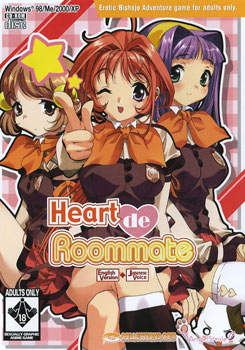
Due to a number of unfortunate incidents, Yusuke is left without a place to live when he transfers to his new school. Where will he go? Then to his surprise, he runs into his childhood friend Asumi. Misunderstanding Yusuke’s situation, she escorts him back to her girls’ school dorm and announces to her astonished roommates that Yusuke will be living with them! It sounds like heaven for Yusuke, but it’s not: the other girls make him take care of the cleaning and cooking, and he also has to wear a girl’s uniform to hide their secret. Tough luck for Yusuke, but over time he starts enjoying life with his cute roommates. What he never expected was where his ever-growing passion towards these pretty girls would take him…
An innovative and beautiful dating-sim game created by famous illustrator Deguchi Yosuke and Japanese game publisher Angel Smile, this multi-path game is organized into 26 anime-style episodes, with accurate bumpers, “eye catch” pauses for TV commercials, and “in the next episode” previews.



















Hi, i’m sorry but… how can i instal this game ? ^^
I’ve download all part and unzip but after i understand nothing…
there is some people for help me ? ^^
>.< this game is far FAR too short
Wish I could get this game to install, can anyone help? I install it but when I go to play it prompts me to insert another disc, which I do but it will not let me play.
did you mount the cd2 file?
i just download complete and install it,
i mount the cd1 file and try start but it’s say i need a second disk,but after i mount cd2 file i can start playing.
can i play this game in XP?
LOL a lot of people downloading are noob @ installing come on people is thisour first time to install a game?
i installed it but it says it “can’t use the connected file GGD”
“LOL a lot of people downloading are noob @ installing come on people is thisour first time to install a game?”
Moron. You were like that at one point. Everyone has to be told how to at some point, so jump off.
At any rate, I like this. I recommend it to anyone and everyone.
I call bullshit on that. I started to use computer before I got internet connection so I had to figure things out on my own.
And you had to use a program in order to install the game? You had to find said program all on your own with no help?
No you used a disc and that’s idiot proof.
Hey how do you extract? i am using winrar but the thing is encrypted so i was wondering what is the password
I use winrar as well ^^
You click the extract button at the top and type in erogedownload.com for the password. The password is actually under the download links, just for future reference with other games~
Hope you have fun!
I have installed completely and extracted the files.
What am i suppose to do next?
Lawliet, if you installed it completely you should now play the game.
How do you save in this? what button do I push?
nevermind. I think I figured it out
I seem to be having a bit of issue getting this to play. This is not my first VN, and I’ve downloaded and installed about 15 or so… So you would think that this would be a snap for me. But it seems no matter what copy of this game I download (this is the third DIFFERENT one) has the same issue; I install disc one, mount disc 2, and no matter WHAT I use to start it, it tells me to “insert the correct cd-rom and restart” The one crack that I’ve found, when used, starts up a background process, but otherwise does nothing. I gave up on getting this game about a year ago from the same issue, but now I’m determined to figure this out. Any and all help appreciated.
Btw, sorry for the tl;dr moment.
there are 3 part of the download,how come it short?
Im thinking of getting a VN cause this vn uses a lot memory You Have to Mount the CD to Play the Game CD 1.47 GB Install File’s 600+ MB wew… so much for 3 File Download eh…
I already installed it… mount cd 2 oh yes I can’t play it ’cause it asck me to put the correct disc wich is the one mounted… WTF DUDE?
¬¬
You’re not the only one. I asked for help on this one a while ago, it seems this is a pretty common problem everywhere I look. And yet, for a problem as common as this, nobody seems to be able to come up with an answer…
problem can be that you HAVE to use first CD-drive (or virtual drive) in some point renaming of drive can help, dont know if it is the case cos it is working for me…
Did you mount both disk 1 and 2? If so, I think you should try using Virtual CloneDrive. Once I mounted both disks, it let me play
Good luck!
well,that just suck,im downloading it so i hope i wont gt any trouble
for those still having a problem there’s a nocd fix at gamecopy world
The girls have very likable personalities and the story is funny. This game is a gem.
yes it worked but there’s no BGM does any one know how to fix this?
Is there a hotfile mirror on this ?
those are hotfile link
Anybody else have a problem saving the game? I figured it out to get to the save screen menu but, I just can’t save.
play the game as an administrator
Do you know how many girls are possible to unlock in this version? Becouse if it takes about 700MB on your hard drive than there can’t be many right?
I’m trying not to say too much and be a spoiler, but you have 3 major endings, one for each of the roommates, 2 minor endings (one for sis and one for the teacher), and one “encounter” with the transfer student, plus 3 endings for when you fail to get the roommate of choice. There is also a special ending for one of the characters that doesn’t unlock until you’ve played the game a few times. Hope this helps.
i can’t get this to download
Ah, sorry, my bad, I meant to say in the first line that “you SHOULD have 3 major endings…”. Otherwise you don’t have the full game and that’s a real shame because it’s a good game.
Well, turns out it works after all.
ukeyaoilover is right, you need to have both discs mounted at the same time if you’re having an issue.
Thanks!
what discs?
I am having a bit of trouble, i mounted both discs.
Clicked Heartust.exe and i get a screen with play – help – quit.
click play, it comes up with install selection.
Click OK, select file location then execute.
then it says Fail to copy file.
anyone help me out here?
i have this problem too
btw i have windows vista
why is there no sound??
i have an issue with this… downloaded… extracted… then an issue i have never run into before… the cd files come up as vlc media files(.bin and .cue) i cant mount them. i cant extract them… and i cant select an appropraite application to change them to so that i can mount them….
any suggestions?
Those are dvd-images. Maybe your mounting program doesn’t support this type? download deamon tools.
Part 2 seems to be broken just now.
When I try to play this game, my computer says “There will be no voice or sound effect because the systeme does not support ADPCM files…” How can I resolve this problem ???
I’ve the same problem, but, i found a little solution… only need download the file “imaadp32.acm” (you can found it in this link: http://www.mediafire.com/?m45zi2zfjym ) after that, copy the file in the game instalation folder, with that, the game work fine with sound…
perfect answere, just resolved the problem for all the games that had sound error, big thanks.
trying to do it wondering how you did it
The fact that the protagonist is such a wimp really pissed me off. This game is great and everything, but it really knows how to push my buttons. >:/
Hey there, the VN runs fine, but when apparently someone is going to talk, there’s this message “Loading sound effects has failed” any idea how do I solve this???
Mine works. But you might copy cd2 onto the same directory like the main game, open daemon tools… find cd2, and play. If you want sounds.
Mine too!!! It keep saying,pls insert the correct cdrom…admin pls help…..need crack file
Cant get it to save!
i hate this game………………………. -_-
Ohhh forget ..Thank For a Good Game Man!!!!!i search for this game long time ago and now i found it.THANK YOU SO MUCH
Steps to Install.
STEP 1—–After downloading, open Cd1.bin by mounting it to a drive. This can be done by using the program I use, which is called Virtual CloneDrive. It’s simple to use, and I’ll even include the link at the bottom.
STEP 2—–After Installing the game, don’t bother pressing PLAY. It will just tell you to insert the disk. Right now, you should have Cd1.bin mounted, but you don’t want that. Instead, eject the current drive and mount Cd2.bin instead.
STEP 3—–Reopen the game by going to the directory where you installed it, (unless the CD autoplays), and simply enjoy.
Virtual CloneDrive—- http://www.slysoft.com/en/virtual-clonedrive.html
i cant get sound will anybody please help me?
i have voices but no bgm how do i fix this
i did what Mao said but with daemon tools and it works like a charm, no problems with no bgm so far and i like the story (even tough the protagonist is a total wimp…)
When the BGM cuts out there is no voice audio till BGM starts back in new scene. Is this a glitch or the whole not voiced?
Running .exe in XP SP3 mode fix my problem.
hi, i’am already download all part, but when instaled it, its not working?
it read for bin file and i dont understand what it called
how to install it, because there not file installing
thanks a lot
The bin files contain the data while the iso files are used to install the data onto the computer heres what you need to do step by step
1: Download all 4 parts
2: Extract files from the file with winrar/7zip to the desktop
2a: Skip 3 and 4 if you already got daemon tools
3: Download daemon tools (lite free)
4: install daemon tools (lite free)
5: Bring up daemon tools
6: mount Heart De Roommate Cd1 (iso)(its the cue file) not bin file
7: Install
8: mount Heart De Roommate cd2 (iso)(its the cue file) to play the game
I’m quite confused. I have downloaded plenty of games from this site and reinstalled this game a few times using the instructions above but for some reason… Whatever I do, it just says “Cannot locate the CD-ROM. Please insert the correct CD-ROM, select OK and restart application”. If anyone can help. that would be great.
Sound does not work, and keeps sending the same message about sound while playing. Is annoying, how do I fix this