
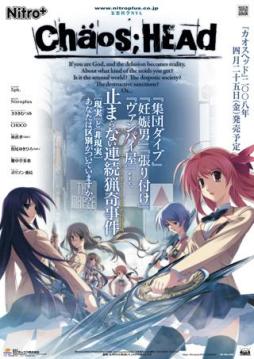
Takumi is a high school student. He is withdrawn and is not interested in 3D things. In his town, a mysterious serial murder case happens and people get panicked. One day, when he chats on the internet, a man suddenly contacts him and gives him an URL. He goes to the website and finds a blog image that suggests a next murder case…. On the next day, it really happens….






Wait a sec, do I NEED to use app locale because I tried English and Japanese Unicode settings and the very first part had these weird characters (I don’t know if its supposed to or not) and then it was in Japanese. Anyway seems to be working otherwise, thanks for the upload, and hope for a solution (or I need app locale).
same thing happened to me
well thing is i don’t know where is the no DVD patch thing if you could kindly tell
i got a weird problem here the game just suddenly stopped showing the char. sprites and i tried to reinstalling it but the same thing happened, can someone help me?
Thanks for the uploads!
You rock admin!
Same for me,in that place should be video but it shows only black screen only voices can be heard
dont understand how to intasll it and where is the crak ???, can somebody explain it ??
Found solution,just need to download k-lite codec pack and problem with movies will be resolved
Can somebody give me a link to NoDVD patch (a .exe). I can’t seem to find it. Is it even included?
Is this an h-game?
No, it’s all-ages game.
Hey the game doesnt have any english words even though I applied the patch. Can anybody explain why?
I am using Win 7.
Every time I try to run the Antifail Installation, it seems to progress as normal. It asks if I have npa_backup and I type, “no”. A box appears saying it is confused about how to open a file and I click cancel. Afterwards, a window pops up and says, “crage.exe has stopped working.” I click cancel, close, and OK several times; the installer continues. When I try to run the game, it shows the caution in English but no menu; I get a black screen with music. When I try to close it, I get the red box to close, yet no options to actually leave. I read the previous conversation by Chaos and Astral, however; the steps did not solve my problem. Can anyone help?
Uhhhh I tried doing the steps, but I don’t have any cracks or anything. The game runs, but I can’t get english. My nitroplus folder with Chaos;head then another folder called 1.00 which just has two folders: images (empty) and common (which has two files, not sure about them.) I put the english patch stuff in the 1.00 folder, went through the process, it did some stuff, I tried running the game again. works fine, but no subtitles. I opted for hardsubs, I don’t have the thing required for softsubs. This is my first time ever having an issue patching a game.
admin i cannot find NoDVD patch (a .exe)
admin i cannot find NoDVD patch (a .exe) too
also i can’t download the english patch because the file has been deleted…
The link for the English patch is down, anyone got a mirror?
hotfile file is gone 🙁
admin reupload the link 4 english patch plzz…T_T
Um, I just tried installing this game by clicking CHSetup and all I get is a warning message saying “The requested operation requires elevation.” 0.0
nvm, but I have a problem with the engish patch, I tried running the batch file and I keep getting “Please reinstall the game; an error was detected in ChaosHead.exe at line 2252.”
@Arcane umm.. there’s no problem with my english patch though. I’ve already patch it n play it rite nw. Prbbly there’s somethin wrong wif ur ChaosHead….just try reinstalling it n try the patch again.
P.S sry 4 poor english, english is not my 1st language.
you have to set your pc complet to japan and than all j-games will run smoothly :3 i don´t re answer any questions 😛
can you upload these in fileshare there all removed on hotfile
Okay,there’s no longer an antifail installer,now there’s a Glorious Installation.bat file instead.By crack he means just put in the NoDVD Patch.The “DO NOT TOUCH.RAR” is now “Everything.rar”.DO NOT EXTRACT THAT FILE.
The answer to the question that the .bat will ask is NOT “UNRAR”.”
The correct answer to put in is “trickquestion”.
If you don’t put that in,it will lie by saying that there’s some 2252 error.(It’s test to see if you can read or not.)
Also,how do you get it into fullscreen mode?
Ok if anyone can help me then bless the gods.
(Just want to say that i have tried many many times. I can count how many times i unistalled then installed.)
My problem is that After i use “glorius translation” (I used the password and everything) I click the application, or i started the game, but no matter what i do the text stays in japanese….. (Oh yeah i forgot to say that my system locale is Japan)
If anyone could help thanks
Yeah I’m having the same problem as Bob. =/
Heads up, the script was fucked for me. To fix it right click glorious translation, click edit.
Now find this line
set /p myon=(Soft) or (Hard):
Create a new line after that and enter:
cd C:\Program Files\Nitroplus\CHAOS;HEAD
Please note that since I was forced to fix the filepath in the script, IT MUST BE RUN IN THE CHAOS HEAD FOLDER.
Save and exit after you have finished editing.
glorious installation*
Should I put the path where I installed Chaos;Head in the line “cd C:\Program Files\Nitroplus\CHAOS;HEAD”? It’s because I installed it in the D:\ drive that’s why I’m asking.
For the lazy, use this instead of the zipped installer, again it must be run in its default folder with everything else in the zip file in the same folder.
(which would be C:\Program Files\Nitroplus\CHAOS;HEAD)
http://www.mediafire.com/?b3c7295i32gcw0n
@Bob’s problem
Try not to run the glorious installation.bat as administrator (it worked for me in Windows 7). I dunno if it’ll work on earlier versions of Windows, though.
I’ve got windows 7 too and I’ve never ran it as administrator either and it still doesn’t work. I even tried Mark’s solution and it’s still very much the same.
@Arcane looks like were the only 2 who cant play :/
At everyone, keep the suggestions coming im trying all of them
is the antifail needed 2 dl 4 this game??
and also when i try 2 run the setup exe its asking me a password code what is the password there??
If you are talking about the serial number. It’s 000-702-000-114 I think.
@Jan Mikaeel the answer is
trick question
good luck
I can’t play it either. Nothing’s been translated and the game doesn’t start 🙁
i’m still a little confused about the sub prob can some one explain a little bit more about that glorius file?
For all those hoping to play this on Windows 7, and have at least Pro or greater, the way to play this game is through XP Mode running through VMware Player. Just grab Windows Virtual PC and Windows XP Mode from Microsoft, install but do not run XP Mode, install VMware Player, then have it import the XP Mode you just installed. Now you will have a virtual machine that supports DirectX 9.0c!
How do you put it in fullscreen.can’t find the option
For those with windows 7 having problems (able to play the game, but is still in japanese) you’ll want to follow mark’s post.
“Heads up, the script was fucked for me. To fix it right click glorious translation, click edit.
Now find this line
set /p myon=(Soft) or (Hard):
Create a new line after that and enter:
cd C:\Program Files\Nitroplus\CHAOS;HEAD
Please note that since I was forced to fix the filepath in the script, IT MUST BE RUN IN THE CHAOS HEAD FOLDER.
Save and exit after you have finished editing.”
However since you’re windows 7 it’ll look more like
cd C:\Program Files (x86)\NitroPlus\CHAOS;HEAD
After that run the batch file (glorious installation) as administrator. The installation should would fine then. Except I messed around a bit more so the menu is still in japanese, game is in English though.(not sure if its supposed to be like that).
Also, for those wanting to know how to go to into full screne, start up the game, right click, go to “F”.
When I have to create a new line after
“set /p myon=(Soft) or (Hard):”
Would it be like this?
set /p myon=(Soft) or (Hard):
cd C:\Program Files (x86)\NitroPlus\CHAOS;HEAD
Yeah, that looks right.
Make sure you save afterward though. Then run as administrator or else 12 (I think it’s 12) files will fail to be moved (due to permission).
It may say something along the lines of “oh boy, an error has occured, ignore it?”
You’ll want to ignore the error and continue installation.
Hi I am having the same problem. I added the line and it seems it was successful, but now another problem occurred. For some reason when I open the game I get a blank screen, I can still hear the audio, but nothing else is showing.
yes, I’m having the same problem here.
can anyone help??
Looks like I got it now.
While You’re running Glorious Installation as Administrator,
at the end, it says ‘Now this will look like it’s frozen. It’s not.’
At this rate, you can’t do nothing except close it.
NO, DON’T CLOSE IT (close it and black screen is what you got). Just wait a little longer and it’ll continue, inserting scripts… Inserting CGs… etc
It finished for me but the game became blank, but I found another solution to my problem.
Nope, still doesn’t work. =/
Any other suggestions? I also tried Sherine’s patch and all I keep getting
“The game is not here. You must run the patch from the game folder”
And it IS in the game folder… I even tried moving everything to any Chaos;head related folder and it’s all the same…
C:/Program Files/Nitroplus/CHAOS;HEAD
Anyone got any tips on how to run this with Fedora or Kubuntu or am I just SoL?
I found a solution to the problem. The Chaos;Head English patch RC1 didn’t go so well for me, even after I tried sparenoone solution the patch finished installing but then the game became completely blank. Later I found an updated version of the english patch on google. I downloaded it, installed it and then my Chaos;Head worked perfectly fine with the english translation. For people who are still struggling you can get the Chaos;Head English Translation RC2 here http://www.mediafire.com/?xkwwiqzwzm3
I had problem B too, I tried running it in App locale and now it works fine.
Hrm, so I did everything right (I hope) up to setting the English patch. I did read the readme and follwed the instructions, but where exactly do I put all those files so the game will actually be in English? And what files do I move?
how do i install this properly? i tried everything in the comments but none worked…
I have a Real Problem here T^T I did all that stuffs, and now, when I run the game, I click start button, but a black screen appear, and after it I have only the main one, with start another time :/
Is this the +18 version or the +15 version of the game?
There is no 18+ version. Never was.
I keep on getting error 1512 anyone know why?
Hello guys.
Firstly I got the same prob mostly the same with all of u. I tried some of the suggestion above and succeed. this is the detail about how I did it.
1. Install the game
2. Copy ChaosHead.exe to your Chaos;Head folder, overwrite the .exe that’s already there.
3. Copy all the data in the english patch to your Chaos;Head folder
4. Edit the Antifail Installation.bat
find this line
set /p myon=(Soft) or (Hard):
Create a new line after that and enter:
cd C:\Program Files\Nitroplus\CHAOS;HEAD
Please note that since I was forced to fix the filepath in the script, IT MUST BE RUN IN THE CHAOS HEAD FOLDER.
Save and exit after you have finished editing.”
However if you’re using windows 7 it’ll look more like
cd C:\Program Files (x86)\NitroPlus\CHAOS;HEAD
5. Run ‘Antifail Installer.bat’
answer the question
? License
! “trick question”
? Softsub or Hardsub
! If you have the latest vsfilter answer “Soft” if you don’t “Hard”
? npa_backup
! “No” if windows asks how to open a file, click “Cancel”
After that wait a while for the file to be extract
? Deleting RAR and extraction files
! “Y”
6. Play the game
Play the game in Applocale under 日本語 or use a Japanese non-unicode setting.
P.S Sorry for my english
Well I got the game to work finnaly… Im using wins 7 and the way I fixed it was move the whole entire chaos head folder to like the desktop. Then I ran the .bat file after that was finished I moved it back into the programs folder where i had originally installed it.
Had to do the same thing… however, it still isn’t working perfectly well, as I can’t save the game! Anyone knows how to solve this?
Just solved it… I had to run it as admin.