
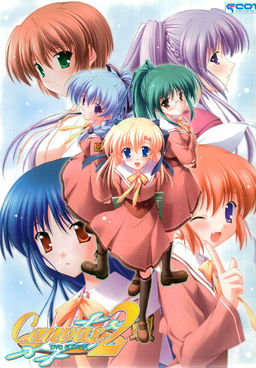
The series focuses on the lives of some students and teachers at Nadesico Academy both at school and their private lives. The main character of the series is Kamikura Hiroki, who lives with his younger cousin Elis. Hiroki is training to become a full-fledged art teacher while also trying to take care of Elis. When his childhood friend Kiri starts working at the school, drama begins to flare as he has to juggle his work, private life, and the feelings of these two important girls.

















Thanks a bunch, this quite an enjoyable novel
was the first canvas game untranslated?
also, would it be possible to get a copy of Majikoi here? I heard Yandere translated the prologue
Thanks~
Thanks I love the anime so I can’t wait to play this.
Thankx man…
I’m sure this will be definitely better than the anime..
and I think the art is better in the VN
thank you. What does the NoDVD patch/crack do, btw?
I can’t get it to work no matter what. It keeps saying system.unt. When I copy over the canvas2_DVD application from the NoDVD patch zip, it seems to install something (system.OLD appears and etc) but still says something about system.unt and No DVD.
uhnngh… After doing everything, I end up with a DAT folder, SAVEDATA folder, Canvas2_DVD application, game01.mrg, game02.mrg, README, system.OLD, and voice.mrg. IMO, there seems to be lots of missing components. I don’t see the game application, for example… Please help me. Anyone?
Hello Admin. How to install Canvas 2? i have do everything so up on list but i cant install Canvas 2 on my computer. Please hjelp me Admin:-)
@ baki
try re-installing and make sure you do a full install with the mounted ISO
sometimes, part install or installation glitch happens
after its done installing, i would first copy the english patch and then the noDVD – good luck Lol
@ crystalgurl18
do you have daemon tools? did you make sure to mount? after that it should be self explanatory
just google daemon tools lite and you should get it.
If thats not the problem post problem below
btw sorry @ doublepost, dind’t notice 2nd person requesting help @ w @
I assume that by a full install you mean the second option that says 2.2GB. I tried re-installing it couple of times now but it still does not work. Perhaps it is because I have Windows 7? I thank you for your advice though.
On second thought it could be my antivirus software interfering since it detects Launcher.exe as trojan… I hope that is the case
Yup, it worked. Guys, turn off your antivirus software for the game when you install it. Otherwise it is recognized as installed properly!!!
the install screen was so epic xD
it worth downloading just to see that
thank you for always! will enjoy the game!
Thanks so much for uploading this. Now I can get that bitter taste of the anime ending out of my mouth which was the worst and creepiest ending ever. I gotta say the Kiri ending which should have happened in the anime was a million times better than that crap they showed on tv.
hmm can anyone post a walkthrough? :S
i’m kind of lost with this many choices every day >.<
another great VN game……
nice work…..
why there’s no iso file when I installed it?
@shadovv-san
You can find Canvas 2 walktrough at http://erogedownload.com/walkthroughs/canvas-2-walkthrough/
at installation screen, why I can’t choose option 1 to three??
Thanks for this upload, you guys are doing a great job.
thx 🙂
Guy’s the No DVD patch does not work (At least for me it doesn’t) If it doesn’t work for you have the ISO in the drive and press the the top button on the install menu it will start the game no problem
The dvd patch DOES work, but it’s an odd one. You place the exe in the install directory and run it once. It will then patch the game. Now the game will run without the dvd, but you do NOT run the no dvd exe anymore.
is this an eroge or all-ages game?
eroge
The game worked great, i turned my comp off for the day, then on the next and the mouths & voices were messed up(not really the problem).I downloaded again but the launchers 1st or 3rd(uninstall)option were not clickable.I thought redownloading would work, is there a way i can get the 3rd option to uninstall?then reinstall?or any other suggestions?
Thank you very much for uploading this.
By any chance do you have the OST of the game? I quite like the tracks played.
So basically, I screwed my computer up before when using the game (not that my computers screwed up), but now it won’t recognize the game as gone, so I can’t uninstall it because it’s not there, but it thinks it is, so it won’t let me re-install it.
Mosaics ( ゚д゚)
I can’t seem to get past the main route, with no ero. I am trying to do Elis route, but I can’t.
Hello i have a problem. When i have download Canvas 2 and i is trying to install Canvas 2 it does work. What can i do for Canvas 2 to install on my computer.
I know I’m about to sound like an idiot, but how do I get to the root folder to replace the ‘game01.mrg’?
And exactly how do I replace it, for that matter?
Is option 1 or 2 install cause I can’t click on 1, and 2 does nothing, I had it working before I was able to click on option 1 and it was running fine.I deleted it cause it mouths/voices were not working.Now it’s not letting me install again.I was getting into the story and now I can’t finish it…it’s killing me…
1st and 3rd options are not available?
Okay, i saw a bunch of question up there and i’m feeling like answering !
First thing i’m gonna say is that I DON’T have downloaded the game yet, but it won’t be the first (far from it).
So the first thing you’ll need is some app to mount the CD image (read it was an ISO), so for that you’ll want to download Daemon tools (go for the lite version) or an other like PowerIso.
You can find daemon tools here :
http://www.daemon-tools.cc/eng/products/dtLite
-Install it say no to the toolbar (or yes if you really want it …), after the installation it’ll ask for a reboot, say no for now.
-After that go into the configuration panel, go to the language option, you need to (well i’m not sure if you need to but at least it’ll do nothing bad, it SHOULD help and SHOULD resolve lots of problem) change the “unicode” to Japanese. This will need a reboot to, so do it now.
-Now it’s time to mount the image, for that open the .iso whit daemon tools, or drag the .mds? (if there’s one) file to the daemon tools window.
-Now just install the game normally
-You need to copy the NoDVD.exe to your game folder (where you installed the game) and launch it, of what i heard after that you just launch the game normally.
-Final point is to translate it, so just replace game01.mrg in root folder with the one in the english patch thingy.
I don’t know for sure if your really need to be in jap local to play the game but it sure wouldn’t hurt !
As for myself i do not use jap local much, i prefer using appLocal, which do the same but it need to be “activated” for each executable that is being launched.
As of what i know, it only work on XP, so here’s a link anyways : http://www.microsoft.com/downloads/en/details.aspx?FamilyID=8c4e8e0d-45d1-4d9b-b7c0-8430c1ac89ab&displaylang=en
For those who wish to use it (for this game or any other which require it), Japanese is Nippon (or something like that) for those who only got the sound of japanese (such as myself…) in any other case the japanese should be the last choice, it’s written in kanji.
If any more question were to occure, or if this just don’t work, just post it here, i’ll try to find a solution
Varatnar
everything except for the voices of the girls in-game, it does work in the options screen though. HELP PLEASE!!!
Okay, this may sound like a stupid question, but did you actually say that you want to hear the voice in the option menu ?
I’m still in the progress of downloading, so i can’t help that much for now, still that was the only thing that poped into my head XD
Sorry about that…:P Let me rephrase… Ummm… The voices in the game aren’t there. I can hear the SE and the BGM but there is no talking. Except for the options where you can set the voices, because there they do work… Hope you understand this!XD
Hmmm…
I can’t say for sure i know what the problem is, have you tried to reinstall it ? Have you switched your computer to japanese local ?
And do you see the voice sound file ? (they could/should be hidden so it doesn’t mean much, but if you do see them, then something is really wrong …)
I’ll finish the download and i’ll come back here !
I’m really busy whit school those days, so ain’t got much time to download !
Hm…
I just finished downloading + installing.
For me everything is doing good !
Except that the starting menu haven’t been translated (well edited, you get the translation into the “document” subfolder in the ENG patch).
Frank, i don’t know if you’ve resolve the problem yet, but if it can help i’ll just write down what i did … (kinda a resume of the step by step i’ve written earlier)
I started by mounting the image (as u probably did..) then since i am not in japanase local i just canceled the installation (which was written whit lots of “??” and other weird symbol XD). After that i choose to “explore” the CD, and boot the LAUNCHER.exe whit appLocal (here if you had put you’re computer into jap local you wouldn’t need to do that, and you would’ve seen beautiful kanji and hiragana when i told ya that i got “??”). So now i see the installation panel and click the second choice (which mean install or something) and i choose again the second choice (2.2 go ? the bigger one XD). “Someone said that you needed only this game for the installer, damn, true XD, it’s beautiful !!”.
Well after sometime the installation is done (i haven’t but, since you got problem whit the voice you should just run the game here (be sure to still have the CD mounted since the noDVD crack is not yet active) if you hear the voice, than continue, else heum… i realy don’t know what you’re problem is XD). Now you only need to put the noDVD executable into your game folder and run it and put the game01.mrg whit it too (just delete the one that was there first or change it’s name so you still have it, just in case…).
At that point everything’s fine for me, i won’t be playing it yet since i got a bunch of other one to read, (gota finish fate stay/night one of those days XD and got a 2-3 other, hm.. for those interested and not following the first part of the muv luv new VN have just been released)
Have fun,
And ask for question if you have any
This is really strange….:S When I double-clicked the uninstall button it was ready in like half a second, and when I tried to install the game again it was still there!!! Then I started it and it had voices!!! *sigh* Everything’s good now so thanks for whatever you did!! XD
I got some telepathic power (or something close to that), might be why it work now…
XD
Well glad you got it to work even though we didn’t really found what was wrong …
Hello Varatnar. I have download applocale and i is trying to find nippon in applocale but i cant find it in applocale.
What is japanese in applocale?
just finish this game…. i have to say it was wonderful
thanks a lot for the upload..
currently playin…
Mirai no Kimi to, Subete no Uta ni
a short story about miku from vocaloid..
@ darkwings, are those in eng? o_o
yeah..
there is an english patch
Works perfectly.Thanks for upload
Hello everyone, Does somebody Knows what japansk is in applocale? I cant find japansk in applocale. So can somebody explain what japansk is in applocale and what i can do for Clannad and other games to work?