
This patch restores removed content ( hentai scenes, kissing, dirty jokes etc. - basically everything that localization company deemed unsuitable for 12 year old French girls ) in English release of “If My Heart Had Wings” (“Kono Oozora ni, Tsubasa wo Hirogete”).
If My Heart Had Wings - Uncensor Patch
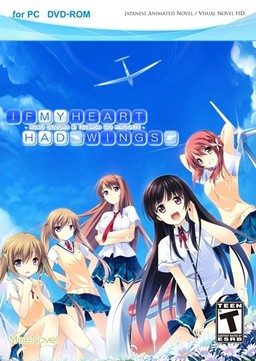
- IfMyHeartHadWingsUncensorPatch.part1.rar - 200.0 MB
- IfMyHeartHadWingsUncensorPatch.part2.rar - 200.0 MB
- IfMyHeartHadWingsUncensorPatch.part3.rar - 200.0 MB
- IfMyHeartHadWingsUncensorPatch.part4.rar - 200.0 MB
- IfMyHeartHadWingsUncensorPatch.part5.rar - 200.0 MB
- IfMyHeartHadWingsUncensorPatch.part6.rar - 200.0 MB
- IfMyHeartHadWingsUncensorPatch.part7.rar - 51.1 MB
295 comments
i hope someone will notice this
1. Right click an affected folder.
2. Click Properties.
3. Click the Security tab
4. Click the "Advanced" button.
5. Click "Change" next to Owner.
6. Type your username, click the "Check Names" button, then click OK.
7. Check "Replace owner on subcontainers and objects" under the owner's name.
8. Click OK again. If you get a message saying "Do you want to replace the directory permissions with permissions granting you full control?", click "Yes" and you're done.
9. Click the "Edit" button.
10. Click on your username from the list.
11. Check "Full control" underneath it.
12. Click OK.
13. Click OK again.
Another option, which I prefer, is to use Applocale. It's one of the first results on google (its on the Microsoft website). More than likely, you'll need use compatibility mode to install it.
To use-
Search for Applocale and open it.
Click next and select “Launch an application”
Click browse and find the exe of the game you want to run/install.
-in this case it's "AdvHD"
Click next and select Japanese (日本語) from the drop down menu.
Select create a shortcut and click finish.
The shortcut should be found in the same folder where you find Applocale. Feel free to move it.
Good luck!
Why were even kissing scenes removed?
I don't want H-scenes in the game, but were the kissing scenes really removed?!
Were the kissing scenes really removed?! Why?! It's just a kiss!
I don't want H-scenes in the game, but were the kisses really removed?
Or are the french kids under 12 years not allowed to see a kiss?
Did it install? '-' Does that, in any way, shape, or form mean that the patch has been applied, or am I doing something wrong?
I'm seeing these files called \Chip1.arc\, Chip2.arc\, etc up until number 6, A \Graphic.arc\, a \Rio.arc.new\ and a \Voice.arc\. I can only assume these are the patched voice and graphics that add the desired scenes back into the game, but am I supposed to do anything with them beside launching the 'Application' file in the folder?
I also used the 'Apply Diffs\ Batch File, and that loaded a bunch of shit before closing itself as well.
I'd really like to know if the patch has been installed before starting this game again (I had it on my phone before realizing I could get it here) and still not having the damn kissing scenes '-'
but still No H-scene
Normal love ending
and some times error pops up
I have been install and uninstalling this game for a while
Can any 1 make a proper walkthrough
restart pc install game and then install patch and if the patch works u wont see the moenovel when u start the game
1. Download the main game and the uncensor patch
2. Install the game, and when prompted for an install location (default is program files) click browse and choose the desktop
3. Once the installation is finished, copy the files from the uncensor patch and put them into the folder that appeared on the desktop.
4. Double click apply_diffs.bat DO NOT RUN AS ADMINISTRATOR running as administrator gave me a ton of error messages looking for different file types which couldnt be found, but running it regularly worked.
5. You should see a bunch of processes happening in the command prompt, as it makes the .new files and the .diffs
6. Wait until it says "press any key to continue" It will take a few minutes, and just because words stopped doesn't mean its done.
7. Upon opening the game, if it worked it will go straight to the title screen, and skip the moenovel logo. Last time i tried this i was using the bath scene as a guide, but thats a few hours in.
Hope this helps others who had trouble, as this is a beautiful VN and worth the time to read in its "original" version
To clarify, you extract the files in the seven .rar files and take them out of the folder and smack them right into the game files with all the DAT and ARC files. Then you follow the things above. TY for help.
_ After installing the patch, the game will have some problems such as errors pop-up and no characters, etc...; in my case it showed "the program has stopped working" but not when starting the game but right after the first windmill part happened (I did quick-save and tried to loaded but it didnt work).
_ I tried reinstalling it many times and the result was still the same.
_ Fortunately, I started the game without patching and played it through the first windmill part (which exactly after Aoi puts Kotori to the ground part). Then I did a quick-save and patched the game. Finally, I reloaded and it worked, it didn't show the error "The program has stopped working" anymore and I went on playing the game.
_ That was my solution, but i think i just got lucky. Hope this would help you guys to run the game.
and please excuse for my bad english because its not my native language. T.T
Thanks for reading.
im confused, i have downloaded all the uncensor patch...
is this just the patch without the game? if so.. i cant find the game on downloads page
@admin please merge the main game and this pls... ty!
if my heart have wings main game link:
http://erogedownload.com/downloads/if-my-heart-had-wings/
it adds the ff:
Adds 4 extra scenes for Kotori, Ageha, Amane and Asa + Yoru at the end of their routes. Sadly, this scenes aren't translated.
Replaces the Moenovel UI with the original Pulltop UI, fixing some weird sprite issues.
Increases CG pages from 8 to 12 and adds a Scene Replay option.
I had to repost this because the last comment glitched out.
I've used the patch as explained but I still have a problem : the game works but I get a strange error message which is this one :
http://hpics.li/495be8d
It doesn't shut the game down but I still haven't any H-scenes.
Does anyone know what I should do ?
Thank you a lot for your answers !
List+of+what+has+been+successfully+downloaded+by+me...
1)+Maji+Koi+S
2)+Maji+Koi+A1
3)+Maji+Koi+A2+(Found+at+hhdgames.com)
4)+Funbag+Fantasy
5)+Free+Friends
6)+Free+Friends+2
7)+Bunny+Black+1
8)+Bunny+Black+2
9)+Taimanin+Yukikaze
10)+*working+on*++If+My+Heart+Had+Wings
They+all++managed+to+start+up+just+fine.+I+didn't+even+do+any+setup+or+anything.+I+just+found+the+application(to+play+the+game),+double+clicked+on+it+and+the+game+would+start+up+automatically.+Every+game+would+bring+me+to+the+title+menu+like+it+always+should+and+it+the+sounds+are+working+just+fine,+I'd+close+the+game.+I+have+yet+to+try+playing+any+yet+but+going+through+a+bit+of+research,+I've+figured+that+it+might+just+be+the+region+that+downloaders+are+in.+If+you+are+in+the+US,+then+of+course+the+games+would+be+giving+you+errors+regardless+of+whether+you+are+in+the+game+or+booting/setting+the+game+up.+That+is+why+changing+your+region+to+Japan(Japanese)+helps+alot.+
Changing+your+region+is+very+easy.
1)+Type+in+and+click+on+"Region"+in+your+search+bar+(Windows+10)
2)+Click+on+Administrative+tab
3)+Click+on+Change+System+Locale
4)+Change+the+Current+System+Locale+to+Japanese
5)+Hit+Ok/Apply
6)+Restart!
7)+After+restarting,+relaunch+the+game+through+"setup"+(if+there+is+any)+or+simply+launch+the+game+application+(if+there+isn't+any+setup)+By+now,+you+should've+notice+that+all+the+alien+like+letters+from+before+are+in+Japanese.+That+means+that+you+are+doing+it+right.+If+you+are+confused+because+you+can't+read+Japanese,+then+search+for+a+"readme"+file+or+any+".txt"+files.+Open+it.+Of+course,+the+text+will+all+be+in+Japaneses+but+at+least+you+can+copy+and+paste+the+text+into+google+translate.+From+there,+you+should+be+able+to+get+a+rough+idea+of+what+you+should+be+doing+to+launch+the+game.(Google+Translate+doesn't+do+a+very+good+job+at+it)
This+worked+for+some+of+the+games+that+I've+downloaded.+Some+other+ones+required+a+third+party+app+known+as+DAEMON+Tools.+Some+of+the+games+don't+start/gives+you+errors+because+it's+technically+on+a+disc+but+your+computer+doesn't+have+the+disc+so+without+it,+the+computer+can't+read+the+files+that+you've+downloaded.+That's+where+DAEMON+tools+come+in.+It+basically+tricks+the+computer+into+thinking+that+it+has+a+disc+in+it+and+opens+up+the+disc+to+let+you+view+everything+inside+the+disc.+Of+course,+the+game+is+also+inside.+You+can+then+play+directly+from+that+"fake"+disc+(your+data+in+the+game+is+kept)+or+you+can+manually+copy+everything+from+that+disc+onto+your+computer+using+another+application.+I+don't+happen+to+know+what+that+application+is+because+I+decided+that+I+didn't+need+it.+I+also+had+help+from+my+older+brother+because+he's+played+alot+of+Japanese+games+before+and+he+had+to+go+through+these+exact+steps.+
Sorry+for+the+long+text,+but+I+hope+most+of+this+information+is+accurate+or+able+to+help+assist+you+in+your+journey+to+conquer+2D+girls.+I+have+yet+to+begin+mine+though.
Good+Luck!
shit
does the game have nudity despite being for 12 year old French girls? Or did I actually download the patch along with it? I don't remember so can someone tell me if the regular one has nudity or not?
Thanks!
If the regular does not then,thank god! I did everything right.
Someone help
plz tell me if i have missing files
1. DON'T install the game with your system set on Japanese locale. That seems to be the biggest mistake I did.
2. Don't install the game in the default directory. I installed it in C drive (C:/).
3. Copy the patch files into the game folder. Run the "apply_diffs" batch file normally and not as administrator. Wait for it to finish installing the patch.
4. NOW change your locale to Japan, restart your system, run the game, and you should be good to go!