
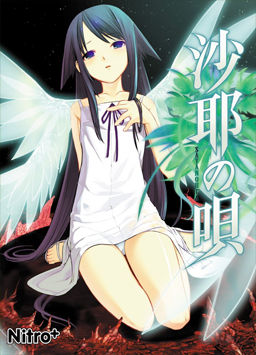
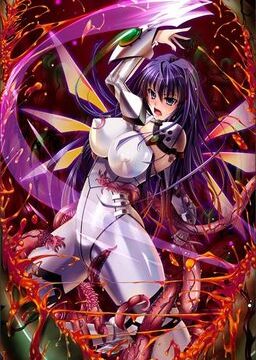
After a traffic accident, Sakisaka Fuminori’s perception of the world changes: everything he sees becomes blood and guts, people’s looks and voices seem like monsters, and food that normally appealed to him tastes disgusting. As he contemplates suicide in the hospital, Fuminori meets a beautiful girl among the flesh-covered walls, who introduces herself as Saya.















how am i supposed to install this?
i downloaded both parts and they both contain the same files even though part two is only 25mb?
extract the files in a folder, and click on setup or something i guess.
didnt load the game “yet” so dont excactly now how to install…
ahh, i had to extract it all and there was a image in there which i had to mount, it just didnt show up in daemon tools since didnt have it showing all files.
just extract the first part and then all files from part1 and part2 will be extracted, then mount the .iso file.
can someone tell me how to install this?
Extract the archive.
Mount/burn the CD image.
Install game.
Install english patch.
ok. now how do i install the English patch?
Just run the exe and follow instructions
is the second part needed at all? it came up empty for me
How to extract the files in English patch?
I cant extract them using ExtractDataEng software. Maybe I should use another software?
Thank you very much for this game!! It worked really well for me and now I am enjoying it!
The disc image file says that it isn’t valid
So I can’t burn it. What should I do?
Chaos, download Daemon Tools.
This game is amazing. Everyone should play it.
Yeah, I did but I couldn’t mount it for some reason :/ It wouldn’t come up for some reason so I couldn’t mount it. Any ideas?
I can’t even get an image file to pop up.
Chaos,
Start Daemon tools, click the cd icon with the plus, select the .iso
click the file shown in the top window
go to my computer
click the icon that appears
follow instructions to install it
???
PROFIT!
seems a password is needed any chance that you will post it ? ^^
is right after part2
Password: erogedownload.com
Password: erogedownload.com
ah seems i was looking wrong, thanks for telling me
got a problem jap versions starts ok english one stops a a black screen any of you know what i did wrong?^^
happens to me to.
okay if you guys can start the japanese version means that you got the game installed.
what you need now is to extract the files from the folder
[TLWiki]_saya_no_uta_english_location
if you read the “readme_patch.text” it explains how to put in english
I extracted everything on this folder and replaced the ones of the japanese, except for “saya.exe” which dint allow me
but the game works great ^^
the folder in program files is “NitroPlus”
in case you dint know xD
no wonder forgoted 1 of the files thanks for the help
this migraine ive been having today rly takes away my focus >.<
get some rest 😛
I actually don’t manage to run this despite having followed the instructions: running the original Japanese game works, but as soon as I install the patch, it stops working. Since I read that the patch makes the game slower, I left it there for quite a while, but nothing happens – I only ever get to see the first screen with the disclaimer, and I don’t even get to the main menu.
I’m on Windows 7 home premium, changed the locale to Japanese, using the original game (bought it from Eroge shop, it’s apparently some sort of “The best” kind of collection).
Any help would be greatly appreciated!
Same, running it and Chaos;Head on Windows 7 home premium
Im also running windows 7 home premium and the game works with no problems. It doesnt slow down at any moment.
just to clarify, english isnt my first language.. but im gonna try to help you.
“I only ever get to see the first screen with the disclaimer, and I don’t even get to the main menu.”
—you see a black screen right? that should mean that you are running saya.exe not located where the game is installed.
You should only need the files from this folder
“[TLWiki]_saya_no_uta_english_location” which i believe is where you are trying to run the game, the files here should be extracted to either the “NitroPlus” folder or to desktop and manually copy and paste.
when pasting in “NitroPlus” you should get the warning to either replace the file or keep both files. Replace everything that needs too.
i dont think you need to replace “saya.exe” in my case i couldnt, so just copy and paste
-the folder “cg”
– _patch.pak
– system.dll
it seems a messy answer and long answer.. so er.. hope you see something that you missed.
I don’t even get a Nitroplus folder to show up-_-
There IS no NitroPlus folder, at least not for me.
It’s not in Program Files, it’s not ANYWHERE on my computer. What gives?
When the game is installed it creates a NitroPlus folder…
so it must mean you guys havent installed :/
what i did to install it :
selected saya no uta part 1 and 2 (with winrar) and extracted them to a folder in desktop (which i called “Test”). It asked for the password.
DeskTop–Test–Saya.No.Uta
It extracts the folder Saya.No.Uta to my folder “Test” with the items “[TLWiki]saya_no_uta_english_location” and “Saya.No.Uta”. Note that they are still in winrar format
DeskTop — Test–Saya.No.Uta –[TLWiki]saya_no_uta_english_location , Saya.No.Uta
I made another folder in desktop, then extracted the item “Saya.No.Uta” -compresed file- (Not the folder, but the item inside called the same)
Desktop — Test2
Then i opened “Daemon Tools Lite” and clicked the “add file” disk. Find the folder that you just extracted “Saya.noUta”, in my case called “Test2”
Now, change the “all supported images”, to the “All Files”. so that you can see all the files in the folder.
click the “satanouta” –disk image file– and then click open.
Now under “Image Catalog” you see the file, double click it. If everything has being done correctly, you should see an “eye” picture at the bottom of Daemon.
OKay, now go to “my computer” and click the “BD-ROM Drive (E.) SAYANOUTA”
You will see right away the option to install it. Install it, just make sure you see where it was installed.
After installing it, go to the folder, should be “NitroPlus” and run the “saya.exe”. Thats just to check if the Japanese version works.
To put the english translation.
Go back to the other item in the “Saya.No.Uta” folder, ([TLWiki]saya_no_uta_english_location) and extract it. I made another folder just for this… and then copy everything on it, but not the “saya.exe”
Go to the “Nitro PLus” folder and paste. A warning of replacing or keeping both files should come up. Replace anything that asks.
Now click the “saya.exe” in the NitroPlus folder, and you should have the english version 😛
Note: In my case, it didnt let me to replace “saya.exe”. If for some reason your game doesnt run, try replacing it.
Also, at the beginning of the story, you are gonna hear some weird sounds, and the dialog will be random symbols. At first i thought it was because it wasnt in english, but is normal, and later on you get why.
Just ask if something seems messy 😡
thats not a “mad” face at the end, no idea how it got there -.-‘
Stupid question then…how can we install it if NO FREAKING DISC IMAGE FILE COMES UP.(Sorry for caps) When I open the disc image file and try to BURN/MOUNT IT. It will say Invalid image file or no show up AT ALL when I use damon tools
you have dameon tools, showing “all items” ?
“When I open the disc image file and try to BURN/MOUNT IT. It will say Invalid image file”
thats an error you get if the file is compressed. If is compressed it doesnt show in daemon tools either
so just extract the folder with the disk image, to a new folder in desktop, then open daemon tools, set it to show “all items” and you should be available to see “sayanouta” disk image file.
So…just move all the files with the disc image to a new folder?(sorry for yelling)
Ok, I can get it running in japanese, but can’t in english. Wth am I doing wrong*sobs* :/
yes all the files with the disc image to a new folder and dont worry about the yelling : P
good to know you were available to install it
now to put in English, you need to use the files from the other folder “[TLWiki]saya_no_uta_english_location”
extract everything to a new folder in desktop. Then copy
“cg”, “_patch.pak” and “system.dll”
Go to “NitroPlus” folder and paste, accept anything that asks to be replaced.
And that should make it run in english, so after pasting, run the “saya.exe” in NitroPlus to see if it works
So I pasted everything into the nitro plus folder…aaand still a black screen-_-
meh….
when you pasted, you did replace right?
Yeah, replaced each the files that popped up. I did drag the sayaexe to the nitroplus folder… >..>
Well, I read somewhere that some people had no luck replacing the .exe, so I tried not replacing it, but I got the game in Japanese, like that.
“that you are running saya.exe not located where the game is installed”
Could you elaborate more on that? Does it mean I’m running an exe which is in the wrong place? Could it be that having a non American English OS may cause the problem?
I just thought of a weird thing: my game folder is called something like nitroplus/japanesenameofsaya the best (because that’s the version I got).
Could it be that the name may be different from what the .exe expects and that messes things up?
Would you mind telling me what’s the exact path in your pc (from the nitroplus foder onwards) just to see if I have to rename anything? Thanks in advance!
“Yeah, replaced each the files that popped up. I did drag the sayaexe to the nitroplus folder… >..>”
in my case i wasn’t available to put saya.exe (from the english patch fodler) to the NitroPlus folder.
I used the same “saya.exe” that started the game in japanese, but after pasting the other files, it worked in english…
“I did drag the sayaexe to the nitroplus folder… >..>”
If you got two saya.exe try deleting one.
“Well, I read somewhere that some people had no luck replacing the .exe, so I tried not replacing it, but I got the game in Japanese, like that.”
I think what “saya.exe” does is read the files from the folder and then screen them. When you install the english patch, you replace the files that are in japanese with the ones in english, like the script of the game. So “saya.exe” would screen english. As long as you have extracted/pasted correctly the “cg” folder,“_patch.pak” and “system.dll” the game should run in english.
“that you are running saya.exe not located where the game is installed”
What I ment by this was that you were running the “saya.exe” located in “[TLWiki]_saya_no_uta_english_location”. Which is just the english patch, not the game so you would only see the images from the “cg” folder and then get a black screen because there is nothing more on the folder to show.
The “saya.exe” that you are suppose to run ,is the one in the folder where the game was installed.
I dont think that having a non American English OS should interfere with you installing an english patch for a game.