
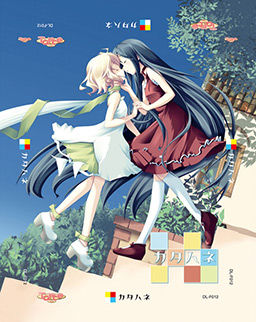
The story takes place in a world with 3 kingdoms, the Red, White, and Blue Kingdom. In this world, they have highly-advanced dolls with some closely resembling humans. These dolls occasionally need maintainence which done by a “tuner”.
A young playwright named Wakaba writes a controversial play about a traitor named Ein who killed a ruler of the White Kingdom, Christina. In Wakaba’s play, she presumes that Ein did not betray Christina, but was actually her loyal supporter.
When Wakaba’s history major friend needs to make a trip to get Coco, a genki doll that lives with Wakaba, maintainence, Wakaba and her brother Light travel with him. Wakaba travels in the hopes of finding some actors for her play. Along the way, they meet a beautiful doll with one wing named Belle and an aspiring actress named Angelina.

















You’re my god Admin. Thanks for upload.
Nice one admin, thanks!
any intructions on which one goes first? rar then version 1.1 update then translation? or some other orders?
game>1.1update>english patch
I was still writing installation instructions when you asked.
I’m having no luck with the install – tried both on XP and 7 – I get a message (can’t read it) after the setup finishes and it looks like it copied all files except the actual exe – so I copied that myself and the game runs in Japanese, but then when I try to do the 1.1 patch, it gives more messages and doesn’t do anything
Did get it working on XP – now that it’s done, I’ll see if I can copy over to 7 and it’ll keep working – that works a lot of the time.
how did you get it working? i’m having the same problem
Yeah… messages are garbled up. I managed to get the base game running just by copying stuff from the ISO into the failed install dir, but the patch is beyond me. I have no idea what it’s complaining about. Tried all kinds of compatibility options, etc.
That was fast thanks a lot.
Complainer will probably be here soon 😛
hmm my bad. okay which is better literal or natural? anyone who tested it already??
It’s just a matter of preference, just like butter and margarine.
Anime fansub scene has debates about this for like 20 years already.
If you like to have untranslated word like for example oniichan then go with literal if not go with natural.
Onii chan should forever be literal.. i mean cmonn , it’s freaking MOE
Okay thanks. sorry if i complained to much. haha XD
lol they aren’t here yet but i’m sure they will soon they were complaining like crazy when admin released hanabira 5 and now this make 2 yuri in a row and 3 in the last 4 VN released.
Well at least they can be happy no yuri eroge have been announced to be released anytime soon.
YES, THANK GOD..NO MORE xDDD. now i can look forward to Little Busterss and NO Yuriii
i don’t think we will see the full patch for Little buster before the end of this year.
I might be wrong, but at the speed they have gone until now i doubt it will be released before the start of next year if i had to guess i would say around feb or march 2012.
WHATTT, there’s only 10% left ?? Will it really takes a few months to complete 10% of the patch??
10% on a vn like Little busters isn’t only 10%.
Little buster have more content in the game then Clannad and if you played Clannad then you will know how big this mean.
Also normally they don’t release right after they reached 100%
they need to at least do a last SC and QC just that will probably take several weeks.
Anyway like i said i might be wrong that was just my opinion from how fast i saw them working on Little Buster until now.
Just a question … why do you invite (or her) on the games Fileserve? The idea is good that you have loaded on Filesonic, but why could not even have to Megupload Hotfile or reload? Because really, the modem speed of Fileserve is damn shit!
Speeds and accessibility really vary, depending on country, ISP and even time of day. If you look around comments you will find many people asking for fileserve links for uploads where it’s only filesonic for now.
actually, megaupload, fileserve and rapidshare are the biggest filesharing sites in the world and the ones most people use.
filesonic on the other hand is a curious thing since it has much much less users.
as long as admin gives me fileserve, i am 100% content!
filesonic is more popular than rapidshare (at least according to alexa )
Filesonic is useless for this unless you have a premium account with them. Their maximum download size for free users is 400MB, these rar files are in 500MB chunks.
Fileserve actually seems useless to me as well, with no download starting, but I can’t see why.
Also, why is it that young males always want to tread on the smaller or less renowned players in a field? In open source software this does real harm, with almost all enthusiastic young programmers supporting the sometimes ridiculous “technologies” coming from corporations with a vested interest in limiting the freedoms of users and programmers alike, and taught in schools which are supported by these corporations. This rubbish has become a religion so all-pervasive it’s followed devotedly by those who pride themselves on being irreligious.
You don’t need premium account to download from filesonic here.
You lost me on second part.
Eh, ignore the 2nd part. I posted it, looked at your post again, and thought “oops, not quite relevant.” Sorry.
Not sure what’s up with FS. It says it only allows 400MB downloads, but maybe it allows bigger ones anyway. Neither site worked for me because I had javascript disabled at first, but now I’ve enabled it Fileserve is working well enough. Still, I think I’ll get a premium account if I download more than a few of these.
wow, nice. we have to choose 1 of 3 kingdoms?
btw, i just want to remind something, Osananajimi wa Daitouryou ~My girlfriend is the President~ can’t be played at my current windows 7, it said: can’t read/open the fle. any suggestion?
Run as administrator.
i don’t know, but it said: .mdf type file, can’t read/open those kind of files.
any ideas?
for .mdf files, use daemon tool to read it
sorry my bad english
it’s ok, dude. im still learning too.
daemon tools, is that a program?
any links for download it, please?
Check “F.A.Q” section of this websites – it has detailed instructions for it.
can I ask something about it too? is Ran’s route isn’t finished? cuz it stop in the part where Ran rescued Junichiro from the maid trying to kill him. nothing appears in her text box.
Thanks ! You’re awsome <3
Yeah finally managed to get the game up without any problems. thanks admin for a new game XD
Oh yeah just wanted to ask aside from hinato bokko and katahane any other tarte games available? Love the art
In english no but if you don’t mind in jap then yes they have a few more.
Installed and works fine.
Thanks again.
pure yuri?
as usual tnx for the update admin i hope u update another new vn soon
Please help me, the japanese game is installed but when i try to run the update patch, it only give me a error message, even with AppLocal.
Ok, there are some deatial that have yet to be mentioned. Your problem can be easily solved by going to the “TLwiki” homepage and clicking on the “Katahane” option. There you will find a link to the windows update that is likely to solve your issue (as it did for mine)
Tought it would be useful since it hasnt been uploaded here yet, and , as always, keep up the great work admin.
Thank for your answer, I have try, but the link is one of the 10 they give or another ?
Admin truly are an admin… (^O^)
Admin Can You Tell Me The Sites That Sell VN?
just check up the mirror 3 the admin is posting
So, am I guessing right, that I actually DID download a Yuri Visual-Novel…? Shit, man. I guess, I can give it a try, though I never liked Yuri… well, whatever. Thank you, admin.
If it’s yuri only, then what about all the ship tease between Wakaba and Cero?
Admin i would like your opinion on how you would rank this game since i hear a lot of people on other VN download sites say that this is the best place to get your games XP
sorry for intrusion!
i would like to play the similar game as G-Senjou no Maou.
it made my tears flew non-stop.. any suggestion? 😛
sorry for my english
Sharin no Kuni, Himawari no Shoujo – it’s made by the same company, and it’s very similar in many aspects.
Next time ask questions like this in comments about game you’re asking about.
if you like sad ending vn try muv-luv alternatife, the story make me cry even in my sleep.
I get an error that setup.exe “is not a valid Win32 application.” Running this on windows 7 64bit. Any easy fixes?
Open cd dir.
Click setup
Right click
Click troubleshoot compatibility.
Install.
Profit?
erg. I wish it was that simple, but I think I actually assembled the parts wrong – windows thinks it’s a 16bit installer. Any recommended program to complete the iso from the downloads above?
admin, please check FAQ mount image in daemon topic, i want to ask something in there. thanks. 😛
Getting another error myself, something about dir/uninst.exe and a bunch of weird asterisks. Probably a failed to copy message or something, been googeling for it but can’t find anything about it. Anyone have an idea?
I’m trying to run the update patch, but cannot read japanese, so i cannot follow the instructions. Also, trying to run the english patch, it cannot find the driectory, when it is on the desktop. Please help >_<
Hello…
Does this game works on windows 7 computers?
it works perfectly
also for those having problems understanding the update patch run it and click the top option then click yes uncheck tick box after it’s completed and click ok then follow the instructions in my previous post also make sure to change your regional language options to japanese
windows xp –>control panel—>date,time,language and regional options–>regional and language options–>advanced–>click dropdown menu and select japanese
for vista
Open Regional and Language Options by clicking the Start button Picture of the Start button, clicking Control Panel, clicking Clock, Language, and Region, and then clicking Regional and Language Options.
Click the Administrative tab, and then, under Language for non-Unicode programs (System Locale), click Change system locale. Administrator permission required If you are prompted for an administrator password or confirmation, type the password or provide confirmation.
Select the language, and then click OK.
To restart your computer, click Restart now.
for windows 7
Open Region and Language by clicking the Start button Picture of the Start button, clicking Control Panel, clicking Clock, Language, and Region, and then clicking Region and Language.
Click the Administrative tab, and then, under Language for non-Unicode programs, click Change system locale. Administrator permission required If you’re prompted for an administrator password or confirmation, type the password or provide confirmation.
Select the language, and then click OK.
A tuner? Synchro summon!
What a boss.
OT: Interesting story. Ein is a great character…
WEW LIKE IT …. 😀
hey admin, think you could find the game: color of the water, color of the sky/ mizu no iro, sora no iro. thx i apprecciate it.
Is this yuri or not?
Btw, how’s the forum coming along admin?
hey admin…links are interchangeable..?
yes
good…thanks…=)
Hi admin, I’m looking for “Ushinawareta Mirai o Motomete” for PC, is there any download link for this eroge game? thank you~
for what i know, it is not being translated, so i doubt you will find it here…of course if you can read japanese, then you can check it somwere else
Hey admin, I’m having a little trouble installing the English patch of the game. I keep getting a warning that says “The application has failed to start because of its side-by-side configuration is incorrect. Please see the event log for more details.” Can you tell me what’s wrong?
no need to install English patch, just copy paste it to game folder.
I’m having the same problem. I install the game, run the update. No problems up to this point. But when it comes to the English patch, it just wont run it. What am I doing wrong?
Did you try to run it as an administrator…if you are using vista of course…??
I’m using XP. It doesn’t give me the option of running it as an admin.
I ran it in admin on vista, it still did not work ><
So I’m guessing there is no solution to this problem? Oh well, guess I’ll just have to skip on this one.
Chaos47… sorry i just have no idea when it comes to XP
You are getting that error because of Visual C++
I was trying to figure this same problem out and it turns out the 2005 and 2010 versions wont work (I tested them). You HAVE to have the 2008 32bit version (even if you are running a 64 bit OS). Here is the link to the copy you need.
http://www.microsoft.com/download/en/details.aspx?id=5582
Make sure to uninstall any other Visual C++ programs before you install it to avoid extra problems.
After you have it installed run the English patch from the game folder and it should work.
When I try to install it seems to install all the way but then I get a error message
does someone knows why the route selection options dissapear when you start the game with the Katahane.exe in stead of the カタハネ.exe…?i guess you will play them anyway…am i wrong..?
cant find katahane.exe help any1?
If the initial installer doesn’t work, all you need to do is change your language for non-unicode programs. Go to Region and Language> Administrative> Change system locale and change to Japanese. I’m running windows 7 x64 home premium.
i have a problem with step 5:
(5. Select “File” and “Font Config” in-game, and change the font to “S2GP月フォント” to fix wordwrapping.)
there’s nothing there to choose from… just empty white box
any1 can upload the font plz?
oh yea, and there isn’t any text in the game T_T and i’m stuck on the first page
Does anyone know how to get the scenario for the Angelina x Belle ero scene? yuri fan xD
Hello, just downloaded game today and having problems. I downloaded the game, literal patch and the update. I saw the instructions but it’s not going that way for me.
I click on the update and it’s all gibberish and it pops up that it needs something (like when you go to Browse for file) but I have no idea what it’s asking for. The game isn’t popping up. The game is an .iso file.
I tried skipping the update and went to the English patch to select the game and the game is still not popping up! What’s going on? X_X It’s been a LONG time since I have done this and totally clueless. Please anyone help me? :'(
first of all make sure your locale/language for non unicode programs is set to japan (to do this go to region and language in control panel and go to administrative tab.)
once your done, mount the iso image with a virtual drive (I use daemon tools) or burn it onto a DVD. open the disk and you should find the installer. after the game is installed, it should run in japanese.
to install the patch, locate the directory that the game is installed in.
after the patch is done install the english patch.
Just finished this one the other day, pretty good if you ask me. Keep up the good work Admin, looking forward to any future adds. Now to finish Shikkoku no Sharnoth :]
sigh, for some reason, the skip function doesn’t work right I end up having to keep F7 pressed but then it even skips stuff i haven’t read yet, so annoying… any idea how to fix this ?
off topic about this game
but suggestion
can we get some sort of way to tell if a game will require the applocal usage or changing the computer around to jap settings
so we do not waste a few hrs dling for no reason
Yes, it’s on my TODO list. Right now i’m uploading all games that were ever released in English, but are still missing on this site. Once I’m done i’ll be making installation instructions for every title posted, with MD5 checksum for files ( to verify you downloaded them properly), required environment ( does it need japanese locale, does it run on windows 7/Vista etc.) and step-by-step instructions, with screencaps included.
do i have to download all five mirrors, the update and the english patch?
it takes 7 hours per mirror..
I cant find the font config for S2GP月フォント.. There are only 3 options and it aint one of them. Help? 🙁
My katahane.exe is also missing even though everything else is in the folder…
Was a bit ahrd to get to run, but very enjoyable.
expecially the Kurohane is very bittersweet and moving.
Heh, my favorite couple Dua and Ein never even were a couple, but check this for yourselves
When I extract the Rar files it says all the files are corrupt. :/