
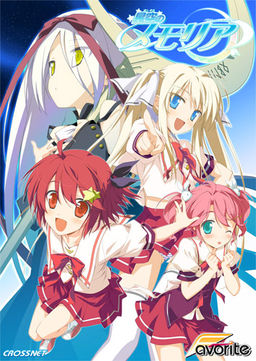
The story begins with the protagonist, Kogasaka You, moving back to his hometown, which he left behind several years ago. Upon arriving, he stumbles into an abandoned, sealed observatory, whereupon he encounters a mysterious girl who looks exactly like his childhood friend did years ago. She introduces herself as Mare, a shinigami who reaps nightmares.
Meanwhile, back at school, You ends up joining the astronomy club, which is desperate need of new members. At night, he continues to visit Mare at the observatory, all the while trying to remember a certain someone’s name…















HoshizoraNoMemoria.part07.rar seem to be broken :/
Forget it, the problem came from me
When i start the game i get an error
C:\\User\Documents\FAVORITES\s901.bin then random stuff How do i fix this
And yes i patched it with the 1.1 v but still get the same error. I keep deleting the FAVORITE folder but it keeps coming back
the favorite folder is the save data from the game
i’m having an error here
it’s said in japanese not graphic or some folder issue, it’s error when I play Yume route
something is wrong with the English patch download i keep trying but it says ip wrong
Whenever I click on any of the download links on this site the page just reloads so I am unable to click on any of the links. Can someone copy the links for the instalation and english patch?
i cant download the enoglish patch it says wrong ip when it is suppose to download the patch
For anyone having problems, ill copy what this guy (Albert) said, it was exelently useful to me, and I run a very crappy pc, just follow as he says:
“Albert says:
May 15, 2012 at 5:25 pm
here’s a quick guide for all those with trouble:
*unrar the ISO with winrar
*mount it with Daemon Tools, if you don’t have it download it
open Daemon, select virtual drive and browse for the ISO
*Once mounted, make sure you change your locale language to japanese
*to do this: start menu, control panel, language, system locale language,admin tab, change config, choose japanese.
*run Daemon tools, select the ISO you mounted and run “launch.exe”
*you can’t read most of the stuff during the instalation but nevermind that, just make sure to check the instalation directory (C:program files/CROSSNET/ ……)
*once installed, run the patch file
*it will automatically search for the folder where the game is installed and apply the media fire English patch
*go to the instalation directory and look for the exe named (memoriaEN) that’s the game in english, but don’t launch it just yet
*To get rid of the dolphins: there are 3 ways of doing so.
-disable total control of the graph_vis folder: (properties, advanced, edit….)
-replace graph_vis folder with an empty folder with the same name
-open graph_vis folder, select all files and edit them to “read only” attribute.
these methods worked for me, if they don’t work for you, just delete graph_vis folder everytime you play :/(this is the best option)
*now before you play, search for the update 1.1 patch
it’s one rar file that came along with the game
*unrar it
*DO NOT open the exe
*instead open the patch data folder, copy and replace the files there with the ones in the instalation directory.
That will solve most bugs and crashes (i know it did for me)”
The rest can be seen in the troubleshooting
mine always say graph_vis and it always crash even though i already deleted that folder how can i fix that???:(
the error goes like this graph_vis/YUMEe01a pls help me. i really want to play this game
i am also getting a error
c/user//documents/favorites/??????/save/s901.bin
need help
You’re getting this error, because your system is not in Japanese locale.
yo i try what u said but it’s still not working, but thanks 4 helping me.
yo it works now, i just need to restart my computer thanks.
Wow, after jumping through hoops for like an hour i finally managed to make it work. Was totally worth.
Thanks for the upload.
Any mirror for the English patch? Captcha absolutely refuses to show up.
Go to staircase subs.
What’s the heck is going on
Instead of Mare, I’m seeing dolphin. Is there any patch to remove those?
after backing up the files, I messed around and found a way.
It seem either the 1.1 or the eng patch censored Mare completely with the dolphin pic.
Delete the graph_vis FOLDER, not the bin and it’s all good.
I already delate the graph_vis FOLDER…
But the freaking Dolphin is not gone from my monitor ???
It was all so good until I get to the last girl…crappy end for final route
Overall 9/10
Hmm, why not join the English Patch and English Update in one ?
i dont get Asuho H scene from my laptop… anyhelp? it just skip to the next day when Asuho kiss You..
Hoshimemo Eternal Heart getting translated or not just curious?
etoo…
after i run launch.exe
i can’t find the folder C:\Program Files\CROSSNET\Memoria
instead i found the folder in G.
anyone can help me?
i know iv seen this in the comments but i cant find a solution. is there a way to fix the issue with the text going off the text box and not having the whole conversation in it. its not really a whole big deal but im one that loves to read the whole story. but im not losing the whole conversation so im able to understand what there trying to say. thanks in advance if there is a way to fix.
you need to install the staricase subs font that you should have in the patch folder, and then change the font in the options of the game
Thanks DJ works like a charm. now i can read it w/o having to backlog it 😛
i am right now almost at the end of my second route, so as of now i still have to go through quite a few routes, but the two i have played were quite similar constructed. but that doesnt change that i liked both of the routes and the main route as well, so i dont really see a problem there. just stating that for those of you who want something completly new in each route.
The english batch link is broken…
The english batch link is broken…
So I dowloaded the game, applied all the patches just fine. Problem is when I start the game, the screen is black and the game won’t close. The music is playing just fine. Anybody know what the problem is?
DWM/DQM reference in the game? My god…
To anyone who cant find the English patches they’re actually linked properly in the installation guide above. Thanks again admin!
you got torrent now and that helps a lot… THX ADMIN :3
Go ask Staircase subs.
Admin, can you get Happy Marguerite -or- Happy Margaret?
It’s one of CrossNet/Favorite releases too.
Ohhh man this game was horrible for the first few routes. Everyone’s all “omg i’m such a victim thank goodness there’s someone who can magically make my life better,” etc. I was really starting to enjoy Aoi’s route and found her to be quite adorable (after such a struggle of enduring her horrendously long coodere phase, very late with the dere). Following that was Chinami’s, the one I wanted to start with. She was entertaining and incredibly adorable; I picked her as my first route the moment she popped up (and was instantly disappointed upon finding she had to be second). Her end was just as disappointing as Aoi’s, the good ol’ “let’s have that scythe make everything all better cuz who cares about working through our own issues.”
That being said, I really started enjoying this game from the Hisakaki sisters on, my last four routes. I started out disliking each sister at the beginning of their respective routes and came to appreciate them by the end. I was really struggling and considered stopping until reaching Komomo’s route. Good game all-in-all, I really enjoyed it. Thanks for the upload Admin.
I get a crash every time a play in the beginning of the game when i first get to the house and a girl starts saying she overslept. After that I crash every time.
I keep getting error etc/038 everytime in the beginning where the girl says she oversleeps 3x is there anyway to fix this?
Got the exact same problem…
SOMEONE PLEASE HELP ME
I’ve been playing for days now really enjoying it then suddenly i try to open the MemoriaEN and its just says appcrash graph menu_bin. I dont know what to do Ive reinstalled but nothing pleasse help
Works like a charm. You deserve a thank you for posting such a great game.
i got a error about when i start the game.
Direct3D:……
something like that
I get my HCG censored. i did everything the instructions said to do
install,patch,1st english, 2nd english, deleted folder, but it still is censored. any idea what else to do?
Eto… Is it normal to have a dolphin picture in the 6th route ???
uhhh not really sure if this is a problem but when going through Yume’s route, when I meet Mare later on and an H scene was about to happen a picture of some Dolphins replace the scene…
Someone here who can give me the torrent MAGNET link so for this? >w< (not baka download link)
All works fine, except that in some lines, the text doesn’t fit in the box… just a little thought, so I’m not sure if it’s normal. I saw the problem above, but I already installed the custom font and set it in the options. It’s not that big of a deal but could someone tell me if that’s supposed to happen or not? It happens rarely, in moments where there is a lot of text and only one or two word are out of the box.
Hey when I try to install the patch(not the english patch but the regular game patch) This message comes up and it doesn’t download for me. Can someone translate or tell me how to fix it please? http://i.imgur.com/NdARC.png
Welp, it was actually just a message telling me it had updated. Nothing happened when I hit begin, so I assumed it was an error message.
Can’t install it at all. I have it mounted. I have on Japanese locale. The install box comes up and I go through the process and get to the install progress bar and then an error or something pops up.
http://i.imgur.com/MyxDN.png
there is a scree shot of it.
graph_vis/YUMEe01a
I keep getting this error right after he says Tanabata in the very beginning
thank you admin for the great post, kinda tricky to install thou~
I’m having the same error as some of the people above, but I haven’t seen an answer for it.
When Chinami first appears (saying she overslept) I get an error “etc/038 then some japanese”
I’m guessing it has something to do with her character image.
when i start the game, MemoriaEN it says graph\main_window*japanese characters* idk how to solve the problem i did every step the installation guide told me to do i’ve been trying for the whole day to download it but its just not working please help!!!
ok so partway through the game around 7/19 – 7/23 During long texts the game doesnt fully display the text> is there any way to fix this?
why does mare remind me of llya from fsn?
got an etc/038 problem near the beginning of the game…retried it twice, the game still crashes when chinami first appears
works like charm, finished all the route , including mare dolphin scene lol, i dont really care about loli though, thanks admin.
Someone help me. I get this problem: error etc/038 everytime in the beginning where the girl says she oversleeps 3x. How to fix? Any ideas?
I installed the game and it works perfectly, but I have a problem with the movie mode. No video scenes were played at the beginning of the game or a route. I looked into the movie folder and there was only the opening movie. Does somebody knows how can I fix it or if the video scenes are important?
Hi,after i download the english patch what should i do