
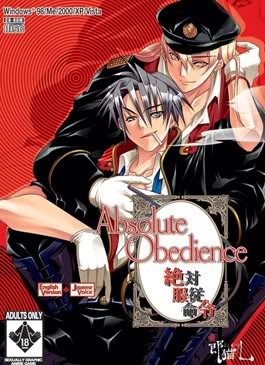
Welcome, one and all, to our little Agency. I’m sure that at one time or another, you’ve felt frustrated by the actions of a certain troublesome individual, who always seems to make your life more difficult. You know the feeling – through no fault of your own, your every step is hindered by the actions of someone who’s been born onto this Earth just to trip you up?
That’s where our Agency comes in. With just one word from you, our special volunteer staff will happily lay a complex trap for the individual who causes you so much frustration, and exact sweet revenge on the troublemaker for you, turning their life into exactly the kind of living hell you want. We’ll make them surrender totally to our will, force them into perfect obedience while we punish them for the crime of tormenting you. Of course, we use the word “volunteer” loosely. Payment is always required for our services, but don’t worry – we’ll never ask you for money.







179 comments
I first:
1) extracted the 6 "free" files since I'm not a registered user. Got like 4 discs. 2 for Daemon and 2 for ISO. I used the ones for Daemon.
2) mounted the first disc as a visual drive on Daemon tools
3) clicked setup for it
4) when it was downloading it asked for the second disc
So I assumed I must mount again on that same drive with the second disc thing, I did that. Pretty much deleted all the data from the first disc. (like deleting disc 1 completely by over mounting with disc 2)
installation was completed...
5) i remounted the first CD and started the game, (which pretty much deleted everyone on the second disc)
Game works fine just no sound, and can't save, and can't load.
I'm assuming all this is from the missing, deleted, overlapped second disc.
Can someone tell me how to mount the 2nd disc properly without overlapping and deleting the other disc? Thanks!
i need help
•I've extracted all 6 files, and received 4 discs.
•After that I used Daemon Tools Lite to mount the first cd. I tried installing it after that.
•Then I was required to insert the 2nd cd on the same place as the 1st cd was placed at. So I did that, and... nothing happened.
•So I just created another virtual device for the 2nd cd.
•I repeated what I did but that didn't do anything at all.
Am I doing something wrong? After the third step, am I supposed to press something? After mounting the 2nd cd on the 1st cd, it does nothing at all. I don't know what to do. Please help. :'|
well don’t close this box & directly replace cd 1 w/ cd2 using daemon tools then go over the box again (the box that ask u to replace cd 1 w/ cd 2) & press retry button so it will automatically continue the download for u
if it still does not work then my diagnosis is incorrect, forgive me
Gd noon! :)
The complete silence from the admins about this problem is a little annoying and the solutions on this page make no sense.
"Just open Daemon tools" whatever that's supposed to mean.
Second thing you need to do is (if you're on windows, this will likely already be as it should if you're using wine) set the game's exe file to run in compatibility mode for winxp service pack 3.
Most importantly, in the compatibility settings, check the box that says "Run in 640x480 screen resolution" if this is not selected it goes right back to the white-out menu.
Thanks for the links, i just have one problem, my disc 2 doesn't work, i need a passeword. Can someone just tell me which one is it ?
thank you in advance for the answer :)
~Everything has gone well and the downloading process was fine, the thing is, when I try to launch the game, it doesn't work and a pop-up saying "Application Formatting Error" or so appears. I have followed one of the comments. that have said to change the compatibility settings and so on. Yet it still doesn't work.
~I am on windows 10. Can anyone help?
Thank you, all