
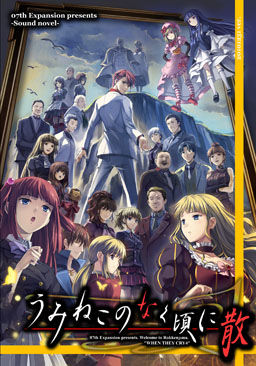
Umineko no Naku Koro ni takes place in the year 1986 during the time frame of October 4 and October 5 on a secluded island named Rokkenjima (六軒島). The head of a wealthy family named Kinzō Ushiromiya, who lives on and owns Rokkenjima, is near death, and eleven of his family members arrive on the island to discuss how Kinzō’s assets will be divided once he is dead. Also on the island are five of Kinzō’s servants, and his personal physician. After the eleven family members arrive, a typhoon traps them on the island and shortly after people start to get mysteriously murdered.
Umineko no Naku Koro ni Chiru is the second set (EP5-EP8) of stories, the “Breakdown” episodes.

















Whenever I try to unpack it gives:! C: \ Users \ RAFAEL \ Downloads \ UminekoChiru.part02.rar: CRC failed in UminekoChiru.iso. The file is. corrupted
The part 2 in the Mediafire link keeps ssaying the file is corrupted.
you need all 12 parts and then select every part at the same time, right click, then “Extract to UminekoChiru/”. I had no problem with part 2. If you did have all 12 parts and did that, check the file size and make sure it’s 199MB. Just in case the download didn’t complete or something.
I too seem to have an issue with part 2 from mediafire being corrupt. I can’t even use rapidshare because it’s super slow on my computer and often just gives me an error page about not being able to load the page, or the request timing out.
Ok, so, I’ve download all the files and all I’ve got is one .iso image. I’ve mounted it using daemon tools and know I don’t know what to DO. I click on the UminekoChiru image and it opens Nero Burning dunnotwhatelse… PLEASE, HELP ME! Sorry for my poor english but I’m freaking out right know. I want to play this game so much and I don’t know anything about mounting images…
Andrea, you just must to install the english patch. Are you italian?(Andrea is an italian name, or not? xD) ‘Cause there’s an italian site where you can find an italian patch too, with all the istructions in the pack. I haven’t alredy try it, but i think that it goes. ^^ But I have a question: the patch goes if I use the game downloaded in differents parts? o.o I wonder yes, but I don’t know, this is the first time that I download a pc game. xD Please, reply!
P.s.:sorry 4 my bad English, but I’m italian, you know. xD
Andrea you have mounted rigt so all you have to do now is instal the english pach
I also have a problem regarding on one of the parts in the game. It seems that part 2 (I think..) is corrupted. Please fix it immediately. I AM DYING TO READ THIS.
I tried to download part 7 from mediafire but the link was kinda…Broken (i think thats the right word for it) So if there is any other free link to it pls help me. Im REALLY desperate to finish reading this T_T
Do you have to burn it to a cd? When I use mine it says I have to.
Thanks very much for the MF links!
Can you please tell me how to install the english patch?
I need to locate the installer but since it’s all in one rar; how do I do that…? Thank you.
i have all 12 part. i have extract this and the new one extract, too. and then ???? can one person say me, what i make step for step. my english is bad.
darkerfan22, if you still need help you need to extract the files to a empty folder. Then you have to run the installer and chose the right file in the folder you extracted the files to and run it. However for it to work you need to go into your controlpanel, press change keyboard, then internaltional settings, then administrative settings, then change systems country standard to japan. Then it should work
Good luck
Forgot to send the first as a reply
Hey I downloded all 12 and extracted and it starts up find so then I rememberd I had to install the patch and when I tried it said that ALL fils were to small help!!!XC
Thank You!!! awesome game/story
Thank you for the quick fix, admin. You’re a hero the internet deserves.
Thanks admin, I just finished the Question Arc ^_^
Where can i find a walkthrough? Do I even need one?
I can’t download anymore the captcha doesn’t apear anymore.
Does anyone nows what the problem is ?
Can someone please help me? I need help with the installation, I downloaded everything and suddenly after extracting all the files from the folder, it became Umineko Chiru then when I click it, it goes to nero! Please help!
Can anyone help me? im downloaded all 12 part and im already extract, when im open launcher im stoped at files07th expansion umineko exe. sorry for my bad english
Have you tried you tried to run it with applocate? It happens to me with the first half of the game, I use applocate and then it works perfectly.
language?
‘Umineko no Naku Koro ni Chiru is the second set (EP5-EP8) of stories, the “Breakdown” episodes.’
Do I have to find/read the previous episodes to fully enjoy this one?
Yes, You have to watch the first ones or you’ll be completely lost
and i’ve tried tried to run it with Microsoft applocate, but it doesn’t work
don’t use applocale. Follow the steps to set japanese for non-unicode programs(mentioned in FAQ in this site). Applocale often causes problems
is this the version that adds PS3 Sprites + Voices from the PS3 game into the PC version?
Hello, can you guys help me?
It’s not that I’m achieving Install game Umineko Chiru, hangs every time to load the EXE game!
Who can help me?
As a warning to others, when I downloaded this, I noticed that many of the game’s sound effects were missing from the SE file. While this is just a minor bother, if you want to play the game with the full array of sound effects it was meant to have, you can copy them from the first game’s (Umineko no Naku Koro ni) SE file and it will run just fine.
omg thanks you’re a genius
Does this also Umineko No Naku Koro Ni work inside the windows 8.1 environment?
About the ps3 sprites / audio voice
This is the original japanese game + english translation. For the ps3 sprites and audio voice is necessary download a patch named “umineko tweak” (search at googgle). Warning: The tweak is not the game itself, is necesssary download this game, firstly, then, download the tweak (I think the size is +/- 4Gb). Game withour errors, running 100% on my PC.
And in case anyone was wondering,the patch doesn’t require a lot of RAM memory,it works perfectly on my compuyer with 512 RAM.
This is the best VN i have played. Thoroughly satisfied.
I am with a problem, the installer stops in the part o .exe and don’t go foward, i have download all the parts without errors i have mount the image, but still in .exe.
It seems that part 2 of the file is broken because whenever i try to extract all files it says Data error : UminekoChiru.iso, i thihk that part 2 is kinda broken, not sure really
Its not broken, i think you should download the part that you think broken…
Because when I want to extract the files after downloading all the parts, some of it are broken, so I recognize the part that was broken, and download it again.
That’s how I solve the problem, try it first… Not sure if this can helped… 😀
is there any where that i can download the new images?