
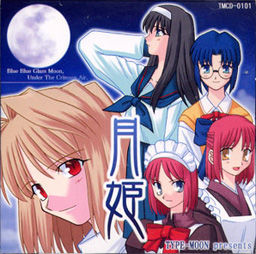
Tsukihime is a doujin visual novel, released in December 2001 by TYPE-MOON. It tells the story of Tohno Shiki, who since a life-threatening accident in his youth is cursed with the ability to see “lines” on everything around him. Lines along which objects can easily be cut.
Having lived with foster parents for seven years, Shiki is recalled to the household of his family. He had lost all contact with his family over this entire period, making it difficult for him to get used to the new situation. As he gradually learns more about his past, the situation becomes more and more unfamiliar and dangerous.















As a great fan of the manga, I thank you a lot for the game, the patch and all your explanations, I couldn’t do it without you, but it’s now installed (on linux!) and the music is working. Perrrrrfection !
for no reason the ccd file wont mount image on daemon tools is there something i am missing?
Hello,
Thank you so much for the help. Just quick question. I didn’t use at all the .img files at all in part two of the downloads. Is the part two download useless? Do I need the part two file? Tsukihime seems to open fine with no problems. I just want to make sure that I’m not missing anything by not using the part two download.
I have the same question, so is Tsukihime.part 2 needed?
I don’t know what’s wrong here, is it on my side or your side?
The only thing that works is the .CCD file but it is solely filled with the VN’s soundtrack. The .IMG file does not even loud, gives off an error message.
If it at all matters my system is set to Jap locale. I’ll report back after trying other downloads.. =|
i have a problem, after i finish it says something about needing to burn a cd
thank you very much
the 1st link, the 1click download link is dead
Soo… Umm… Forgive my stupidity, but the patch asks for an arc.sar file and when I extract the files, I only get a .ccd, an .img and a .sub file. Am I doing something wrong ? Am I missing something ?
.ccd/.sub files are disc images – you need to “mount” them, as if you inserted game’s disc into PC (refer to site’s FAQ section for instructions), install the game, then patch it.
Is downloading both english patches needed or will 1.2 suffice?
You need both. 1.2 is kind of “patch for a patch”.
I’ve tried using PowerIso and Daemon tools to mount the sub and img file. The ccd is just a soundtrack. PowerIso says “The file format is invalid or unsupported” even though img is supported. Daemon tools returns a command line error for some reason. I stumped.
Mount the disc image (Run Tshikihime.ccd)
Then, run the patch 1.1 (this is the installer for the game, so you get to install the original game and the patch at the same time)
Anything else is just next – next….
How do you fix the blur text problem for the english patch?
I have no idea what I’m supposed to do. I can’t burn it onto a disk, I got DAEMON but after mounting it all I get is music on my media player, the .sub still doesnt do anything. I just want to get the game but I have no idea what I’m supposed to do with what programs, it’s just made more complex and I’m getting nowhere.
Mount the disc image (Run Tshikihime.ccd)
Then, run the patch 1.1 (this is the installer for the game, so you get to install the original game and the patch at the same time)
Anything else is just next – next…
I keep getting the same issue as everyone else. Daemon Tools will only recognize the .ccd as a mountable file, and when I right click on the other files and open them with Daemon Tools, it returns an “Error in command line” error. You sure there isn’t an issue with the files you’ve uploaded? Has anyone succeeded? I’ve been successful with several other VNs on this site, so I don’t think the issue is me.
Mount the disc image (Run Tshikihime.ccd)
Then, run the patch 1.1 (this is the installer for the game, so you get to install the original game and the patch at the same time)
Anything else is just next – next…
Instead of doing all the hard work, why not go out, spend 5 dollars or less on CD-R/RWs and do it this way?
Use whatever image burning software you have (i use ImgBurn) and burn the .ccd file to a disc. Then, open the first patch file and install the game, using the disc in your drive rather than the extracted .ccd files. Install 1.2 afterwards. Then use CDex to convert the files on the CD (go to track 11, then the Tsukihime with the red ISO icon) to OGG format by going into options > encoder and changing your encoder to OGG Vorbis. Convert the CD tracks to compressed audio files and put them in the CD folder of the game and named them track01, track02, etc…. the rest is in chapter 7 of the ReadMe. Actually all of it is.
I had a hard time using CDex because it wouldn’t recognize either of the virtual drive software i have, so it made it way easier to just buy a few blank CDs and install everything from the disc.
I decided to just make a straightforward tutorial for anyone having my issue in which a virtual drive was not recognized in CDex. I followed other tutorials above but only came to failure. Plus, I had an issue after installation from using the extracted files of the .ccd, in which no image files would load during gameplay because they were not found (says the stderr.txt file that appears once you start the game for the first time). However, putting the image on a disc and installing from there fixed my issue. It must be my OS because I don’t see this issue anywhere else in the comments and I’m sure the majority of commenters are on Windows 7…. I’m running Windows 8.1 64-bit. I honestly hope this helps in the future, and I really hope too that I’m not the only one with the issue…
because windows 8 can mount disc image files by default, I tried mounting it, but it displays an error message saying “The Disc Image File is Corrupted”.
Is win8 ust not capabale of mounting this particular image file for some reason? do I need to use daemontools or similar software?
I think I did read someone saying the files are corrupted in the comment.
Finally got this to work!! For everyone having problems understanding how to install the game, understand that kiryu-kun is being literal when he says to mount the CD image then run the english patch installer. As in mount the CCD file in daemon tools then run the patch from the tsukihime folder with the CCD file in your virtual drive. Then when it asks you for arc.sar the file location will be displayed in the window and you just hit next. After that it’s simple. So simple I can’t believe it’s taken me 3 years to figure this out.
it keeps saying please specify location of arc.sar data achive from the Tuskihime cd. I have no idea wht to do, its unzipped, i got all downloads please help me
Im sorry, I have it saying it’s installed, and I’ve mounted the ccd thing, downloaded everything, but all I get it a note and no game. It doesn’t actually open. It sas v.1 installed but nothing else aside from the icon. Please help
it also says installation does not install backround music for t… Please read ch.7 of the readme for info.
ok the entirety of the issue is that it is saying I have Tsuki Hime, the disk file corupted. I have downloaded the game 6 times now and it keeps giving me the same bs. If you guys could message me back that would be great.
Is the game only play in Windows 98/Me/2000/XP? And Cant play in Windows 7?
Actually i know how to install it with daemon tools and such as thing other. But when i opened inst.exe インスタル (install) at program file, it said “because copy file is failure, it cant install” in japanesse.
Can anybody help me with this problem?
Install it in different directory (this advice is good for many other games as well) – “Program Files” is kind of privileged directory and requires administrative permissions to write anything into.
Okay. Thank you, Admin. And somehow finally i have fixed the problem.
😀
Yaaaay
Any Idea on how to fix the blur text issue with the eng patch Admin sir?
because windows 8 can mount disc image files by default, I tried mounting it, but it displays an error message saying “The Disc Image File is Corrupted”.
Is win8 ust not capabale of mounting this particular image file for some reason? do I need to use daemontools or similar software?
I think I did read someone saying the files are corrupted in the comment.
Can someone help me with the music? I’ve installed the game (and English patch) perfectly. But even though I read and tried to follow the steps about the music in readme (chapter 7), I still don’t understand at all.
Well, gents, I figured out what the arc.sar problem was.
Pay attention to what drive you are mounting the game on, and when you start up the 1.1 patch and get to the arc.sar part, make sure you change the letter of the driver to the same as the mounted driver.
Ex.
Patch: \E:tsukihimearc.sar\ -> change the \E:\ to the mounted driver’s (mine was Q) -> now it should look like this \Q:tsukihimearc.sar\
hey guys,i got a minor prb, game works fine and all but i cant switch to full screen…somethin i missed? (usin windows7 if that helps somehow)
nevermind…just read the readme file…
i somehow managed to download the game but it’s in japanese, how to I get it in english?
the english patch v 1.1 download is broken
Alright guys. here’s the step.
1. Download those shits (Tsukihime and Tsukihime_English)
2. Extract Tsukihime.rar
3. Just mount Tsukihime.cdd(using Daemon Tools etc) and do not run inst.exe.
4. Run English patch and it will ask u to locate a certain file. Just change the Disk Letter to your mounted image earlier.
5. Finish. Have fun.
yes, thank you. it’s been awhile since I’ve used daemon tools, and have forgotten so much. the game is running just from following this. (using Windows 7)
i have downloaded the game, mounted it with Daemon tools, change the file location when asked and i have the 1.2 patch but the file does not contain the game. Help plz
I’m only seeing audio files in the image, and because of this, the installer can’t find the arc file.
So quick question, I properly managed to install Tsukihime on my computer, but now the icon wont launch. Is it a problem on my end?
(https://www.daemon-tools.cc/products/dtLite) download this “free with ad” after finished downloading patch 1.1 and 1.2. And the game itself.
After finished installing daemon tool. Open that shit up.
Go to “Add drive” within Daemon tool.
Virtual Drive: DT
DVD Region: not set
Mount to : Folder “for this one, create a new folder that’s empty, then click that … thing and choose the folder”
click “Add drive”
And then click that rectangle looking drive, just below, or bottom left the overall interface of daemon tool. CLick dat, go to the folder, open the tsuki hime.ccd one. Then you will see a music note on it. Click dat, if this open up a folder with stuff in it. Then you succeed. Now quit that shit.
Open “Tsukihime_English_v1.1”, basically the patch of the game that you’ve downloaded. It will asks for “arc.sar”. Then just simply go to that folder that you have just created. You will see that the folder of the new folder turns out to be a disk shape. Click into that folder, then go to “tsukihime” folder. Then double click, or just choose “arc.sar”. Then you downloaded the first patch.
After you’re done with that, you then download the “Tsukihime_English_v1.2_update”
Do the exact same thing. After you’re done. Go to your game directory, or the folder that you’ve decided to download the actual game in. You will sees that there’s no sound. Go to the read me notepad to figure it out by yourself 😉
Do the exact same thing. After you’re done. Go to your game directory, or the folder that you’ve decided to download the actual game in. You will sees that there’s no sound.
So here’s a way to have music in your game. Tho no VA coz, meh.
(http://www.mediafire.com/download/ei633e3gpi96qwo/Novela+Visual+Tsukihime+%5BEspa%C3%B1ol%5D.rar)
download this. Extract “CD” only. After doing that, copy and place those CD into the tsukihime folder that has “CD” folder as well. Replace it with those track1.ogg or some shit into the folder of Tsukihime with the application to access into the game. And there’s sound now.
Anyone know how to fix the blur text problem with the eng patch?
Thank You.
I have been facing the blur text issue with the english patch on my windows 10 pc, The only way I finally managed to fix this issue was by running windows xp(32bit) through virtual box and downloading and installing the game in windows XP.
I have been facing the blur text issue with the english patch on my windows 10 pc, The only way I finally managed to fix this issue was by running windows xp(32bit) through virtual box and downloading and installing the game in windows XP.
Hope all you future gamers will find this useful.
I can’t download the file. Every time go to the link and press download it says “this site can’t be reached”…..
i was able to make it work but,,,, how can i fullscreen this game? it doesn’t have any fullscreen option so,,, it will be pretty good if someone will tell me how to fullscreen this game! :—))))
Anyone has a solution for the text problems in the game? It’s blurred and doesn’t load properly.
Windows 10 does not read the ccd or img file, saying it’s corrupt. Virtual CloneDrive also reads the img as corrupt, ccd as an audio file. Any solutions?
Surely a way too late reply, but if it can help anyone with this similar issue :
The image file is indeed weird. But you can open it with IsoBuster (a data recovery tool) and from here, you’ll be able to extract the data required for the install.
You’ll see 2 Tsukihime folder, one with japanese file name, and one with no japanese character in the files. The one without japanese character works, didn’t test the other. Extract the entire folder somewhere and you’ll then be able to access the arc.sar file required for the english install, located in the TSUKIH~1 folder.
Can you explain that in more detail ? I tried to open with with the ISOBuster and the file just becomes more corrupt.
Just realized this is the Ever After – Music from Tsukime Reproduction, thanks!
Image is broken.
@Igotitworked Thank you so much!
When I first got this game, being aware of its popularity, I had huge expectations – only to see them quickly crushed.
Here’s a Summary of Tsukihime for you:
Head about to explode, Thump, thump, thump, Vampires, Rinse and repeat like 17 times, H-scene, The End.
Only worthwhile characters are Hisui and maybe Arihiko (tho they butcher him in the anime). Dude, I had more fun playing Monmusu Quest and that game was bad!!!
Stupid plot. Hateful characters. Boring af neverending routes. No voice. No Music (Yeah, believe or not this crappy game doesn’t even have bgm, the most basic think you’d expect – how mediocre). Oh and Fuck! not even Fullscreen mode (Are you fucking serious?)
Edit: there actually is a Fullscreen toggle, and just guess what it is, Alt+Enter… no… it’s the F key!!! (Sigh) Also there’s some key, dunno which, to make text appear instantly, unless you like torturing yourself with the slowest text in vn history.
Fuck this game. Fuck Typemoon. And Fuck Akiha. I fucking hated that mood-swing bitch.
3/10. Don’t play this. You’ve been warned!
Lol
I dont remember it being that bad it was my one of first Visual Novels I played long time ago.
A useful tip in older VNs to fullscreen usually you need to press “Alt + Enter” or “F”
(edit : I read your edit only after I finished typing lol)
hmm…
BGM is not present most of the times and I dont mind it either cuz its unnecessary. Whenever I play plot/suspense based VNs I turn bgm down or just mute it anyways I dont like annoying music when Im reading suspense filled lines
yes there is a lack of bgm but its not that bad simple clock ticking sound is good enough at times
I would complaint on art though its not well done, routes can be just too long and sometimes boring
the plot is kinda rough but its enjoyable, Its more of a beginner VN if you are playing VNs for years it might look lacklustre
and its kinda mean Akiha is fucking hot ok?
LOL, it has bgm. You are just stupid and lazy to search for solutions. Do you even open readme.txt? Btw, this game is popular in its own way, you are just unfortunate or maybe Dumb, lololololol.
You lost all credibility when you said Monmusu Quest, one of the best eroge, was bad.
what a hater lmao
you cant even download these the hosting site has you finish a captcha and theres a button to create download link but the button doesnt work in chrome or firefox. host it somewhere less useless plz, ffs google drive is fine
worked fine for me, man. just gave me like a two-minute timer first before the button worked