
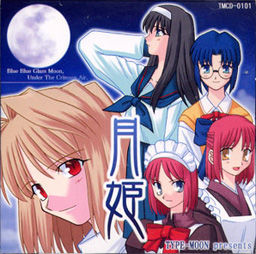
Tsukihime is a doujin visual novel, released in December 2001 by TYPE-MOON. It tells the story of Tohno Shiki, who since a life-threatening accident in his youth is cursed with the ability to see “lines” on everything around him. Lines along which objects can easily be cut.
Having lived with foster parents for seven years, Shiki is recalled to the household of his family. He had lost all contact with his family over this entire period, making it difficult for him to get used to the new situation. As he gradually learns more about his past, the situation becomes more and more unfamiliar and dangerous.

















Please disregard all of that, as is my luck I figured it out seconds after posting that message. To those having problems I recommend Isobuster and extracting the ISO file to your area of choice, then focus on running the patch properly. Once the patch is set up try the folder the patch created and look for the application itself. The game should work properly from there aside from the music, which has to be accessed through a different way that the patch explains. Hopefully this helps someone out.
So how do I do this?
I’ve downloaded and extracted the file. I then used Isobuster to extract an iso file from the img file in the rar, but now what? When I mount it says it’s corrupted or something and I can’t access it
Do I have to re download?
For everyone who’s having a hard time downloading this game: Download and Install Isobuster and the English Patch. Using Isobuster, go to File>Open Image File and open the file “Tsukihime.ccd” You should get something like CD/Session 1/Session 2/Track 11, etc. Extract the file named “TSUKIHIME” (It’s after the word “ISO” in a red box) to your desktop. Install the english patch through the setup wizard. When it asks to locate “arc.sar,” browse for it in the “TSUKIHIME” folder on your desktop (It’s in the “TSUKIH~1” folder). Ta-da! Installed. As for the music, I’m working on that myself. I’ll probably post later on.
thank you soooooooooo muuuuuuuuuuuch >___<
No problem. As for the music, just read part 7 of the README that pops up, and you’ll be cool. Sucks that there is no voice acting, though. 🙁
How to you extract the music? I tried mount the Tsuki Hime.ccd and extract music files from it but no file was created. I am out of idea.
Please help.
This is the most classic game ever, u can’t demand Voice’s here… u should even be happy there is background sound althoguh =/ you really don’t know who Type-Moon is do you?
This game is what made TYPE-MOON what it is today!
go fuck yourself.
Bieber.
You Sir, got yourself an internet cookie right now.
I searched the interbewz in despair for WEEKS downloaded every single version and tried everything out (and got an amazing amout of viruses during that time), but no fucking person on the internetz posted in any forum i found that i actually have to open the ccd and not the img -_- i even tried to convert the img to iso (which failed miserably); therefor you are my hero. I don’t think I’d ever be able to play this game without you.
Thank You.
I extracted the Tsukihime folder to my desktop. The only problem is there is no Tsuki-1 folder in it. Is there any easier way to install Tsukihime?
I’m not seeing the Tsukihime folder at all. Just Session 1 with 10 tracks and session 2 with track 11. No folders, or anything labeled Tsukihime. I’m not even seeing the red box… Help, please!
On the off-chance that our wonderful admin might read this 😉
Could we hope for an upload of Kagetsu Tohya (which can be considered a sequel)? I am really curious about it, and currently just fool around with Melty Blood since I cannot find it anywhere.
P.S.: Keep up the good work, admin. I’ve got countless good novels from this site and am looking forward to everything you post~
just to confirm,tsukihime vn dont have any voice for the characters,do they?
admin, when will you upload kagetsu tohya? it is sort of sequel for tsukihime
Both mirrors are not working for me, anyone mind uploading on another mirror?
How do i put the music ?? :/
If you followed RaitoDemonSakura’s advice, and have used Isobuster to install then I can help. Make sure you’ve installed in the same way as his instructions then read the Read Me file part 7. It will tell you to use CDex to extract the music off the disc. We obviously don’t have a copy, so instead of that method, open the CCD file again in Isobuster. Click “Session 1” in the sidebar menu and you should see ten music files. Extract these to a folder; they will be WAV files upon initial extraction. Use any free audio converter to convert these to Ogg format, then move them to the “CD” folder the read me talks about. Run the game and voila.
there two english patch what the difference ?
First translates the game. second is only an update – if fixes some typos/errors in translation
NOW THIS MEANS BUSINESS thanks!
hey, I don’t notice this before… but after I played it, I suddenly remembered an anime… I think this is one of the anime that I watch when I was a kid though I didn’t remember the main heroine Arcueid but I do remember the twin maid though :3 this takes me back, seriously X3 hehe, thanks again for uploading this one admin… now I just remembered one of most favorite anime though I though I only remembered the first episode…. I think its the first episode? or did I watch the second episode…? arrgghh just forget it, what important is I did watch the anime and it got an interesting storyline and I bet the VN is better…
what makes me remember:
1.the breaking line*the stitches?*
2.wear glasses to dispel it, kinda
There is no Tsukihime anime. What you saw was probably just a poor fan made thing, or something like that.
Well, actually, there is. Shingetsutan/Lunar Legend Tsukihime, it came out in 2003/2004.
Its an internet meme…some fans don’t acknowledge the existence of the anime because it fell extremely short of expectations.
so i must have dreamed it, since i saw the anime quite some time ago and last night i was talking with a friend about it(he must have dreamed it too).
Actually thats why i am here now downloading the game XDDDD.
I just wanted to ask does this game contain nudity,so that my bro can play it too…. thanx…
This game is tagged 18+, so yeah. Also, if you have questions like that, check out the vndb entry of the game. Sexual-wise the game has the following tags there: Late Sexual Content, Low Sexual Content, Anal Sex, Long Sexual Scenes. although I haven’t ever given a crap about this whole “inappropriate age” business, if it matters for you, then no, it’S not for your bro.
Actually, it’s possible to install the game without the ero-scenes through the installation, which should make it a bit more for all-ages. I’m not sure if it removes the explicit violence though.
lol what do u expect
this site is for eroge
and eroge has sex in it
@Tj
This game contains nudity. The English patch even mentions it! The patch contains a feature to censor/disable the nudity stuff, though.
Yeah it has, I’ve already played it. As they said, try to disable it (:
ok im having problems, i originally thought i patched the game, i followed all of Raito’s instructions and put it in and ARC.SAR and everything but when i open the application i see the two options at the bottom of the screen both are in japanese characters… when i click on the right option it closes the game and when i click on the left option it opens up my browser? making me search for a program?? i don’t understand why those characters are japanese and i don’t know what it wants me to find. im confused so can someone help me?
Just started playing this, looks great, thanks for the help RaitoDemonSakura and Netsuki
is there Kagetsu Tohya?
Ok im not sure whats happened here. I downloaded the 2 parts of Tsukihime VN. Now im not even at the translation yet, but ive been given 3 files.
Tsuki Hime.ccd
Tsuki Hime (IMG file) which i cant mount. Im using Power ISO and Daemon tools pro.
and finally Tsuki Hime.sub
Can someone tell me what to do? Ive installed plenty of VN’s before and never got this problem. Thanks in advance 🙂
Please ignore this. Just figured out what RaitonDemonSakura was on about. Cheers
Im sorry but i really need help with the music file. i didnt get a file called CD in with the files i downloaded. i dont know if maybe i just dont know what im doing but i have no where to put the tracks the i have converted to ogg. sorry if the awnser is obviousi just really have no clue..
I have the same problem with ServentSaber , 10 ogg.files ‘re ready but I can’t find “CD folder” , plz help 🙂
What’s the difference between the newer 1.2 english patch and the earlier one? And does ciel’s lesson’s affect anything in the game?
mostely typo error fixes and such.
Ciel’s lessons are HILARIOUS skits that play when you make a bad choice that results in your death. Such as choosing to wait to long before attacking Nrvqsr Chaos. You die and she tells you YOU ARE DOING IT WRONG.
Game files have been deleted from Mediafire.
P.S. Thanks for providing all these great games on your site. Much appreciated.
download link doesn’t work. T__T
Could you upload it again, if you have time for it? =)
Could you please re-upload game’s second archive as the one hosted at mediafire is broken.
Thanks.
This instructions posted above mine are right…the below is what I did to run it on my MAC OSX Lion…
a)used ISOBUSTER (on a pc or mac running VMWARE/Parallels/VirtualBox and WinXP or Win7, since ISOBUSTER is pc only) to open the CCD file & to extract the “tsukihime” directory (the one that shows under the blue label in ISOBUSTER).
b) Installed the game from the resulting “tsukihime” dir extracted from ISOBUSTER.
c) Also extracted the 10 wav files with ISOBUSTER.
d) Converted the WAV files to OGG, since I’m on OSX, I downloaded the free XLD app to convert sound files.
e) Rename the resulting OFF files with no black space in their names…e.g. “Track 01.ogg” to “Track01.ogg”…since we’ll be using those later…
f) Run the “Tsukihime_English_v1.1.exe”…it;ll ask you for the location of the “arc.sar” file…I used the resulting from the install in c:\Program Files\月姫\arc.sar
g) “Tsukihime_English_v1.1.exe” doesn’t overwrite, but creates a new folder called “Tsukihime” in c:\Program Files\ Apply the “Tsukihime_English_v1.2_update.exe” patch onto that directory,
h) Copy the renamed OGG files with no blank spaces in their names to the “CD” directory that was created bythe English patches in c:\Program Files\Tsukihime\CD
Aside from the ISOBUSTER part, which was faster doing it on a pc or Virtual Mach, converted the WAV to OGG at the OSX level, but installed the game, and patches within WINESKIN for OSX (I used engine WS8Wine1.4 & wineskin script 2.5.4), and game seems to work ok, with sound)…just in case, I added DirectX9 from Winetricks…
Why can’t I use fullscreen or is it that I missed doing something?
Got a problem, when i played the novel the intro appeared but when i tried the actual game the screen went black, only the letters were appearing, anyone know what i can do?
Does this include the plus pack (kind of an expansion) with the idk… side finals?…
I mounted it with ISOBuster, extracted TSUKIHIME like directed, tried installing without English patch and I get “Title image does not exist”. I don’t want to install with English patch… Can someone tell me what’s wrong?
Hey. I have tsukihime all set for playing, but when i launch the game and try to play it on full screen, i can’t move the mouse, and for some reason, ciel pops up out of nowhere just to converse about the game, but that happened only once when I try to launch tsukihime full screen again, ciel didn’t pop out, but the problem is still there, I can’t move the mouse. Why is that?
Hmmmm I am not sure if you had the same problem I have, but when I played tsukihime my mouse seemed frozen but it was somewhat invisible. Like I would move it there would be lag and it would appear in a different place. I eventually found out that I could guess the position of the mouse without seeing it and I played through a route like that. So ya try moving the mouse slowly to see if options pop up and you might be able to play.
is there any hope for kagetsu tohya?
To get the game music WITHOUT having to burn a CD
In ISOBuster, click on Session 1, highlight all the tracks, right-click and select ‘Extract Objects’ & select an output folder. This will extract the game music as .wav files. You can then use CDex or some other program to convert them to the ogg files the translation README recommends.
Sir, can u reupload the game with simpler way to instal it?
i am newbie at technology 😀
so i really appreciate it if u read my comment and grant my wish 😀
thanks you sir 😀
and if u can, please upload “kagetsu tohya”
its sequel from tsukihime 😀
sorry for bad english
I followed all of Raito’s instructions up to after installing the english patches. Could someone help me with the rest because I have no idea what to do now. If I’m doing this right,
I’ve been trying to open the INST file. However, I cannot make any sense out of it. I tried to open the TSUKIH 1 folder, but I keep getting something that I can’t understand.
The game lags like crazy, freezes for like 3 seconds frequently. If anyone knows how to fix this I’d be glad 🙂 although it’s still somehow playable. playing on windows 7 64bit.
the lag problem solved. although I want to play this game in japanese and not english, meaning I run the game from the orginial tsukihime folder i downloaded. the problem is that I don’t know how to get the music to work in this folder. tried placing the cd folder pretty much everywhere but the BGM won’t play. if anyone could help I would be glad :p thank you.
Is this version censored?
i did everything with the music, as it is said in the readme. but even with the .ogg files in the CD folder, i don’t get music. or is it the fact that im only in the prologue? isn’t there any music in there?
problem solved. i called them track1.ogg etc. but it turns out i needed to call them just track1 etc
why is it that i get wrong IP address when i attempt to make a download from downloadani
I can’t play the game on full screen. Is this a bug with Seven ?
Ah, found it. You must click on f to play in full screen.
when i try to extract the file using isobuster it tells me that it needs to allocate a different amount of space than usual(?) then it says that cant read the file. it probably doesnt help that all the files have strange symbols instead of letters.
when you go to screen title and want to load the game as it says save memory and as i click on it, it doesn’t work can someone help me?
After I extracted it and installed the english patch, it try to install it and get an error. Help?
Um nvm got it. but its in japanese even though i installed the english patch… help
Just about finished all the routes…and now I really wanna play kagetsu tohya…really hope that also ends up here!~ Thanks admin!
for some reason i still can’t get the music to work.I converted the music files into .ogg and moved them to the appropriate folder in the C:Program FilesTsukihimeCD. When it wasn’t working at first i noticed that some ppl deleted the space in Track 01.ogg so i also changed them all to Track01.ogg but still no luck. Any ideas?
I only have the free version of IsoBuster, can anyone tell another program to use; you can’t extract with the free version. Could you also include a step by step download method?
part 2 isnt workig help !!!!!
HELP HELP HELP HELP<<>>>HELP HELP HELP HELP HELP HELP
This game is not as good as Truelove, is there anyone as good as or better?
Here is how i get it to work
#not sure if this is required but my system has been set Japanese Locale. OS is win7 x64
#extract Tsukihime.part1.rar, will see 3 files
#mount ‘Tsuki Hime.ccd’ (mine using daemontool)
#dont launch installer from mounted iso. Directly run patch 1.1 exe
#patch will ask to locate arc.sar which is in the mounted iso in ‘tsukihime’ directory
#run patch 1.2 exe
Rip music
#i use this http://www.fairstars.com/cd_ripper/download.html free, easy to use, low footprint (3mb+)
#rip from cd-da, output as .ogg. Should get 10 files
#rename file e.g. ’01 – Track01.ogg’ => ‘track01.ogg’
#note that after install patch 1.1 there will be a directory named ‘CD’ on game directory. Copy the .ogg files ripped/renamed earlier into this ‘CD’ directory
#launch game tsukihime.exe. If successful should already able to hear music playing at main menu before even start game