
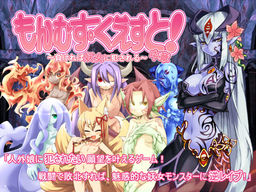
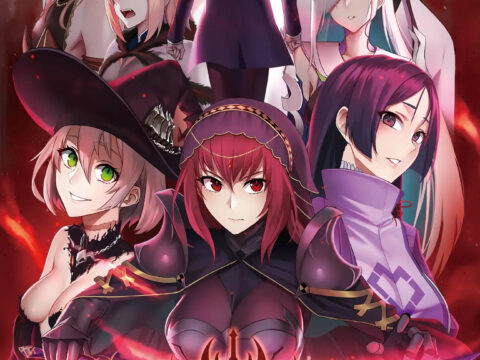
Toro Toro Resistance presents the 2nd act of the massive fantasy RPG adventure!
The story of being reverse-molested by sexy inhuman vixens!
Sweet monster girls seduce and pleasure you! Lose and you will be raped!
Not one scene of boys violating girls. Masochists rejoice!
You are the hero, a young boy.
Battle sexually with diverse characters in a world of humans and creatures.
All the creatures are sexy girls of some species or another! Find them all!
It’s an epic quest. Will your dirty dreams come true?



I have converion part 1 of monster girl quest to my part to but now my part to don t go anymore why?
so i think one of the parts is corrupted, wintrar gives me this error:
! C:UsersLuisDownloadsMonsterGirlQuest2.part1.rar: No se puede crear MonsterGirlQuest2mod?????????????????.ini
El nombre de archivo, el nombre de directorio o la sintaxis de la etiqueta del volumen no son correctos.
! C:UsersLuisDownloadsMonsterGirlQuest2.part1.rar: Intentando corregir el nombre de fichero no válido
! C:UsersLuisDownloadsMonsterGirlQuest2.part1.rar: Renombrando MonsterGirlQuest2mod?????????????????.ini a MonsterGirlQuest2mod_________________.ini
! C:UsersLuisDownloadsMonsterGirlQuest2.part1.rar: No se puede crear MonsterGirlQuest2mod??????onabe.png
El nombre de archivo, el nombre de directorio o la sintaxis de la etiqueta del volumen no son correctos.
! C:UsersLuisDownloadsMonsterGirlQuest2.part1.rar: Intentando corregir el nombre de fichero no válido
! C:UsersLuisDownloadsMonsterGirlQuest2.part1.rar: Renombrando MonsterGirlQuest2mod??????onabe.png a MonsterGirlQuest2mod______onabe.png
! C:UsersLuisDownloadsMonsterGirlQuest2.part1.rar: No se puede crear MonsterGirlQuest2mod??????story.ini
El nombre de archivo, el nombre de directorio o la sintaxis de la etiqueta del volumen no son correctos.
! C:UsersLuisDownloadsMonsterGirlQuest2.part1.rar: Intentando corregir el nombre de fichero no válido
! C:UsersLuisDownloadsMonsterGirlQuest2.part1.rar: Renombrando MonsterGirlQuest2mod??????story.ini a MonsterGirlQuest2mod______story.ini
I also got those corrupted messages, but it seems you can just close and continue the extraction.
Though when I opened it and tried playing it, the text were really tiny for some reason, not ineligible, but close to it, especially on window’s mode, can anyone help with this?
The files are corrupted, the mod folder has a folder labelled ???????????? which has an .ini also labelled ??????????????????????????
I am unable to import my part 1 file, according to the read me all i need ti to copy and paste gloval.sav onto MGQ2 folder, i do but the option is grayed out.
I saw on the forums that you also had to copy the arc(?).nsa file from the first part then replace it with the MGQ 2 one…
I think it was only the arc.nsa
im able 2 extract the patch but not the 4 rar files getting a ???????????????? message plz help
how to ever play this game and what to do to active it and download my first game data into it.
Rogue is working on the translation of Part 3, but he’s doing it in his free time and will probably take a few more months. A partial translation for the first third of Part 3 is out, though.
For the people having problem with ???????, the game has file names with Japanese characters. You need to have the Japanese language pack installed on your Windows. Also, to successfully play the game you need to set the language for non-Unicode programs to Japanese. In Windows 7 this is in Control Panel -> Region and Language -> Administrative -> Change System Locale. Not sure but WinRAR might also need this to understand the ???? file names.
Just for information I’m using hongfire’ japanese local (name of file “HF pAppLoc”) and work like a charm with most game. I even used to open my ImgBurn CD burning program to write a CD with vocaloid japanese titles, that didn’t work without it. Try it with winrar for fun, might work as well.
I had the same issue with the ????????? files. When I tried to extract it, it kept popping up with more errors, and wouldn’t even finish extraction.
I found a way to fix it! Extract EVERYTHING except the file ‘mod’. From what I can assume, it’s the folder holding all the corrupted files. That way, the extraction should go fine, for those of you having trouble! I tested the game as well, and it works… at least without the English patch, I’m still DLing that.
I don’t think there will be issues.
Sorry for the double post! The English patch works fine, it adds a mod folder of its own and when testing it out, I had no issues.
The ???? files are not corrupted. They are file names with japanese characters, which your Windows won’t understand unless you properly setup your languages.
Step 1: Install the Japanese language pack. In Win7 this is in Control Panel->Region and Language->Keyboards and Languages->Install/uninstall languages (or you can do it directly from Windows Update). To make sure this has been done right, try choosing the Uninstall option and make sure Japanese is in the list of installed languages. However, leave English as the display language. It is enough to have the pack installed.
Step 2: Set the Japanese language for the installer and the game by changing the system locale for non-unicode programs. This MUST be active both when you run the installer and when you run the game. Control Panel->Region and Language->Administrative->Change system locale…->Japanese
Sorry if I called them the wrong thing. The files, even in Japanese locale and with Japanese installed (I type in it all the time as I’m fluent and have many friends over there) showed up as errors and were labeled with ???????. I assumed they were corrupted, but I didn’t know what else to call them…
I was actually just describing how I got it to work on my laptop to hopefully help others.
Thank you for trying to help though, I appreciate it ^^”
When will you have Monster Girl Quest 3 available? Overall, I thought the series have been a fun advanture.
When will you have Monster Girl Quest 3 available (Japanese with English Patch)? The series had been fun overall for me.
help me everytime i click on the game it says a problem has caused the program to stopped working properly. when i open my event viewer it says tht my nsogg.dll has faulting module what shud i do i used to b able to play it
My game works but its all in Japanesse. My uni is in Japas well! What Im I doin wrong?
Please and Thank you!
Ok, I had this same problem, and I just deleted everything and re-extracted the files into the folder and it appears to be working.
Where can I find info on when Monster Girls Quest {art three will be available for DL here?
I love erogedownloads
Sorry for any perceived rudeness but is Monster Girl Quest 3 going to be posted once the English patch comes out? Thank you for delivering these eroges to us over the years.
It’ll be out tommorow.
I don’t see it 😕
http://erogedownload.com/downloads/monster-girl-quest-3/
are parts 1 and 2 incompatible or something? every time i try to combine them in the game it crashes even when i exclude the corrupted parts. can some one help?
most off the zip has error unable to play
! C:\Users\xxxxx\Downloads\Eroge\MonsterGirlQuest2.part1.rar: Cannot create MonsterGirlQuest2\mod\??????\???????????.ini
The filename, directory name, or volume label syntax is incorrect.
! C:\Users\xxxxx\Downloads\Eroge\MonsterGirlQuest2.part1.rar: Attempting to correct the invalid file name
! C:\Users\xxxxx\Downloads\Eroge\MonsterGirlQuest2.part1.rar: Renaming MonsterGirlQuest2\mod\??????\???????????.ini to MonsterGirlQuest2\mod\______\___________.ini
! C:\Users\xxxxx\Downloads\Eroge\MonsterGirlQuest2.part1.rar: Cannot create MonsterGirlQuest2\mod\??????\onabe.png
The filename, directory name, or volume label syntax is incorrect.
! C:\Users\xxxxx\Downloads\Eroge\MonsterGirlQuest2.part1.rar: Attempting to correct the invalid file name
! C:\Users\xxxxx\Downloads\Eroge\MonsterGirlQuest2.part1.rar: Renaming MonsterGirlQuest2\mod\??????\onabe.png to MonsterGirlQuest2\mod\______\onabe.png
! C:\Users\xxxxx\Downloads\Eroge\MonsterGirlQuest2.part1.rar: Cannot create MonsterGirlQuest2\mod\??????\story.ini
The filename, directory name, or volume label syntax is incorrect.
! C:\Users\xxxxx\Downloads\Eroge\MonsterGirlQuest2.part1.rar: Attempting to correct the invalid file name
! C:\Users\xxxxx\Downloads\Eroge\MonsterGirlQuest2.part1.rar: Renaming MonsterGirlQuest2\mod\??????\story.ini to MonsterGirlQuest2\mod\______\story.ini
I have the game running, and I’ve already done that Japanese locale thing, but at least half of the stuff is still in Japanese. What do. I didn’t have this problem with the first part.
hey, i tried to save game but i can, when i want to save, there is a window appear with ????? and say don’t change the text, what i must do for this?
you do as it says..
don’t change or add any text in the text box..
and you get to save at “SAVE LOCATION” only..
it needs to be done so that the game can run perfectly fine
I can run the game perfectly fine..
but at one point my game crashes once..
after that, I can start the game again, but all the save data and monster pedia are gone..
when I checked the installation folder, the save data are still there.. what should I do?
same probelem here
i’ve found a solution that worked for me. Basiacally I took the .rar files from the part that I downloaded the first time i downloaded them and replaced all the files with them, but i kept the save and save image. So basically redownload the game or use the files from before and put the save that wouldn’t load before in the save folder(you DO NOT need to import a save from the first game(replace the gloval.sav file)
if you do import your save again, you’ll get your stats from the first part, but if you don’t care about that, its unnecessary.
Anyone have a copy of the 1.5 patch, not the 1.05?
I’ve copied arc.nsa of MGQ1 to MGQ2 but monsterpedia of MGQ1 not appear in MGQ2
Just finished MGQ1 and went to start MGQ2 but it isn’t giving me the option to import my game clear data, even going into the extra menu it’s greyed out
What can I do to fix this?
PLEASE HELP i dont get this at all. How do i continue playing after completing part 1? I have the rars (and english patch) for part 2 but theres no instructions on how to set it up or transfer the game completion save from part 1.
I really want to continue the rest of the game as soon as possible.
im sorry,im new to this….but can someone tell me do i need to install it in the first monster quest girl folder or not?did it will continue right after where it end in part 1 with all our status and item? im new to eroge though….monster quest was my third game and i find it quite interesting than other i have played….. i would be happy if someone could reply to this message….im stuck….. please
because no one reply to me i try something crazy and it worked out.i went to extra and open part1 conversion, copied the arc.nsa file like been told and tried the game but no save data is shown….so i try to copy the part1 save folder and paste it in part 2. i basically select dont copy if the file in part 2 is larger and select copy and replace if file in part 1 was larger…to anyone having the same problem i hope you will sucess….and just try some thing crazy…it may work…just don’t delete the rar file.in case your trying failed just reextract ang try something new.good luck
cannot axtract the file due to it file have japanesse letter.
and probely my os just profesional. even though i fallow all the instruction
Arigatou Or Thank you~
Upon copying the arc.nsa from the Mon_Que Part 1 and using the “Part 1 Conversion” option ingame, I found that the Monsterpedia data was all missing.
To reconcile this I tested copying the arc1.nsa and the arc2.nsa files aswell and upon repeating the “Part 1 Conversion” option, all the Monsterpedia entries are added.
This may be obvious to some people but I thought I’d mention it just incase it might help someone else… The patch readme has quotes around the file name, and indicates a singular item as opposed to plural items.
Upon doing this and rejoicing for a while then trying to play the story, I have identified that copying the two additional files causes an error at that point. After deleting \arc1.nsa\ and \arc2.nsa\ files in previously added and putting the 2 files that came with the game back in, The error with the story was fixed and all the Monsterpedia data remains available.
– Steps taken summary –
1) In \MonsterGirlQuest2\ folder…
copy \arc1.nsa\(841mb) and \arc2.nsa\(43.8mb) to desktop.
2) In \MonsterGirlQuest\ folder…
copy \arc.nsa\ \arc1.nsa\(11.7mb) and \arc2.nsa\(8.82mb).
3) Back in \MonsterGirlQuest2\ folder…
paste the 3 files from step 2 into the folder.
If it askes if you want to replace existing files say \yes.\
4) Enter \Monster Girl Quest Part 2\
Use the \Part 1 Conversion\ option then exit the game.
5) On desktop…
Copy \arc1.nsa\(841mb) and \arc2.nsa\(43.8mb).
6) Back in \MonsterGirlQuest2\ folder…
paste the 2 files from step 5 into the folder.
If it askes if you want to replace existing files say \yes.\
– Result –
All Monsterpedia data form Part 1 available in Part 2 and no error in Storyplay.
MSG part 1 came with an arc2 file?
Didn’t for me…
Also, MSG P2 also came with an arc3 and arc4. Leave them as is? Re-name them? As stated above, MSG P1 didn’t come with an arc2 file nor was arc1 11.7 (or 12) mb. So I’m thoroughly confused.
I’m still trying to fix my game, but I would suggest you only worry about the mentioned arc files. The new ones may pertain exclusively to the second part of the game.
If anyone is stuck with windows 8.1, don’t forget to copy the save folder. I found that following this trick along with copying the save folder helps a lot.
Gaaaaaah!!!! How do I play this stupid game?!?!?!
im playing this game its good but????when IM playing its lagging >>>>how can I fix this>>>> sry for my bad english ..pls help me
Everything seems to go perfect except a little after I import my MGQ 1 save it gives me a message saying
099.txt line: 19811
\sean0160
>bg \BG/bg077.bmp
It crashes right as i accept the message. Any ideas what this means?
You need to replace the save data “gloval.sav” from MGQ Part 1 and follow the steps from Krammer.
I need help wen i instal the patch onli tanslate the title screen the text continues in japanese please help u.u (sorry for my bad english)
the main game works perfectly fine for me with no issues and I beat it but when I tired the extra stories I keeps getting errors something about NSA and textlines
When I try to start the game japanese text appears in an error box, I have tried with and without the english patch but it always pops up. Please help!
I just tried opening it again, and it worked. I guess that you can’t have chapter 1 and 2 open at the same time… 😛
I have a problem when I turn on the game everything is fine, but when I start a new game all the text is very tiny and it can not be read. Please help…
(Sorry for my bad english)
People who have problem white save import grayed Copy gloval.sav in the main folder not in the save folder a dont know what happened but a just see the gloval.sav in the main folder and copy to save folder of part 2 and them the save import work normal
sorry for the (engrish) i dont know much
Ok, I’ve followed the instructions but every time I import my MGQ1 save and then get to text about finding Undine, this shows up:
099.txt line: 19811
\sean0160
>bg \BG/bg077.bmp
…and of course crashes the game.
Does anybody know how to counter this and make it work properly? It’s so irritating.
just re-install your game..after that copy the ‘ arc.nsa ‘ thing..
then,copy your latest save data MGQ1 and paste to ‘ folder save MGQ2 ‘
no need to copy gloval.sav thing..just copy your save data MGQ1..
enter MGQ2 and load your save data..it works for me..
i have the same problem, i looked in the files and backgrounds 077 until i think 155 are missing, thats why it won’t work i just have to find them.
Did you find the files?
I too have the “looking for Undine error”
The third link is broke. I love this game and would love to play the next part so if you are able to please fix this.
Link part 2 dissapear or has been moved. Please fix this. I cannot download from downloadani.me
Tried System Locale, Format, Language, Region and I still couldn’t get rid of those damn ?????????????? when extracting. Can someone please copy and paste the FOLDER name and the .ini FILENAME here instead? Instead, I could just easily rename it manually. Thank you in advance!
To fix the message:
099.txt line: 19811
\sean0160
>bg \BG/bg077.bmp
ONLY copy the arc.nsa file to the moster quest 2 folder, not arc.nsa1 or arc.nsa2
The BGM didn’t install for me, do I need to install the third game just to have the music or what?
I also tried moving the BGM from MGQ 1 but some songs play on spots where they shouldn’t be, for example the battle music plays after a battle or even the main menu music plays in game till a new song comes on.
Nvm I figured it out.
how do you solve that?
Can this work on amazon tablet if so how do I open files
Can this work on amazon tablet if so how do I open files to play game on my tablet
i’m looking for 100% save file for this game….i only found saves for part 1 & 3..not 2
Hello, can someone explain to me how to correctly download the game. I downloaded a RAR opener to get MGQ 1, but for the first part of MGQ 2, it never fully downloads. I really would appreciate the help, I’ve had this problem for a while now.
For whatever reason, the arc#.nsa files seem to break when extracting from most of the free split up .rar parts. For MGQ1 and MGQ2, though, the broken arc#.nsa files usually do work in at least one of those .rar part folders, you just have to find which one doesn’t give you the error when extracting. Usually it’s in one of the first or second .rar parts, and is then overwritten as you extract the others.
MGQ3’s arc2.nsa is broken in all of its .rar parts though. Send help qmq
Not sure what the latter does, but SaveImport carries over your MGQ1 Monsterpedia to MGQ2, an issue some other commenters couldn’t solve without issue below. Hope this helps.
How to use “Part 1 SaveImport”:
– In , copy
– In , paste and replace
– Open
– Extras, “Part 1 SaveImport” should work now.
How to use “Part 1 Conversion”:
– In , copy
– In , paste and replace
– Open
– Extras, “Part 1 Conversion” should work now.
Amazing. I’ll rewrite comment in a sec lmao
HOW TO IMPORT YOUR MGQ1 MONSTERPEDIA TO MGQ2
(+whatever Part 1 Conversion does)
“Part 1 SaveImport”:
– In [MonsterQuest\save], copy [gloval.sav]
– In [MonsterQuest2\save], paste and replace
– Open [mon_que.exe]
– Extras, “Part 1 SaveImport” should work now.
“Part 1 Conversion”:
– In [MonsterQuest], copy [arc.nsa]
– In [MonsterQuest2], paste and replace
– Open [mon_que.exe]
– Extras, “Part 1 Conversion” should work now.
.
Note that [mon_que_NOwordwrap.exe] didn’t seem to recognize [gloval.sav] for me, so I’d just stick to using [mon_que.exe].
Ignore my other comment below. Tried using greater than/less than signs instead of []’s and it killed all the file and folder names qeqSaveImport carries over your MGQ1 Monsterpedia to MGQ2, an issue some other commenters couldn’t solve without issue below. Hope this helps.
ick what a mess qwq
oh well
I cant dowmload it i dont konw why.
can someone help me?
they snuck in some mozart, niceeee
So how do i download part 2? Just download all 3 parts and put them in one folder? can i have a step by step guide that would help thank you!
i give up on this bullshit, i cant get it to run at all it keeps giving me error messages upon opening it.