
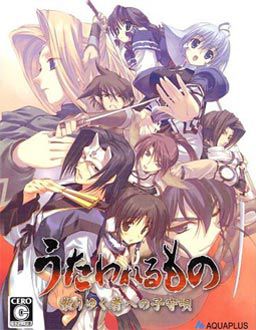
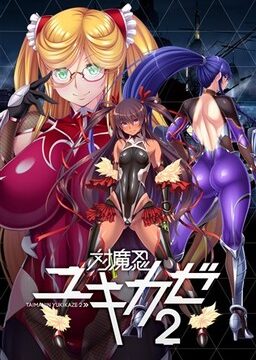
Suffering from a fatal wound, you have lost your memories and were taken back to Eruru’s village. The villagers not only gave you a place to stay, but also a new identity, Hakuoro.
To return their kindness, you helped them by farming and harvesting crops and doing small favours.
However this tiny north eastern village is under the iron clad rule of a difficult daimyo. This greedy person wants to take all of the crops you have worked so hard to harvest as taxes. Rescue the kind people who have looked after you and rise against the lord.













hey admin are the the two filehosts interchangable because from the file sizes it doesn’t appear that way.
This game does crash a lot in Win7 64bit.
I “fixed” the issue, or rather worked around it by:
– install virtual box
– set up a virtual machine WinXP (did not need to switch it to japanese region)
– play the game inside the VM
This works fine, the VM is 32bit, no more crashes.
I got the game and the patch installed just fine. It crashed soon after I started playing. I’m on Win 7 64 bit, so I followed your suggestions and installed the virtual box and the VM Win XP. When I try to run the game, I get an error message from the VM telling me no bootable medium found, system halted. What am I doing wrong? Any help would be much appreciated.
you need to install the windows XP into the box first
my biggest problem is the jap. locale. cause i dont have a OS disk to do all that but im on xp and if that virtual box thing can get me around it (if needed) be very damed happy.
If you are already on WinXp, the virtual machine approach will not change anything for you. It’s just a way to quickly get a WinXP running for those of us on Win7 and Vista64.
But you don’t actually need japanese locale to run this game.
Just make sure you erase any japanese signs from the install path.
So instead of what the installer suggests, you type in ‘C:\Utaware’ for example.
Hey, anyone else having the problem where the game just doesn’t advance at some point in the tatokori gate fight?
You need to destroy all of the fences too. After that, enemy reenforcement should show up.
Okay so I downloaded the files from Mediashare, extracted the files in the 5 rars into one folder. Should I also extract the rars in the DirectX81 folder? And what is the piece update for?No matter what I did, when i run setup via the english patch, when it asked to locate disk, it could never locate the disk, and I can’t completely setup. What am I doing wrong?
You need to mount disc image. Head over to “FAQ” section of this website for instructions.
Hey everytime i try to download Part 2, it doesnt seem to work. Every other part is fine but i only get a few Mbs for part 2
This game had awesome fighting parts to it… but the ending SUCKED!!! I cant figure out what the hell happened…
Just finished this tonight. It’s well worth the effort to get it up and running.
As for the ending… I’m not crying, I got some dust in my eye. 😉
Thank you for the excellent upload.
good for you.
me? oh i tried to download it, but the file has been DELETED. waaaaa…
Um, the link is down for downloading the game. Could you possibly upload another link please? I lost the data on my computer and am trying to regain what I lost. I really enjoy the story of this game and would like to possess it again.
Thank you
excuse me, why is it always tha game stop or crash when Kamyu is trying to give Eruruw a Nick Name???
Help please….
You’re using voice patch? i remember some people had problems with crash in one part. play that bit without voice patch and return to it a few lines later.
Is that so< ok thanx Sir Admin, But as long as i mount Utawarerumono Dvd on daemon tools, everything is just fine… But still crashing after save but it is okay as long the data is saved….
Thanx for this Great Game, very2 good story…
How do we disable the voice patch and re-enable it? i have the problem the game closes upon trying to nick name elraru and read above the patch needs disabling for a few lines.
You can just skip the scene. It hangs at the last syllable, so you can just hold ctrl for that segment only and it should be fine.
Is there no auto-read for this game?
Just click “ctrl”
I can get the game to start in japanese but when i click the english patch after installing the game it tells me i need admin priv to run this program (wich i do) so is it because of win7?
NVM solved it:)
Argh! Part 4 has been deleted and is damaged…
Nvm… seems that the problem was with my wireless and it lost the connection during download
How do i install this? Do i need to use the english patch or install from the .ISO first and then the english patch?
Sorry for another comment so suddently but the english patch seems to fail to “Extract” files when trying to install with it. D: Argh i so want to “play” this but cant get the installation to work… running windows 7 64-bit ultimate. D:
Scratch that! Seems that installing in for example D:\Program files\Stuff\Visual Novels makes the install crash for me. I changed the install path to D:\Uta_Eng and it installed fine.
I’m sorry…I’m hopeless with computers. I extracted the five parts and mounted them with daemontools but when I try to add the patch to the folder it tells me that the folder is full and nothing else can be added. What am I missing here?
Have you installed the game first? It should have created a folder in program files/leaf directory. you copy the patch into there and not in the Deamon tools Virtual CD.
So I have played the game a few days now and its worked great but suddenly, upon opening the window and reloading my save the letter spacing is now irregular. K indo f l ik ethis. In some cases the letters are inside of other words. Now the whole game is doing it. Any help please?
Well i have the game and all but when i run it it only shows the intro. after the intro it freezes and says an error has a occured do to problems. Help?
I have been looking for a guide for this game for quite a while. The only one I have found is for the PS2 version. Its helpful but there are some information that is specific to PS2 ie Special attacks, Team attacks and the skirmishes. If anyone knows a guide or can explain how to do these on this version that would be most helpful. Also besides TTT and CF2 is there any other games like this on here. I love them
Been playing this game on Win7 64, however when I reach the part where Kamus, Aruruu and Yuzuha are giving each other nicknames and Aruruu calls Eruruu “Erunga” the game crashes!
Need help to resolve this issue please!
Also everytime I save the game crashes T_T
Yes please read the previous posts.
Admin states that if you are playing the voice.exe version the game does crash when nicknames are given. to get past it save right before the scene run the utaware-dvd.exe version and save after the scene is done.
Also 64 bit does crash after every save but the save still takes. 32 bit does not have this problem.
Just turn off the sound of the game this part, then you can keep playing without this bug.
This was truly a great game. Really enjoyed it, such a sad ending though 🙁
Whats the different for normal mode and hard mode1,2,3 ?
Will i unlock anything if i am finish playing hard mode ?
The differences are simple, hard mode is of course harder, you will you need ensure playing tutorials for hard as it is notably tougher. Hard mode unlocks (after beating it) the battle data area, which opens a system sorta like Achievements from a xbox, you have several titles you earn, upon earning them all you get the final CG clip which will still be locked atm. Also hard 3 is rumored to unlock the other missing CG clip (hard mode says it unlocks it when you beat it but it doesn’t, im currently on hard 3 so i will confirm this one later). My advise is have strategy on hard modes, you can keep dying and because when you fail you dont loose what exp/lvl up’s you earned this is a way to slowly beat the modes but this is unskilled and will become boring, so i recommend building strategy from protecting certain people and ensure you build your soldiers well. Good luck and hope this helps.
I can’t even extract the iso, it just gives me an error message and quits…bad file?
I am wondering, but if I host this (or any other game listed here) up as a torrent, would you post it here?
I would only post a game that I have downloaded from this site so as to not have different versions, of course.
Hi, I just have a little question about uninstalling the game? I have already played it and beat it and decided to uninstall it and delete it since it takes up quite a bit of memory, but whenever I click uninstall theres a small window that comes up that says something about the setup couldn’t determine my windows version or something? It also said “Setup can continue and ignore any windows-related problems that might occur, but it cannot be guaranteed that the installation will be succesful.” and it asks if I want to continue or not. Sorry if this is a stupid question but I’m not really to good with computers so I don’t know if I should continue or not? The part that says that the installation might not be successful kind of worries me.
Alright nvm, figured it out myself. Thanks anyways
Sorry Im new here but although I know how to install the game any chance someone could tell me where I could find the image to mount
can some1 reupload part5? or give me a different site to dl from plz.
Nvm got it fixed and dled
Holy poop. Why is this in Japanese and what did I do wrong..? ;_;
You didn’t install the EnglishPatch, maybe. 🙂
Holy Jesus hard 3 has some of the stupidest fights ever. I had to do hyberbolic farming for hour for certain fights.
I’m having a problem with the game screen that always stays with cuts on the sides, if anyone knows how to solve this could you please tell me how, thanks advance
admin there is no uncensored patch?
I having trouble with the English patch. It won’t fully install it stops at bgn or some such file before displaying a message stating it hasn’t installed properly and to restart the process. I have tried downloading the files again just in case it was corrupted but the result is the same. I downloaded from the installer maker site and nothing. The game plays and the menu, stats, and everything not story text seems to be in Japanese(barely started). Any assistance would be appreciated. By the by is it possible to upload a English file of the of the game?
torrent please…
Game run good, but I can’t save at all it just don’t create saves and there is a crash where they giving nicknames to each other.. need help ASAP
Save problem – run game as administrator ( game doesn’t have write permissions to create savefiles).
Crash when giving nicknames – bug in voice patched version. Play this part without voices, save bit later and return to voiced version.
*Clap* *Clap* *Clap* This game was fantastic the game’s characters went through obvious development and everything was wrapped up well in the end. In my opinion this is one of the better games on this site.
For those with difficulty to make it work under windows7… I found the easiest way to make it work…
Mouth UTAWARE_DVD.iso with daemon tool and install…. It will create a folder with weird character (Japanese stuff..) just rename the folder with “normal” character. Then install the english patch.. And that’s it.. XD Can’t believe it was that simple.. XD
Hey how do you turn it fullscreen? I changed it in options but it remained the same size and just made everything around it black
Why did it end like that, WHYYYYY!
Admin, I would like your help, please.
I have been installing visual novel for quite some time but I never have problem with it. I have been trying to install the Utawarerumono English patch but it always give me a black windows screen and then disappears. I even googled and follow the steps, like starting off with mounting the iso dvd file, then trying to press the english part. Probably the problem comes because I initially installed the Japanese version with no problem at all, which probably messed up the installation for the english patch. Can you please guide me on how to solve this?
My computer is running on Windows Vista, if that makes any difference.
Thank you in advance.
Nevermind. Find that it works fine after downloading for the 8th time.
Hi…. Well i have a problem with those links, i can´t download them, actually i´m start to thinking that i dont know how to download it.. jejeje someone can help me? please, i really want to play this game. Thanks 😉
If your’re checking back –
When you get past the pesky popup ads that pay the bills, after selecting the free download as I do, you need to fill in the “captcha”-like response, but can’t press the button to continue until after the 120-second countdown:
Type the two words: (from picture image)
[__________________]
“Wait 42 seconds”
-> will eventually enable button “Create download link,”
and after pressing that, your browser will DL to default folder or prompt you for folder.
Hi,
This doesn’t need to stay in permanent comments, but could you change the game descrip to something like “Suffering from a near-fatal wound…”? It just bugs me.
Thanks
I need to ask is there no way to play back the voices already said when playing through? You know the normal sound replay when you bring up the backlog,or did i do something wrong since i can not seem to replay already spoken voices.
is this like a kamidori alchemy meister gameplay (tactical square based)?
Yes, but much simpler – no equipment to be used.
What folder does the game save to? Been looking all over for file path, but no luck.
My game saved to C:\Program Files\Leaf
Yours probably saved to a similar location.
Oh, whoops, just realized you probably meant the game’s save file, not where it installs to. /derp
Sorry about that, I’m not sure yet 😐 I’ll let you know if I find it, unless someone else responds first.
How to play it without the disk? Thanks.
Hello~
I downloaded everything, moved the .dll and utaware-voice.exe filed to the game directory, and copied the UTSOUND.SFS file to the same directory, but when I try to open the game with the utaware-voice.exe, it gives me the following error message:
Error: UTSOUND.SFS has wrong size 37605120, should be 1272057856
Can anyone help? Thank you ;-;
So I installed the game and applied the patch, but it doesn’t look like I can use the ‘Magic’ function in game? I just finished the Suicide Attack mission. Does this function unlock later into the game or should I reinstall?