
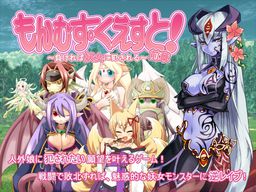
Toro Toro Resistance presents a massive fantasy RPG adventure game!
The story of being reverse-molested by sexy inhuman vixens!
Sweet monster girls seduce and pleasure you!
Lose and you will be raped!
You are the hero, a young boy.
Battle sexually with diverse characters in a world of humans and creatures.
All the creatures are sexy girls of some species or another! Find them all!
It’s an epic quest. Will your dirty dreams come true?















how do you start the game after you’ve downloaded all the parts? im still new to torrents but i have 7-zip, final torrent, and daemon tools and i cant seem to start the game. what am i supposed to do?
If you have 7-zip then click on the part1 file and it should combine and open all the parts. then just copy the contents where ever you want.
After that open the patch rar if you want it in english and copy the contents to the folder you just made.
then just click on the exe.
I donloaded everything and used 7 zip but it still wont work right, and when I do get it to come up it comes up in japanese how do i get it to work normally?
Right-click and extract part1.
i downloaded the English pack how do i play monster girl quest am i missing something
—————————————————————
Tutorial
—————————————————————
Download all the game parts > then open in 7zip, winrar or some other program, > open all the downloaded zip’s and extract them into a folder of your choice > the game should now work (on Japanese) > for English, download the English patch and extract it into the folder that you earlier put the game files in, (remember to take a backup of the game files before doing this just in case something were to go wrong) > then you replace the files in your game folder with the English patch files.
This is how you install and “update” the game “Monster girl quest 1”
If there is another problem then just ask.
—————————————————————
whats with the wrong ip when i want to download
I get the same problem on part 2 and 3.
how do i use the patch
—————————————————————
you add the patch files into your game’s directory and replace all the files that it asks you if you want to replace
—————————————————————
You might want to take a backup of the folder because if something goes wrong then it can corrupt the entire game and other files like saves
—————————————————————
hey, i downloaded the english patch fine, so i extracted it on 7zip and when i open the .exe file it says ‘NSA..’ and all these random letters. Someone help me please i don’t know what to do >.<
I had the same problem for a while. i was extracting the game files into a folder then the english patch into the same folder. the thing is, when you extract the game files, it makes its own game folder. so extract the language patch into the newly made folder and then it works fine.
i downloaded by parts so it ran but it has a japanese translation what parts should I copy
—————————————————————
Part 1 > Part 2 > Part 3 > English patch
—————————————————————
Put the files into the same folder in and in the same order that I wrote at the top
————————————————————–
@admin
i have a problem here, the game is not responding when i was fighting the kraken and the “Pendagram” is being activated please help
a ive solved it, iran my program to japanese, set compatibility to xp sp 2 (cause im using win7), run as admin and load where the kraken fight is, defeat kraken save in town and repatch english (dont forget to backup saved file)
————————————————————-
Tutorial
————————————————————-
Well that’s one way to do it, but there is another way that I used.
————————————————————-
Really simple, beat the kraken before it uses the special attack, I don’t remember what the attack was named but if you beat her before she uses it, the game won’t stop working.
—————————————————————
I also did the same in “monster girl quest 2” when I was fighting a succubus boss (I think it was that) (there was two sisters you were fighting) and the game stopped working when they used a certain special attack, soo, I just thought why not try to defeat them before they use the attack and it worked 😀
—————————————————————
but of course what @kaizer says is easier than fighting and trying to defeat the kraken before she uses the special attack
—————————————————————
I downloaded all three plus english extension and trying to use 7 zip but it says cannt open what should i do how does it work
The link to part 3 of this download doesnt seem to be working for me. part one and part 2 are downloading fine. any reason? It says the link could not be found
Yeah having issues getting the english patch to work, it seems to mess up to whole game when I try to replace the files
I have a problem,when I enter the pirates cave and Alice leaves just as the monster is about to attack me it says mon_que.exe has stopped working.Anyone know what to do?
LOL! Playing this game some how feels like playing Pokemon GBA with adult theme!!
Can’t wait for 3rd part!!
I having problem with part2 download…
They say taht the page can’t be found
—————————————————————
In some regions they have site restrictions (the site could be one of the restricted sites)
Or
—————————————————————
it was just a page/site problem
In that case it have been fixed
—————————————————————
I can do all the stuff to where I extract part 1. I read the readme in the patch file. It tells me that I need to extract the patch into the part 1 folder, but everytime I click on the mon_que.exe to play it I get some little window with Japanese text in it and then on a second line is says:
099.txt line:81603
1 savoff
1 lsp 107, “:a;system\logo.bmp”,79,100
> bg “bg\bg001.bmp
what does this mean? I’ve followed every step I’ve ever heard anyone say on how to do this but it never works. I’ve even changed the locale but it still doesn’t work. Can’t someone just upload a full english version or at least the parts pre patched to mediafire or something? If not can I get a walkthrough?
————————————————————-
For people that have the bug in the game that a message that says:
————————————————————-
099.txt line:81603
1 savoff
1 lsp 107, “:a;system\logo.bmp”,79,100
> bg “bg\bg001.bmp
————————————————————-
Or something else.
————————————————————-
The first thing you can do is to download the files and then extract them into a folder with a specific extraction order. Mine was to extract the game files in this order:
————————————————————-
Part 3 then part 1 trough 3
————————————————————-
Then I started the game before installing the English patch and played the start with Ilias slowly (letting every word appear completely in the text box) until I got the error message. Then I shut the game down and extracted the English patch into the game directory(map) I then started the game and pressed “new game” button and went trough the Ilias part slowly letting each line finish before going to the next “page” and when I came into the village I could skip all the text and just rage click on the text and go to the next “page”
————————————————————-
Well at least that fixed the problem for me
————————————————————-
Duplicate of the original I created
————————————————————-
how to extract this?? i already extract part 1, but i can`t extract the other part..
I got the english patch but all the bloody text is crammed together
google text fix for harem party or koihime or this they all use same text just find a link for the font download and install you should be good ^.^
I googled and I’m not having much luck
anyone?
if what gameipedia dude says that it uses the same font as Harem Party and koihime. then look at the “Koihime Musuo Page” here in this site and download the link under the Fonts. on the side note:I’m still currently downloading this game T_T so I don’t know if it will really work…..
does it work?
—————————————————————
As I am testing the game to check for problems to fix this font fix fixed the text problem that I was looking into
—————————————————————
Well it worked for me at least
—————————————————————
weird i can download any two parts but when I try to download the third it dosent allow me to do so hmmm strange.very strange indeed.
—————————————————————
You can try to download the two first parts of the game and wait for them to finish and then download the third part (optional) and download the English patch after that
—————————————————————
I’m not completely sure if this will help but if it doesn’t then tell me and I’ll try to figure something out
—————————————————————
xdd quick question the theme is almost what i am looking for XD , but it is the opposite u know what i mean? XDDD . can u guys recomend me a game , where u dont have to lose to get that “end” XDDDDD
—————————————————————
I know a lot of games of different styles, so if you give me a deeper in-sight of what you are looking for then I might have some games that I can recommend to you
—————————————————————
So just leave a reply with the details
—————————————————————
welp downloading the new fonts did nothing, the text is still jumbled together
perhaps it is related with the os? , i have xp and no problem so far… well there is no voice but i guess it is how it is suppose to be XD
I got XP
what do you do with the local.conf file?
I’m having the same problem with the text being crammed together i downloaded the font(s) and installed them but the text is still crammed together. the local.conf in the font file i have no idea what to do with and I’m wondering if maybe that’s why the text isn’t working? any help would be greatly appreciated
—————————————————————
You can download the text fix (font) for the games Koihime Musou or Harem Party or Monster Girl Quest, because they use the same fonts
—————————————————————
I think it was those games
If it doesn’t work then leave a reply saying what problem you were having and I’ll see if I can help
—————————————————————
—————————————————————
Or you can just keep your save’s and delete the game files and then try to use on of my other Tutorials on how to I installed it without further problems
—————————————————————
But there could also be something distinctive about the game reacting to some other games or something else you have installed
—————————————————————
When I launched the game with the english patch it caused the game to be badly off centered. All I could see on the screen was the upper left of the game. Does anyone know how to fix this problem? It did not do this prior to the patch.
I have the same problem. Any solutions would be appreciated
I had the same problem as well, I tried to play the game anyways, see if it would work itself out but it kept crashing. It only started doing this after the english patch
I succesfully extracted and started the game. However after opening the game and playing it after two selection screens the programs ends after i tried to move to the next page of text.
It said something like. texec error
I got the same problem. Did you get the corruption warning when downloading the files?
When downloading there came a consistent error saying that one of the files was corrupted. I’ve tried playing and I can’t get past the intro without an error popping up saying that it’s incomplete. I’ve downloaded everything, but it still won’t work. Any suggestions?
————————————————————-
For people that have the bug in the game that a message that says:
————————————————————-
099.txt line:81603
1 savoff
1 lsp 107, “:a;system\logo.bmp”,79,100
> bg “bg\bg001.bmp
————————————————————-
Or something else.
————————————————————-
The first thing you can do is to download the files and then extract them into a folder with a specific extraction order. Mine was to extract the game files in this order:
————————————————————-
Part 3 then part 1 trough 3
————————————————————-
Then I started the game before installing the English patch and played the start with Ilias slowly (letting every word appear completely in the text box) until I got the error message. Then I shut the game down and extracted the English patch into the game directory(map) I then started the game and pressed “new game” button and went trough the Ilias part slowly letting each line finish before going to the next “page” and when I came into the village I could skip all the text and just rage click on the text and go to the next “page”
————————————————————-
Well at least that fixed the problem for me
————————————————————-
the 3 part download isnt working every time i go to the 3rd one the page says the page doesnt exist…..
Ah err I think you need to wait for the 1st two to finish downloading then download the 3rd one that worked for me :/
Text doesn’t seem to be working well for me. Actual words come out fine, but numbers seem to be missing (i.e. “Luka took Q damage!”). I copied the exact same file to my friend and everything worked fine on his computer. Can someone help explain this to me?
hey I keep getting
099.txt line:81603
1 savoff
1 lsp 107, “:a;system\logo.bmp”,79,100
> bg “bg\bg001.bmp
When I try to play the English patch, can anyone help please??
————————————————————-
For people that have the bug in the game that a message that says:
————————————————————-
099.txt line:81603
1 savoff
1 lsp 107, “:a;system\logo.bmp”,79,100
> bg “bg\bg001.bmp
————————————————————-
Or something else.
The first thing you can do is to download the files and then extract them into a folder with a specific extraction order. Mine was to extract the game files in this order:
————————————————————-
Part 3 then part 1 trough 3
————————————————————-
Then I started the game before installing the English patch and played the start with Ilias slowly (letting every word appear completely in the text box) until I got the error message. Then I shut the game down and extracted the English patch into the game directory(map) I then started the game and pressed “new game” button and went trough the Ilias part slowly letting each line finish before going to the next “page” and when I came into the village I could skip all the text and just rage click on the text and go to the next “page”
————————————————————-
Well at least that fixed the problem for me
————————————————————-
I finished part 1 but I don’t know what to do. I don’t know what I have to do to play part 2. I am stuck please help ASAP! 🙁
—————————————————————
did you mean that you downloaded part 1 of “Monster Girl Quest 1” and played trough that first part you downloaded?
—————————————————————
If you did then:
download part 2 and 3
and extract the part 2 files into your game directory(map) and replace the files that it asks you if you want to replace them
and do the same with part 3
—————————————————————
If you didn’t then just tell me what you did and I’ll see if I can help you with the problem you’re having
—————————————————————
Hey, I have the same problem. :/ First off, I have all the parts and the patch downloaded correctly in one folder, and I played through Part 1, it ended, and now I have no idea how to begin Part 2. :/ I was hoping you could assist me in this… Predicament.
i have part 1 and the english patch how do i play it
—————————————————————
If you mean that you have only downloaded part 1 from the download links then you need to download the 2 other parts (part 2 and 3)
—————————————————————
If you meant that you have downloaded all the parts to the game then take part 1 trough 3 (game files) and extract them to wherever you want, when you’ve finished extracting them then you can extract the English patch files into the game’s directory(map)
—————————————————————
what program do i use to run the game
—————————————————————
you use the mon_que file that you get with all the file it’s an .exe so you can run it on Windows
—————————————————————
you can’t run an .exe file on Linux without an emulator, you can’t on a mac either but there are different things that you can get for the mac to execute an .exe file on the mac OS (I would recommend CrossOver)
—————————————————————
————————————————————-
For people that have the bug in the game that a message that says:
————————————————————-
099.txt line:81603
1 savoff
1 lsp 107, “:a;system\logo.bmp”,79,100
> bg “bg\bg001.bmp
————————————————————-
Or something else.
The first thing you can do is to download the files and then extract them into a folder with a specific extraction order. Mine was to extract the game files in this order:
————————————————————-
Part 3 then part 1 trough 3
————————————————————-
Then I started the game before installing the English patch and played the start with Ilias slowly (letting every word appear completely in the text box) until I got the error message. Then I shut the game down and extracted the English patch into the game directory(map) I then started the game and pressed “new game” button and went trough the Ilias part slowly letting each line finish before going to the next “page” and when I came into the village I could skip all the text and just rage click on the text and go to the next “page”
————————————————————-
Well at least that fixed the problem for me
————————————————————-
So this is really frustrating, but my game absolutely will not save. And I am only trying to save at the “save location”s but even then it does not work. It says save confirmation, I hit yes, then a line of random characters and symbols that says do not change the text in this line, I hit yes again, and it looks like the game saves but there is no change to the save slot and I am not able to load from that save slot.
Its just like the game saves but doesn’t actually create the save file. Please help 🙁
check if your MGQ directory has a save folder. if there isn’t, make a new folder and name it “save”.
I have all 3 parts downloaded and in 7-zip, but I can’t start the game. I’ve tried extracting them, it doesn’t do anything either. Any suggestions?
i finished part 1 how do i get part 2 and 3 to work i am lost
I can’t change the window size and its current size prevents me from seeing all the text, options, and attacks
I downloaded everything fine its just that the english patch wont work with it.
I did part 1 > part 2 > part 3 > english
i dont know if theres a specific way to do it or not
Whenever I try to extract parts 2 & 3 I get an error saying “Data error in ‘MonsterGirlQuest/arc.nsa’. File is broken”.
What does this mean and how can I fix it?
Same issue here but mine happen at part 1 and 3 🙁
I downloaded all 3 parts and it let me play through part 1 up to getting gnome but when i went to open part 2 and start playing through it(in the separate downloaded set) it says the file is corrupted i tried redownloading twice but nothing happened someone tell me why im stupid please?
PS i used 7zip if it matters
the game keeps getting an error that causes it to shut down. Happens every time I try to play a new game and happens every time I try to load a monster encounter.
Any solutions?
I finally managed to get the game to work on my Mac using VMware Fusion & RyonaniXP. I made it up to the Dragon Pup and right after the line “I knew it. Even though she’s so tiny and cute, dragons are still very powerful.” it throws up an error message crashing the game and kicking me back out to the windows shell.
099.txt line: 81974
>if %bwait= 0 texec
Can you help get me past this? I’d like to be able to play through the game.
nm. i got it to work by taking the patch off?
i extracted all three files to the same folder then put the English patch in and replaced all the files but when i beat gnome it says thats the end of part 1 I have tried extracting them to separate files and putting in the patch but whenever i open a file its always part 1 how do i get to part 2?(i downloaded the 3 part files)
Unfortunetly, I believe part 2 and 3’s download link is corrupted, and almost every link on the web(besisdes most torrents) seem to use the same download link…..Guess your best bet is just buying in Q_Q
Mine this is annoying but want to play it okay mine’s says Don’t encounter point of start of the process _except_handler4_common in the library of links dinamycs msvcrt.dll. (i am argentinian so i don’t have the system in english sorry ) and then says jpg text line (kanjis) title logo or something like that i do all you say extract first part 3 then 1 to 3 and yet not can play i want to play it so badly
So, like many others, I’m having a problem. I replaced everything (except the application) in Part 1 with the English patch. It runs okay, the title and the options (new, load, configure, extras, quit) being all in English. But as soon as it goes to the next page, where you have to choose the difficulty, it pops up with and error.
NSAfA[fJfCfu,(a symbol: the c in the circle),cftf@fCfsystemselect_window2.jpg,(followed by a bunch of symbols)
099.txt line:81805
|
| if %selectnum>=1 lsp
553,\:s/24,24,1;#FFFFFF#FF4444\ +$select00,172,203 ;(more symbols),P
> if %selectnum>=1 lsp
554,\:a/2,0,3;systemselect_window2.jpg\,150,190
when I extract the files, they have the “mon_que.exe” but when I extract them all. I can’t find the mon_que.exe??? help…
I already Dl the 3 files and english patch…
can someone tell me how i can save? ever i try it doenst work
Could someone please upload a save file for the gold region or anywhere after undine? please my save was lost when i shut my computer off for some reason and now i will have to replay it all.
btw it is said that mgq 3 will be release this year. i hope it will release early so the translators can start their work
Hey, I can only download the english patch, whenever I try to download the japanese ones it keeps asking for a disk. Help?
Im having troubles i compressed folder and stuff does mgq work on windows 8? New laptop and trying to get it to work.made me petition my computer within a week of having it i want to play the game but any suggestions for windows 8 im desprite to play game any answers just email me at sshaner72@ gmail.com please want to play but not sure if it works on windows 8 and what i need to do to get files to work
Guys are you new to the Internet? Its so simple
just download part 1, 2, and 3 then download the English patch.
Now you go to Destop, create a folder (MGQ1), then extract all the 3 in this folder. Then you extract the language patch in a new folder (patch), go in the folder and copy all files, go back to MGQ1 and paste it in there. Now you can push the .exe and have fun.
I hope it will help and sorry for my fucking horrible english.
Have a nice day
works lovely, my first eroge. thanks!
OK so I think I found the problem about why you can only play \part 1\.
There are 3 chapters to the story, everything you download here is chapter 1, so once you beat gnome, that’s it.
Monster Girl Quest 2 is not a new game, it is in fact the second part of the story. You’ve gotta download everything there like you did in part 1. It has a different English patch too.
This took me hours to figure out and I feel so stupid now that I know how simple it was.