
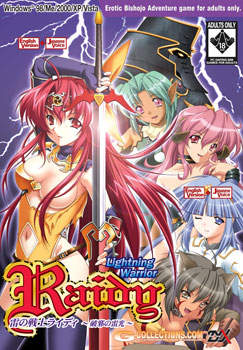
I am Raidy, wandering this continent of Else far and wide as an adventurer. I can freely bend the power of thunder to my will, so people have taken to calling me the “Lightning Warrior”. Why am I standing here in front of this tower, you ask? The cause lies in the village of Saad that I visited recently. I got there to find it in decay, deserted and transformed almost completely into a ghost town…
Apparently it became that way due to the monsters living in this tower. They’d been stealing away all of the young maidens from the village, and none of the men who went to rescue them ever returned… a harsh and terrible tale. Being who I am I could’t hear that story and stand by idle, so now I find myself here, facing the tower…




















Erm. My sound dissapears!
Just there is no more sound in the game, and even reinstall won’t help.
When i try to fix it in options, the game will just shut.
I can’t run the setup because it can’t open the source file \E:RAIDYRAIDYSYS.EXE\ Help
there is no problem with this game, right? right?
>why do you ask?
cuz the comments so quiet. -.-
Thank you so much for this title. This is what originally got me into these sorta games, but as you probably know, the Japanese to English translators…. suck.
Ok, forget sound, forget setup, I don’t even have a .exe file. Just .ccd, .img, .cue, and .sub files…After nearly half a day of downloading all 4 parts..
Those are disc image files. Refer to FAQ for instructions how to mount them.
Creating a virtual drive should be tought to school nowadays, it’s so important. That’s the first thing I do after installing OS.
How so i install the game please!
For people having trouble, when you extract the downloaded files, you have to extract them again. Pretty simple once you know you have to. Hope this helps.
Works fine, just need to use the Daemon Tool thingy and it’ll start.
Only problem I had were the saves not saving, but I had forgot to run the setup program. After doing so and playing in fullscreen mode, saving works.
To the people with the save problem, this only occurs when you launch it from the wrong exe. Only use the ones that you get right after you finished the setup, they should be in your C, even if you changed your install folder. You can just drag them in your game folder for the future. (The ones specifically named with fullscreen/windowed!) Otherwise saving won’t work.
Hope this helps.
I can’t use the free download, it always said the file error. WhY???
Hey 🙂
I downloaded the 4 Raidy patches but I don’t see any setup and even no password to start the installation
Can someone help me next? (I do not speak fluent English I am using google translation, I am en x))
So. Just in case anyone else has the raidysys.exe issue – which I had even with a brand new copy I bought – I have a way of solving it.
Install it in Windows safe mode. I can’t guarantee anything, but it worked for me. And once you’ve installed it in safe mode, you can play it in normal mode just fine.