
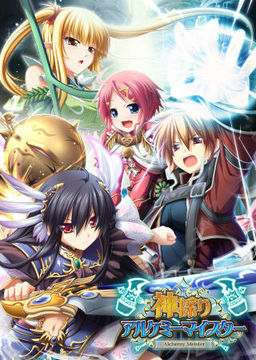
In the Setetori region of the southern part of the Raulbhach continent lies the Mikelti Kingdom. Among the seven major cities is the artisan city of Yuidora. This is where a young orphan named Wilfred lives, pursuing his dream of becoming an alchemist. As tensions between neighboring nations rise and a threat of war looms, three girls in distress come to his place and he helps protect them. Using a new technique that he discovered and with the help of other races, will they be able to restore peace to the lands?
















I downloaded everything fine, installed the game and the patches, and installed the English patch and moved it like i was supposed to, but the game still is in Japanese. Can someone explain this please?
I got the game, installed everything and it is in english but when I try to start the game or chose a configuration,it closes the window. What do I do?
same with me…I read the Readme.txt and it says about the game font not available or something… I wanna play this game T__T
whats the font use in the english translation?and can you give me some links please?
Help, i’m stuck at chap 3. I have 3666 evaluation pts which is way above the reqirement of 1700, i’ve upgraded all my rooms, i’ve cleared all the dungeons But the game still won’t let me go into the next chapter. Any suggestion?
go to the info screen (from the right-click menu on the map) and double check your quest list (not just the missions list) sometimes there is a sneaky quest that has you do something like revisiting something or crafting an item that will not appear in the “key items” category
I’ve completed all quest in this chapter. All i have left is quests which can’t be completed at this moment. Like Fix yuela’s sword or hunt the reaper or that quest u have to spend 20k to buy a single bottle of wine. I wonder if the evaluation pts is stackable. I mean i got like 1800 evaluation pts in chapter 2 ( it’s too much i know but i was busy with all the quest and crafting stuffs) in chapter 3 the requirement is 1700. Can it mean i need to get 1800+1700=3500 pts or more to get to chapter 4? But even so my pts is way above that. What should i do? reinstall?
“ARCGame engine is not responding” is what I keep getting when I try to play. Does anyone know WHY this would be happening? WHAT can be done to fix this?
Nevermind, was missing a codec pack, plays fine now.
can you tell me where you found the missing codec file? because I;m having the same problem.
Try installing CCCP, worked for me anyway.
ummm… I already download the game and extract it in my Local Disk C:… but the only thing i can see are Kamidori.mdf and Kamidori.mds… My question is do I have to download software’s? so I can open the mdf files? or I downloaded it wrong? Thank you
an mds file is essentially a CD or DVD in software form. you need something of an emulator to be able to use them. a nice, simple one that i use is called “Daemon tools lite” completely free and pretty user friendly (though sometimes you have to load up the mds a couple times before the autorun kicks in, though that hasnt happened as much recently so i think they updated)
Can someone please put a video on how to install it? I’ve done everything you said guys but the english patch won’t work.
ill get right now it
how to setup kamidori on my window 8 enterprise plz help
got the same problem with my w8, and someone said….don’t bother with it, just rollback your window…
….I’m fvcked.
I have a question. When the game say u need to raise your evaluation pts above a certain number, it means that u have to raise your evaluation above your previous chapter’s evalation + the requirement right?
Just want to ask: are there any other Eushully games translated out there?
When ever I download patch 2 it says one of the files is corrupt and won’t work. As such I can only get Append disc one and the 2.00 not Append disc 2. Any other links to a working file?
I just downloaded the torrent and after Mounting it with Daemon tools i cant understand any of the words on the installation and when i try to install it somehow a tab shows up saying 1155:?????????? mostly question marks and special characters.. anyway of installing it..? ive downloaded it for like 3 times already >.<
You need to set your system locale to japanese, here’s a link on how to do so: http://windows.microsoft.com/en-US/windows7/Change-the-system-locale
Dafuq is wrong with this after using dameon tools to mount it after a few sec at installation.. installation wizard tab shows up and says 1155:??????(special character)?????
i dont know how to install this shit.. >.<
Change locale to Japanese, else the game will not download.
When asking for help you should put more information, like what OS you’re using. Since I had the problem with win7 Ultimate, I’ll share how I fixed that. I just changed to Jap Locale by going Control Panel –> Clock, Language, Region –> Region and Language —> Administrative Tab —> Change System Local –> Japanese.
Should fix problem.
Hello, as someones I have the 1155 thing when I try to instal the game. I’me already in Japanese local but it don’t work…
(Windows 7 Change locale)
Control Panel – Region and Language – Click the administrative tab – Should see “Change system locale…”
You may have changed either the format or location tabs to Japanese but all you really need to change is the locale via administrative tab.
Might be similar if you’re using something other than Windows 7.
Lost all sound except for the opening. Thinking of re-installing since I think it will fix the problem but I don’t want to lose my save file. I can’t find where it’s located.
Kamidori save files are in a stupid place. Usually C:\Users\(Your)\AppData\Local\Eushully or in XP it’s c:\Users\(Your)\Local Settings\Application Data\Eushully
I am having a unique problem!
Whenever i try to install something like the game or the patch a icon pops up like this “Windows installer service could not be accessed.contact you support personnel to verify that it is properly registered and enabled”
this happens everytime i click a installer!
the installshield preparation wizard starts and in the middle of it this happens everytime!
So anybody please help!
I am having a little bit unique problem!
this happens when i start the setup!
first the installshield wizard starts then in the middle of this starting process a window open saying ‘your installer service is not registered and not enabled’ or something like that!
help needed please!
There is something wrong here. Whenever I equip an item, the game loads its special effect on a separate window.
— TLDR version —
Hey, I’m getting a “ACR Game Engine is not Responding” message when I try to go into “New Game”. Does anyone know where i can get my hands on the codec sandoe41 needed?
— Full Version —
I’m using Win7 64-bit, and this is what I’ve done so far:
1) Downloaded the game download from the torrent, the v2.0 patches, and the English patch from the links provided by erogedownload to my “Downloads” folder in my profile.
2) Used 7zip to assemble/unzip the downloads into the .mds/.mdf game installer, the v2.0 patches (kami_200, kami_ap01, and kami_ap02), and the kamidori_1_1 English patch into “Kamidori”, “Patches”, and “Kamidori_1_1” folders respectively, all under a “kamdori” directory in “Downloads”. These files did not move unless otherwise specifically stated.
3) Used the “administrative” tab in the “Region and Language” control panel to change the local to “Japanese (Japan)”
4) Mounted the .mds with Daemon Tools Lite, ran the installer.
5) Ran Patches>kami_200 (success here is assumed).
6) Ran Patches>kami_ap01 (success here is assumed).
7) Ran Patches>kami_ap02 (success here is assumed).
8) Copied the contents of Kamidori_1_1 into my C:\Program Files (x86)\Eushully\神採りアルケミーマイスター directory.
9) Ran “Kamidori English”. Game opens, but i still see a lot of Japanese text I can’t read in the CG screen, options screen, and the menu when I click “New Game”
10) Used “administrative” tab in “Region and Language” to go back to “English (United States)”.
11) Ran “Kamidori English”. Some kind of setup utility runs, but its in Moonspeak Japanese (special characters), so I can’t read any of it. Closed util without changing anything.
12) Ran “Kamidori English” with Applocale. Setup util Ran, and I can read the Kanji and Hiragana. Clicked OK.
13) Ran “Kamidori English”. Game opens in windowed mode. Opening Cinematic plays. Main menu opens (noted that buttons are now in English). Clicked “New Game”.
14) New Game screen comes up, Game freezes. “ACR Game Engine Not Responding” (win 7 message box) appears.
15) Read Erogedownload.com posts (this page)
16) checked in my “Programs and Features” Control Panel, and see “神採りアルケミーマイスター”, “神採りアルケミーマイスター Append02”, and “神採りアルケミーマイスター Ver2.00 Update”. (Unsure if that means that all the patches are installed correctly, but have no reason not to believe they are, other than that the game is crashing).
17) google “Kamidori Alchemy Meister codec”, find someone at vn-meido.com saying that I need to un-install the codec to prevent the codec from trying to take over the decoding. Not sure if this is right since the opening plays fine, and it conflicts with what sandoe41 was saying about adding a codec.
any insight?
Thanks in advance
Appending: So I ran “AGE” using Applocale, and the game seems to get past the crash point, but everything is in Japanese. Running “Kamidori English” without Applocale makes Moonspeak appear, and crashes the game. I tried to Get past the crash by immediately clicking on the “Begin Game” button after selecting “New Game” when I ran “Kamidori English” but the button doesn’t seem to work (not sure if that has anything to do with the crash).
The “Text” and “Character” buttons in the “Options” menu cause the same “ACR Egine” Crash, as does going into “Eushully’s Room” and “Extra Stories”.
Windowed mode/Fullscreen mode seems to have no effect on the error coming up for “New Game”.
Okay, I highly doubt anyone but me is having this problem. But, here goes.
My computer is in Japanese locale and I have downloaded other games and their patches and installed them all as well. Yet, when I try to download the patch for this game it doesn’t work. I can get to the DA site but when it starts generating the download link, it never finishes it. I’ve sat around for 15 minutes waiting for this thing yet it never finishes downloading. So I was wondering if anyone has any method for fixing this. It’s not due to slow internet cause when my internet is fast, it doesn’t download. I have successfully downloaded other games, but this one just won’t do it. If anyone has any suggestions or anything I’d really appreciate it. <3
hello I have a big problem though I have installed the patch the only part of the game is translated the first game start screen help :'(
someone can explain how to finish the second forest dungeon? i’m stuck where some fog did not permit me to proceed…
Guys, in case you haven’t already, don’t forget to change your locale to japanese before installing this. According to the patch’s website, using applocale complicates the installation (some files are not copied over like fonts and such). I learned this the hard way after trying to troubleshoot my installation and all it took was changing the locale to japanese and installing straight from the mounted CD. Cheers!
I wish there was a step by step guide to doing these. I haven’t been able to figure out how to install any games from this site….
here the working one, installation guide..
#who got the same problem as mine#
1. First download the main game..(kamidori.iso as example)
and install it, using power iso or else that compatible.
2. Then download kami_ap01.exe,kami_ap02.exe, kami_200.exe
and Kamidori English 1_0.exe……
Then,put all this four inside this folder..
C:\Program Files\Eushully\神採りアルケミーマイスター
install that patcher according the sequence, 01, 02, 200..
and last one is Kamidori English 1_0.exe
3. DONE FOR PLAY~
can somebody give me Installation instructions ? plis plis 😀
Kamidori patches part2.rar cannot be downloaded, always showing “error service currently unavailable”. trying the 300MB one, but free account restricts it. can someone fix it?
I already finished this game a few months ago and I loved it, it made my summer perfect! I think I will play through this again since I haven’t found an eroge with gameplay as fun as this one.
Here’s a simple guide to help you to install the game.
1. Download all parts of the game into a single folder. (If the download doesn’t work and you get redirected try again it happens be patient).
2. Open the Kamidori.part01.rar and move the file to the place where you would like to install the game. (For instance I have a folder on my computer called v-novels where I store all my v-novels data).
2.5 You will need to change your locale to Japanese if you haven’t already.
To do this go to control panel, then go to Clock/Language/Region (this name will vary depending on your OS just go to the one that says language. I’m using Windows 7 so that is how mine reads). Once you open there will be a tab that says Administrative. Click on this tab and then click change system locale and change it to Japan/Japanese. You may be prompted to restart your computer, if so let your computer restart.
3. Next you will need Daemon Tools Lite to mount the image. This is a free software just google it and download. Once You have Daemon tools installed on your computer double click the KAMIDORI.mdf file and it will pop-up an install wizard in Japanese. To install just click the buttons (just think of where the next button is in the English version of install wizard).
4. Now that that is done you will need to go to your C: drive on your computer. Go to C:\ProgramFiles\Eushully and there should be a file with its name in kanji. Move this file to the place where you want to launch the game from (the .exe file is inside of this folder so unless you want to go into your C: drive everytime you want to launch the game you will need to move it).
5. Now you will need to open the KamidoriPatches.part1.rar. Drag the patches folder into the file with the .exe. Next open the Kamidori_1_1.zip and highlight everything in the file. Drag everything into the game folder and replace everything when asked.
6. Launch the Kamidori English.exe and enjoy.
Hope this helped and don’t forget to have fun 😉
How do I install this game and how do I install the patch?
Does anyone know where the save files for this game end up? I built a new computer recently and don’t really want to lose all the data that I had.
Hey i have a problem, everything is installed correctly changed the games directory to english tried running the english launcher with administrator, with applocale, and without applocale.
The problem is when i go to start a new game (first time playing)
and it crashes and closes.
Any ideas?
20
I don’t know why some people can’t install this game.
the only things I do to play is :
I use Win 7 32 bit
Ram 1 GB
VGA 256 Intel
1. open control panel > region and language
2. go to administrative tab
3. klik change system locale
4. choose Japanese (Japan)
5. klik ok
6. restart windows
7. install game, 3 patches , and finally english patch (english patch must installed last)
8. Play…
I don’t know if you can play it after change your locale to english back.
hope this works
Anyone have a problem where in the past you had the game running fine, but then later on every time you try to change equipment or an ability it freezes up?
If not, do any of you know all the registry files/folders for the game?
I’ve gotten the download to work. The trick was in making sure all downloaded patches were in the same file and then manually installing the english patch.
Problem that maybe someone can answer: Having played the game through, I eventually had the game freeze and it continues to do so every time I try to equip gear or abilities. I tried uninstalling-reinstalling everything and the freezing persists.
Anyone know how to fix this? Also if not, has anyone manually uninstalled in the registry, if so it could help me for the next time!
Is there a way to get this game in full English text, up and running WITHOUT the “Japanese locale” process? I mean, I’ve learned that there are many games here that don’t need the locale to be switched to be playable.
I can’t get this game to work. It doesn’t let me proceed once installed it just shows an error DirectX graphics followed by a string of Japanese letters. I have Japanese locale, XP, and directx 9. If anyone knows the solution for it I would appreciate the assistance.
I can’t save my game… I always get an error (dunno what it means cause it’s in japanese) and it doesn’t save anything… After that the game still continues, but it kinda sucks to start everytime from the beginning^^ maybe someone can explain what to do…
It’s difficult to tell without seeing the exact error message, but most likely it’s lack of permissions to write in program files directory on windows vista and 7. Right click on game .exe and use “Run as administrator” option.
Sir! the 2nd part of the free patches download when already generating the dl link , it says file not found. pls help
this is really great game! i completed yuela route and now finishing emelita. the game get really hard as we progress each chapter. before i gave up i try using spoilerAL and the game became much easier to finish. thanks for sharing the game! really appreciate it.
Upon starting up, I get a an error saying DirectX then some Japanese text afterwards.
from what i’ve seen on google image, looks like a fun game (i like games with strategy) 🙂
plus, the artwork suit my taste ^^
but from what i’ve read on VNDB, it’s really easy ;l
o well, i’ll give it a try 🙂
thank you admin ^^
and i find it funny how everyone are giving different solutions lol
hope i won’t meet any problem :p
I used to torrent to down load this just fine but I can’t access the disk using the tools I have. What…?
well download all files and install it with japanese regional
and its work play with jap langguage
download all patch
1. install kami_ap01
2. install kami_ap02
3. install kami_200
4. extract kamidori_1_1 to kamidori game folder
5. play with kamidori jap/englih patch
result jap and english language both of them works
How do I save the game? lol
This game is high quality stuff imho but if you are gonna play it don’t play it for Hcontent or you will be disappointed.
is there a voice patch for males?
can u reupload the second patch or is not required?
Plizzz help….
when i go to runic foret ruin to defeat the reaper i got required unit unavailabel…
help
this is my second play with all clone character…..