

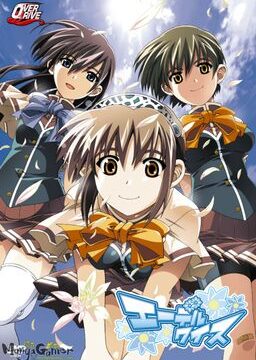
The story begins with the protagonist, Kogasaka You, moving back to his hometown, which he left behind several years ago. Upon arriving, he stumbles into an abandoned, sealed observatory, whereupon he encounters a mysterious girl who looks exactly like his childhood friend did years ago. She introduces herself as Mare, a shinigami who reaps nightmares.
Meanwhile, back at school, You ends up joining the astronomy club, which is desperate need of new members. At night, he continues to visit Mare at the observatory, all the while trying to remember a certain someone’s name…




















YES YES YES!! THIS WHAT IM WAITING FOR BANZAI ADMIN-SAMA!
hey guys anyone have got the problem like mine? i got a graph_vis/YUME_e01a not sure why but the file is not there.
Yeah I got the same problem. I finally got the game running and then that happened >.>
Did that fix it? Got the same problem.
uhm were you referring to my post? i sort off fixed it by 1. install
2. english patch.
3. got the problem.
4.uninstall but i kept the patch in the installed folder.
5.reinstall.
6. for me, the problem was fixed after doing all of that. also i deleted the graph_viz to be sure and the problem was solved.
Strangely the original post disappeared or something?
I’m a victim of graph_menu.bin 🙁
run the patch file after you extract it in thew game folder if you get errors its cause you didnt
not the egn patch the 1.1 one i mean
Rofl komomo and kosame combo is just too funny XD
do u mount the mds or the iso file
The iso-file … look at the size of the two files ;D
MDS is a pointer file to the ISO. as long as they are in the same dir it dosn’t matter.
what happened to the torrent downloads?
*SPOILERS*
If this isn’t an April Fools joke, here’s my problem, which a couple others have already mentioned. Right after the scene where Mare stabs You with her scythe to erase his nightmare, it changes into a scrolling image of the Tanabata night sky, after which the game crashes with “graph_menu.bin has encountered a problem and needs to close. We are sorry for the inconvenience.” Then I figured I’d try running the Japanese execution file “memoria.exe” to bypass that spot. When I got to the same location in the game I crash with “memoria.exe has encountered a problem and needs to close. We are sorry for the inconvenience.”
Mind you I have the 1.1 Update installed and also running the game on my computer’s Japanese locale and not AppLocale on Windows XP Home Edition version 2002 service pack 3.
That sounds to be right where the video would start playing, so may be caused by lack of correct codecs having been installed on your machine. All I’ve got installed in CCCP, and the video plays back fine, look up and install said codec pack and hopefully it’ll work fine.
Nope, still get the same error, even with CCCP codec and have the latest direct X installed, still get the same error. I’ve installed and reinstalled the game, ran 1.1 patch update, then the english patch, the error still persists.
Had that problem. I went to the ../Memoria/movie directory and renamed 01.mpg to something else like 01.mpg.old
Yes, that worked for me as well. The problem I had was the the video opened in another window, and after when finished, it never returned to the game.
This is getting ridiculous, so I’m doing what you guys suggested and every time I open up the movie folder it crashes my explorer.exe; I’ll update when I figure out how to resolve this.
So I ended up deleting the movie folder and that worked… \(^v^)/
Rename the folder the movie is in will solve your issisue as well. Without entering it will say.
If you want to avoid this problem all together, don’t install the OP movie Staircase english Sub, but oddly the original Japanese Video has no sound, the video plays just fine, no sound however.
Yup.
Before I installed CCCP the movie never showed up. After installing it the movie opens in a new window.
Anyone know how to solve this problem?
Hey Ivan, are you planning on putting up a torrent?
I’d to know so I’ll know to wait for it. If not then I’ll just start downloading now from media fire.
Either way, thanks for the upload. People mentioned lolis and now I’m looking forward to playing it.
Well nevermind. Went ahead and already downloaded it.
I get the dll29.dll or something like that error, it says the file is not found. I installed everything correctly, ran the update, then the eng patch
nvm, its some DirectX problem
ADmin do you have backups of everything you have here?
How do you run the update?
Can anyone help me plz
Just drag Patch 1.1 into the main directory of the game and Double-click it. If a window with Japanese bars appear, u made it right and only have to press the upper one. After that, copy the english patch into the folder and install it. If u r done, look for the MemoriaEN.exe. As soon as you r in the Main menu, go to: Options —> Page 2—> Fonts and look for the Custom Subs.
did that and when i open the game(english) it still says version 1.0
Am i doing something wrong? But when i open the jap version it says 1.1
Just play it, if it s english everything s fine 😉
i got the update window to open and i clicked the top bar but i keep getting some error popup with a bunch of gibberish. any ideas? 🙁
Your locale set to Japanese? Most of the problems with fantranslated staff happens to be that. If you did, maybe u should try to reinstall it and do like it s written. If u also tried that, you have to delete the registry files referring to the game and install it again. I d suggest to get “CCleaner” for deleting the registry stuff if u r unsure bout it.
Can we has torrent plz
Dang! 3 and a half gigs? Is this game animated or something?
Yes, it got quite some animations. Oh, and also it s around 35 hours.
This isnt about the game I did not know where to post this so sorry if it is trouble. I dont want to force u or anything however I wanted to ask, Admin can u plase upload Otome wa boku koishiteru. thank u.
He only post up games which have been translated. That one hasn’t been translated yet.
Here s a walktrough: http://seiya-saiga.com/game/crossnet/hoshizora.html Unfortunately, it s in Japanese so u have to translate it with Google. Well, it should be fine though.
Is it just me or is the game a bit buggy? Have to apply the english patch before i start the game, otherweise the custom fonts r gone
Nevermind, u have to delete the graph_vis folder AFTER u applied the patch -__-
Ok, DO mind it. Have to apply the patch after every PC restart and i think that s not supposed to be.Well, it just takes less than 20 secs, but it s still anoying.
I have have same problem as you. I think it be better not having this problem but i seen far worse than this of course, so it’s bearable i think.
Hi i was wondering if anybody can post steps on downloading this so i dont screw it up and just give up all together thank you?
can anybody help me, when i try to run the game in english it gives me the following error:
Unhandled exception occurred at 0x2044F13B.
Check the error log for details.
I run windows in Japanese local.
same issue, your getting woke up from someone and then the game crashes
hold on, is anyone else having trouble installing the game in the first place? mine just stops almost straight away with the installshield and pops up with an error message saying: “1155” followed by a bunch of weird gibberish. someone help? :S
my locale is set to japanese btw.
dont install via auto run mount the image in DT and rightclick the disc in the virtual drive press “open” and run the install file directly not via wizard the direct install should be at the very bottom if u open the disc
Anyone else lose the ability to hear sounds from videos except .wmv files?
The nightmare is over, I downloaded and reinstalled Realtek drivers, disconnect and reconnect my headphone and speaker jack to reconfirm the hardware on my computer and now my sounds work, that’s a relief!
Everything works fine for me. Thanks admin. You rock!
Hey can someone help me? After installing and running the english patch I try running to game but I get and error with C/Users/owner/documents/FAVORITE/??????/save/s901.bin/(japanese letters)
Could someone please help? QQ
Run the game in Japanese locale. It can’t create the path because it contains ??????? instead of 星空のメモリア; it will have the correct path when run in Japanese locale.
I saw lot of annoying character until now but Chinami beat them all by far.
This VN look nice, but i can’t endure Chinami anymore…
hahaha i know what u feel.
in the first 2 hour gameplay i feel that chinami was “cute little sister” and then….. 100% annoying XS
exactly like her older bro says about her, “machine gun mouth” lol
i still think she’s cute till the end.
good thing my little sister is not like her otherwise i will trapped in sister complex D:
Can anybody explain the memoria_update_v11? It doesn’t extract.
Test archive using (7-Zip, WinRAR or what have you) to find out if it’s corrupt; redownload it if it is, then extract etc.bin and Memoria.hcb files from to the game’s directory using your acrhiver (overwrite Memoria.hcb there).
anyone got skipping problem?
i got unread text skipped too even though i set it properly on the options, anyone knows how to fix this?
What has happened to torrent option?
Run the game in Japanese locale. It can’t create the path because it contains ??????? instead of 星空のメモリア; it will have the correct path when run in Japanese locale.
can anybody help me, i set the system to japanese local but when i try to launch memoria in english(japanese works fine though) i get an error:
Unhandled exception occured at 0x2044F13B
i get ”etc/038blablabla” error wtf :/
Completed and have fallen for Chinami XD. Hurray for lolis haha XD. hoped i didnt express myself to be caught.
Hmmm, Chinami’s first line seems to kill my game. I get an etc/038 error and it closes the game.
Any suggestions?
Everything works fine for me. Thanks for the upload Admin.
For those who are having problems installing it, here’s what I did:
1)Mount the ISO file.
2)Open the installer with AppLocale(Japanese).
3)Once installed, update the game from Version 1.0 to 1.1. (Open patcher with AppLocale also)
3)Once you have updated to version 1.1, run the English Patch normally. Upon the completion the Patcher will create a shortcut to the game at your desktop.
4)Use AppLocale to open that shortcut that was made by the English Patcher.
5)Unmount the ISO. Done.
Just to note if you still have problems after doing everything on the list, try uninstalling but make sure not to remove the english patched files. then reinstall. then use the english patched exe. it works for me. i played the game and so far no problems after doing what i did.
I’m disappointed there’s no torrent…
hey guys have problem chinamis first line appear and my game crash something about etc038something appears and the game closes what do i need to do 🙁
Is this a VN?
If anyone is getting the first error with chinami about etc/038, this is because you didn’t patch the game itself before using the english patch. you can find the v_11 patch of the game inside the folder that you extracted from the mediafire game download link. It’s where the game mds and mdf files are – I made the mistake of thinking it was an english patch update that everyone was talking about and that’s why I didn’t understand at first. I hope this helps anyone who may come across this error in the future.
Kindest regards and thanks to the admin,
smooth_rider
It’s pretty daft not to have a torrent up for a game this size…
Need a good ENGLISH walkthrough plz
its simple. each heroine got 2 decision points, you just have pick both with positive decision to get to the route.
isuzu route unlock chinami’s
komomo route unlock kosame’s
you’ll get another one after clearing all asuho, isuzu, chinami, komomo, and kosame route then another one after that route
Excuse me Admin, but most people are having a bad time fixing some errors that they don’t understand.
Can you make a Torrent of this, that is already Fix, without problems and Translated in English?
“d3dx9_29 missing in your computer” damnit! i always get that error after clicking memoria.exe same goes with the jap exe to plese help me :(:(
“The program can’t start because d3dx9_29.dll is missing from your computer. Try reinstalling the program to fix this problem”-Memoria.exe system error please help me with this guys i can’t seem to properly install it the right and i’m growing desperate here my locale is at japanese
Your installation files are corrupted. Re-download the ISO image again and it should fix the issue.
It’s inside Feb2006_d3dx9_29_x86.cab file located in the directx folder on the game disc. Unrar it to the game’s folder.
Though it will likely complain about another DLL, so just download DirectX web installer from Microsoft and it will download the needed files itself.
thank you!!! man u helped me good though i have one more question howi cant seem to get patch 1.1 for the english patch
kay after the installation i install the english patch and then deleted the graph_viz file and then i extracted 1.1 and sent it to the directory. i tried to play the english app and it still says at the top complete 1.0 is that alryt?
This is alright. The patch 1.1 is only for the original (japanese language) game. The english patch (1.0) means only, that this is the first version of the english patch, which works only on patch 1.1 of the original game … perhaps on version 1.2 of the original game (in the future), if not, there will be version 1.1 of the english patch 🙂
tnx man!!!:) i was just wondering though at mare’s route how do u remove the dolphin troll? lol it’s just getting on my nerves
After the installation of the english patch, delete the graph_vis-folder (not graph_vis.bin)
thnx it helped me too
is it just me or does sometime the characters are too big for the screen and get chopped off or is that how its supposed to look
If u mean u just see the upper half of the body, that s how it s, most of the time, supposed to look like. Otherwise, try reinstalling the game.
no i mean like the person is in the center of the screen but it cuts off above the mouth or if their is two people one in the center and one to the right it shows half of the person standing to the right
Same here, but I think this is normal 🙂
That s not normal, maybe use another Screenresolution? Otherwise like i said, reinstall the game.
so is this 18+ or all ages?
It’s 18+
its all ages, coz mare is all ages 😀
why the custom font gone when I restarted my laptop?? does anyone know how to fix this?? :/
got same problem.
i re-install the english patch, and everything back to normal 😀
Don t forget to delete the graph_vis folder after reinstalling the english patch 😉
True Route is really EPIC
my “Wish upon a Shooting Star”: Translation of Eternal Hearts … more from Yume 😀
Hmm I am wondering something
Does patch 1.0 mean its “1.0 version of the patch” or “Patch for game version 1.0”
I am wondering if there will be untranslated content if you play on 1.1
1.0 means, that this is version 1.0 of the english patch. If there is a new patch for the original (japanese language) game, there will be probably version 1.1 of the translation patch … if 1.0 doesn’t work with newer patches 😀
Only Asuho, Isuzu and Komomo’s routes are open during the first playthrough.
Requirements to unlock the others’ routes are as follow :
Finish Komomo‘s route to unlock Kosame‘s
Finish Isuzu‘s route to unlock Chinami‘s
Finish Asuho, Isuzu, Komomo, Kosame and Chinami‘s routes to unlock the Mysterious Girl‘s route.
You must complete all the routes to unlock Mare‘s route.
Choices in parantheses () might not shows up, if they don’t appear, then simply ignore them.
Minahoshi Asuho – 南星明日歩:
Stay out of it.
Tell her.
(Forget it.)
Tease her.
(Take her feelings to heart.)
Keep silent.
Grab on.
Drop the subject.
(…………)
(Stay still.)
Aoi Isuzu – 蒼衣鈴:
Cover up for her.
Don’t tell.
(Forget it.)
Tease her.
(Take her feelings to heart.)
Welcome her.
I can’t.
Drop the subject.
(…………)
(Stay still.)
Hisakaki Komomo – 姫榊こもも:
Stay out of it.
Don’t tell.
(Forget it.)
Thank her.
(Take her feelings to heart.)
Keep silent.
I can’t.
Give it a shot.
(…………)
(Stay still.)
Hisakaki Kosame – 姫榊こさめ:
※You must do Komomo’s route to unlock Kosame’s
Cover up for her.
Tell her.
Try again.
Tease her.
(Take her feelings to heart.)
Keep silent.
I can’t.
Drop the subject.
……A couple?
(Stay still.)
Kogasaka Chinami – 小河坂千波:
※You must do Isuzu’s route to unlock Chinami’s
Cover up for her.
Tell her.
(Forget it.)
Tease her.
Thank her.
Keep silent.
I can’t.
Drop the subject.
(…………)
Embrace her.
Mysterious Girl – 夢:
※You must do the 5 above routes to unlock this route
Stay out of it
Don’t tell
Forget it
Tease her
Take her feelings to heart.
Keep silent
I can’t
Drop the subject
…………
Stay still.
(……Don’t say that.)
(I can’t accept her.)
Mare – メア:
※You must do the Mysterious Girl’s route to unlock Mare’s
Stay out of it.
Don’t tell.
Forget it.
Tease her.
Take her feelings to heart.
Keep silent.
I can’t.
Drop the subject.
…………
Stay still.
…………
Respond to her feelings.
Can you post full instructions for installation please(hopefully with images)? Afraid I might screw up the installation. 😛
nvm managed to get it working. 😀