
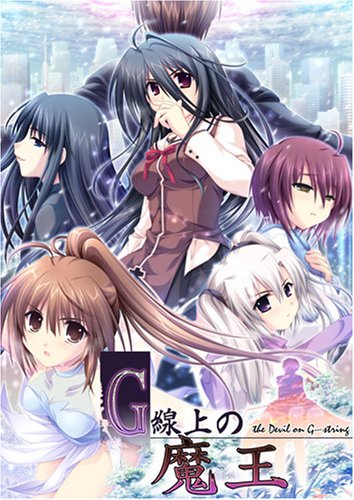
You play the role of Asai Kyousuke, the son of a legendary gangster infamous in the underworld. You spend your time listening to Bach, playing God at school and covertly working for your stepfather, a ruthless financial heavyweight. This idyllic existence is broken when two individuals appear in the city – a beautiful girl from your past named Usami Haru with hair you could get lost in for days, and a powerful international gangster known only as Maou. Almost without delay, the two begin a deadly cat-and-mouse game, bringing you and your friends into the crossfire. Plotting, political intrigue and layer upon layer of interlocking traps are the weapons in this epic battle of wits.

















I cried. and it was well worth the tears spilt. Thanks again Admin.
This stuff does wonders for a frozen heart.
Check out Sharin no Kuni and Grisaia no Kajitsu if you liked this one. They are pretty similar.
Is it just me or does the Downloadlink for part 3 not work anymore cause it says to me Files deleted
It’s work fine to me
Yeah I cried too at the end. I don’t usually for anything but this one hit me. Should also be tagged with “Great Soundtrack” I love what they did with some of the classical songs.
So I downloaded the .rar files. How do I run them?
See my comment below!
Download-Link for Part 3 does not Work
”File Deleted”
Hope for new upload soon cause i cant play it
How do I extract the files from the .rar. folders? I am using win7 but it will not work. Keeps saying part1 failed partway. HELP?!?!
Played this after playing “A profile” which is also from AkabeiSoft… Screw this circle for making me waste so much tears in a week T_T 10 out of 10 I say.
I cried my eyes out at the end one of the best games ever but what is litte girl’s name at the end ? I still couldn’t figure it out
i’m going to answer ypur question after 7 years my friend, her name is Kiyomi, haru named her after Kyousukes dead sister.
I’ve just managed to install the game and would like to share how I did it!
1. I first downloaded all the files from “DA free” on this website
2. Then I selected all the zip files in file explorer (I have Windows 8), and extracted them all at once
3. Download the DA English Patch
4. Download, install, and open Power ISO
5. Using Power ISO, click “Open” and select the file named “gstring.mdf”
6. Highlight all the files you opened and extract them
7. Run the setup “g_setup.exe” to install the Japanese version of the game
8. Run the setup you downloaded from this site, in step 3. Make sure you install it in the same folder as you installed the Japanese version, and you’re done!
9. Don’t forget to change your system locale to Japan!! Happy gaming!!
the english patch always says stopped working. how do you fix this. if possible please tell me what buttons to press on the step 7. how do i change my system locale to japan as well?
Hi Concord,
Here are the steps for installation. I verified these steps just now on Windows 7.
1. Download Power ISO software and mount gstring.mdf. You will see a virtual drive appear in the My Computer with the name gstring. This drive is now the virtual disk.
2. Now click into that virtual drive and set up the japanese game. You won’t be able to read so just go with the instincts and install it.
3. Once you are done with the installation, find the 14 Mb English Patch.
4. Place that patch anywhere. Desktop, or some folder, anywhere is fine.
5. Install the patch. They will show you the installation path to C:\Program Files\AKABEiSOFT2\G-Senjou no Maou English
Don’t change it. Let it be like that and continue with the installation.
The English patch will automatically extract files out of the Virtual disc gstring and install the game in English.
6. Once the installation is complete, you will find the game icon on the Desktop. Enjoy!
7. Alert: Don’t try to install the English patch in the same folder as the Japanese version. It crashes! I tried and failed three times. Then I realized that I shouldn’t try to install both versions in the same folder.
See my comment below!
guys what the heck is this??!!
when i install the JP game it does not work when i try to open
When i try to install the patch i cant get through because the JP game is not detected.
When playing g string maou I get an information screen outside of the school that stops me from playing help!!!!!!
Can any one tell me how to install this english patch thingy :((
Is this a censored verion?
no
I loved the work as a whole… But chapter 2… I thought there would be a limit to how good something could be, but G-senjou no Maou proved me wrong. Highly recommemd to everyone.
To elaborate, chapter 2 was, IMO, the best.
Is this voiced?
is this version voieced or voiceless ????????????
Is this voiced?
if anyone is wondering, it is voiced.
Yeah, but is it voiced?
Yes, this is the voice version.
this is the HD version right is it voiced??
I think so yes. I am grateful I am not the only one who reads a ten year old novel!
is this the 18+ version?
or it’s just the all-ages version
so i downloaded and extracted everything, and i mounted it. but when ever i run the set up it shows up like when you have your system local not set to japan. so it doesnt run properly. any suggestions
Dude, all I have said for the last hour is duuuudeeee! I just finished haru’s route and dude, it was beautiful, but I’m contemplating whether I should do tsubaki’s or kanon’s route or will I be too disappointed compared to haru’s ending
you will
Does this version have everything in it like the original game if not is it the best version for now?
Honestly, I don’t understand the hype with this one. Was kinda bland, the characters are meh, and it’s full of cheap twists that feel anticlimactic.
And screw Kanon, she’s such an arrogant brat who is so full of herself. Also she looks like 90% of anime girls from the 2000s. Basic ass.
HARU ENDING SPOILER!!!
if anyone is wondering, Kyousukes daughter name is Kiyomi, haru named her after Kyousukes dead sister.
and youre welcome