
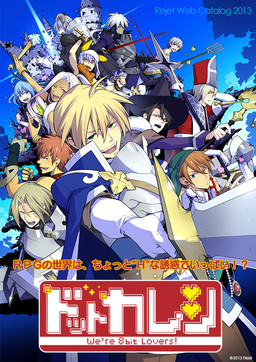
Have you already forgotten the time you spent playing with us back then? You’ve also become an adult and you’re probably busy. But even if it’s just a little, please remember us. Because of you… we’ve become warped!
An RPG world with many “H” temptations!? Now is the time to carve out a new legend together with the characters who were changed when you played the game!
















I know I’m asking too much but,is it possible if the admins upload part 1 and part 2 as well..?
it crashes T^T… after i click start… it say’s it’s not working…. ughhh huhuhu ToT
Hello, you should try this way. Hope it works for you.
Right click at DotKareshi -> Run with graphics processor -> Change default graphics processor
A window called manage 3D settings will pop up
Then click Add and choose DotKareshi.exe
Next, at the drop down menu choose High-performance NVIDIA processor.
Let run the game again.
Did you follow the instruction? It will working if you change system locale to japanes
I have different issue in here.. Before i change system locale the game is not working but they have voice. But after i change system locale, the voice gone… Did do something wrong?
Oooh i see… I know whats wrong hahaha sory…
Hi, can i please get some help? I started the game but there are no text or dialogue showing on my screen. Please help.
When the game starts, is there a box saying REVERSE near the title (on the title screen)? That means your localisation is not set to Japan, and will cause the text to not show up (e.g. if you try to close the game an empty bow will show with Yes and No options). Note that when you go to the settings for location (Change location), you have to go into the Administrative tab, not the Location tab (that doesn’t do anything) – and there change the “Language for non-Unicode programs” to Japanese. After that you’ll need to restart.
Hopefully this helps.
excuse me I have the same problem. Even though I did exactly as you said the text still doesn t show. I hope someone will see this
I had the same problem, but I managed to solve it by installing the font in the folder. Moved the meiryo_dot_kare file into resources folder, clicked on it and hit install. I hope this helps you!
I+downloaded+the+game+and+followed+the+steps,+but+when+I+open+it,+it+crashes+and+turns+black,+while+saying+”not+responding”+what+do+I+do?
Hi There, Admin
I have also been experiencing the no text issue.
I have already successfully changes my locale to Japanese, I have also installed the font multiple times and yet there is no text showing up in the message box. I already uninstalled and reinstalled the game many times.
For those people who already tried the previous solutions, I leave what I work for me:
First had the problem that the game was closed as soon as it opened and changed the “Language for non-Unicode programs” to Japanese. After restart the program could already be opened but the voices are not heard.
And I realized that you can also start the game and then in the options menu and verify that this activated the voices of all the characters in the game.
(This is pretty stupid but spend several hours to realize)
I hope I have been able to help someone
Yo, so, after bout hour I figured out how to get the gamer runnin (IT school useless, lol), but have one question.
When characters are talking, their speech ends+up+in+annoyingly+long+sentence+that+can’t+fit+in+my+screen+and+continues+beyond+it so sometimes their talk is not finished. Is there some way to fix it?
Oh, nevermind. I figured it out, lol.
how?
O loved this so much. Thank you for making it available. I really hope you upload the other two some day!
hello, may I ask how to unlock the extra section? thanks in advance =)
Does anyone know how to unlock the extras menu?
The text is displayed with large gaps. L i k e t h i s . What to do?
If you’re having the problem where the game crashes when you push start you should download Locale Emulator. Then right click the application, go down to Locale Emulator and click ‘Run in Japanese’.
Even though my computer was in Japanese locale, it wouldn’t work until I did this. It seems to be a thing with Rejet’s games. It happened to me with ALICE=ALICE too.
Just another person here to complain about the text being too spaced out and not fitting in the text box :/ has anyone found a solution yet?
I swear I had this game working before but now when I hit start the window closes on me. I tried running the locale in Japanese I tried changing the processor it runs with but NOTHING. I wonder if I screwed with something with a previous game I played and it caused this….
any one here that have the english patch for 2 and 3? the original post for the english patches are down and all i can see are the trial patches from different translator?
4 years later but i have archived both patches from the original fan translator’s tumblr, if anyone wants them
if the text goes too out of the box:
When you install the game (with the patch and all), make sure you install the desktop icon. Right click it and go to properties. Under the Compatibility tab, there should be a check box that says “Override high DPI scaling behavior. Scaling behavior performed by:”
Make sure the box is checked and change “Application” to “System”
Click OK and start the game. Font was fixed.
(or change the display of your desktop to 100% instead of 150%
(SOLVED- cannot even install/start game)
As I wrote this I realized I’m just an idiot. Here’s my problem:
I can’t even start the game.
I already installed the meiryo patch.
My system locale, time zone, and region are set for Japan.
I have Daemon Tools installed but it doesn’t seem to require it.
I even installed the Locale Emulator to see if it would solve my issue but it didn’t.
I run Windows 10 64 bit.
I keep getting the same error, which google translates into “Configuration file is invalid. Please correct it and start again. Error message: input stream error. Error Code: 8”
Here’s my solution:
The folder that forms after extracting the files (DotKareshi1) MUST be MOVED (not copied; it will require ADmin permission) to Program Files (x86). If it still doesn’t work, move it to Program Files.
That’s it. I’m stupid.
Can you please upload Dot Kareshi II & III?
Does anyone know how to fix the no-text issue???
i’m on Priests route and the text dialogue isn’t showing at all!!