English visual novel downloads

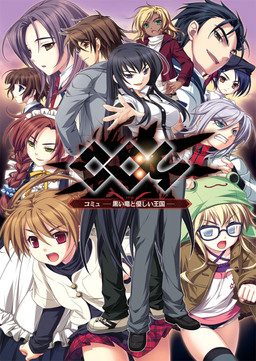
Coμ - Black Dragon in a Gentle Kingdom

Coμ - Black Dragon in a Gentle Kingdom

“We are the team. Yes, it’s like a community….”

There is a legend of a mysterious girl called “Girl A” who appears in the city and sings all night. One night, Akihito meets four boys and girls as if led by the Girl A….

There is no friendship nor trust between them, but they can control a huge iron monster as they like by combining their power. Since the day they get the power, their extraordinary life starts….

Akihito later knows that they will need to pay a price for the power. When the monster dies, their community will also disappear….

They decide to head for another world called Communet with a help of Kagome, a black witch…

164 comments

JustinReply
It worked one time. Then my new update fucked EVERYTHING up. This is no longer compatible with the latest Windows 10
JustinReply
I'm gonna uninstall it and delete all files then download for a 4th time. If it doesn't work I'll buy from the original producers
FinalCloudReply
This game is very frustrating, I really want to play it, but the damn thing crashes every 10 seconds to 3 minutes. Does no one know why this is?

I figured it must be a windows 10 thing, but seems others are running fine on windows 10.

Any ideas would be much appreciated!
FerlucioReply
After playing and instaling well over 100 VNs, THIS, has got to be the hardest to instal. I`m not even sure what, out of all the things i did , made it work. I had the same kernel32 issue many others seem to have and what seems to have worked is one of either( I hope posting links is ok , those are all official sites):

I downloaded and instaled a different kernel file( https://www.dll-files.com/kernel32.dll.html ) to my system32 folder( which requered a lot of fucking with sistem permisions and was the hardes part, seems like Windows 10 realy likes it`s TRUSTED INSTALER status, so youl have to change ownership of you system 32 folder and give it to admin/use. And you must do it before instaling the game.
I also downloaded and instaled the files LALALALA directed us to( ill copy his link here just in case, no ownership of copyright strikes hopefuly) http://wordpress.click3.org/garakuta/Win8WOH.zip
and did some more fuckin` but it seems to be some of this.
Hope it helps and sorry for long post.
FerlucioReply
Correction, downloading the Win8OH from my second link( LALALA`s) link seems to be causing the kernel32 error , i did it on my first instal and it didn`t work. after i finished my shenaningans with the new kernel32 file and fuc....destroyes TrusterInstaler i had to reinstal the game and it worked, but i didn`t put the win8OH files so then i went in and dubble check and put the files in game folder and then got the kernel error again. Seems that those files aren`t doin` any good. Name implies the`re for Windows 8 and I`m on Win10 so maybe you`ll need them with 8. so just in case if you do everything i said in step one( New Kernel32.dll) and it works then dont do step 2( Win8OH Instal), but if it doesn`t work with just step 1 , do try and download these files, thou i dont know if it`ll work or no.
FerlucioReply
Forgot to mention that there seems to be another solution that i didn`t have to use and it`s considered foolproff. You need to instal a Virtual machine( Like Oracle) and instal and XP on it and run the game from there.Not gonna go in detail about doing it ,there are many guides to do so in other places.
david zxcReply
This is a stunning game. Play it 5 times now, always been on my top VN list. Don't give up when yu have kerne32 module/ NM problem. (window 10 users)
To fix this yu need to delete the following:
1.src file
2.version.dll
3.version.sln
4. (if anyone have this) readme.txt
Good luck and enjoy :D
uknow9990909090Reply
kerne32 module/ NM problem...isu...it ez...just download=http://resemblances.click3.org/?p=1406
and paste all the file to the game folder...
it work for me in window 8.1
ShanaloliReply
Thank You LALALALA that file sorted everything out. Much Appreciated.

Thanks Eroge.
YoshiReply
Sadly, no matter what I do, i can't get this VN to work. Even when I solve the kernel error, i get a syntax error. Does anyone know how to fix ???????syntax error?
YoshiReply
PS. My locale is japanese
YoshiReply
Nevermind, I of course figure this out minutes after I ask for help, but basically I didnt have the "correct" locale setting. The syntax error is created from non-unicode japanese which you need to switch over to.
maxReply
how did you solve kernel error? i'm still stuck in that part. thanks
LIGHTDXReply
For those who can't made the game work look for the file Win8WOH and then put them in the game folder. It worked to me and i have Win10 64x bits. But some people say it doesn't work with 32x.
BloodWingedAngelReply
So... bought the official version... required a soft battery runtime program for some damn reason. Switched locale to Japan and it will play...

However... the moment I try to add the english patch I get a unicode error with a bunch of Japanese that I cannot read. Have any of you experienced this as well? How do I solve?
BloodWingedAngelReply
How Do I get the English patch to work on the official patched version of the game that I got to get around the kernel issue? When I add the English patch files to the game folder I get unicode errors, could anyone please help me XD

Leave a comment