
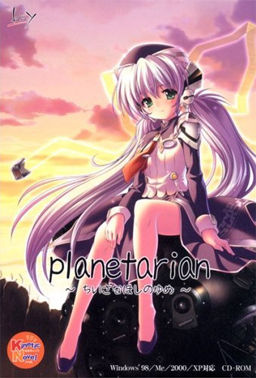
The unceasing Rain──
The 『sealed city』,
abandoned 30 years ago after a sudden biochemical warhead strike.
The uninhabited ruins,
ruled over only by autonomous battle drones.
The man came to this place,
finding shelter inside a tall building as he grew exhausted,
and there he came across
a planetarium,
a room that once filled the hearts of men
with the wonders of all the stars in all the sky.
And there, he met a young woman
whose name was 「Reverie」.
A member of the planetarium’s help staff
who had continued to wait for customers for over 30 years;
a broken robot──
Entreated by 「Reverie」,
he lost track of time as he repaired
the nonfunctional planetarium projector.
The continuous Rain.
Those quiet days spent with 「Reverie」.
A long-lost nostalgia that began to arise in the man’s heart.
What will he think about this sky of manmade stars?
And what is the fate of this 「Reverie」 of a little planet?


















Realy asome story! A bit tragic in the end, but it helps you think about stars
A really good game…
A must play…
anyone?
@ sol
Did you extract it at the same folder as the japanese one?
Because for some odd reason while you extract the english patch, it will take you to some other folder. Just make sure that you extract it at the same folder as the japanese one
The new upload probably left less room for me to screw it up, and it’s running now.
Thanks!
Ok so after a thousand years, I can now play it.
But what happened to the voice?
The prologue part has a voice, but after that, their voices suddenly vanished
try to install the voice path, “Yumemi Hoshino” (unless I’m mistaken) or “Reverie Planetarian” will be fully voiced
This VN was really good. The ending almost made me cry bitchtears.
I played this game a while ago… and it is one of the best VN ever to be made…
Is this really the full game? The file says it’s only like 40 mbs
Yes.
The game itself is quite short ( few hours of reading) and unvoiced, hence the small size.
For some odd reason I keep remembering Muv Luv Alternative while a play this game.
Short but sweet – this game will make you cry manly tears of sadness 🙁
Did I screw up the installation somewhere? Every time I click play I get this http://i54.tinypic.com/2s84gp1.jpg
I can click ok and it seems like it still plays fine though.
Yeah I noticed that too. Administrator, any way to translate the message and see what’s up?
For some reason I keep getting a message thats apparently not letting me play. It says something like “buy,” and “get” on the two pictures that show up on it. This is really frustrating. Can someone tell me what the problem is?
You need to use cracked .exe
How do I use it? I assumed it had something to do with that, but nothings happening so far. Is there a place I need to put it?
Can you please tell me, i’ve been at this all morning with no progress.
I got around the “get” and “buy” by going into the installation folder and running the Kinetic.exe instead of the Start.exe. If you still have problems, move the Planetarian.exe file from the crack folder over to the installation folder as well. (not sure if that did anything but it shouldn’t.
Does anyone know how to use crack.exe? It doesn’t seem to be working on my computer.
so i am reinstalling this game, but i didnt need to use the crack. I used the launcher, cancelled the run on administrator, get the error message and it still runs. Is that wrong?
Thanks in advance!
Very good story. Thanks to the website for making it available to us!
Hi,
I can start the game, but at the first screen and after the first spoken line the screen doesn’t change and all I hear are car sounds.
Can’t figure out what is wrong. Please help.
Also have the same problem,don’t know whats wrong with it.
Same here! And a year after! HELP!
I have the same problem! I need some help
I can’t figure out how to use crack.exe! D: When I click it, it just pops up a message with the file directory, where the crack.exe file is located, and then does nothing.
If your game crashes at the first picture, with or without voices, try installing this font. http://haeleth.net/dl/sazanami-gothic.rar
It worked for me, thanks
The font link doesnt work, could you post a working one game keeps crashing at first picture. 🙁
is the patch compatible with the Memorial Edition(which includes the voices from PS2)?
just listened to the drama cd that brings planetarian to a final close, a bittersweet ending
Hey there for those who do not know how to get past the buy and get screen what you do it this.
1. Load the game
2. Hit play on launcher
3. Open that buy/get screen
4. Use the crack.
It should let you play the game after this.
Not to sound rude, but that doesn’t really explain HOW to use cracked.exe. I’ve been struggling with this for months and it is very frustrating. Where are you supposed to put cracked.exe to allow you past the buy/get screen?
Just transfer the planetarium.exe file from the crack folder to the game directory
Yeah? I did that and it doesn’t work. Still gives me that screen.
WTF am I doing wrong?
Did you put it in the game directory? As in, the place where the program files are housed. If you installed it to C:\Program Files go in there and drag it into the planetarian folder.
I read the review about the game and… I can’t play it…it’s so sad.
yo filesonic’s down
Thanks for the reupload admin.
do you know that the opening of this game (piano) is an indonesian song? i wonder if Japan payed for it.
It must be your imagination btw im curious do indonesia make eroge?
its a good story. around 90 minutes worth of reading.
anyway yeah, the opening~The World of the stars composed by Charles Crozat Converse is taken from indonesian old song. You can google it and see it for urself.
i mean those old song is taken from Charles Crozat Converse. The real title is “What a Friend We Have in Jesus” from 1868.
I heard that this game was made by KEY, aka the same people who made Clannad, among other things. The comments already point towards that being true, but can anyone give me a definite answer?
Yes, it’s true.
>Made by Key
Ok, I HAVE to read this now.
OH GOD DAMMIT.
My shit-tastic monitor strikes again.
I can’t even start because the monitor’s shitty resolution crops out what I assume is where the main menu is.
yep…a truly beautiful story with a tragic end….but still I enjoyed most of it….
show how stupid a war is….
crack exe not working how did you guys specifically install this?!
1. open the game
2.click play, the buy and get appears ignore them
4.minimize the game
5.open the crack file
6.click planetarium, then something install
7.u can play now….
better u placed the crack in program files where u put planetarium files…
this game made me cry… manly tears
Try right-clicking and choosing “run as administrator.”
Harrowingly beautiful… I guarentee this will make you cry either manly tears of sympathy or of sheer sorrow of the purity of the girl who waited, who was abandoned… who’s life ended after fulfilling her purspose to simply show people the stars and make them happy….If you don’t cry for poor Revire and her devotion to stand out in the rain for years on end to call customers in from the rain, to give her bouquet of scrambled parts, and give her last show to her precious customers, then your heart really must be made of stone…
when i start the game there’s a massage window with a red x on it. it start anyway. is this normal, or is it only me?
When i start it up it freezes on the first scene, did i do something wrong?
Is this link dead?? I keep getting error downloading. Can somebody reupload this?
I really want to try this one
So does anybody else have problem downloading this??
Sorry if double post.
firstly got problem with the buy and get… then when i used cracked its run fine…
I installed the game and the English patch but when I try to run the game a window pops up with Japanese text. I have tried extracting the cracked .exe to the directory where the game is but whenever I do I get an error message saying: Cannot open file.
I have heard this VN was good and I really want to read it. I have tried the solutions that other people have said but none of them have worked.
Need to add some information. When the Japanese text pops two red boxes pop up as well. I click on either one and click on the choice below and it brings up a progress bar. After a few second the bar goes away and a Japanese text pops up with a red X. I have tried using the crack and even put it in the same folder where I installed the game.
It doesn’t work. Any help would be appreciated.
After i install it there a get and buy and get button.What should i do.Some one please tell me how to install it correctly
That has happened to me as well.
and your reply helped the situation
I knew 20 minutes in that it would end badly and after that I just shed countless numbers of tears throughout the whole story. This is why i absolutely hate stories in the hopless future. They always make my cry. Saying that it was a good story would not be enough but sadly the sadness and remorse make it impossible to express my feelings in any other word. It was a good story.
this VN made its way to my favorites even though its so short. Beautiful in every way, i think this is my favorite, even beats steins;gate in my favor. made me think about stars, how there everywhere, but no one really takes the time to look up and realize the beauty. ending was sad though……
can someone please put up information on how to download,I dont speak japanese so i can understand why the hell it wont install
This was made by KEY right. If so then it is a must play
I’m gonna write a quick guide for those who are having problems with the buy/get problem and general installing (as I just went through this).
INITIAL INSTALLATION
As usual you will need to extract the planetarian.rar into a folder. But before you start using the PlanetarianEnglishPatchSetup, go to the extraction folder and run the PlanetarianRetail application. You will follow the steps and make sure to send the information into your extraction folder. From here you now need to run the PlanetarianEnglishPatchSetup follow the steps, and naturally, add it to the extraction folder.
BUY/GET PROBLEM
This is where the buy/get problem arises if you try to use the Start application, basically there’s no way to play the game at this point as you’ll just loop between loading screens. However, this problem is easily remedied! In your extraction folder you will have a folder called Crack. Inside the Crack folder is a application called planetarian with a purple and yellow icon. You need to move this application out of the crack folder and directly into the extraction folder. Once there you need to run the application and press ok. Now you have a item in your extraction folder called Kinetic.OLD! Congrats! You can now click the Start application, press play, (and after you close what appears to be an error box) the game will load!
I hope this guide helps, I don’t really check these forums after I play the game, but I might in the future. Best of Luck!
i did all of this, but my game freez at the first image, but i keep hearing the sounds, im using windows 7 so i dont have japanese founts on my computer :S and im not being able to find anything on the internet, maybe that the problem?
From that response I can feel pretty certain that your system locale is not set to Japanese. The process behind that on windows 7 is to open your control panel, then select Clocks, Language and Region, the select Region and Language, Then open the administrative tab and the second selection will be your system locale, change that to Japanese and restart your computer. Should be good to go, but let me know if it doesn’t work.
That’s worked for me thanks:). And i want to add a side note. Game doesn’t work with applocale. After i opened game via applocale, whenever i click font options or reach first background, game crashes. But that will not happen if you set your system locale to Japanese. Thats first time to me a vn not working with applocale actually runing if you change your locale to Japanese.
ha… thanks. you solve my problem.
It worked for me. Thank you very much! :)
It does not work for me, as at start when you hear the first line a girl says in Japanese it stops working. Where did I do it wrong? Or it means I need Voice patch for it to work?
I have the same problem any help?
mimic?…………………..
iDIn’t cry itech
I got it to work.
First, take that file in the root called: PlanetarianRetail.exe and run it. Choose the directory and all that.
Then, run the english patch, using the same directory
Move the file [under ROOT:\Planetarian\Crack]: Planetarian.exe into the root of the main install [ie ROOT:\planetarian].
Run it. You should see a yellow exclamation mark.
Then run Start.exe
That should work! Good luck! I haven’t played it yet, I was just hoping I could help some of you out 🙂
Is the voice patch Fanmade, or just didnt get carried over properly for the release? Also if fanmade is it good?
how can i run the game
Although a little tricky to install, this VN is most definitely worth it. Took me roughly 3 hours to finish it but man, what a story! Don’t forget to change your system locale to Japanese manually! The game only runs when its done manually and not through AppLocale.
HERMERGERD. I can’t seem to install this. D:
I downloaded both files. Extracted them (separately). When I try to run \PlanetarianRetail.exe\ (the grey icon) — nothing ever happens, I tried checking my Task Manager, nothing is listed.
I tried:
-run as admin
-run normally
-run in compatibility mode (WinXP SP2)
-run in compatibility mode (WinXP SP3)
Nothing happens. Please help me. D:
P.S. I’m using Windows 7 Ultimate (64-Bit Edition).