
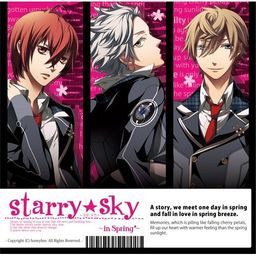
The first of the four Starry Sky games starring the characters from the drama CD’s of the same name.
Starry Sky takes place at Seigetsu Gakuen, a school which specializes in horoscopes, astronomy and other related topics. The main characters are all based on horoscopes.
Starry Sky Spring features Suzuya Tohzuki (Cancer), Kanata Nanami (Pisces) and Yoh Tomoe (Capricorn).





![Tokimeki Memorial Girl's Side Premium 3rd Story [PSP]](https://i.erogedownload.com/wp-content/uploads/2014/06/Tokimeki-Memorial-Girls-Side-Premium-3rd-Story-PSP-360x540.jpg)
276 comments
I went to the control panel to try to uninstall then reinstall the game, but it wont disappear from my list of programs :C HELP PLEASEEEE
So, here is the way :
1. For example you installed the game to this directory :
C:\Program Files (x86)\asgard\Starry™Sky`in Spring`
Just copy this directory.
(The directory depends on your pc default)
2. Then run the patch, in this step just paste the directory you
copied before in the directory box.
(Do this instead of manually selecting the directory)
Well, it worked for me.. Good Luck
Alright, so.... I managed to successfully install the game (Windows 7 PC) and skipped through some of the game to check it was actually working. (And 'cause I was pretty excited, too. Even if it was all in Japanese. x'D ) Then I even managed to patch the game, using all the tips about the right folders and how the patch can't process the weird characters in the game's name. However now, here is my problem!
Whenever I try to open the game, it gives me a box with a red x and Japanese which reads 'registry errors.'
The game won't uninstall, I've changed my system locale to Japanese (which by the way is how to stop all the ?????? appearing everywhere and show the characters instead.) and I have no idea what to do now!
I was going to start from the beginning and try getting the unpatched game up and running before trying the patch again, but I can't even do that. Please, any help would be much appreciated, this game is amazing and I'm desperate to play!
~ Tsumiki
-unninstall the game (run the install wizard then choose "no" then choose the last option)
-make a new empty folder (i make it at data D i'm not sure if it worked on data C either)
-run the wizard again then install it at the new empty folder u make
-the folder "asgard" or whatever its called should be nowhere to found instead its replaced by the new folder u make
-then just install the patch normally
it worked for me thou :I
For those having problems with the patch (still in Japanese even after it says patch is success) you can try this:
Instead of clicking the file directory for the patch exe, just go to the program files in asgard and right click on the address, copy the address then paste it into the patch exe. This should start running. Worked for me!
Download all parts for the game, then download all parts for the patch as well.
1) Only extract Part1 for the game. Then extract the .iso using PowerISO or any app that might work for ISOs. Run the setup.exe for the game.
2) Copy this WITHOUT THE ASTERISKS here it is *C:\Program Files (x86)\ASGARD\Starry™Sky`in Spring`*
3) Extract the patch rar files. Then run the patch .exe file. When it asks for the directory, paste the one I asked you to copy from Step 2. It should run smoothly. Then it will say patch was successful.
4) Voila! You can now play the game in English.
Note: In my case, I set the Region to Japan. I had some weird characters in my first run for the game but that was because I didn't download the extra files for Japanese language in my Window settings. I suggest you check for that in yours, or do the same. But if you don't see weird characters in your game, then theres no need for it.