
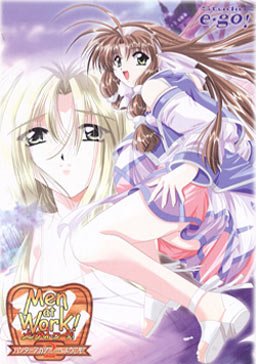
A Hunter Academy was established to teach Monster Hunters.
Cliff came to the academy to become a Hunter,
but the place turns out to be an old building unlike its name suggests,
and the great Hunter couple who was supposed to teach him leaves the Academy to go solve an incident in another town.
The Hunter candidates are all girls except for Cliff.
And after many turns of events, Cliff is placed in charge of the Academy and gets to stay with all the girls…




















I have a little problem. Every time I run the patch i get a message that i need to un the patch as administrator even if i do so. How can i fix this?
Admin, I encountered a problem when I extract it, it just shows that part 1 has some 2 errors when getting extracted, I close it and continue the extraction, then when I open the setup.exe it gives a message box that I cant read cause it’s in japanese, I already tried the first “windows installer” type, then open the setup.exe again but nothing happened, It also showed that the setup.exe is not installed properly, How can I solve this? Please help me admin, Much appreciated and Thank you in advance.
I just have a little problem with this game, I just change my computer (OS : Windows 10) and when I run the game, the game run fine but I haven’t see any random monster…
Someone know how I can fix this problem ?
Thanks !
Cantseem+to+figure+this+install+out.+Ive+got+4+files,+one+is+____-_!2__-___-____.msi,+data1.cab,+data11.cab+and+setup.exe.
The+setup.exe+comes+up+with+an+installer+window+then+a+message+box+mostly+in+japanese?+pops+up+and+only+a+button+to+say+ok+is+there.+It+doesnt+seem+to+have+done+anything.
The+.msi+file+brings+up+a+window+then+a+error+notice+pops+up+references+setup.exe+but+everything+else+is+in+japanese.
I+also+have+the+english+patch+but+that+isnt+of+any+use+yet.
Geez thats what happened after a failed captcha. I think i hit enter part way through lol. Sorry but i cbf re typing that all on my phone. Where there are + that should be a space.
Is this dummy cut? I suspect it is, as there are only Data1 and Data11 files(where are Data2 up to Data10)?
I also have a problem. When I entered the fighting scene in the prologue the outlines of the characters were black rectangles. I was wondering how to fix this?
thank you.
Anybody ever wondered what Men at work 1 was like? I can’t find the damn game anywhere…
Even after renaming the .msi file and starting setup.exe with jp locale as administrator (using Locale Emulator 2.4, which never failed me before) installshield exits with error 1628: [in japanese] couldn’t complete script based installation.
Any ideas? tia
Goshh, fiiinally got it to work. This game seemed such a pain to run, and was actually on the verge of dropping it, so far I’m glad I didn’t.
So my problem was one already mentioned, being on jap locale but unable to unrar properly, in the end just found a way to manually type Japanese name for that file, as posted here. If you do that, don’t forget the space after the number 2, it’s got to be precise or it doesn’t work. Now to enjoy 😎
Hey, I have an issue. In the “Crying voice in the cave” mission I cannot find the girl… Help?
Though I had to use my xp to be able to run it, I’m happy I played this rpg eroge. The biggest flaw though here is on the saving system you see in this game if you save and quit during a mission you lose all your progress -_-.
So anyway I decided to leave a couple of tips on this old game here:
* Buying the bath is virtually impossible and even if you manage to get the 9000zel you’re probably already too late to get the cgs. What’s worse you lose all your zel on your next run. Best to use them on pepper,etc.
* Raise att, def and will – my guess is that it replenishes your force faster, maybe?
* DON’T confuse the load and save tabs, once I accidentally loaded when I wanted to save right after barely beating Kitty’s route – you can imagine the frustration.
* Finally, the characters from best to worst in battle:
Cliff: his Whirlwind is the best, it kills crowds at a minimum force cost.
Lucy: normal attack does good damage. Use Double shot and Trigger happy, also Holy warrior for final battle
Aoi:Evil Smiter kills undead instantly though it can miss. Blue fire attacks are nice as well.
The rest:
Mena: Taming monsters with Mena is a pain and not really worth it, you lose them anyway on a second run. Stick with her frying pan and healing. Maybe use failure.
Sheryl: Good normal attack plus ice spells.
Other than that too weak for most fights.
Kitty: too weak for most fights.
Nice game though I couldn’t get last 2 routes, game kept defaulting to Mena. And I have to insist, even with the warding bell which decreases random encounters having to beat the game 5 times basically the same way for each route gets so repetitive. Would’ve been better suited with a ladder structure maybe.
For everyone having issues on new Windows OS’s here is what worked for me.
To bypass all of the issues folks have been having with setup.exe not working, we are going to do a manual install. To do this, follow these steps.
1. Move MenAtWork2.rar’s and Men_at_Work_2_English_v1.0.exe to desired install folder.
Extract downloaded rars (If using WINRAR to extract, when the Diagnostic Message appears, click “Close”. DO NOT CLICK “BREAK OPERATION”! We will fix this error in the next step.)
2. Move Men_at_Work_2_English_v1.0.exe into Men at Work 2 folder and open it.
Rename the .msi file to メンアットワーク!2 ハンターアカデミーへようこそ.msi (copy the text from here and be sure to not add any spaces at either end by accident)
3. Extract Data1.cab and Data11.cab
4. Make 3 subfolders. Name them SAVE, Music, and Movie respectively
5. Move ALL .avi files to Movie
6. Move ALL .wav files to Music
7. Move ALL .dat files to SAVE except game00.dat, game01.dat, game02.dat files. They’re okay where they are
-Manual installation is now complete- To install the english patch, continue to step 8.
8. Right click on the Men_at_Work_2_English_v1.0.exe and click Troubleshoot compatibility
9. Click the bottom option (Troubleshoot program)… Check 1st and 3rd boxes (The program worked in earlier versions etc. and The program requires additional permissions)
10. Select Windows XP (Service Pack 3)… Click “Next” then select “Test the Program”… A user account control message should appear… Click “Yes”…
11. When the patcher appears, click “Cancel” to close it. When the window pops up to confirm you wish to exit the installer, click “Yes” Then back to the Compatibility Troubleshooter, click “Next” to change the .exe file.
12. Click the top option (Yes, save these settings for this program) and then click “Close”
13. Run Men_at_Work_2_English_v1.0.exe and another user account control message should appear… Click “Yes”…
14. The patcher should appear…
Click “Next”…
Put a check agreeing to the EULA…
Put a check on Subtitled OP if you want… and Click “Next”…
Click “Browse” then search for the folder you’ve been working in all this time… You’ll know what to do after that…
Once it is finished, click “Finish”… A maw2-enlish.exe should appear in the folder (replacing it’s Japanese predecessor)
This should work for windows 10 and 11 for anyone who still wishes to play this today in 2025.
Hope this helps!!!
Special Thanks to Hikari no Yami and their guide from 2011 in the comments here. I took it and just made it more clear and concise and posted it here so more folks will see it.
P.S.
This is not necessary but for those wishing to save some space it is safe to delete the following files:
Men_at_Work_2_English_v1.0.exe
setup.exe
Data1.cab
Data11.cab
MenAtWork2.rar’s
P.P.S.
For those who wish for a Walkthrough, just google it and you should find some.
For step 2, I meant to say, open the folder. Do not run the english patcher until later… Sorry for the confusion this might cause…