
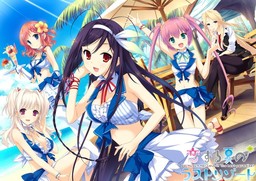
Soutarou just manages to pay his school fees by doing part-time jobs. After helping his junior Umi and skipping his shift, he was fired from his part-time job and was having problems making ends meet. Umi felt responsible for his present situation and introduced him to a part-time job at a Southern resort. With deep blue skies, clear seas and vibrant vegetation, the place looked exactly like in the travel magazines.
Moreover, he was surrounded by many girls: energetic little sister-like Sango, affectionate tennen ojousama Riho, shy and earnest Shiori, and the kind but also strict manager Nagisa. Arriving at the resort, Umi turned to him and asked him to spend the time there as her boyfriend.














Thanks. As usual. 😀
Thanks for this!! I have the game but i really needed the patch!
LOL I have the patch, needed the game. You the best Admin! ^v^
Where did you get the source? could you drop me a link?
Admin is great putting up all these games, but im really starting to hate downloadani.me
Same here. The free site has a bunch of fear mongering phishing schemes trying to say you have a virus. DONT BELIEVE THAT MESSAGE. It is a scam and the best way to deal with actual viruses is download a reputable antivirus like avast, AVG or the likes. Never download or believe a popup that states you have a virus. I was actually planning to buy the premium until they started these terrible and evil pop ups.
TAHNKKKKKKKKKKK U
i needed the game and the patch… ty admin-sama i love u…
Thx admin! Saw that there was a patch for this earlier today on vndb, and popped onto the site and saw it wasn’t there refreshed a few hours later and it was. Keep up the good work bud!
pls add pastel chime 3 TY
Welp…. What appointments should I cancel tonight :3
– P.S. I love the Captcha xD (good job)
Does this include the Sun tan and Harem Patch?
MDZ (the translator), said he won’t translate those or the fandisk’s
Any reason why?
Hey!admin.can you please make the download links resume capable!!!!!thank you as always for the hard work
its only 200mb per part =_=
Well, some of us do have a crapy internet…
Hi. Thx Admin for the upload. Is this version uncensored ?
Do you guys know what Font this game uses?
The text is more or less broken here, I’ll have to install this font manually.
I’m using Japanese locale.
Windows 10 additional fonts fonts did not help here, I solved my problem by going back to windows 8.1, it fixed my problems on others old Pc games too.
Windows 10 down the drain, best solution ever.
THIS.IS.FREAKING.AMAZING
Admin, I love you so much (no homo though)
Like seriously, beach + bikini = boys’ romance
Excellent game. Feels like years since something like that was last translated. Excellent balance of content, erotic, plot and characters.
Finally.. summer episode, mwehehehe~
how do u get past ADVHD
duh? Advhd.exe is the main game executable – just double-click on it to start playing.
so stupid question how come i cant see the text when i start new game
Using Windows 10? Game requires additional font installation.
1. Click the Start Menu -> Settings
2. Choose “System”
3. Choose “Apps & features” on the left panel
4. Click “Manage optional features”
5. Click “Add a feature”
6. Find “Japanese Supplemental Fonts” and install it
thx
Thank you! It worked.
oh my god thank you for telling me this, just update my computer to windows 10 and i have a question…. can every eroge here be played in windows 10?
Well, most shouldn’t have problems, since architecture and libraries haven’t changed that much since Windows 7 – some tweaks might be needed (like additional fonts, like in this case), but overall it shouldn’t be a problem. Very old games (late 90s-early 00s) from DOS/Windows98 era might have problems, but it’s nothing new – just use DOSbox for those.
It does not have a feature for me to add. what should i do?
Am I the ONLY ONE who doesn’t have “Japanese Supplemental Fonts” in the options?
Guess this is unplayable for me, what BS.
So is there going to be a product key requirement? or is it actually free?
Duh? Just extract, put patch in, then play. This is “pirate” site, you know… I post links to English translation companies shops for some releases, but it’s always optional. Every game posted here can be played for free.
why do you even answer these kind of questions admin?
Anata wa hijō ni ōku no Kanrisha-san ni kansha.
So, can see the options and all that OK but cant see any of the text in-game, is the any font i need to install, running a xp CM with jap locale, first time something like this happened.
Any help apreciated.
No idea about XP – I tested the game only for 7 and 8.1. Windows10 requires additional font install (details in previous comments).
Font name is “MS UI Gothic” – you might try getting it and installing manually, but personally, I’d advise upgrading – XP is very old already.
Ah, finished! I went to apply and work with MDZ on this to to help finish it up, was told they were basically done except for cleanup. Glad it’s finished up!
Why must hight sexual content? can it be disable? well, it’s not that i hate that stuff, just feels something wrong.. But, still i’m gonna download it.
There is no all-ages version of this game.
What were you expecting, on a site called erogedownload?
You do know what ero means…right?
How is it wrong to have sex with the one you like/love?
Would you rather play an eroge where girls gets raped left and right?
Did I mention you could just skip those “wrong” scenes with the skip button+a certain option?
“Would you rather play an eroge where girls gets raped left and right?”
YES! Especially the loli, that would be great.
I thought this was still on translation check, well nice one, thanks.
buenos dias ay alguna manera de jugar con menos resolucion de pantalla es que no tengo la resolucion de 1280×720 y deberiais de decirlo al principio para que la gente no lo descargue si no tiene esa resolucion de pantalla
ya no hace falta ya consegui hacerlo funcionar la pantalla se ve medio rara pero funciona deberias de poner que el juego no te arranca a menos que pongas esa resolucion
do you need applocale?
No. I been running this fine on korean locale.
is it just for me or someone else recieve a warning of malware when you click on the “free” button on downloadani.me?
What antivirus are you using? Everything works fine for me.
http://www.google.com/safebrowsing/diagnostic?site=downloadani.me
https://www.virustotal.com/en/url/e7fee5323df864054cb3e5986df1eab162d23cd5b251f5647d69a2e606fdd896/analysis/
I use avast. It happens when I click on the “free” button and it open a new window to another site, like aliexpress. But it only happens some times. Sorry if my english is wrong, I am not a native speaker.
probably the adds
This game dont have any eng sub ????i have downloaded the english patch but only active button like”option”,”save”,”sound” is in eng but the text is in japanese !!!!
I seem to be having the exact same problem. Thought i put in the eng patch, but all that is in English are everything but the main text? What am i missing? Can someone answer this.
Make sure you put the patch in main game folder, not sub-folder – basically, if you’re not getting “Are you sure want to replace those files…” prompt, you’re doing it wrong.
WHAT DO I DO! IT SAYS I CANT PLAY THE GAME BECAUSE MY RESOLUTION IS BELOW 1280X720.
i have a dell inspirion netbook and the screen is 16:9
Whenever it says patch on the vndb i think that its only partially translated but admin has it here so that means its fully translated? someone explain it to me.
I’ve visited vndb.org and it’s complete patch. the translation team said that there would be some minor error. maybe it makes the status is partial patch. just hope for the newer patch
Thanks for the upload.
Mhhh can’t get it to run on windows 10, tried adding everything containing japanes to the adds&features section, only leads to the game running a few secs longer before it collapses.
seems to be trouble with the fonts, though they are installed.
Will try on Windows 7 later.
nvm made a stupid mistake, all works fine
I am having the same problem how did you resolve the problem?
You really are going to make me said it, aren’t you 😀
Problem was, you need to restart after these updates, which should be a given, since it was this way in every windows-version so far, however windows 10 doesn’t ask for a restart, it just leaves a comment below the installed feature (available after restart).
Probaply won’t help you though ^^
(make sure however you really got the right japanese-feature installed, there are a couple of them)
so….
i just try to play it but i have some problem it say the program can’t start because d3dx9_43.dll is missing and after i change the program name d3d9.dll (from english patch) to d3dx9_43, now it’s say xinput is missing, can someone help me with this problem? 🙁
My Windows is 8.1
You need DirectX library (this is required for pretty much every modern game – it’s basically a set of instructions that tells your graphic card how to draw stuff).
Get it from Microsoft’s site: http://www.microsoft.com/en-us/download/details.aspx?id=35
Thank You, now it’s work 🙂
thanks admin, for upload such a great eroge. looking forward to the next great eroge
Wow! Didn’t expect this one. Played it’s japanese version, but not all routes. I guess it’s time to return to my backlog. Thans, admin!
I extracted all the files, replaced the files with the english patch, downloaded the directX library when I got the same error as Th3Only1, but now when I click the advhd thing to launch the nothing happens. No error, no game nothing help plz
Hello,
I am having the same font problem as posted earlier, I can see the english text in the options menu but the in game text is gibberish.
I have Japanese locale and all Japanese related language features are currently installed on my computer via the windows settings properly without problem, (I am running Windows 10) but I still cannot read the in-game text even after restart and reinstall of the text.
Can someone please help me? I am not sure what I am doing wrong or whether I need to install a supplementary font.
Thank you!
Thanks admin.
One question, it would be helpful if I purchased a Jast or MG eroge from your links?
I get small kickback from each purchase, but in grand scheme of things, it’s more important to show that we’re not all dirty pirates here, and people are willing to put down money if they played pirated version, and enjoyed it.
Admin does this have the suntan and naked harem patch?
I keep crashing after the scene where someone comes to receive them at the island when the fade out happens can someone please share a saved file after that fade out ?
“I have already been swept up in a storm”. Right after that line the game crashes no matter what i do so if someone can upload me a save after that i would be very thankful.
Managed to fix it in case someone has a similar problem install latest k-lite codepack.
You saved me my man, thank you so much for posting that.
same probleme here, game crash just after “I have already been swept up in a storm” no matter what i do, k-lite codec didn’t change anything for me :'( some help plz
What patch are you guys referring to? The english patch or harem patch?sh patch or the harem patch?
uh a quick question how come my text is idk signs of some sorts not even letters anymore can someone help me with this?
Some options seem unavailable, is this due to new game+ content or is it something to do with the untranslated patches and /or DLC? Or is it some other problem? Also a walkthrough would be much appreciated.
hey how about duel savior??vany way to play it on the windows 10???
help I can’t save
Run the game as administrator (one of options when you right-click on game .exe).
Well I tried to do that and I still can’t save . I don’t know why , do I have to make save folder or something ?
Make sure game folder isn’t set as “read only” in folder options. You might also try moving it away to some non-privileged directory, like “My documents”.
I don’t know why, but Umi’s attitude at the start really pisses me off
I still can’t save . di I really have to play it in one go?
can you upload the rar folders to a different website ani.me keeps giving me popups
This is my first time ever attempt at downloading an eroge. I’m planning on using Wineskin and wondering if there are any guides on how to do this since i have no idea. I have downloaded the english patch and the game but after that I’m lost.
Thanks for this, Love that game. I just need some help ( please ). I was playing till the near end of Umi’s arc, then the game crashed. When I restarted it, there was no more an image, just sound of the game. And Iam blocked there, black screen, sound of the game, and to quit I need to use Task Manager. I tried everything in the compatibility options but nothing. Do you have some advice? Thanks a lot 🙂
Is it just me, or is Part 18 always failing in a network error? I’ve retried the download but I’m getting the same thing :
Failed – Network Error.
To make it worse that’s the last part T_T
Got a problem here, game work well in english until the moment when somebody come to pick us up ( me and umi ) for the new job, the text “I have already been swept up in a storm” appears then the game crash, telling me adv(kanji)hd stopped fonctionning, and it do so no matter what i do, i tried to install the k-lite codec pack like suggested but impossible, so if anybody could make a save just after that moment ( i suspect there’s a video that my comp don’t wan’t to run ) and send it to me, that would be great ( that or a solution for my problem will also be great XD )
Someone already reported exactly the same problem in previous comments. Downloading codec pack ( http://www.cccp-project.net/ ) fixed it for him.
I know that and i did install codec pack too but didn’t solve the problem for me :'( always the same crash at the same point
did you restart the PC after installing?
yes i did, problem persist, tried with k-lite codec pack, with cccp, with codec for windows 8, tried to change region to japanese, game still crash at that same moment
And the thing is, i think my codec aren’t in cause since i can perfectly read the video alone ( when i launch the op_movie.dat, i can read it perfectly and get the video without any problem ), but as soon as i reach that point in the game, it crashed :'(