
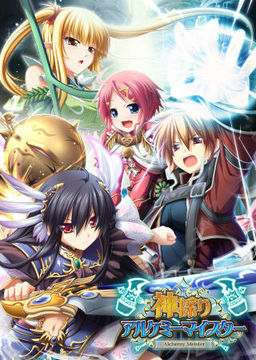
In the Setetori region of the southern part of the Raulbhach continent lies the Mikelti Kingdom. Among the seven major cities is the artisan city of Yuidora. This is where a young orphan named Wilfred lives, pursuing his dream of becoming an alchemist. As tensions between neighboring nations rise and a threat of war looms, three girls in distress come to his place and he helps protect them. Using a new technique that he discovered and with the help of other races, will they be able to restore peace to the lands?



















Nice one !
Crashes when the OP starts for me. Anyone got either a workaround or the codecs needed?
Welp, got it to work. Anyone else having issues just download the latest K lite pack and instal it. Default settings work perfectly.
Found this on 4chan for installation instructions:
Installation:
1. Set locale to Japanese locale
2. Mount and install main game
3. Run “kami_ap01”, “kami_ap02”, and “kami_200” in that order.
5. Follow the translation patch Readme.txt
Is this a trial game?
Wow, torrent seems to be popular, I have only downloaded 10% and already uploading 30Mb/s.
Oh, and obligatory thank you for release admin.
Well that’s a surprise. I didn’t expect anything will be realeased before Deardrops and look what we have here. It’s a RPG and it’s brand new.
seems like 12 is broken, no matter how i download it keeps crashing
Try the torrent link
some antivrus will say virus whne you instal the patch english
keep getting “ARCGameEngine has stopped working” it starts up fine with the intro, but when i choose an option in the main menu it gives the error message mentioned above. I’ve tried everything that comes to mind(might be missing something obvious, dunno)
thanks in advance ^_^
It happens whenever i move my mouse over an option in newgame or gallery room and when i press load game/extra stories
how instal game using demontool and instal English patch and patch download in same time ???? plzz Explain to me because i have many troble using demontool
If you had look on the posts above, someone posted the instructions already.
Installation:
1. Set locale to Japanese locale
2. Mount and install main game
3. Run “kami_ap01″, “kami_ap02″, and “kami_200″ in that order.
5. Follow the translation patch Readme.txt
On a side note, Avira realtime protection caught a suspicious file called “age” or something. Anyone getting this falsepositive?
age is the .exe u need to run the game so don’t get rid of it. Also anyone know how to switch between full screen and window mode for the game? cause the options menu isnt translated =x
Oh nvm, just found out, needed to put my mouse at the top of the screen or press Alt to see the menu.
how do i instal this game? the setup is alweys exiting o.o
Set system locale to Japan yet? I wonder how much money I would make if I got a nickle every time someone asks this question.
@topfpflanze umm did you put all the patches in the same folder as the game then patch it? also did you use the patches in the right order? its ap01 then ap02 then 200
well, i already did that but the setup send a message than exit, it’s pissing me off
What are u using to mount the ISO? cuase I always use Daemon tools and never had a problem with it.
i’m useing Daemon tools too
damn! there’s another to instal this like copying the data on the mounted image to a new folder?
Hmm are you mounting the right file? Cause I mounted the .mds file not the .mdf one
yeah. that’s the one i mounted o.o
well i can show a screen shot of the problem to you
I installed the game and all three patches but when I try to start the english patch I get this error message: “Invalid start mode: Missing_IRAFN command line switch”
can anybody help?
Well fuck its a big game, but sure to be worth it
Yay! Thank you for the game, Admin. Especially because it’s SRPG and that means at least 40 hours of fun :p
Btw, anyone have a walkthrough for Koenchu? Thx before.
are the 3 append disks included in this?
Try looking in the Mediafire: Patches download section
Ohh, so the patches are the append disks. Alright thank you. I thought they were expansions.
my english patcher always says software nor found even with all 3 patches installed anyone know why
Is the english patch in the same folder as the game? If it is try running it as Admin, if that isnt it either then maybe its an antivirus program getting in the way, if not any of those then idk
english patch is in the game directory and i dont use antivirus programs this things clean
the files in my game directory are as follows:
$1$ALINIT.BIN $1$SHMES.BIN
$1$CGINIT.BIN $2$ALINIT.BIN
$1$CIMES.BIN $2$IMINIT.BIN
$1$COINIT.BIIN $2$ITINIT.BIN
$1$IMINIT.BIN $2$ITMES.BIN
$1$ITINIT.BIN $2$SCJUMP.BIN
$1$ITMES.BIN $2$SKINIT.BIN
$1$SCJUMP.BIN $2$SKMES.BIN
$1$SKINIT.BIN
okay nvm thats alot to type but pretty much my game directory is full of BIN, OGG, ALF, AGF files. what do people who have working game have in folder?
Ya u need all those files.
Just intsalled the Game under Win 7 64 bit, and under Japanese Locale. Renamed the Folder to English Letters, moved the Files from the Game up one Folder ( To the renamed one ) Deleted the empty Folder in Japanese Letters. Then installed the 3 append disks/files. The were installed in an subfolder with Japanese Letters. Moved all Files from there to the Main Folder, overwrite the age.exe. Delete the now empty append Folder.
Set Locale back to German ( English should also work, the English patcher doesnt like Japanese Letters, and again be sure to put the Files in the MAIN directory of the game, the patcher puts the files in a SUB directory ). Run the English patcher. Done and working.
This worked, but required additional steps for me:
– the english patcher moves age.exe to the “Backup” folder, but does not replace it with anything. So move it back into the main folder aftwerwards and rename it back to age.exe
– use japanese local to actually run the game, otherwise it will crash (this is because we are using the unpatched exe…)
Torrent? How sweet, thank you 😉
Huh…found out you can’t put the game on the USB or else a bunch of stuff won’t come out translated.
it seems the link for KamidoriPatches.part1.rar is broken. May you reupload it please?
Woah, worked perfectly thanks alot guys.
But fuck…why applocale never works. I hate to have my PC set in japanese.
umm.. admin? I have a request… please put numbers to the download links… its annoying to count the links to which part you have already download.. please… I have a very slow internet connection.. I can’t download it all at once so I have to stop from time to time… Thank you in advance…
If you’re using Firefox (which you should :3) then you can just highlight > right click > open in new tab. That way you can see which part was the last you downloaded as it will leave it highlighted.
That’s what I’m doing and like I’ve said I have a very low internet connection so I stop and close the browser from time to time… and I really find that out very annoying -_-
i’m using mipony as my download manager for mediafire..less trouble in downloading manay parts
Holysh!t, one of the most popular games translated SO FRIGGIN FAST AND IT’S NOW EVEN MORE POPULAR!!! WHOOOOOOOOOOOOOT!!!!
AND LOOK AT THE COMMENTS, 100+ ON THE FIRST DAY! YABEDOBEDO!
thats alot of files hahahaa
What’s the gameplay like? Is it Eien no Aselia style or more like Brave Soul?
Oh damn it! Seriously! Seiha is so quiet nowadays and I thought he was not doing anything but now…Bam! Kamidori Alchemy Mesiter in ENGLISH!!!!
Thanks a lot for this game, admin.
It’s an ero visual novel. With a built in turn-based strategy RPG. Big swords. And hot elves/catgirls/demons. A THOUSAND TIMES YES.
Just wondering…the version 2.00 bonus characters and game changes are not available until i beat the game at least once right?
That is correct. Youll need some events, beat the Game, Start new game.
sound like new game+
Thanks a lot for clearing it up.
is there a trainer for this?
So as for romance options does it only include the three girls on the cover? As to choose a lovely dovey ending I mean. I would be very grateful is someone could tell me that.
part03 is a broken link 🙁 but thanks
hmm, i encounter problem in playing game, i installed the game and patched according to the order using applocale set to Japanese then i open the game in applocale / without.. i be able to view the opening however when i try to press new game or others, it will come out a message box indicate that “age.exe has encountered a problem and needs to close. We are sorry for the inconvenience.”
Please help me on this issue
p:s i will try to reintall whole thing 1 more time to test it out
encountering the same issue, please post a fix here if you find one.
No fix needed. Just testet it and doublechecked it. Applocale WONT work. Just set the Regional Setting / Locale to Japanese.
For example under W7 under Regional Settings. TAB 4. NO need to set Formats ( Tab 1 ) or Language/Keybords ( Tab 3 ) to Japanese only the Locale. Then the Game doesnt crash anymore by clicking the Buttons. ( Had the same Problem ).
i encounter kind of the same problem. after i press the new game button i get a runtime error when i try to press any button in the menu. no matter what i try to solve the problem it has no effect and i get the same error. your solution doesn’t work either. 🙁
it really bugs me…
ya, i also suspect need to change it after i test with soreApp and NTLEA however due to my pc cd driver corrupted, i cant use windows cd to change the language settings… currently still downloading microsoft OS from msdn to get the i386 language pack.
Ok, able to play the game successfully now.
Installation
1. Go to Regional and Language Options > Set Language to Japanese.
2. Mount the image and Install the game.
3. Install Kami_ap01 > Kami_ap02 >Kami_200 .
4. Put the Kamidori English 1_0 on the game directory and install.
5. Run the game and have fun.
“Using AppLocale, SoraApp, NTLEA to change the locale language to Japanese won’t work when execute the exe to play”
wowwowowowo, yeah…. new game!!!!! 😀
is there any H-scene ?
yup, and quite many…
Anyone know what being a deadbeat means for you?
I would want to know this aswell… After I took stuff in the Deadbeat dungeon I have this mark which indicates that I finished deadbeat … no clue what that means …
Thank you very much (again) for this game admin (and of course al who helped, translated, etc. too)
Thanx, admin, this site is just awesome. Keep up the good work! 🙂
i cant install the game every time i try apeared an error something about a 115 error someone hellppp
i reinstalled the japan pack in windows and problem solved XD
i got same prob with a error about 115
but on my end i cant make it work even after i reinstaled the jap pack, admin any chance you could make a upload or torrent with the game already instaled?
if you find the fix for this please tell me
found a fix for it
i updated my xp to service pack 3
activated the language suport and started the setup with applocale
Thanks a ton!
Thanks a lot for the game, but when i’m downloading the part8, it says it’s broken … ?
I love you Admin, have I mentioned that yet? Thank you for this.
can anyone tell me if the file needs to be constantly mounted to play? like if a disc game needs to keep the disc to play or if only needed to install and can play without?
Crap, I installed kami_200 before kami_ap01/02 yesterday, before the helpful instruction comments appeared… the game seems to be working fine… but should I re-install it just in case? lol
nm, starting a new game leaves question marks for much of the options there (related to 2.0), so I’m trying kami_200 -> English patch again, and if that doesn’t work, a complete re-install. :p
uhh.. That “question marks” mean that those options are locked – they will be available once you complete the game once.
… Right.
Well, doing a re-install will probably fix “something” anyway, since I messed up the order of the patches originally. xD
If anyone has gotten to this part yet, are there choices that lead to certain routes? or is there another way to get one of the endings?
after installing, patching, reinstalling
3 times…
i still cant get it to work, the game still crashes after a fixed amount of time, everything works, text is in eng etc, but the game just crashes due to time, any idea what is causing it?
also, it seems my window has a red border around it, is this supposed to happen?..
… im guessing its just my com’s problem since i used some of the above instructions. its still weird that mine auto closes :/
If I’m not mistaken that red bar comes around window when avast! runs applications in sandbox mode so might want to check that off, since it might give some problems.
o seriously? ok thanks i’ll try it out
it works perfectly now, THANKS ALOT FOR THE HELP DUDE
Hey,
i installed the game and then patched it. After starting the englishpatch the age.exe disappers and i can´t start the game anymore. Any hints why the englisch patcher screws the age.exe?
I Get an error when I try to save does anyone nows how to solve?
hmm for me no eror make sure you instal in d if you have and maybe unistal and instal agin and pachit before you instal the eng patch if you have an antivirus make sure you turnit of becasu for some reason some antivirus block the ag exe and it stops or dont run i hope i helped.ps dont set to japanse i dint set it and it still worked the patch tip kami200 ap 01 then ap02 it shold work
thanks mate. avire deleted the age.exe because it found a trojaner in it (called Crypt.XPACK.Gen3 )
I’d like to point out that all files posted on this site are verified and clean.
If you get any virus warnings, then send the .exe file to your antivirus vendor so that they can check it and update their databases to remove false-positive. This helps both your antivirus vendor and future users of this site, since those warnings make installing some games really difficult.
no worries mate, i din´t want to imply something. i´m happy the game works finaly….stupid antivir
and i run it noramly withohu appcoale or set to japanse wierd
any pointers on how to play the game on windows xp?
my game crashes when i hover over the begin game buton so…. any ideas would be welcome
Problem solved, the game was not opening in admin mod. Just changed to open with admin mod and I can save, thx.