
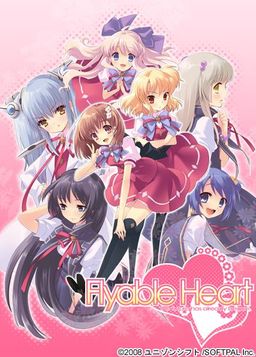
One day, Shou, who is always hungry, receives a letter. It contains a student ID issued by a famous school and the ID says “All school restaurants are free of charge.” He immediately decides to transfer to this school. The school, however, is divided into two groups…. Also, what welcome him are a strange fortuneteller, a huge explosion of fire works, and his room at school dormitory for girls…. What will happen to Shou? What will happen to love romance between Shou and six female students? His new school life now starts….
“Watch out, boy. Various misfortunes will happen to you….”












Already left a comment but wanted to mention for anybody starting this VN it’s recommended you follow this route order to avoid any major spoilers. Mayuri, Sakurako, Amane, Kururi, Yui, Suzuno
It was admittedly pretty boring to start out in that order at first but got a lot better as more of the overall plot was revealed.
Can’t install the english patch, keep getting a slightly smaller rar file than I’m supposed to and it can’t extract the exe files. Keeps saying \Unexpectable end of archive\, and I’m kinda at the end of my wits. Please help
Maybe your antivirus is false-detecting some patch contents as virus and tampers with archive? Other than that, no idea. Patch downloads and extracts fine for me.
I still can’t patch the englsih patch into the game. It keeps giving me “Fatal error patching file. You may have to reinstall.” Then it says this dll\PAL.dll
I’ve reinstalled and kept doing things to fix it but nothing works. anyone can help please
I seem to have the same problem as Sanguin. (He decides to join and it crashes) Has anyone else found a way to fix this yet?
Admin? Anyone?
Same here 🙁
descargar el font
sorry i have one question. do i have to mount the image everytime I run the game? I didn’t see any crack in the folder. thanks
The English patch contains the “Win32:Dropper-gen” Virus.
Dear admin, please post a version of the patch, which is not corrupt.
It’s a false positive. Read previous comments.
Does the english patch cover all of the game or just partly?
hola este es un mensaje para el admin por favor tienes que poner la fuente para descargar por que sin la fuente el juego funciona mal y te empieza a dar errores o se traba. menos mal que me meti en la pagina oficial de traduccion y lo descargue ay lo pone en la pagina web que sin la fuente para las letras el juego funciona mal digo esto esto para que la gente pueda descargar el juego y jugar si que se le trabe el juego o de errores
Is there any way to disable the voice of the protagonist? i mean the robotic Voice it’s really annoying
Yes, there is a way to disable that annoying robot voice, place the shouvctl.exe file in your game directory and double click it. A menu will appear and allow you do disable the robot protagonist voice. Cheers! 🙂
i did that and it says can’t open FH.exe
Probably permissions issues. Try some of the ones floating around about ‘inability to remove files/folders’ or ‘trying to delete file but I get “access denied”‘
is the translation still shit
People having issues with the fhinst.exe (the english patch) It will be detected as a FALSE POSITIVE so make sure you allow the files through your anti-virus. Also if you need to run the fhinst.exe as an administrator for it to work properly. I was struggling as it said my game wasn’t fully installed but it was because I installed it into Program Files. If you installed it there then run the patch as administrator and it will work perfectly.
did anybody know if the VN flyableheart: if that time, have been translated to english? when i look the thriller in youtube i’m realy courious about that 🙂
Can anyone help me…. I’m having trouble with the patch. The game w/o the patch seems to be working fine but when I installed the patch I can’t even reach the title screen when it crashes. How do you fix this?
All The Best Gin and other fellas
Even though the translation is not good let me tell you, this vn is a masterpiece. Even though it took a bit more time to read because of bad translations, it was worth it.
For+those+that+still+don’t+know+how+to+get+the+English+patched+version+to+work,+I+figured+out+how+to+get+it+working.+
First+of+you+should+have+Daemon+tool+(or+a+program+the+is+similar)+as+once+the+files+have+been+extracted+they+should+come+out+as+MDF+files.+
After+clicking+on+the+file+it+should+go+through+the+installation+process.+Once+your+installing+it,+when+the+menu+of+where+you+have+to+put+the+files+into+a+location,+you+have+to+make+sure+that+the+top+drop+down+bar+says+the+program+files+of+your+system+and+then+install+it+into+said+location.+
After+finishing+the+install+it+should+make+a+new+disk+drive+(D:+or+E:)+with+the+game+in+as+well,+you+don’t+want+to+open+the+game+from+here+as+it+will+open+the+Japanese+version+only,+but+you+also+don’t+want+to+get+rid+of+it+ether+as+you+won’t+be+able+to+play+at+all+if+you+remove+it.+
Once+you+have+downloaded+and+extracted+the+English+patch+move+the+files+that+came+from+it+into+the+location+of+the+game+in+your+program+files+and+then+click+on+the+fhinst+file.+
Go+through+the+install+and+then+to+play+Click+on+the+FH+File+in+the+same+location+and+it+should+play+the+English+version.
Remember+DO+NOT+remove/delete+the+disk+drive+as+you+won’t+be+able+to+play+it+all,+if+you+do+don’t+worry+as+you+can+just+reinstall+the+file+from+the+MDF+file+extractor+that+you+used.
I+hope+this+helps+anyone+and+everyone+wanting+to+play+the+game.
I don’t know why the comment went funny so here it is again
For those that still don’t know how to get the English patched version to work, I figured out how to get it working.
First of you should have Daemon tool (or a program that is similar) as once the files have been extracted they should come out as MDF files.
After clicking on the file it should go through the installation process. Once your installing it, when the menu of where you have to put the files into a location, you have to make sure that the top drop down bar says the program files of your system and then install it into said location.
After finishing the install it should make a new disk drive (D: or E:) with the game in as well, you don’t want to open the game from here as it will open the Japanese version only, but you also don’t want to get rid of it ether as you won’t be able to play at all if you remove it.
Once you have downloaded and extracted the English patch move the files that came from it into the location of the game in your program files and then click on the fhinst file.
Go through the install and then to play Click on the FH File in the same location and it should play the English version.
Remember DO NOT remove/delete the disk drive as you won’t be able to play it all, if you do don’t worry as you can just reinstall the file from the MDF file extractor that you used.
I hope this helps anyone and everyone wanting to play the game.
lol i’d be lost without you
thanks men, you really help me a lot
omg the fonts are horrible there’s no way to change it to another font?
after a while the games chrashes while his dad is talking(after the MC saying his going to that school)
you need this font copied to your Windows/Fonts folder
Click on Ralph to download
I have a question? Admin, could you please tell me if this is the full English Patch for the gane? Cause when i look for it on VNDB, there no english translation and that makes me confused…
Holy shit this translation needs some QA. About 1 in every 3 sentences is proper English.
buen juego interesante
Where can i just buy the English Version?
Very good game. Enjoyed it
Hope Flyable CandyHeart (fandisk) also be published here 😀
Are there other games which are that badly translated?
I really enjoyed reading the weird translation.
Also, are there other games from the same developer on this site? Can’t seem to find other games.
dunno about that but what’s the crap with potag calling all the girls (young Ladies) children when he’s same age +- a year and thinks he’s a man and also the stupid line “every moment, her body” and another “it’s different” wtf do these lines mean?
After installing it and got it to work on english and play it after 1 minute!! it’s crashed i don’t know please someone help me
does anyone else get this error whenever they install the english patch? whenever i finish installing the english patch it says “Fatal error patching file. You may have to reinstall.” and it tells me dll\PAL.dll and bgm.pac. ive uninstalled and tried reinstalling the game and running the english patch as administrator but none of that worked. can someone help me? it’d be really appreciated ;;
I did this, the game worked for me.
1. Just download the game.
2. Open the MDS file with Daemon Tools, it mounts the game disc.
3. Install the game using the Setup.
But it showed error, so couldn’t install.
4. If you open FH.exe, the game will start but in Japanese Language.
5. Copy the Game Disc onto your desired location.
6. Open English Patch, follow the instructions to install the English Patch.
Game will crash, in start due to a missing font.
7. Hence, Download the file MISCFS_.TTF(a Font file) from internet(a common file, so you won’t have any trouble), copy it to Font Folder in the Windows Folder in C Drive.
8. Enjoy the game!!!.
Need help when i try to install patch it says The specific installation could not be verifed {E=0} please consult the release notes for supported upgrade paths
no issues so far with crashing like others seem to have, but i am unable to save– either regular or quick save. anyone know a fix? playing the original japanese without the patch btw if that helps
Having the same problem too
anyone know where to get the serial code or crack for flyable candyheart?
jesus, anime sharing didnt give the crack in the file
Search Internet for “flyabletrans” and you will find their official site, they have a English patch for the Mayuri sequel too. Translation is quite literal but understandable if you know even a bit of Japanese culture.