
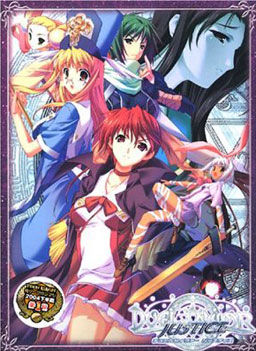
There is a prophecy that every 1000 years, when the destruction draws near, the Messiah will come from a different world to the root world of Avatar and save them all.
Mia Touma, while returning home from school, finds an old but highly decorated book. When she shows it to her brother, Taiga, the book teleports them to another world – Avatar.
When they awaken, they find themselves in a world reminiscent of Medieval Europe. Before they understand what’s happening, an energetic woman comes before them and tells them they have become Savior Candidates.
They must use the training they learn at the school to defeat the Lords of Ruin and Ruin itself to save Avatar and every other world along with their friends. However, Taiga finds he has become the Red Apostle, which complicates matters greatly. What is going on with the fight with Ruin? Will he actually be able to become the Messiah and save Avatar?

















is there always after credits in every route?
They will play: Every. Single. Bloody. Time.
Sorry. 🙁
Anyone know how to get to the music files? I really want to put them on my mp3 player.
Is there any adv.-visual novel game like this in this site?
It’s pretty fun~
Not sure if these are what you are looking for, but here are some that you might enjoy:
Sengoku Rance- Lots of rape but fun gameplay, so based on preference.
Tears to tiara- Overall nice game with turn and grid based combat, very fun imo.
Yumina the ethereal- Turn based combat more like rance yet still different, very RPG like with many skills. Has a great storyline, worth it to play all routes. Just might need to take a break after each one for a while. One of my favorite games and favorite on this list.
Utawarerumono- Very close to tears to tiara, made by the same people after all, couldn’t play much since it crashes a lot if run on windows 7, though very fun when I ran it for a bit on another computer.
Probably leaving a few out, but these are the ones I could think of, hope you enjoy them.
I have recently purchased a new laptop, As i figured once I got it I hate the “new” windows 8 Operating system that they decided to use now. navigation from menu to menu is a pain in my ass and I am not certain what still functions on this OS that did on windows 7. So, my question is are there some sort of special proccesses I have to go through to get this game to work? cause I have followed both the faq and read up on all the comments made above for guidance. I have reinstalled duel survivor gotten a new copy of daemon tools, thought perhaps I may need a different variation of daemon tools so tried a light version next but nothing. I’ll mount the disc image it will use the auto run contained within the disk image bring up a menu i press the one that reacts the most like it is attempting to download something, but then Nothing. I can run duel savior, everytime i try my laptop simply says “would you like to run this program?” I click yes. A little hour glass appears for all of 4 seconds, the disappears as if i had not clicked on anything at all. I am sorry if i am overloading your chat with this particular comment but 10 hours of sitting around downloading a multitude of different files in hopes of getting a game that shoulld have been easy to install is just infuriating.
Signed,
The fiercely resolute Mace Of Spades
Windows 8 got a undercut version of DirectX, we now have no way to play this game on Windows 8. Only option is to downgrade to Windows 7 or Vista in order to play.
Yeah, this game can’t be played on Windows 8 yet 🙁 There’s this DirectX issue. I’ve read other VN forums and they confirmed this, even compatibility mode doesn’t work. Too bad I can’t play this for now. Just hope someday…
use a vm tah tworks 🙂
wait use a what?
I think he means a virtual machine with windows xp
Thanks for the game ^^ nice one
I can’t seem to get the patch to work for me -_- help please!
to get the patch to work leo do this coppy and past the files and do not deleat the main game file to do so you’ll need to uninstall it then reinstall it just patch then open the game folder to click on dule savior english then play it in destiny or justice your choice.
This game runs good in Windows XP. The only issue at this point is the game automatically exit when Taiga Touma feels sleepy in the principal’s office. When I checked the locale, it’s in English, so I changed back to Japanese. Now it doesn’t have that problem anymore (also the font a little bit screwed up in English Locale). I played it until the two protagonist goes to the dorms for the first time and have no problem at all up to this point (and I hope no at all until I finished it) 🙂
Is their any way of getting the game into windows mode instead of full screen? My moniter is really buggy when it comes to full screen games for some reason. >-<
From previous comments, someone said to you can change into window mode from Control Panel and somehow change to 16 bit color.
Can someone tell me how to get on Crea’s route? I can’t find it in any other walkthroughs.
In order to get Crea’s route, you need to choose Destiny (not Justice) in the beginning. Next, you must finished Berio/Kaede route first, then the other one between Berio/Kaede you didn’t choose earlier, then Rico/Nanashi, then the other one between Rico/Nanashi you didn’t choose earlier, then Lily, and the last Mia’s route, and you’ll get her route.
I have been playing with this game for a while, trying to get it to run on my Windows 8 machine. I finally found a work around using a virtual machine. (VirtualBox) Technically not really running on Windows 8, but it still allowed me to play. VirtualBox with XP installed. Then just install the game as you normally would and it should work. Hopefully this helps some people. I’m not all that tech savy myself, just stubborn with time on my hands.
Best game played in a very long time, thanks a lot ADMIN!
Hoping to be pointed toward eroge type games with some action play.
Could someone help me with the installation? I have install it on my Windows 8. while I want to extract the english patch directly to the game directory, it says error and so on. If I extract it in different place and insert it into the game directory, the game have some unknown Languange and there’s only Okay button and the application don’t wanna function. please help me!
can someone tell me where i went wrong?
i just finish installing the game and open the application then after a few seconds a message pops out saying
“duel savior has stopped working” i dont know what to do anymore 🙁
im using windows 7 ultimate 64bit. it would be nice if some give me an advice about this 🙂
Can I get a tip on the install?
I installed the game, and then the english patch, but when i try to run the program I get a “Duel Savior is not responding” error.
Running on win7
Any help would be appreciated.
Hey Kroznak, maybe you’re have the same problem with me. Try to change the Locale to Japanese also extract the patch on other place. After you extract it, place it on the game directory. I have do that and succeeded
hey guys. i have windows 7 laptop and i downloaded the english version, but when i launch the game, all i get is a black screen with a window i can’t even press “OK” or “Cancel” on, with message that’s in japanese. from what it looks like, it wants me to “insert disc 2”.
any ideas on how to fix this?
So I got the game to work but my english translation isn’t working. Do I have to uninstall and reinstall?
The problem was that my antivirus software was reading the application I needed as a threat so it removed it. The correct file is Duel Savior.exe of anyone else was having the problem. Make sure your antivirus protection doesn’t remove it otherwise it won’t work right when you overwrite the files.
Can someone make a Save Open program that leads to the game’s saves?
Is there a program that leads to the game’s saves? There are not in the game directory.
I’m getting a \duelsavior.exe has stopped working\ error when I played the Chapter 7… Can someone help me how to fix this?
hi i need help each time i try to play the game it keeps saying direct draw.? i dont know what to do i use windows 8 btw
What do you do when you get a disc burner something to operate the game? D:
Game kept crashing whenever I’d go and talk to the ninja kaede after fighting her. Can’t find a way around that.
=(
somebody please help me !!
i got problem, soon after taiga had sex (or not) whit berio at crunch this game stop working !!
i use laptop whit windows 7 as OS so please help me !!
When I run the Duel Savior file (i patched itt by crea quick fix) the screen went black and a board appeared. It said some thing that i couldn’t understand but i saw Game Disconnected. Need help!
Admin, there is 13 files in the free download english patch right? Or is it just a bug?
non blood related sister…ok. My life will be much safe now…
Whenever I open the DuelSavior.exe (without the+patch) nothing seems to happen, and when I open it with the patch a notification saying something about DirectDraw with some Japanese (‘Direct Draw failed to initialize, kill the program’ was what came out of google translate) came up with a Black window of Duel Savior. Playing the game on Windows 10 and on Japanese Locale but I don’t know what’s wrong….
Help Please Admin >.<
Don’t worry admin – I found a website which told me my problem….according to it it’s pretty much impossible to play Duel Savior unless I have windows 7, which isn’t possible (not going to the extent to use a virtual computer – seems way too confusing). Here’s the website I found for anyone else with this persistent problem: http://answers.microsoft.com/en-us/windows/forum/windows_8-gaming/directdraw-was-deprecated-in-windows-8-but-i-need/d21d6775-1006-4da9-a642-39553b286a49?auth=1
Im too lazy to try, but one fix might be to run it in a virtual windows 7 on windows 10. Might fix the problem but I’m not too knowledgeable on how virtual pc stuff works.
hi, how many heroines does this vn have?
There is 6 heroines i believe, 7 routes
So how does all this work? Do I download each individual .rar file and then extract only part 1 or do i extract all of them and place the contents into 1 file?
Just found this patch for windows 10 / 8 if people are having trouble with direct draw errors: http://www.mediafire.com/file/9x4z0uwx2bz2gd4/ds_wineddraw.7z
I fixed DuelSavior not starting up, having a white screen and a DirectDraw error, and finally crashing on startup, by doing the following after trial and error:
Do not delete anything from the game installation folder, or I can’t guarantee this will have a chance of working for you.
I found a fix for the DirectDraw error that doesn’t make you have to use a virtual machine interface that will make you have to download a new OS and make you have to switch between your OS and a different OS every time you want to use the game.
That fix can be downloaded from here:
http://www.mediafire.com/download/9x4z0uwx2bz2gd4/ds_wineddraw.7z
To fix the problem of the game freezing on a black screen and crashing on startup, I looked for a fix which I finally found.
I replaced the voice1.pac with a correct voice1.pac from here:
http://games.seiha.org/duel_savior_files/
It seems the one in Erogedownload’s files is missing around 300 megabytes of data.
When you run the game use the DuelSaviorMod.exe instead of DuelSavior.exe which doesn’t even start the game and instead of Duel Savior.exe which only gives a white screen with a DirectDraw error message.
_______________________________________________
Follow the Instructions below in order to run the game successfully:
1. On a fresh installation replace voice1.pac in the game folder with the voice1.pac you downloaded from here:
http://games.seiha.org/duel_savior_files/
2. Copy all the files from the English Patch WITHOUT overwriting the newly replaced voice1.pac.
3. Copy the 2 DLLs and DuelSaviorMod.exe from the DirectDraw Fix you downloaded here:
http://www.mediafire.com/download/9x4z0uwx2bz2gd4/ds_wineddraw.7z
4. Open the game using the DuelSaviorMod.exe
_________________________________________________________
Note that using the DirectDraw error fix will only lead to a Black Screen and the game crashing on startup, you MUST add the Black Screen Crash on Startup fix then without overwriting the Corrected voice1.pac add the other files from the English Patch folder, then add the DirectDraw error patch and use the DuelSaviorMod.exe to play the game.
Since one doesn’t want to replace the voice1 file while copying the English patch wouldn’t it be easier to just First replace the English files and Then change up the voice1 file?
Is this can be played in Win 10?
Hopefully I can finished this great VN, cause 5 years ago can’t play in Win 8, but still can play in Win XP.
Since my data has gone, and only using my very old XP to play old games, I’m starting download again right now and hope I can continue the excitement like when I finished the first chapter 😀
Thanks for the solution. Now we can play this VN on every OS. I just want to edit a little bit of the steps, which is we don’t need to download newly voice 1 file and overwrite it because it will be renamed (voice 1 to voice 2and voice 2 to voice 1) which will make the file size exactly the same now.
One thing I want to ask is, why I can’t use Crea’s fix patch, no matter before or after the copy of the patch to the installation folder?
I see you guys managed to fix the DirectDraw problem. Did no one try to fix that problem for Xross Scramble yet? I am so disappointed at being unable to play it again like I did a few years ago…
For those that want more, there is a fan disc available!
Just search on this site for “Xross Scramble”.