
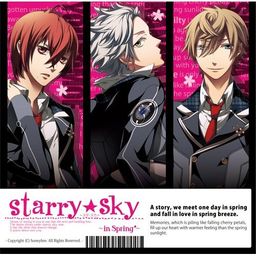
The first of the four Starry Sky games starring the characters from the drama CD’s of the same name.
Starry Sky takes place at Seigetsu Gakuen, a school which specializes in horoscopes, astronomy and other related topics. The main characters are all based on horoscopes.
Starry Sky Spring features Suzuya Tohzuki (Cancer), Kanata Nanami (Pisces) and Yoh Tomoe (Capricorn).















Hey, is this two group of link has to be downloaded?
or just need to download one?
No, you have to download BOTH. Install the game first then proceed to the patch
When I want to click and install the game, there appeared a windows box containing anonymous characters. Is the data corrupted or what?
or maybe there must be an application needed (ex: adobe flash, etc.)
Can you provide a screenshot so I can help you?
I had the same problem as you. xD What you need to do is to manually save the file. Right-click and open the link in a new tab. Then, enter some code. Voila!
I can’t wait to play the game! xD
I have error during patch installation.
Hello,
I’ve install the game and it works wonderful. But as soon as I patch it, it don’t start. An error messages is shown. I can’t read it.
Could anybody help me?
Thx
I included an installation tutorial in my blog. Your problem might be solved if you try checking on what I did. Check my blog by clicking my name.
Admin, is it at all possible to make a walkthrough for how to download/install the game and its patch? A lot of people, myself included, seem to be having a hard time with it…
I downloaded everything and the game installed perfectly, it works when I tried playing it.
But when I extracted the English patch, the game gives off an error box. Can you help?
Yay I Finally Got It Too Work Thank You Admin I Love You <3
Can you , please , help me and can you send me your email ? please >///<
I tried to install part 3 of the patch but apparently the button doesn’t link to the right page or something? Could you help by any chance?
I’ve come across a wonderful blog with a tutorial on how to install starry sky in spring.
sasugasugoi[dot]blogspot[dot]com.
I already downloaded all the Game download requirement .. but how can i install it? .. please help i really i want to play the game .. :/
Will this work on a mac?
Okay…so none of the download files are working. When I press “Download File”, it says “ERROR FILE NOT FOUND”.
so i downloaded the game and its workin perfectly, EXCEPT THAT ITS STILL JAPANESE!!! (and yes i have installed the patch on the game… i am not sure if i did it right though….)
anyyways i need some help here! 🙁
i don’t know whether its my computer or sumthing but when i download part 3 and 4 it says file not found or sumthing similar 2 tht :/ please fix it.
I can’t download part 3 and 4. Please fix it! Thanks!
I figured it out! For me, I had to come back the next day to download part 3 and 4.
Hello! I’ve installed the game (it works) but when I tried to install the english patch it says that:
“This program cannot update the installed version of Starry Sky In Spring beacause of the following reason:
The access to the following file is denied:
F:\Chip.arc”
Please help!
do u have to burn this game onto a disc?
Hello,
I was trying to download the 3rd part of the english patch, but when I clicked the “download file” button I got a message from firefox saying that “the page could not be found”. I’ve tried refreshing the page and I’ve tried downloading it in both google chrome and internet explorer. I’m not really sure what to do so I would really appreciate it if you could help me with this.
Nevermind-it worked now. I have no idea why though lol
I have the same problem except with part 2! Did it jus suddenly work?
omg i love you, hope it works
The fourth part of the installer keeps on saying that it’s not found or something when I try to download it.
Nevermind it works now 😀
are you going to upload the rest of the series? as i love these games
Hi, everyone~!!
I just wanted to ask if this is free otome game~? :3
I’m kinda new with downloading and stuff…
So, do i have to get a CD and put in the iso files? do i put in all 4 of them or just 1?
Nevermind. I just extracted it instead of DVD LOL
ummm… does this download link still work? I mean I haven’t tried it yet but I surfed the net looking for good download links but all of them has a notice about copyrights and legal or something like that.
Part 4 comes up with a message saying “file location may be moved”? any ideas what this means? it wont even let me dl
Does it work on Mac…cuz…I have one and there’s no PC at home except for my dad’s laptop.
I download both and I cant play should I download a different media player because I have quicktime play and VLC media player
Thanks for your crystal clear explanation. I didn’t have problem at all to download and to install it. Thanks again 🙂
Such a great game and works perfectly!!
Just wanted to say that this works perfectly fine on the vista~
Thank you for this admin!!^_^
i unable install, how am i install this patch? Please Help me
I kept seeing a weird box too but it makes sense now! xD
You have to open the file site, not right click and save. That way, you actually download the file. 8D
I can’t wait to play! xD
i installed it the game and works perfectly fine. ive put the patch on and it one yet its not in English still in Japanese
I can’t seem to be able to download part 4.
When i click Da-Free game download and English patch download, all the links that it show i have to download them all to play?
I can’t get part 4 to work
I keep getting an error when I go to download the game from the website, it keeps telling me “Oops! Google Chrome could not connect to 76.73.126.10:182” and I get a similar error with firefox. This has happened quite a few times now, when I got this error before I would refresh and keep trying till it wored but I keep getting the same thing now. Any suggestions?
hey..i can’t Download part 4 🙁 i have try the next day but it still can’t
can anyone tell me why? i really want to play this game
I just started downloading Starry Sky and it may be a weird question but is there a difference in the game if I don’t download the english patch? I’m full japanese so I understand it and all.. and also do i have to download the english patch? is it really necessary?
English patch, as the name implies, translated japanese text into english one. If you can read japanese, then you can go without patch.
So i tried installing the game but for some reason it wont let me it said something about the network being corrupted
I downloaded the DAfree: game download and the DAfree: english patch download …. so what am I supposed to do now?!
soo when i download then what do i do? i don’t get it, just download them all and it will just all come together????? help me????
Are there any more being translated at the moment?
Whenever I try to install the patch, and I get to the part where it has to get patched to a directory, it always says “Invalid Directory”…
What should I do? 🙁
Why am I getting this message?
“This program cannot update the installed version of Starry Sky In Spring because of the following reason: The destination directory dosent contain any files to update.”
do i really have to burn to dics?
please help me, what should i do after extract them?
wah~ Do I really need to burn the game in a disc??? cause I downloADED IT> extracted it all together then says “burn file to disc” ?????
the hell> how can i put the patch right now if i burned it?
you need to have program like DaemonTools for that. When u will get him (ect) it will automicaly made virtual disc of a game after that instal game like normal one useing virtual disc.
Hello, Can you help me?
I’ve downloaded the English Patch.
When I install it a Program-File-something comes up.
Do I need to download something else ?
BTW, I’m quite new here, please help me
Thanks ^^