
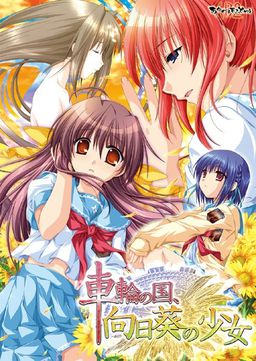
In the near future.
In a not so distant place.
There exists a society where law is based upon deterrence and criminals are assigned “obligations” fitting for their crimes.
Within this society, a man named Morita Kenichi aspires to the position of Special High Class Individual, one who holds authority over said criminals.
For the purpose of fulfilling his ambition, Kenichi returns to the town he once called home. There he will encounter three girls bearing “obligations” and there he will encounter the past he left behind.
Won’t you join him in this story about how people relate to their society?
In this story about how a society relates to its people.
In this story about the girl amid the sunflowers growing in the country spinning like a wheel.




















When I Do Touka’s Good Route
I Still Get Sachi’s Ending
Is That Normal Anyone?
What should i run in applocale ? the setup ? well its not working .. i read the other comment they say run the patch ? what patch please help me!!
Btw which is japanese in applocale ? well i cant see any japanese language there ?! i think its one of the square`s ? but i tried all of`em but still doesnt work ? maybe the problem is the thing running in applocale is wrong ?! .. ~sorry if my english is bad~
it’s @ the very bottom I think
It has 3 characters only so it stands out
http://erogedownload.com/faq/
日本語 << Nihongo = Japanese
http://i.imgur.com/kXNeG.png
This is what happens when I try to open it, what do I do?
This ONLY happens when I have the patch file inside, when it’s not there it runs perfectly fine.
I obviously need the patch so I don’t know what to do.
Same problem for me T_T
so who’s ending did you guys pick. i didn’t know who to pick and accidentally ended up with harem ending… lol
Just tried running this and got a virus warning for “generic21” trojan.
I’m sure it’s just a false positive but I just thought you should know.
Wow this game is amazing thanks admin
am i the only one missing the voice!? voice.xp3 isn’t working for me
Could someone tell me how to install this because it seems i get an error whenever i start it up after install.
Having encountered some error problems myself, it seems that the image needs to be always mounted on Deamon Tools, or it shuts the game down if not.
Having figured that out the hard way, is there some sort or NoDVD crack or something for this game? I don’t really like having this image mounted up all the time just to play it.
I could use someones help with getting the game running! I followed all the steps untill i mount the iso. I SEE the iso but my computer does not reconize it! I cant mount it if my computer does not see it any ideas?
How to install:
1) Run the game setup (setup.exe) of the mounted game with japanese locale
2) copy the patch.xp3 into the game directory (there are also other *.xp3 files)
3) run the game syarin.exe as administrator in japanese locale
4) if you didn’t do step 3 in the correct way make sure everything game related is closed (every debug window) and try again
This game is awesome, thanks for it!
The ending is great exept for the censorship, but dont let that put you off!
First off, thanks for the game admin, I really enjoyed it. It has a rather unique take on the criminal system. Pity about the censoring but still a great game.
thanks for this awesome game
What the hell is this? Why did the five-piece? I’ve downloaded the first part out of two. I just wanted you to spend the second, but now I can not because there is a possibility. Why was the case? What should I do? Therefore, thanks to a very, very>:(!
Old, two-part upload had only fileserve links. I’m reuploading all games currently so that they have both fileserve and filesonic interchangeable mirrors. Sorry for the trouble.
Err…basically I ran the setup with the patch.xp3 inside the game folder and I’m still getting the DVD error, problem is I don’t have an .iso to mount…help?
What happened to my comment about the trojan?
I’m removing this kind of bullshit. I’ve written many times that all uploads are checked, and if you get any kind of warnings like that that means you’re either using shitty AV or you’re getting false positives from it – either way send the .exe to them so that they can manually check it and update their databases.
Thanks this was quite a good game, along with G-Senjou no Maou another game I recommend might be Kara no Shoujo if you like murder mystery games
can someone tell me how to get all sachi CG? i tried a walktrhough but it didn’t give all CGs
Part 5 via filesonic premium is not working
http://i.imgur.com/kXNeG.png
I get this f*cking message ..
Any help?
Ummm. When ever I try to install the game, it keeps saying that the system files are corrupt and I should get a new version of the files. What do I do now?
hey i need some help installing this, i keep gettin an error and i even change my language local to japanese
You need to change locale before you start installing. otherwise the installer can’t copy the files properly.
i hope some ppl translate the other games thats out in this company i love the art work
Please could you post the ost of this game admin?
Hello, Admin-san!
There is no big problem, but I just wanted to know why if my PC does not recognize the English patch? I have it on the Japanese game, but as I said this is not a big problem. I wait your answer.
Sayounara!
After unpacking the patch you will get “patch.xp3” file. All you need to do is place it inside directory where you installed the game to.
I know because I’ve done it first, they are still the fact is, that men’s under load after the patch I’m already beginning not to my Pc has recogni. I can not use it.
help,i cant download part 1
they say the link has expired
Seems like temporary problem on fileserve. You can download other parts in meantime, until they fix it, or download part1 from filesonic instead.
Hello Admin~
Uhm… when I download from fileserve, it always says that the link expired? Did something happen?
Thanks Admin. 🙂
I set system locale to japan after i read the comments, i uninstalled, i reinstalled to default directory even, with all checkboxes checked. I copy pasted the patch file into the game directory after this installation of the game finished. I ran game in administrator mode and i got that blue error screen thing.
Do i have to restart my pc for the locale to change, or am i doing something else wrong? this is my second time i install a japanese game of any kind, so i would appreciate any help – from the admin or the people nevertheless. -thank you in advance – Isi
i only get the error message with the blue window <.<
i want to play it <.< i playerd g-senjou no maou already too i want to PLAY IT!!!!
help pls (location is japanese and i always start it as adminstrator)
thanks for this recommend Admin! (from gsenjou no maou)
Would you recommend anything else possibly bittersweet / mystery?
I’ve been staring at Katahane for awhile, but haven’t been particularly interested in trying it out >_<!!
i can’t run the setup.exe. how can i fix this?
Ive tried mounting both the .MDS file and the .ISO file but no matter how long I wait it wont run the setup.exe and if i do it manually it always stops responding. can someone help me with this problem please
Game stops responding after AB2 logo, it was installed properly (Japanese local) patch file is in folder no error window it just freezes after the ab2 logo
In case people are still having trouble. Proper steps to get this working from start to finish. ~Windows 7~
1. Download all five parts, and the patch.
2. Download Applocale
3. Mount the .ISO using Daemon Tools, or whatever you prefer
4. Run applocale in Administrator mode, then run the install file on the mounted CD using Japanese. INSTALL
5. Move the patch.xp3 file to the main directory of the game
6. Run the game in Applocale, use Administrator mode again with Applocale.
Can’t see how anyone can’t get it working with those steps. Hope it helps.
I have installed it without any problems thx admin 🙂
I’m having an issue with the patching; the game’s fully installed and running, and I downloaded and extracted the patch zip from the Mediafire link, but the game still runs in only Japanese
Thank you for the download, in any case.
This Game was Absolutely Amazing, quite possibly the best VN i’ve played thus far it was very gripping, heartfelt, and had some pretty good morality packed in it as well. I can’t wait to play the sequel and the other games by this company, they have definetly won me over with Sharin no Kuni! if anyone hasn’t played this game yet and is reading this, what are you waiting for? You should be playing it already!
Thank you for the uploads admin as always it’s a great help
A “no-dvd” patch is needed.:)
The files on mediafire arent there anymore? admin can you reupload them or something?
the file has been deleted admin! T.T reupload plz
Just a heads up, all the dl’s for this one are dead.
please fixed mediafire link
admin please re-upload this.
Mediafire Links are down.
It says Invalid or Deleted File.
is this going to be re uploaded by any chance? if possible a torrent download =3
Stunning Visual Novel, I think I enjoyed it more than G-Senjou no maou. Thanks for the upload! 🙂
for those of you having the weird blue box error when you try running the game. Uninstall it all and go to Control Panel > Regional and Language > Admin tab > and set all non unicode to Japanese. Restart and try installing again
Grrrr. I tried to install this on many occasions, however when ever I mount the ISO onto DAEMON tools, it keeps saying the files are corrupted, please obtain a new copy of the program. Please help!
Hey there, I downloaded part 6 three times already but it still says that the file is damaged when I try to extract the iso….can you re-upload it please??
part 5 is not working, please reupload