
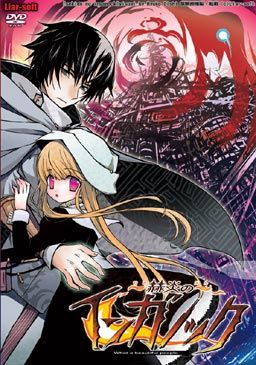
Inganock, a city isolated from the outside, a city where everything is distorted, even the sun. It all started ten years ago, at a day called as ‘Revival’. Then residents of the city slowly changed into beings that are partially human and partially animal.
To this day, only a few still look fully human on the outside. One of these is Gii, a former medical student, now an illegal doctor that walks the city and cures the poor for free. He changed too, but only in the inside and his change enabled him a mysterious ability that he uses to heal people that keep mutating further every day.
He has a few ‘friends’ if you can call them that. One of them is a black steel cat girl called Ati. Another one is an old friend from his medical school that he just met again after ten years, Salem. And the games story really begins when he encounters a little girl with pink eyes named Kia…


















Its not working for me it says
Error opening file for writing: Adenium Text
Two most common causes: Not in japanese locale, patch not ran as administrator.
Is this needed to play Shikkoku no Sharnoth? As in story wise?
I’ve played Inganock and is currently a few chapters into Sharnoth and I can say that there is basically no relation at all between them, other than vaguely sharing the same setting.
As far as I can tell, they’re both set in the same world but Shikkoku no Sharnoth is set in London while Inganock is a fictional city that might as well be on the moon.
That’s how little they actually have to do with each other.
(So far I like Inganock a lot better, though. So I recommend playing it instead of Sharnoth anyway, if you’re choosing between the two. Just saying. :P)
Shikkoku no Sharnoth and Sekien no Inganock have the same graphical and storycal style, but neither of them share any connection. At least, not found by me yet…
Thanks for this, but i have a small problem with the game, it in stalled good but when i did the patch the words & sentences were all messed up also i kept getting an error that gave me just these symbols [ ^#@&* } do you know how i can fix it? right now im going to reinstall it.
Sorry to double post, i’ve fixed the error problem, but the words are still messed up alittle, meh oh well, lol thanks again.
How did you fix this?I’m having the same problem and it’s really annoying.
O have installed the program, put everything where it wants to go, and when I boot up the game it says that it cannot find the compiler.
What do? Or am I being an absolute fool?
Well, I managed to get that problem fixed…so no worries on that front.
Unfortunately I have a problem with the text being too scrambled to properly read…
I’ll find a way fix it eventually I’m sure.
How did you take care of complier?
changed settings to japanese locale,
patch ran as administrator,
still, for some reason the game does not respond and i’m stuck with a black screen 🙁 any ideas?
Okay here’s how ya do it
First mount the iso file that you get after extracting the winrar files
DO NOT JUST INSTALL THE GAME, you must find the drive the iso file is mounted in, then explore the drive. The folder named “program files” open it. There will be a folder named “liar” copy this folder to your pc’s hard disc and then install the english patch. And there ya go!
so all you need from the .iso/.image is the Liar folder?
i have my computer set up so i can rip literally any disc to my comp and run it, as though there is a disc in the drive. *no questions asking how i do this, because i won’t answer*
or basically i need to take the folder out, install, then run the english patch?
also, all those who have an annoyance with the admin rights, seriously….just disable it, unless you cant because you’re on vista…..then my suggestion would be get wins7/8 or Black.
nvm bout that, figured it myself.
an installation video would be awesome if someone wants to make it for this stuff.
For clarification purposes: (Windows 7)
1 Download all 7 parts and the english patch.
2 Extract all 7 parts anywhere you’ll remember (desktop works).
3 Using a tool like Daemon Tools, mount the .iso file you extracted.
4 Go to My Computer and under the section “Devices with Removable Storage” right click the mounted file and click “open”
5: In the file you just opened select the “program files” folder. (Not your computers normal program files folder)
6: Inside you’ll find a “Liar” folder. Copy the entire folder to anywhere on your hard drive.
7: Run the English Patch (inga-r3) and install normally.
8: Enjoy
Wording was terrible
Doesn’t work still. Tried doing this three times.
possibly one of the best translated games i’ve played. story line easily gets 10, art is okay but not as good as newer releases but even still, 8/10.
anyone that reads comments, i’d say grab this game if you enjoy story plots.
*Spoiler* Ati is by far the most adorable character in this game.
For anyone who gets stuck on the first choice and keeps dying over and over here’s what to do since I had no clue. The section where it’s explaining what the “inner thoughts” and such do isn’t very clear, at least it wasn’t to me. The idea is to click on the lit up portraits in a specific order so you slowly remove them altogether from being selectable. Once every character/item is gone (can’t click on anything except end) you can hit END and then you’ll get options that you couldn’t before.
Amazing game so far. Story has sucked me right in and i’ve only just pasted the first choice and events that immediately follow.
All of the MF links are dead. 🙁 RS links are still up though…
I’m having trouble getting this to run. I install the game, and when I open that it works fine. Problem comes up after I install the patch. After I do the file wont open. I don’t get an error, or even a screen change, it just does nothing. I’ve tried reinstalling, is there something obvious I am missing?
After trial and error with no end I figured out a way around installing the patch, which is where I guess the problem occurs. Just install the game, then install the patch in its own folder. Open the patch folder and cut and paste all folders from the patch to the game itself. Choose to replace all files with new ones and you’ll be able to run it. I hope this helps someone other than myself!
For everyone with Rscript error, RScript.exe is the .exe for Sekien no Inganock, and excluding it from the DEP file list, will fix the problem. It’ll still crash when you close, but it’ll actually play at least.
Hello, I have this Rscript error that prevents me from playing the game. What do you mean by “exclude the .exe from the DEP file list” ? How do I do that ? (I’m on Win7). Thanks in advance, if anyone happens to read this.
Having the same problem as archie, keep getting the Rscript error after the intro movie ends.
As far as I know DEP means “Data Execution Prevention”, which for me at least can’t be right, while it does have a list opition, mine is set for only essential programs and services.
So anyone know what the solution to this problem maybe? Or can confirm what the DEP file list Just a Name is referring to is?
the text is a mess after i installed the english patch in the right place. how do i fix the text?
So to sum it up:
download,then extract, mount ISO, run Iso with Japanese locale or just open in explorer and kopie the liar Folder.
Run Patch as Admin, but select a different folder.
coppy everything of the patch folder in the original one. delete the .exe of the original one.
(Seems like the patch only unpacks the patched regards, but terminates the XFL Data)
Great VN…
Especially the BGM and Art…
Got me into “WTF” moment at the 1st chptr too…
Haha…
Really Salem?Really?
But the ending…I don’t really like it…
Its an open ending…Its like…
Up to your imagination how the character end up after you finish the game…
Really having a difficult time getting the english patch to work. I can play it in japanese, haha but as far as english goes i can’t seem to get the patch to install.
Any chance of getting the full-voice version of the game uploaded?
i+try+to+download+part7+but+it+look+like+this+gamename.part7.htm+…it+supposed+to+be+.rar+right???
i try to download part7 but it be like part7.htm not .rar …can someone help me???
@admins 1-click-download down, parts still up
@admins every single time I try to run the VN, a message appears saying “Compiler error: Compiler not found”.
I’d love to play this VN but I can’t, any ideas on how to solve this?
P.D.: I downloaded the whole thing, installed the patch and also changed the system locale.
HELP ME
Game download is currently dead.