
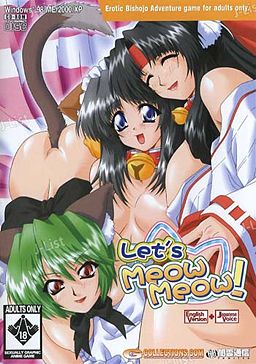
In the game, the player takes the role of Ibuki, a college student living on his own in an apartment complex. A lover of cats who often feeds strays in the park and takes injured cats to the vet, Ibuki is visited in the night by the Cat God, who offers him one wish in return for his kindness to animals. Ibuki wastes no time in his reply: “I want a catgirl!”. The cat god immediately announces his wish is granted and then vanishes, leaving Ibuki to wonder if it was all a dream.
Several days later, Ibuki is on his way home from work when he discovers a carboard box left near his apartment. Hearing the sound of a what he believes to be a cat, Ibuki opens the box to discover not a cat but in fact a catgirl, naked and sleeping. Ibuki takes the catgirl to his flat, where she reveals her name to be Mikan, and explains that she was sent by the catlord to serve him. Over the next few days, Ibuki discovers that the situation may not be as perfect as it first appeared, as a number of unwelcome visitors accidentally moved from the cat kingdom to our world alongside Mikan.















I have install it but when I want to start it, it says “Failure to acquire necessary data from Server. Error code 0x00030001” What should I do?
Use cracked .exe
Where do I get cracked.exe?
After downloading and viewing the folder that I placed the files in, I noticed a separate folder appeared labeled “Crack.” But I cannot install the little crack.exe. I think its titled “MNYANML”…. I’m using Winzip and Daemon…but I’m stumped, I keep getting this error message. “cannot use the connected GGD”….
i can’t install it, it just says can’t use connected file GGD
Ive installed it successfully but it now says that it cannot verify the server, or something to that effect.
You need to put cracked .exe in game directory and start game with it.
thanks very much love the site and keep up all the hard work
Yeah thanks alot Admin 🙂
I may just be really stupid here and i hate to cause anyone any extra work but i just cannot figure out how to do the vmate patch. please help 0.0 Oh and to the Admin i absolutely LOVE this site
i need help its asking me for an installation disc what should i do
can’t wait to play this game
Does Virtual Mate even exist anymore, because i can’t find it
right, so! for everybody having problems. to get it to install, you don’t click on the MINYANML icon. you right click on the CD1 data (I did it on the MDF file, but I have no idea if it works on the other file type), choose open with, and use a proper program to do it. I used virtual clone sheep, and it worked just fine. you open it up, click install, and let it do it’s business. you wait until it freezes and says you need the disc in to continue: don’t freak, just right-click on the CD2 data (again, used MDF) and open with the same program; this has the same effect as inserting disc 2. continue the installation, and boom! you’re done!
that’s as far as I got, however, because when I click play, it says it can’t connect to the server and gives me a whole string of numbers. I know it’s been said earlier that you need to use ‘cracked.exe’ but where do you get that exactly? if you’re supposed to get it in the rar file that comes with the download, well, that’s not working for me. can somebody give me as detailed an explanation as I just gave to help me out like I just helped everybody else out?
to use the crack file you have to copy the application given in the crack file in the download and put it into the the game folder
when i say game i mean the lets meow meow game not as in the solitare game file
mm it says taht the ADCPM files are not supported by the system and that there will be no voices CODE = 0:0 does any one know how to get the voices to work?
alright…this isnt working and i mean i have no idea how to solve this cannot find server issue
so far i can get the setup to the game started and in my game folder i have all the files included the extracted MINYANML.exe file that when i open tells my i cannot connect to the GDD which is fraknly the problem that keeps coming up the other way it works is at the startup menu i click play and it tells my the server cannot be found
…can someone pleasse put up a sort of step by step to get this game running…
So I got everything until it was time to run it. I clicked cracked.exe and it brings up the Let’s Meow Meow and it says game disk. then it does nothing and when I “X” out it says do you want to end setting up….. What to do?
ok i figured it out where the crack goes (in minyaml) go to your computer application search minyaml you should find a folder labeled minyaml replace and bam problem solved and this was after i installed
How to ACTUALLY solve the problem once you download the game:
The Missing .exe file you need, which is the cracked version, is hidden inside the CD folder. Mount the file, but instead of running the program, view all files and folders. You’ll see a folder labeled CRACK… inside there you’ll find the MINYAML-Pahn.exe crack file. Copy/paste into where you saved the game on your computer and remove/delete the old .exe 🙂 Niuuuu!
Eureka. i dont really understand that… and alot of us use diffrent programs to mount or open. i use magic iso and alcohol120% for mounting(for this one im just using alcohol) which cd needs to be mounted? also i mounted both 1 and 2 and neither had a folder labeled CRACK…. also in the files i have so far i dont have an old .exe file that can be deleted once i do find that(i do have it installed now by the way so that shouldnt be the issue)… i will keep trying to figure it out on my own while waiting for someone to give a clear explanation of where it is located.
You can treat most of those comments as obsolete – i’m currently in the process of adding mirrors for every game that’s posted, and where it’s possible i’m trying to make installing and running games easier.
This one had it’s links updated yesterday, and i replaced game .exe with cracked one at installer level – you no longer need to move anything – just install and play.
oh i had probably downloaded the files shortly before the new links were put up then 😛 thanks admin 🙂 the new ones are alot easier to use
where’s the link for the file?
Ok, either it’s just me, or the install doesn’t seem to work. I am running Japanese locale, opened the cd image with Daemon tools. So while it’s installing(around 60% Installation completion), it stops and window pops up saying “Pleas einsert the ‘Game disc’ and press OK.” I tried pressing OK just to see what happens, same thing. So I unmounted Disk 1 and mounted disk 2. Didn’t seem to work.
Is it possible that the second disk’s data is corrupted? The first disk on Daemon shows a chibi icon(the same as the installation tab) while the second disk had no image, no name(only the location of the cd.
TL;DR What’s the “Game Disk” and where am i supposed to look for it?
>.>
Same problem I tried to sidestep it by changing to ISO and using that way but now I get a please install again registration error. Whatever that means
Same problem, can’t mount disc 2 and it seems to be corrupted or damaged. Any solution?
im having the same trouble as neku is…. disc 2 wont mount so i cant install the game…. please help.
Sorry guys – looks like upload got corrupted during uploading. I’ll put old links up for time being – unfortunately you’ll have to redownload this game to get cd2 to work.
Has the files been Deleted? download the files… and i could yesterday why is that?
i cant download the files today
i get that error “can’t use GGD file” too…
please help
i installed it correctly. mount disc 1. mount disc 2. quit the game. replace the original .EXE with the cracked 1….
still get the can’t use GGD error. srslee. any help?
I downloaded the new archives, installed the discs and could run the game. I got a problem with the voices, but to fix it you need to download this file and replace it (a txt with the instructions is included in the zip),so now the game runs perfectly! Thanks
File to fix the sounds:
http://www.sendspace.com/file/bfiz8d
i cant mount any cd1.mdf or mds why? (i use daemon tools lite by the way)
i can’t install when i install it just say can’t use the connected file GGD
Hey, I’m just wondering, I’ve started playing this game… But I heard this one has a futanari (dick girl) path… Which girl is that?
Hi,
I managed to get the game running from a previous download, but the game will not save. I found a save function and replaced it in the folder, but it doesn’t work.
Can you tell me if your newer downloads have any problems with saving? If not, then I’ll dump the old files and grab yours.
does anyone know any download links to cracked. exe i keep getting the wrong one
I get an error saying can not connect to server, so did I mess up, or is there something wrong?
yeah i got the game files installed correctly but i cant copy the crack.exe to the game folder, how exactly do you do this? please help me
can someone help disc 1 is corrupt
yup my part1 file is corrupt too
admin it seems the mediafire links are broken?
Are There eny altant downloads for this novle
The Game stops working after the VCD or The BDROM Drive is ejected it says ggd error or what not im assuming you can’t play the game unless you have the BDROM Lauched or running at all times that means every time you shut down you have to reinstall this game how do you fix this problem
so uh…. not very good at this… i downloaded the 4 zips, extracted them all to the same folder, and what am i supposed to do now? there is this CRACK folder here too and it has something called MINYANML in it and i think its supposed to go somewhere but i don’t no where…. could i get some advise here? thanks
Here’s my method of getting the game to work.
1. Download all four zips, storing them where you can get to easily.
2. Download Virtual Clone Sheep, and when you get to the download page on the official website, click the mirror that says “Freeware”.
3. Install the freeware software.
4. Open the folder in which you downloaded the four zips. Double click CD1, NOT CD1.MDS, or right click to choose Open With… and choose Virtual Clone Drive, the software you downloaded.
5. Choose to autorun it, or if it gives you the option to choose between the .exe file OR to view the folder, choose the .exe.
6. Install the game when the splash page opens.
7. When it asks to insert Disk 2, repeat step 4, but open CD2 instead. Then hit OK on the installer to continue the installation.
8. Once it’s been downloaded, you won’t be able to simply hit PLAY. Otherwise you’ll get an error about the server. Instead, this is where the CRACK folder comes into play. Open Crack, and copy the MINYANML application to the game’s directory, which is most likely in My Programs, under the folder titled YAMIKUMO or so. Click YES to replace the original MINYANML program.
9. Create a shortcut with the replaced MINYANML file to your desktop, or pin it to your taskbar if you have Windows 7.
Enjoy the game!
im in lesbian with you right now ty so very much
Lesbian…?
scott pilgrim referance great manga? and movie
Also, as a sidenote, your Crack folder is located in the download.
I did! Took awhile, but I got it started. I used IsoBuster. I just did as Mao detailed, but it wasn’t starting, but then I extracted the file MINYANUST.exe it worked, though, to start the game I had to click on MINYANML.EXE to start the game. Just follow Mao’s steps and you should be fine. I think you have to have the above two files and MINYANU.EXE in the same file so it works. I had to go back and extract the first file to have all three, got it from CD1 MDF I think
I still cant get it to work. I did what Mao said but it didnt work. Any ideas?
Gonna edit a step, see if this works for you, Haseo.
8. Once it’s been downloaded, you won’t be able to simply hit PLAY. Otherwise you’ll get an error about the server. Instead, this is where the CRACK folder comes into play. Open Crack, and copy EVERYTHING, including the disk files, to the game’s directory, which is most likely in My Programs, under the folder titled YAMIKUMO or so. Click YES to replace anything.
I hope this works for you.
I’ve done everything and it worked up until i needed to put the file into my programs. I replaced the files, then when i go to play it, it says “Can’t use the connected file GGD.” Any ideas on how to fix this?
Somebody help me. I can’t install when i install it just say can’t use the connected file GGD. I use daemon tools.
Another good game, as always admin great work.
When I click on CD1 I get an error that says cant open VCD.
finally got this to work, considering that i first tried to play this a couple of years ago… yeah it was simple to set up… now i feel stupid… meh i usaully gave up and deleted it after failing to get this to work a few times.
I had the same problem. I’m torrenting it from a different website at the moment. Did Cracked make you want to look for this too?
OMG yes i found this because of cracked.
on a side note i cant open the “crack” file so i put the hole thing in program files but it still doesnt work someone help
Open crack file in winrar, take the application file out, put that into the program file, it will ask if you want to replace the other application file, say yes, profit.
I cant download part 3 =( keeps saying the webpage is not found
Found a torrent now =)
I savour, cause I found just what I used to be looking for. You have ended my 4 day long hunt! God Bless you man. Have a nice day. Bye
I tried to get this to work with windows media player and cant get it to work i dont know what programs will work or not for this game i tried to figure it out but cant. If anyone can help that would be great and i would be really happy i want to play this game it looks like fun.
can i use blanks to burn this or mount or whatever i dont understand i know what mounting is but can i use burning instead also whats a free mounting prg sorry im an idiot please help in very simple terms
need blank cds why can people just upload files that are the same as the cds instead of needing to be mounted
I don’t know how everyone is capable of downloading it. I’m still having problems with downloading it, PLEASE HELP