
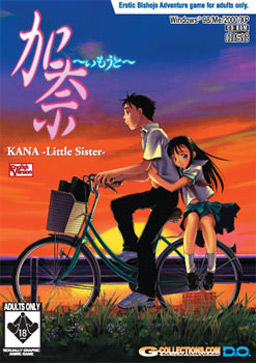
You have a sister two years younger than you. Her name is Kana. She has been ill all her life, and she spends more time in the hospital than at home. Because of this, Kana has always been a higher priority than you. In the past, you have experienced feelings of hatred towards her. However, this all changes one day, and you suddenly find yourself being more and more protective of Kana. Throughout her terrible ordeal, your feelings for each other slowly begin to change. You feel it’s your duty to protect Kana from all harm. After all, you love your sister, and would do anything to save your little sister Kana…even…
















I’m having a strange problem, I think I installed the game correctly and used the crack and patches and all, but when I actually start the story, the text just keeps on skipping… I really have no clue why that is happening, and I doubt my “K” button is stuck just when I play that game… any idea how to solve this?
haiiz this is such a touching game however it will be better if there is voices anyway tnx again admin for this
A heart wrenching title, glad I downloaded it. Thanks.
Do yourself a favor, play it.
My AVG is telling me there is a trojan in the exe anyone else ?
Every upload posted is checked. Only clean stuff here.
Send the exe to AVG so that they can verify it and update their databases.
How do you copy the game into the directory?
There are three parts and three different .ccd files. How do I actually install the game? Specific instructions please! And if possible could you tell how to install the patches also?
I installed it via using the explorer on the mounted image and then I added the music patch and it’s cracked exe, now it runs fine, either in full scren or windows mode on my vista system.
I’m having a issue trying to install this game. I keep getting a “failed to copy the file” message. Any idea’s what the issue might be?
Run installer as administrator (right click on setup> run as administrator).
already tried that and still does the same thing, my locale is set to Japanese as well
THANK YOU, I DID AS YOU TOLD, AND IT FINALLY COULD INSTALL IT. AGAIN, THANK YOU.
if you are getting the: “failed to copy the file” and after that a AVG pop up shows up saying there’s a trojan in it. Just disable avg for a moment, and redo the setup. Then it should install fully without problems. You can reactivate AVG after.
Hope this helped you.
When i try to play the screen goes black and i get the message “not suported”, the question is: How switch to window without enter the game? Because my monitor always show this message when a program use wrong resolution…
I only hear the music.
Can someone provide me a save game in window mode?
Same problem as the first poster…
Got a problem where when i run the game, it’ll go into 800×600 mode and stay there with the game labeled “not responding” in task manager. Then, I can end the process but i remain in 800×600 mode so i can only manually rechange it. Anyways, anyone know what my problem is? I tried installing cccd for the codecs and followed those instructions, did not work -_-.
Using windows 7 64-bit.
same problem
Hey how do I install this game???
hello good sir.. i have downloaded all the files, extract rar, install game, then apply patches from link above.
The game itself works perfect except my screen displaying BACKWARD for images and everything in full screen mode.
Is anyone have same problem with me? fix and suggestion will be much obliged
i’m using XP SP3
can’t install this game….”stopped working” always pops up when i’m installing it.
Guys, mine is working….just mount the .dea file at deamontool and when it autoplays..click on browse folder and copy all the files inside there….after copying all the contents..copy and replace the original .exe file with the no-cd patch. By the way I’m using win 7 🙂
Ok for clarification…
Required:
1. Change your system locale into “Japanese”.
Installation:
1. Extract the .rar files
2. Mount the Kana -Little Sister-.dea
3. On autoplay…click folder to view files
a.On desktop make a folder
b. Copy all the contents of the CD file. Paste it into the folder you made in the desktop
4. Open KANAUST and then reinstall.
a. tick DirectXmedia and Gameapplication
(at the end of the installation…an error will appear: “Stopped Working”…. just ignore that..)
5. Extract the no cd patch and copy-replace it to the original KANAUS.exe.
6. Click KANAUS.exe and done 🙂
Continuation
How to install music patch:
Recap: Remember that I’ve asked you to install or rather copy the CD files and place it in a folder placed on you desktop. Assuming you’ve followed the steps above.. have a working game placed on your desktop.
Let’s say we named the folder (wherein you copy pasted the contents of the image file) placed in your desktop ‘GAME’
1. Extract the Music patch….open the folder ‘GAME’. Drag and replace all the files.
2. Now, Go to your X:/Program Files —> and folder DO –>KANAUS. Again extract the music patch, and place all the files in the X:/Program Files/DO/KANAUS directory (Copy and replace).
3. DOne!
**: Note that bakc-up the original files before you paste and replace. 😀
Anyway, I’m using windows-7 32bit.
I did all you say but a message says “fail to read the sound effect file”. Can you help please ? :s
I have the same problem and I solved it. I install game on WIN98 virtual machine 😛
I think I followed you’re steps, but #5 confuses me. What’s the no-cd patch and how do i copy-replace it?
it says “cannot read Kana registry key. try to reinstall the game”
it’s working thanks
thanks for admin too
This game is very touching
I have a problem where i would click on the exe. and it would make my screen 800×600 but i only see my desktop. and the game itself is not responding. ive tried all the solutions but non worked so far.
Oh yeah i heard this story was really good and this is my first visual novel, so it’d mean a lot to me.
can’t copy the darn KANAUS, now what? T_T
how can you copy the .exe file, coz when I paste it just says it’s write protected?
i can’t install the game properly… I’ve installed it on admin mode via the mounted drive using KANAUST.exe, and set it to C:\ProgramFile\DO\KanaUS.
Once complete, I copy the no-cd, music, and uncencored files to the C:\ProgramFile\DO\KanaUS… then I play the game C:\ProgramFile\DO\KanaUS\KANAUS.exe…
But upon startup it only reaches the black screen without showing the intro D.O. then hangs [not responding]… is there anyway to fix this?
I’m using Windows 7 64bit
Windows 7 64-bit user here, I can confirm that there’s absolutely no way to make this work under this OS.
Best workaround would be to install XP (or any other version of Windows that supports this program) as a virtual machine and use that to run it.
My 7- 64 bits play it well i hare already finishide the game,just need to chose executar as adm when installing
The story is really good, and a bit sad actually. But the true ending can make up for it. 🙂
My winzip keeps saying ‘internal error processing iso image’. How can I fix that?
Hi, i downloaded this then extracted the files, but when i went to open the folder only the CCD file, the IMG file, and the SUB file was there, so i thought i just had to download and extract the crack, well turns out that dident help ether, there is no setup or anything. any idea as to what wnet wrong?
Read this http://erogedownload.com/faq/mounting-cd-images-with-daemon-tools/ for instructions how to handle ccd/img/sub files
for whatever reason, probobly installed it wrong, but whenever i try to mount the IMG file its like deamon tools thinks it doesent exist.
then whenever i actually go to the IMG file and right click on it and try to open it with deamon tools, it sais “error in command line”.
I click on the download button, and it says its only letting the uploader download it. It needs a password, what is it?
I believe the admin is currently in the process of rehosting the files on Rapidshare and Mediafire. Check back later and hopefully he will have this game back online as well. Can’t wait to try it!
thanks for the info it’s good to see that people are rebuilding.
Guys…it´s a bit offtopic, but does someone know from what game this pic is?http://www.wallpaperhere.com/Anime/Other/Anime_Girl_85024
thx for the reply!!!
and great work from the hoster on this site. Have tried just Kara no shojo, but this one seems good too
My image-search-fu informs me that this is Midori Miyazawa from Rain of Summer.
Thank you very much for this information!
I bought the offical game years ago and it also has the virus warning pop up when installing from the actual cd. Also, I’m running windows 7 and it works. was getting a fail error on installation and had to right click and open and then found ‘kanaust’ and right clicked that then ‘run as admin’. it let me install after that.
if possible, I’d like to know, from an admin if the virus threat is just false.
I contacted G-collections about the supposed virus on the game and this was their reply:
Hello, thank you for the email. There are no viruses in our games. Your AVG is picking up a false positive, most likely due to an unorthodox .dll hooking method used in some older games.
I had to install with my anti virus turned off to get it to install right.
Ok, please give me explicit instructions. First I downloaded the game, music, and uncencored patches, then I extracted them. I temporaily disable my anti virus, what do i do next?
Never mind, I found you instructions above… however, the no-CD file, is that the same thing as the uncencored patch? I know you told me to ignore the ‘stopped working’ but before that I recieved ‘failed to coppy the CD file’ which i understand to mean shut off the anti virus program, but where is that done?
The No-CD patch is in the crack folder.
I followeed the instructions posted in the comments section exactly and it just says failed to copy cd file. I’ve tried everything I know to try and install this could someone help me out?
Now for my own problem.
I installed the game, but when I try to run it all I get is the D.O animation and then the game crashes.
But I have not installed the Music patch or Uncencensored patch.
I am now downloading the Music Patch and am going to install that also, but is the Uncencsored Patch required also?
And if you could provide detailed instructions as to how to install the Music Path that would also be very much appreciated.
Thank you for taking your time and reading this.
Installed all 3 parts, try to put on deamon tools and it says the img file is corrupt, re downloaded 3 times and it say this every time.
hey i have a question i beat the game but i was wondering how to i transfer my save to another computer?
I have thougth tha i never could find a history as good as clannad,this game history is wonderful thanks for this wonderful time.
hey guys ive extracted the 3 rar files but the Kana-Little Sister- winzip file keeps failing with an invalid archive how can i fix this?
Can’t play, keep getting “Put NoTitle CD in your CD-ROM Drive” Opening from WinRAR, with all files, on Windows 7. Any suggestions? Tried both KANAUS.EXE files from both Uncensored Patch and Kana.part1.rar, same result.
and yes I’m using the Crack folder.
thanks i love the game im so happy to enjoy it from this sote 😀
When I open the game in fullscreen the main menu turns upside down how do I fix it?
I am a pervert. Honest. So when I looked for eroge(s), I tend to focus more on the *ahem-ahem (cough)* part rather than its storyline….
But I must admit I am also emotional. This one struck me right to the heart, and I cried. I don’t care if it was manly tears or not. I just cried. Even if you took out the ‘ero’ parts from this one it won’t change the greatness of the story.. This will be the most appreciated visual novel in my life ever.
Highly recommended. A must-read.
I just want to ask, coz everytime i run this game my monitor turn black and display a text saying : ” Unsupported Format”. what should I do? or rather how to fix it????
can u show us how to install it correctly so we dint do any mistake…please only show step bu step..allright!!! T_T
download the game and the music patch.
mount the image with an iso program “i use ultraiso”
and then open file “KANAUST.exe” click execute, wait until it finishes… “you have to disabled your antivirus first in order to install the game”
click finish.
extract the music patch to C:\Program Files\DO\KanaUS\ “Replace It”
its done. happy playing 🙂
———————————
never use the cracked one. em i mean KANAUS.exe in the crack folder
Finally, i able t play it. and though, i only interested in “Nasty Stuff”, i can say that this is one of the best visual novel ever made (i haven’t finish swan song yet).
Is it normal for there to be a 5minute delay between each line during the end?
hi im having problems installing can someone tell me step by step how to install it is giving me a lot of trouble please i have downloaded everything now what…
TROJAN 😐